How to create a Gantt chart from Excel or CSV data
How to turn a table of tasks from Excel or a CSV into a Gantt chart: the column names that are recognised, how dates and dependencies are read, and what to do when a cell is refused.
A table of tasks becomes a Gantt chart when it has a task name and either a duration or start and end dates. Paste it into the Gantt sheet and each column is matched by its header.
The short version
- Minimum: a task name, and a duration or start and end dates.
- The first line is matched to columns by name, in any order; at least two columns must be recognised.
- Dates are ISO or your locale's numeric order; an unreadable date is reported and left out.
- Depends on takes task numbers or names, with optional SS, FF or SF and a lag: 3, 5SS+2.
- There is no file upload yet: copy the rows and paste them into the sheet.
What a task table needs, and how it is read
A Gantt chart needs less data than people expect. Each task needs a name. For the bar, it needs a length, or a start and an end date from which a length can be worked out. Everything else is optional: the tasks it waits for, a group, the people who own it and a progress figure. A spreadsheet or CSV with those columns is already most of a Gantt chart.
QueryChart reads such a table when you paste it into the Gantt sheet. If the first line names the columns, each column is matched by its header, whatever order it comes in. The names it understands include Task, Name or Activity for the task; Start or Start date; End, Finish or Due for the last working day; Duration, Days or Length; Depends on, Predecessors or Dependencies; Progress, Complete or Status; Group, Phase or Section; and People, Owner or Assigned to. At least two columns must be recognised, and a column whose name is not recognised is reported and skipped.
Two things trip people up. Dates are read as ISO dates, in your own locale's numeric order or with month names, so a date such as 3/4 means 3 April in some locales and 4 March in others; a value that cannot be read at all is reported and left out, because a wrong date would move a whole plan. And dependencies are written as task numbers or names, comma-separated, with an optional type and lag, so 3, 5SS+2 means the task waits for task 3, and starts two working days after task 5 starts.
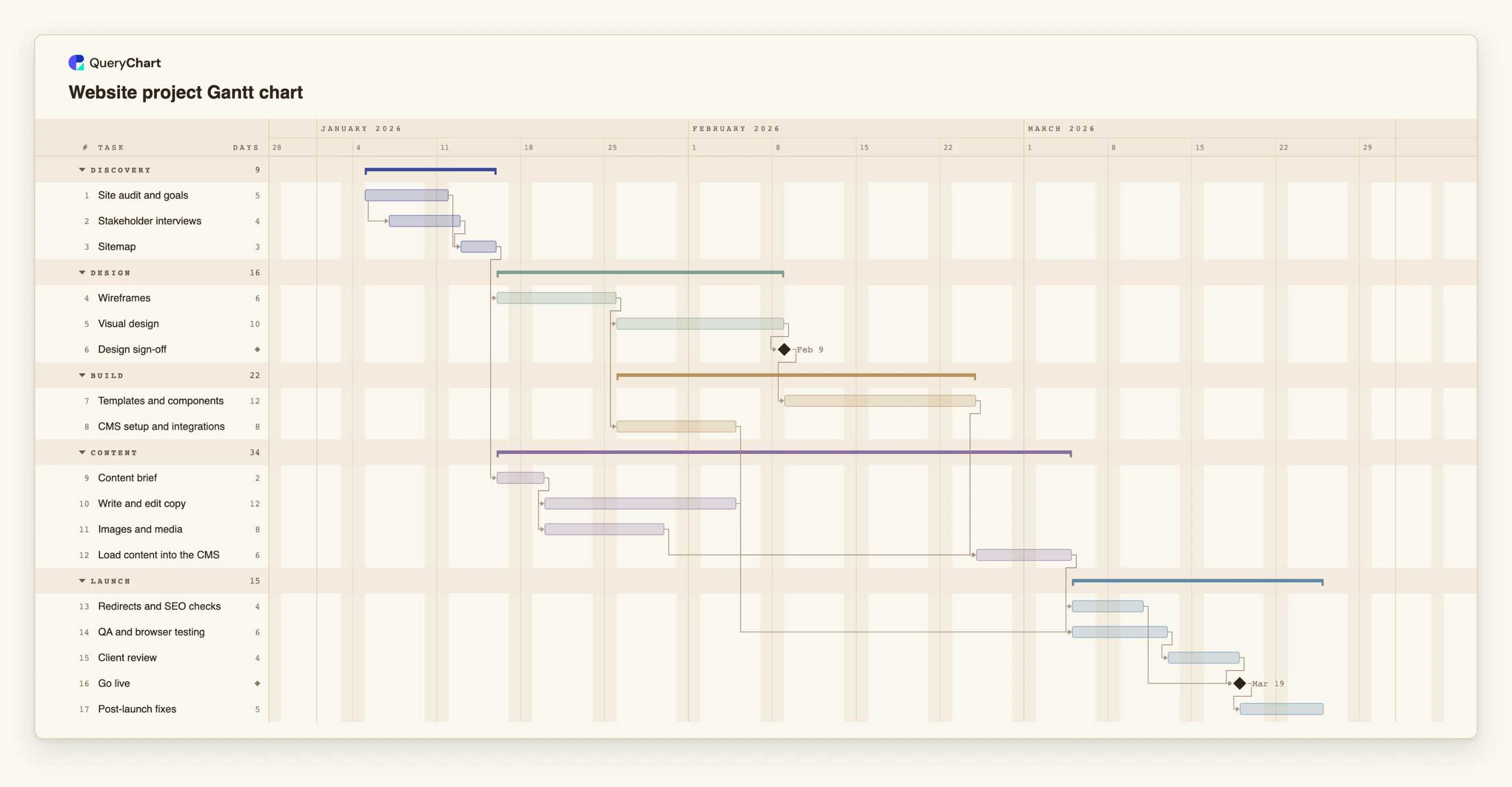
There is no file upload for Gantt charts yet, so copy the rows, header line included, and paste them. The example below shows a website project as the finished result, with the table that produces it.
A website project, from table to schedule
Seventeen rows with the columns a CSV would have: task, group, working days and Depends on. The dates are calculated, not typed.
Tasks and lengths
Three rows, as they would appear in a CSV: "Site audit and goals" (5), "Stakeholder interviews" (4) and "Sitemap" (3). "Stakeholder interviews" starts two days into the audit, written 1SS+2 in the Depends on column.
The design chain
"Wireframes" waits for "Sitemap", "Visual design" waits for the wireframes, and "Design sign-off" has a duration of 0, which marks it as a milestone.
Content as its own stream
"Content brief" waits only for "Sitemap", so "Write and edit copy" and "Images and media" run while the design is made, and "Load content into the CMS" waits for the templates, the copy and the media.
Launch
"Redirects and SEO checks", "QA and browser testing" and "Client review" all finish before "Go live", and "Post-launch fixes" follows it. Every date here was calculated from the lengths and the Depends on column.
How it works
Lay the table out one task per row
One row per task, with a header line naming the columns. Task is the only required column. Add Duration for lengths in working days, or Start and End for dates.
Write dates in an unambiguous form
Use yyyy-mm-dd, for example 2026-04-03. In Excel, format the column as text or as that custom date format before you copy it, so it is pasted as written.
Write dependencies as numbers or names
In Depends on or Predecessors, list the numbers of the tasks it waits for, counting the first task as 1, comma-separated. Add SS, FF or SF for other types, and +n or -n for a lag in working days.
Use names QueryChart recognises
Task, Start, End, Duration, Depends on, Progress, Group and People or Owner are all recognised, as are common synonyms. A column named Status is read as progress, and only a percentage or the word Done is understood.
Copy and paste into the Gantt sheet
Select the whole table including the header line, copy it, and paste into the first cell of the Gantt sheet. The header line itself is not written; each column goes to the column it names.
Read what was refused
A value that cannot be read, such as an unreadable date, an unknown task in Depends on or a loop, is reported and left out, never guessed. Fix it in the sheet. Then check the finish date and switch on the critical path.
Mistakes to avoid
A header line with fewer than two recognised names
If the first line does not name at least two recognised columns, it is pasted as data. Rename the headers to the ones listed above.
A dependency on a task that is not in the table
Depends on can only name a task that exists in the chart. A reference to a missing row is refused and the task is left with no predecessor.
A loop in the dependencies
Task A cannot wait for task B if B waits for A. The loop is detected, the closing link is drawn dashed and it is not used for scheduling.
Dates as the only input
A table with start and end dates for every task gives lengths, but if you also leave Depends on empty you have a drawing: nothing moves when a date changes. Add the dependencies.
Paste your task table into a Gantt chart
Open the website project as your own chart, then paste your own rows over its sheet.
Related guides
Frequently asked questions
What columns do I need to create a Gantt chart from a CSV?
A task name, and a duration or start and end dates. Depends on, Group, People and Progress are optional. The header line names the columns; their order does not matter.
Can I upload an Excel file?
Not yet. Copy the rows from Excel, including the header line, and paste them into the Gantt sheet.
Why did my date come out the wrong way round?
Because it can be read two ways. A date such as 3/4 could be 3 April or 4 March, and the sheet reads it in the order of your language, so a wrong reading would move the plan. Use yyyy-mm-dd or a date written with the month name. A value that cannot be read at all, such as a time or a quarter, is reported and left out.
How do I write dependencies in the table?
As the numbers or names of the tasks it waits for, comma-separated, with an optional type and lag. 3, 5SS+2 means wait for task 3, and start two working days after task 5 starts.
Does it read the Status column?
As progress. A percentage or the word Done is understood; other words such as In progress are not.