Gantt chart maker: build an editable project schedule in your browser
A Gantt chart maker that works from a table: type tasks, lengths and dependencies and the bars and dates are calculated. Edit on the chart or in the sheet; export as PDF, PNG, SVG or CSV.
QueryChart's Gantt chart maker turns a table of tasks, lengths and dependencies into a schedule. Change a number in the table or drag a bar on the chart and the rest of the plan moves with it.
The short version
- Enter tasks, lengths and dependencies; dates and bars are calculated.
- Edit in the sheet or on the chart: both change the same data.
- Four dependency types with optional lag, milestones, groups, people, progress and a critical-path view.
- Export as PDF, PNG, SVG or CSV, or share the chart as a link.
- Not included: resource levelling, cost, baselines and Microsoft Project import.
What the Gantt chart maker does, and what it does not
The maker is built around one idea: the schedule is calculated, not drawn. Each task has a length in working days, optional dependencies and an optional group, and the bars, the dates and the finish date follow from those. Because the chart and the table are the same data, you can work in either: type in the sheet when you are entering a lot of tasks, and drag on the chart when you are adjusting. Dragging a bar to move it, to resize it, or to link it to another task writes the same fields you would have typed.
It handles the things a small project actually needs. Dependencies come in the four standard kinds, finish-to-start, start-to-start, finish-to-finish and start-to-finish, each with an optional lag or lead in working days. A task of length zero is a milestone. Tasks can be grouped into phases, given people and a progress percentage, and the critical path can be switched on. The time scale is day, week or month, or automatic, and a line marks today. Working days are Monday to Friday.
It is deliberately not a full project-management suite. It does not level resources, track cost or compare against a baseline plan, it schedules in whole working days, and it does not import Microsoft Project files. If you need those, keep the schedule here and the rest elsewhere. What you get in exchange is a plan you can build in minutes, share as a link, and export as a PDF, an image, an SVG or a CSV.
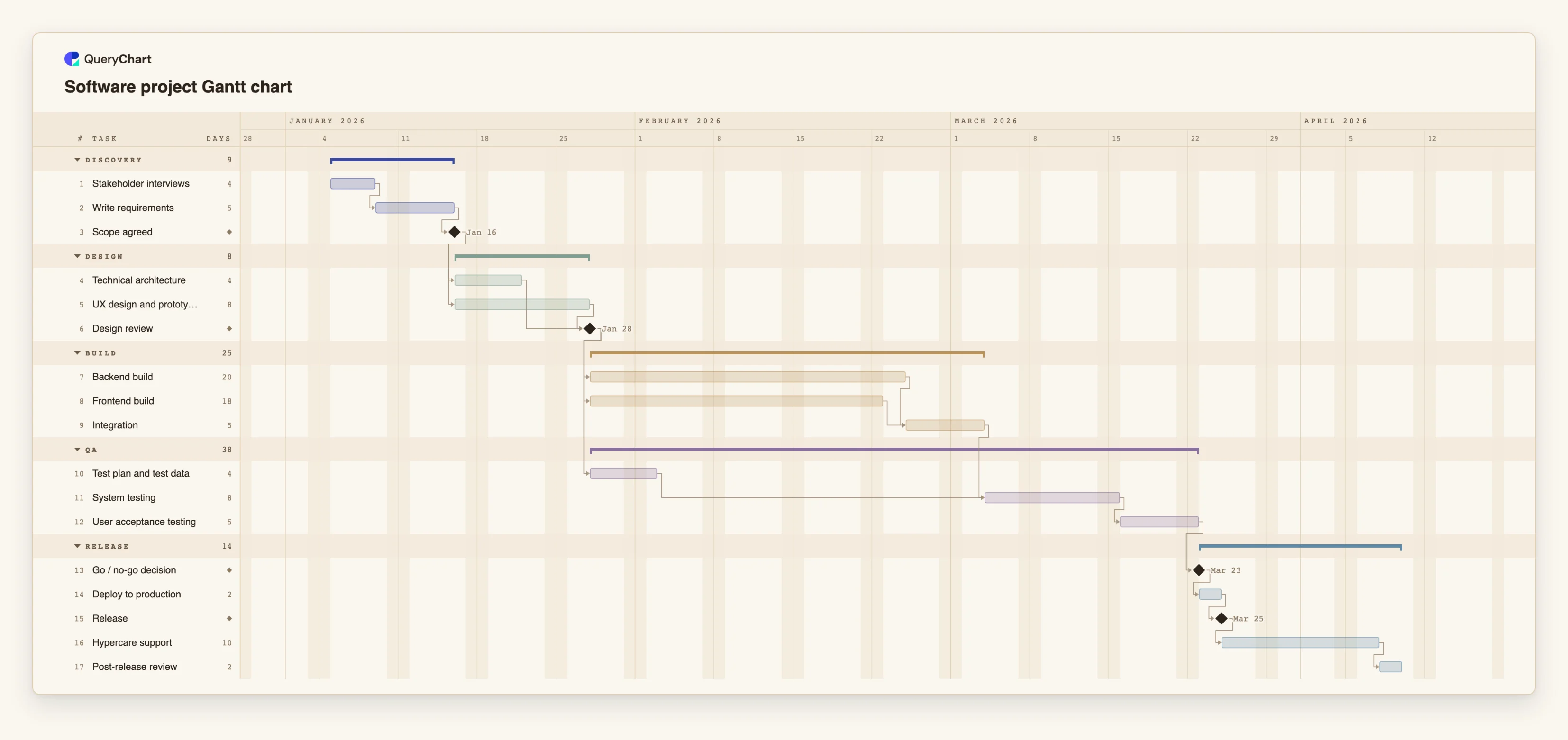
The example below builds a software release plan in the maker, stage by stage. Open the spreadsheet panel to see the table behind the bars.
A software release plan, built in the maker
Seventeen tasks across five stages. Open the spreadsheet panel to see the rows behind each stage.
Discovery with a decision at the end
"Stakeholder interviews" takes 4 working days and "Write requirements" 5. "Scope agreed" has a length of 0, which makes it a milestone, and everything in design will wait for it.
Parallel design streams
"Technical architecture" and "UX design and prototype" both wait only for "Scope agreed", so they run side by side, and "Design review" waits for both. The longer of the two decides the review date.
Build in parallel, test as soon as you can
"Backend build" and "Frontend build" meet at "Integration". "Test plan and test data" is prepared during the build, so "System testing" can begin the day integration ends and "User acceptance testing" follows it.
Release and learn
"Go / no-go decision" is a milestone that "Deploy to production" waits for. After the "Release" milestone, "Hypercare support" and the "Post-release review" keep the plan honest about the weeks after launch.
How it works
Start from a template or a blank chart
Create a Gantt chart from the template that is closest to your project, or start blank. A blank Gantt chart offers three starter plans, so there is always something to edit rather than an empty grid.
Enter the tasks in the sheet
Type one task per row in the Task column. You can paste a block of rows from a spreadsheet: if the first line names the columns, for example Task, Start, End, Depends on and Owner, each column is matched by its name.
Set the lengths and dependencies
Put the length in working days in Duration and the numbers of the tasks it waits for in Depends on. Add SS, FF or SF and a lag where the work overlaps, for example 8SS+3 for a task that starts three working days after task 8 starts.
Group, assign and mark progress
Give tasks a group to draw them as phases, add the people who own them, and enter progress as a percentage as work happens. Progress is drawn inside each bar.
Adjust on the chart
Drag a bar to move it, drag an end to change its length, or drag from one bar to another to link them. Every change is one undo step.
Share or export
Share the chart as a link, or export it as a vector PDF, a PNG or an SVG. The CSV export lists the tasks with ISO dates, ready for a spreadsheet.
Mistakes to avoid
Pasting dates that can be read two ways
A date such as 3/4 is read in your locale's order, so it can mean 3 April or 4 March depending on the language you work in; check it. ISO dates (2026-04-03) are read the same way everywhere.
Fixing every start date
A task with a fixed start date does not move when what it depends on moves, and a fixed date that conflicts with a dependency is flagged. Pin a date only where the date really is fixed.
Expecting resource levelling
Two tasks assigned to the same person can overlap: the maker records who owns a task, but does not warn about overload or move tasks to resolve it.
Make a Gantt chart
Open the software release plan as your own chart, replace its tasks with yours and export when it is ready.
Related guides
Frequently asked questions
Is the Gantt chart maker free?
You can open a template and edit it without an account. Creating an account keeps your chart so you can share, export and come back to it. The usual limits of the free plan apply to the number of charts and rows.
What can I export?
A vector PDF, a PNG, an SVG and a CSV. The CSV lists each task with its start, finish, duration, dependencies and progress, with ISO dates.
Does it support dependencies and milestones?
Yes. It supports finish-to-start, start-to-start, finish-to-finish and start-to-finish dependencies with lags and leads in working days, and tasks of zero length as milestones.
Can I import from Excel or Microsoft Project?
You can paste rows from Excel or any spreadsheet into the sheet. If the first line names the columns, they are matched by name. There is no file upload yet, and Microsoft Project files are not supported.
Does it work on a phone?
A phone shows the chart read-only. Editing is designed for a larger screen.