Gantt chart examples: project, software, construction, marketing and more
Gantt chart examples you can edit: project, software, product launch, marketing, construction, event, research, thesis, implementation, onboarding and more, each with tasks, milestones and dependencies.
These Gantt chart examples are complete, editable plans rather than screenshots: each has real tasks, lengths, dependencies and milestones, and each opens as your own chart in one click.
The short version
- Every example has tasks, lengths in working days, dependencies and milestones, and opens as an editable chart.
- None has a fixed date: each starts on the day you create it.
- Look at the shape: what runs in parallel, what overlaps, which task is a milestone.
- Replace the names and lengths with yours; keep the dependencies that are true for your project.
- For a process rather than a schedule, a flowchart or swimlane template is the better example.
Fifteen Gantt chart examples, and what each one teaches
A Gantt chart example is only useful if it shows a shape you can reuse. Every plan below is built to show one: where the waits are, what runs in parallel, and which tasks decide the end date. They are generic by design, so replace the task names with your own and keep the structure. None of them contains a fixed date: each starts on the day you create it, and every date after that is calculated.
Project and delivery plans: the project Gantt chart at /templates/project-gantt-chart is the general shape, from kick-off to closure. The software project plan at /templates/software-project-gantt-chart shows parallel build and early test preparation, the website project at /templates/website-project-gantt-chart starts content early, and the implementation plan at /templates/implementation-plan-gantt-chart joins configuration, data migration and training at go-live. The product roadmap at /templates/product-roadmap-gantt-chart is a year of initiatives by theme.
Marketing, events and launches: the product launch plan at /templates/product-launch-gantt-chart coordinates product, marketing and sales readiness, the marketing campaign at /templates/marketing-campaign-gantt-chart runs from brief to report, the content calendar at /templates/content-calendar-gantt-chart plans a monthly production cycle, and the event plan at /templates/event-planning-gantt-chart is built around a fixed day.
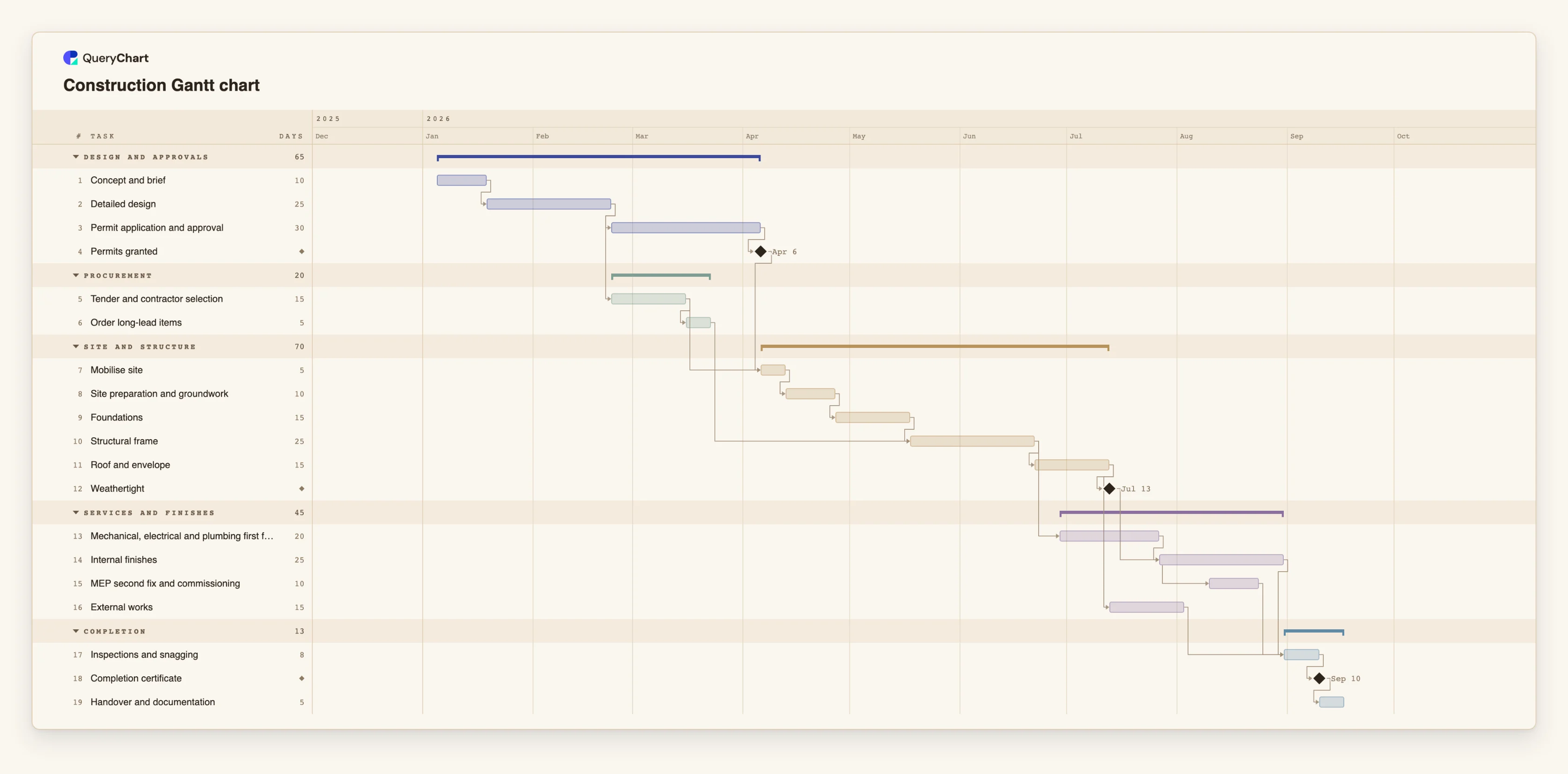
Building, research, people and buying: the construction schedule at /templates/construction-gantt-chart sequences the trades, the research project at /templates/research-project-gantt-chart and the thesis plan at /templates/thesis-gantt-chart schedule the waits of academic work, the onboarding plan at /templates/employee-onboarding-gantt-chart covers a new hire's first 90 days, the training plan at /templates/training-plan-gantt-chart delivers in waves, and the procurement project at /templates/procurement-project-gantt-chart plans a tender. The example below walks through the construction schedule.
A construction schedule, built in four stages
Nineteen tasks across five phases. Open the spreadsheet panel to see the lengths and dependencies behind the bars.
Design, then the permit
"Concept and brief" leads to "Detailed design", then "Permit application and approval", the longest wait at 30 working days. "Permits granted" is a milestone: nothing on site starts without it.
Procurement runs beside the permit
"Tender and contractor selection" waits only for the design, so it runs while the permit is being decided, and "Order long-lead items" follows it so that materials are ordered early.
Site and structure in sequence
"Mobilise site" waits for both "Permits granted" and the tender. Groundwork, "Foundations" and "Structural frame" follow in order, then "Roof and envelope" and the "Weathertight" milestone.
Services and finishes overlap; then completion
"Mechanical, electrical and plumbing first fix" starts five working days after the frame, and "MEP second fix and commissioning" starts ten days into "Internal finishes". "Inspections and snagging" waits for all of them, then "Completion certificate" and "Handover and documentation".
How it works
Pick the example closest to your project
Choose by shape rather than by industry. A product launch and an event both build up to a date that cannot move; a construction schedule and an implementation plan both join several streams at the end.
Open it as your own chart
Use the example's page to open it as a chart you own. You can try it without an account; an account keeps your changes.
Replace the task names
Rename the tasks and groups in the sheet. Keep the order and dependencies until you have thought about each one.
Change the lengths
Enter your own estimates in working days and watch the dates move. The example lengths are placeholders.
Fix a date only where it is real
If something is fixed by a contract or an event, pin that task to its date; the chart flags it if the work before it cannot finish in time.
Turn on the critical path
Use the View menu to see which tasks set the finish date. That is where shortening a task helps.
Mistakes to avoid
Copying the durations
The lengths in an example are placeholders, not benchmarks. Real durations depend on your team, your site or your approvals.
Choosing by name instead of by shape
A plan for a different industry may fit your project better than the one with your industry's name on it, if its dependencies match yours.
Using an example as a commitment
An example shows how a schedule is built. It does not tell you how long your project will take.
Open this Gantt chart example
Open the construction schedule as your own chart, or pick another example from the list above.
Related guides
Frequently asked questions
Are these Gantt chart examples free to use?
Yes. You can open any example and edit it without an account. An account keeps your chart so you can share and export it.
Can I download a Gantt chart example as Excel?
You can export a chart as a CSV with each task's start, finish, duration, dependencies and progress, which opens in Excel. The chart itself stays in QueryChart, where the dates are calculated.
Do the examples have dates?
No. Each plan starts on the day you create it and every date is calculated from lengths and dependencies.
Which example is best for a small project?
The project Gantt chart. It has sixteen tasks in four phases, and you can delete the ones you do not need.