How to plan an SEO project timeline on a Gantt chart
Plan an SEO project timeline as a Gantt chart: audit, priorities, technical fixes, content, publication, outreach and a measurement wait, with the dependencies that decide the order and no promise of rankings.
An SEO plan fails when technical, content and link work are scheduled as if they were independent. This guide shows how to sort the work by what it waits for, find which stream sets the publication date, and plan the wait before results.
The short version
- Order the work by what each task waits for, not by who owns it.
- Agree priorities in a milestone before technical and content work begin.
- Compare the streams: the longer chain sets the publication date, and the other has slack.
- Plan the wait for recrawling as a task, and the review after it.
- A schedule covers the work and the waiting; it does not predict rankings or traffic.
Sort the work by what it waits for
Most SEO plans begin as a list of recommendations from an audit: fix these errors, write these pages, get these links. The list has priorities but no order, and a team that works through it by owner discovers the order the hard way. New pages go live before the site can be crawled properly, or outreach begins before there is a page worth linking to.
The method is to ask of each task what has to be true before it can start. The audit and the keyword research wait for the goals. Fixes and writing wait for agreed priorities. Publication waits for the content to be approved and, if you decide so, for the technical fixes. Outreach waits for pages that exist. Writing these relationships down as dependencies gives you dates, and also shows which stream is the long one. That is usually content, not technical work, so the fixes have slack and the writing does not.
The part of an SEO project people leave out is the waiting. After publication there is a period in which search engines recrawl the pages, and you cannot shorten it. Plan it as its own task so the review is dated after it, not on the day the last page goes up. A Gantt chart schedules the work and the waiting. It does not predict rankings or traffic, and nothing in the plan should be read as a promise of either.
The example below builds the SEO project template in stages. If you want the template itself with notes on each group, see /templates/seo-project-gantt. For a publishing rhythm that repeats every month rather than a one-off project, see /templates/content-calendar-gantt-chart.
An SEO project, built in stages
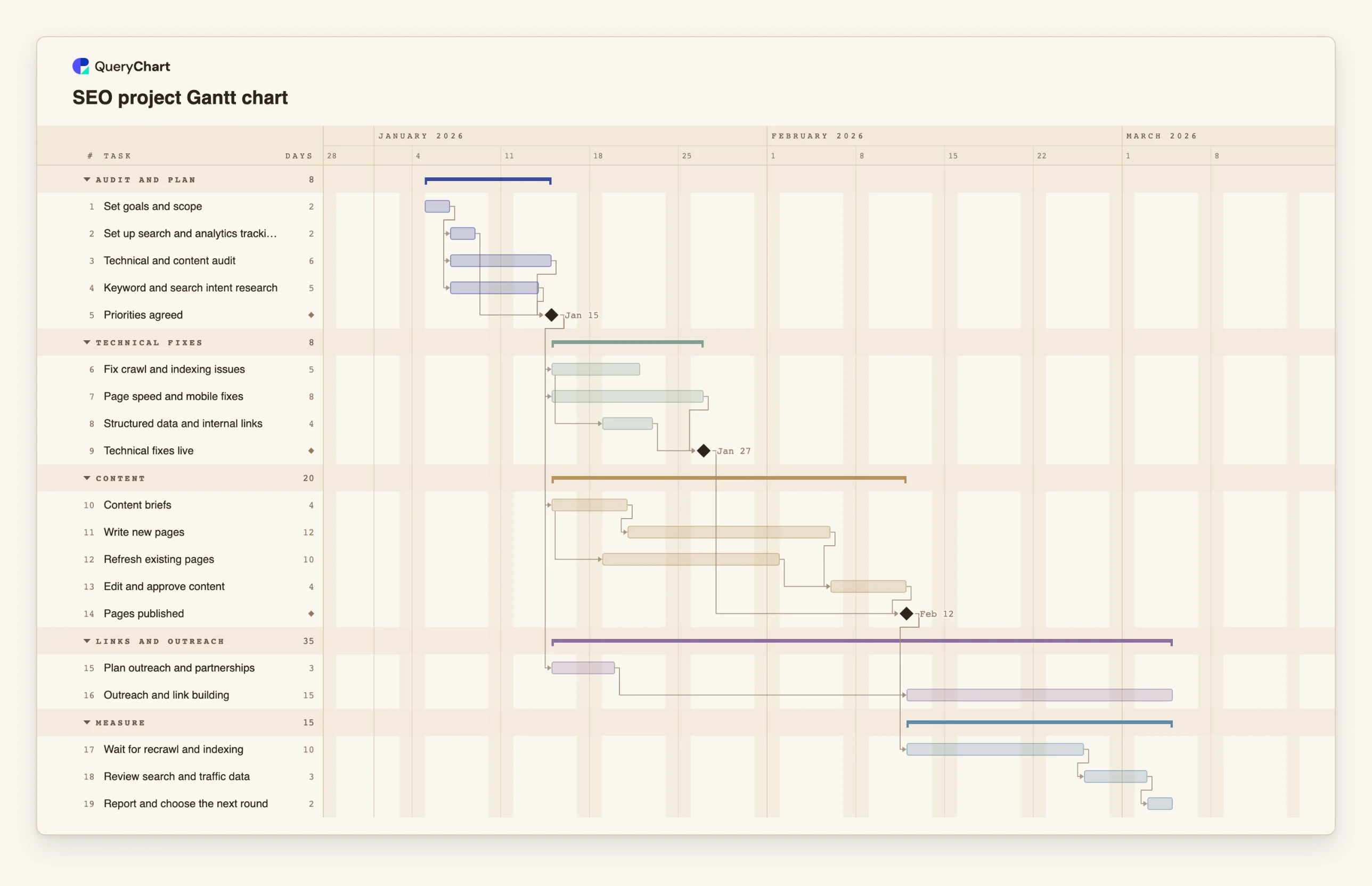
Nineteen tasks in five groups. Durations are illustrative; set your own. Open the spreadsheet panel to see the rows behind each stage.
Audit and priorities
"Set goals and scope" (2 working days) comes first. "Set up search and analytics tracking" (2), "Technical and content audit" (6) and "Keyword and search intent research" (5) all follow it, and the "Priorities agreed" milestone waits for all three.
Technical fixes in an overlapping stream
"Fix crawl and indexing issues" (5 days) and "Page speed and mobile fixes" (8) both follow "Priorities agreed". "Structured data and internal links" (4) starts two working days after the crawl fixes start, and "Technical fixes live" waits for it and for the speed fixes.
Content, and the gate before publication
"Content briefs" (4 days) feed "Write new pages" (12), and "Refresh existing pages" (10) starts two working days after the briefs start. "Edit and approve content" (4) waits for both, and "Pages published" also waits for "Technical fixes live".
Outreach, a wait, and the review
"Plan outreach and partnerships" (3) follows "Priorities agreed", but "Outreach and link building" (15) also waits for "Pages published". "Wait for recrawl and indexing" is 10 working days of waiting. "Review search and traffic data" (3) and "Report and choose the next round" (2) follow it.
How it works
Write the tasks from the audit, not from a template
List what the audit and the keyword research found, one task per piece of work. Group them as streams: technical, content, links and measurement. Give each a length in whole working days.
Make the priorities a milestone
Add a task of length 0 that waits for the audit, the research and the tracking set-up. Everything that follows depends on it, so a change of priorities changes the dates in one place.
Link the tasks inside each stream
Use finish-to-start by default and start-to-start with a small lag where work can begin early, for example 6SS+2 for a task that starts two working days after task 6 starts.
Decide what publication waits for
Link the publication milestone to the approved content and, if your site needs it, to the fixes going live. Then switch on View, Critical path to see which stream sets the date.
Plan outreach after the pages exist
Plan the outreach early, as its own task, and make the outreach itself depend on publication. Replace the example's 15 working days with your own estimate.
Add the wait and the review
Add a task for the waiting period, set its length from how often your site is crawled, and make the review depend on it. Share the chart with the people who own each stream, and export a PDF for a client.
Mistakes to avoid
Reviewing on the day of the last change
If the review is dated the day pages go live, there is nothing to review yet. Plan a waiting task and date the review after it.
Treating the technical work as the long pole
Technical fixes feel urgent, but in the example they finish 12 working days before the content does. Look at the critical path before you add people to the wrong stream.
Putting a promise in the plan
A schedule can say when work is done and when you will look at the data. It cannot say that rankings or traffic will rise. Keep the goals in the plan to things you control, such as pages fixed, published and linked.
Using fixed dates for everything
Dates are an output. Give a task a fixed start only where a date is really fixed, such as a site release window, and let the rest follow from lengths and dependencies.
Open the SEO project Gantt chart
Open the SEO project template, change the durations to yours and see which stream sets the publication date.
Related guides
Frequently asked questions
Should technical SEO always come before content?
Not always. It depends on whether the problems would stop the new pages being found or used. The example links publication to the fixes. If yours can follow, remove that link and the chart shows the shorter plan.
How do I plan an SEO retainer rather than a project?
Plan one cycle as a project, such as a quarter, and repeat it. For a rolling monthly rhythm, the content calendar at /templates/content-calendar-gantt-chart is a better starting point.
Can I import the audit findings from a spreadsheet?
Yes, by copying and pasting. Copy the rows, with a first line that names the columns such as Task, Duration and Depends on, and paste them into the sheet. There is no file upload for Gantt charts yet.
Which task sets the finish date?
The chain of dependent tasks that is longest. Switch on View, Critical path to light it. See /guides/gantt-chart-critical-path for how to read it.
Where do dependencies come from if I am not sure of the order?
Ask what must exist before the task can be done. If the answer is nothing, it has no dependency. /guides/gantt-chart-dependencies explains the four types and the lag.