How to plan a software release schedule on a Gantt chart
Plan the stretch from feature complete to production: set the code freeze as a milestone, run testing streams in parallel, join them before sign-off and read the critical path to see what sets the release date.
Release dates are usually announced before the testing plan exists. This guide shows how to turn the freeze-to-production stretch into a schedule you can check against the date you have been given.
The short version
- Make the code freeze a zero-length milestone that all development tasks must reach.
- Start testing streams, release notes and the runbook from the freeze, so they run side by side.
- Join every stream in one task before sign-off, then gate deployment on sign-off and on the documents.
- Plan the days after deployment as tasks: a smoke test, an announcement and a monitoring window.
- Turn on the critical path to see which stream sets the date, and compare the finish with the date you need.
Planning the stretch after the last feature
A release plan is short but dense. Seventeen tasks can fit in about a month, and most of them depend on two or three others. That is why a flat checklist fails here: it tells you what has to happen, but not that user acceptance testing can start two days after the freeze while regression testing cannot finish before it, or that the runbook has to be ready the day deployment starts, not the day testing ends.
The method is to plan in four moves. First, make the freeze a milestone that everything before it must reach. Second, start the testing streams from the freeze and let documentation start there too. Third, join the streams in one task before sign-off, so sign-off cannot appear early. Fourth, give deployment its gates and plan the days after it as real tasks. Dates are then calculated from the lengths and links, and you compare the finish with the date you need instead of writing the date in first.
A schedule does not make a release safe. It shows when work should finish if each estimate holds, and it will not catch a missing test or an untested rollback. Keep the test results, the approvals and the defect list in the systems that hold them. The chart plans the order and the time, and it does not connect to a repository, a ticket tracker or a deployment tool.
The example is the software release template at /templates/software-release-gantt. If you need the process and its decisions rather than the schedule, see the flowcharts at /templates/software-release-process and /templates/software-deployment-process. For a whole build, from requirements to launch, use /templates/software-project-gantt-chart.
A release schedule, built in stages
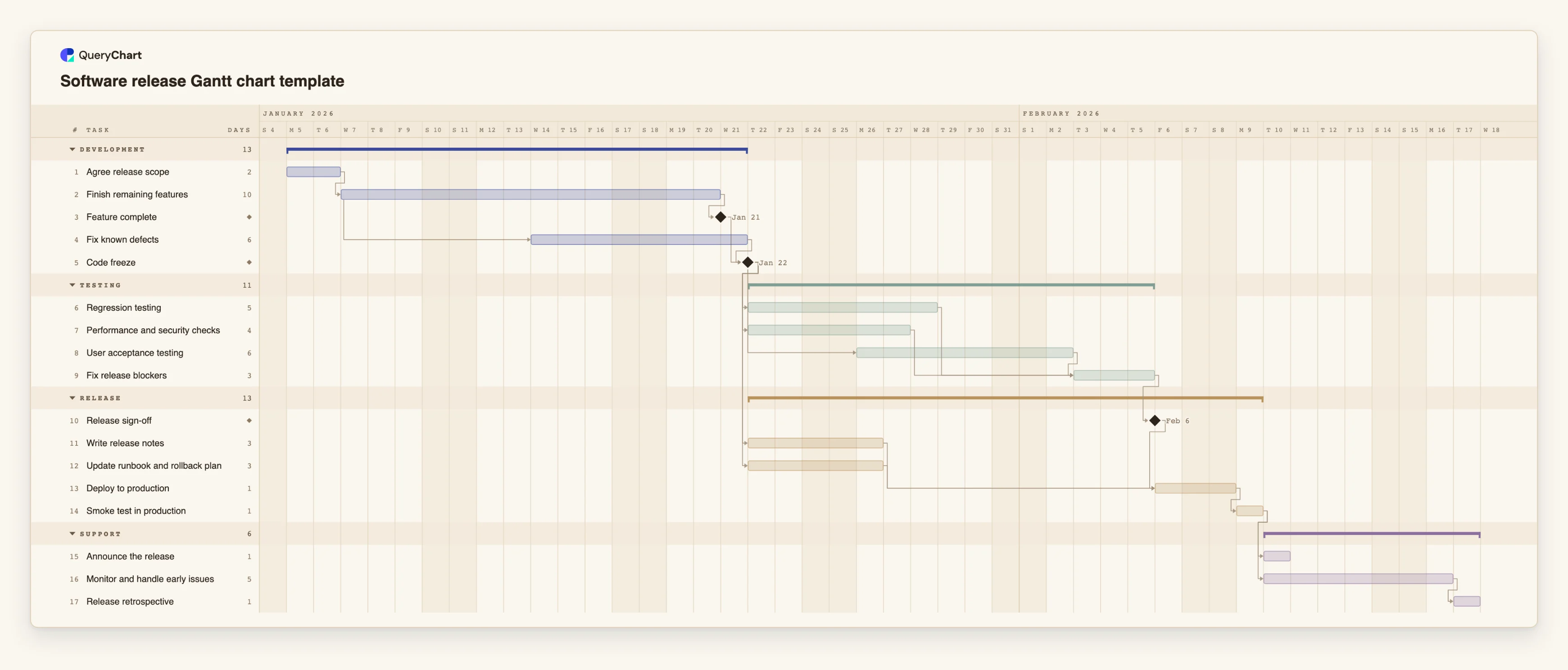
Seventeen tasks in four groups. Durations are illustrative working days; set your own. Open the spreadsheet panel to see the rows behind each stage.
Development ends with a milestone
"Finish remaining features" is 10 working days. "Fix known defects" (6 days) starts 5 working days after it starts, a start-to-start link with a lag, so defect fixing overlaps the end of development. "Feature complete" is a milestone of length 0.
The freeze and three testing streams
"Code freeze" is a milestone. "Regression testing" (5 days), "Performance and security checks" (4) and "User acceptance testing" (6) all follow it, and acceptance testing starts 2 working days after the freeze. "Fix release blockers" (3 days) waits for all three.
Preparation and deployment gates
"Write release notes" and "Update runbook and rollback plan" (3 days each) start at the freeze, not after testing. "Deploy to production" (1 day) waits for "Release sign-off", the notes and the runbook. "Smoke test in production" follows it.
The days after deployment
"Announce the release" (1 day) and "Monitor and handle early issues" (5 days) both wait for the smoke test, so they run side by side. "Release retrospective" is the last task, a day for what the next plan should change.
How it works
List the tasks between the last feature and the first user
Write every task that has to finish before and after production, including documents and the rollback plan. Give each a length in working days. Whole days only, so round up a half-day task.
Set the freeze as a milestone
Add a task of length 0 for the freeze. Make it depend on the development tasks, and make the testing streams, the release notes and the runbook depend on it.
Overlap what can overlap
Use a start-to-start link with a lag where work begins partway into another task, for example 4SS+2 in Depends on. Use it for defect fixing during development and for acceptance testing that starts a few days after the freeze.
Join the streams before sign-off
Give the task after testing a dependency on every stream, written as a comma-separated list. Sign-off then cannot be earlier than the slowest stream.
Gate deployment and plan the days after it
Make deployment depend on sign-off and on the documents. Add a smoke test, the announcement and a monitoring window as tasks, so support time is part of the plan.
Check the critical path against your date
Open the View menu and switch on the critical path. Compare the finish date with the date you need. If the date is fixed, change the chain that sets it, since shortening other tasks will not move it.
Mistakes to avoid
Writing documents after testing
Release notes and a rollback plan written after testing add their length to the end of the plan. Start them at the freeze, and make deployment wait for them so they are not skipped under time pressure.
Sign-off with no join
If sign-off depends on only one testing stream, the chart shows a date the other streams may not meet. Link it, directly or through a fix task, to every stream.
Forgetting the days after deployment
A plan that ends at deployment hides the monitoring and the fixes that follow. Keep a monitoring window in the chart, even if its length is a guess.
Pinning the release date as a start
A fixed Start on the deployment task does not make the earlier work fit. If the calculated date is later than the pinned one, the chart flags the conflict. Treat the flag as the message that the date cannot be met on these estimates.
Open the software release Gantt chart
Open the release template, change the durations to yours and see which testing stream sets the date.
Related guides
Frequently asked questions
How long should a release schedule be?
As long as the work between the freeze and production takes in your team. The template's lengths are illustrative. Replace them with what your last releases took, and include the days after deployment.
Should the freeze be a task or a milestone?
A milestone, which is a task of length 0 and is drawn as a diamond. It marks the point everything before it must reach, and the testing streams link to it.
Can I see which test stream sets the release date?
Yes. Switch on the critical path in the View menu. It lights the chain of tasks that sets the finish, and selecting a task lights what it depends on and what depends on it.
Does it work with hotfixes?
A hotfix is a short chart: fix, test, approve, deploy, smoke test. Duplicate a release chart, remove what you do not need, and keep the gates.
Where is the release process itself?
In the flowchart templates, which draw the decisions and approvals: /templates/software-release-process and /templates/software-deployment-process. Use the Gantt chart for how long it takes, and the flowchart for who decides what.