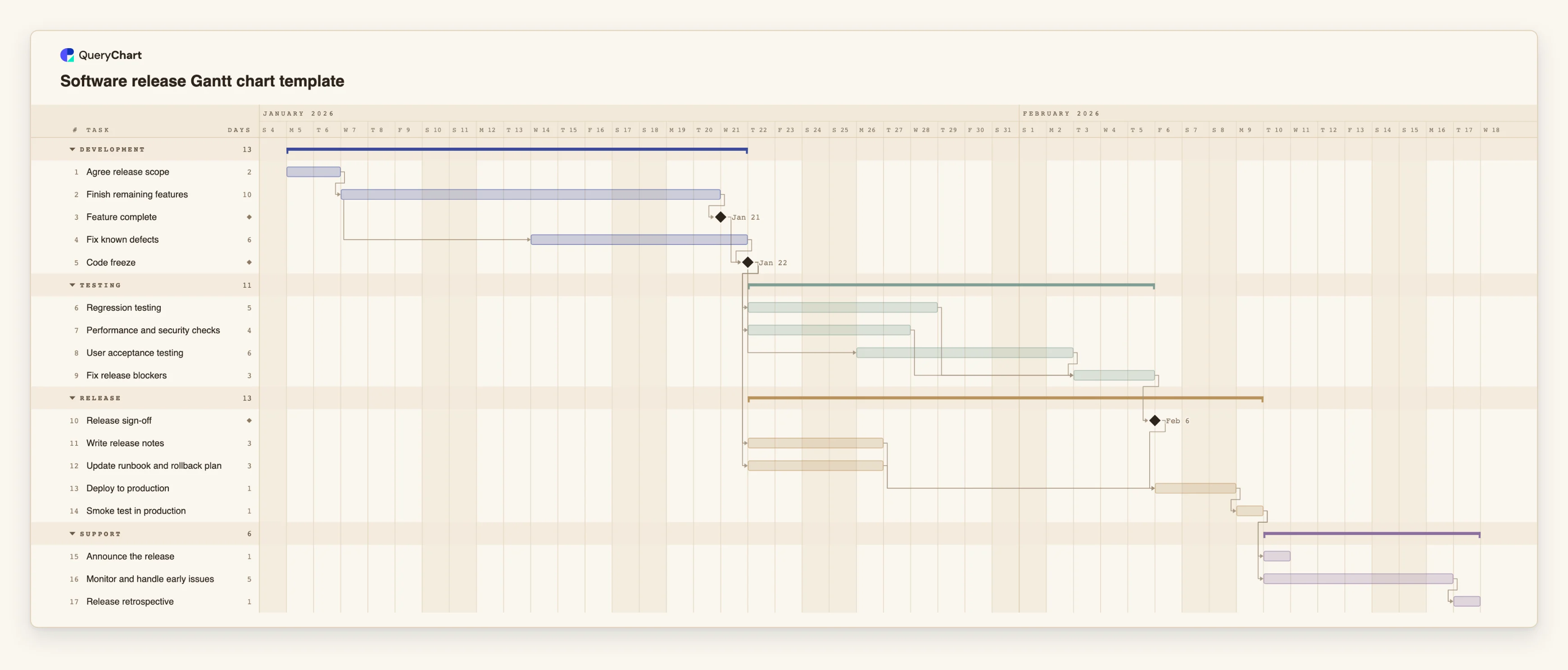
Software release Gantt chart template: code freeze to production
An editable software release Gantt chart: feature complete, code freeze, regression, performance and acceptance testing, release sign-off, deployment, smoke test and early monitoring, with dependencies and milestones.
What the software release gantt chart template: code freeze to production process is
The risky part of a software release is rarely the code. It is the handful of days between the last feature and the first user, when testing, documentation and deployment all have to finish in the right order and the date is already public. A Gantt chart is a good fit for that stretch because the tasks are short, the dependencies are real, and a one-day slip somewhere is visible everywhere downstream.
This template starts at "Agree release scope" and ends at "Release retrospective". Development finishes with the milestone "Feature complete", while "Fix known defects" starts five working days into "Finish remaining features" so defect fixing overlaps the end of development. Both must be done before the milestone "Code freeze". After the freeze three testing streams start: "Regression testing", "Performance and security checks" and "User acceptance testing", which begins two working days after the freeze begins. "Fix release blockers" waits for all three.
Release notes and the runbook are written during testing, not after it, so "Deploy to production" waits for "Release sign-off", "Write release notes" and "Update runbook and rollback plan". After deployment, "Smoke test in production" gates both the announcement and the monitoring window. Turn on the critical path to see which testing stream sets the date. Durations are illustrative working days (Monday to Friday); replace them with your own.
For the whole project that leads up to a release, see the [software project Gantt chart template](/templates/software-project-gantt-chart). This template does not connect to a code repository or a ticket system, and it does not track defects or deployments: it plans the schedule. Dependencies are explained in the [Gantt chart dependencies guide](/guides/gantt-chart-dependencies).
What this flowchart covers
In this template
- Four groups, Development, Testing, Release and Support, with 17 tasks and three milestones: "Feature complete", "Code freeze" and "Release sign-off".
- Overlapping work: "Fix known defects" starts five working days after "Finish remaining features" starts.
- Three testing streams after the freeze: "Regression testing", "Performance and security checks" and "User acceptance testing", and a join at "Fix release blockers".
- Preparation that does not wait for testing: "Write release notes" and "Update runbook and rollback plan" both start at "Code freeze".
- A gated finish: "Deploy to production" waits for "Release sign-off", and "Smoke test in production" gates "Announce the release" and "Monitor and handle early issues".
When to use this template
- You ship on a date and need to see what the freeze-to-production stretch really takes.
- Testing, documentation and operations are done by different people and need one schedule.
- You want a release checklist with durations and dependencies rather than a flat list.
- You need a starting plan for a release train that you can reuse each cycle.
The plan, task by task
Every task in the chart with its length in working days and what it waits for. A dependency is a step number; SS is start-to-start, FF is finish-to-finish, and +n is a lag in working days.
| # | Task | Group | Working days | Depends on |
|---|---|---|---|---|
| 1 | Agree release scope | Development | 2 | |
| 2 | Finish remaining features | Development | 10 | 1 |
| 3 | Feature complete | Development | Milestone | 2 |
| 4 | Fix known defects | Development | 6 | 2SS+5 |
| 5 | Code freeze | Development | Milestone | 3, 4 |
| 6 | Regression testing | Testing | 5 | 5 |
| 7 | Performance and security checks | Testing | 4 | 5 |
| 8 | User acceptance testing | Testing | 6 | 5SS+2 |
| 9 | Fix release blockers | Testing | 3 | 6, 7, 8 |
| 10 | Release sign-off | Release | Milestone | 9 |
| 11 | Write release notes | Release | 3 | 5 |
| 12 | Update runbook and rollback plan | Release | 3 | 5 |
| 13 | Deploy to production | Release | 1 | 10, 11, 12 |
| 14 | Smoke test in production | Release | 1 | 13 |
| 15 | Announce the release | Support | 1 | 14 |
| 16 | Monitor and handle early issues | Support | 5 | 14 |
| 17 | Release retrospective | Support | 1 | 16 |
How it works
Replace the tasks with your own
Rename the 17 tasks and the four groups. Add or remove testing streams to match how you actually test.
Set the freeze as a milestone
Make "Code freeze" a zero-length task that depends on everything that must be finished before testing starts, and make every test stream depend on it.
Let preparation overlap testing
Start release notes and the runbook at the freeze with their own links, not after testing, so they do not extend the date.
Join the streams before sign-off
Make the fix task depend on every testing stream, so the sign-off cannot appear before all of them are finished.
Check the critical path
Use View, then Critical path. If a testing stream is the longest chain, shortening development will not bring the release forward.
Reuse the plan
After the release, duplicate the chart, update the lengths from what you learned in the retrospective and use it for the next cycle.
Frequently asked questions
What is a software release Gantt chart?
A Gantt chart for the schedule from the last feature to the first days in production: freeze, testing, sign-off, deployment and monitoring, with the dependencies between them.
Does it connect to Jira or GitHub?
No. There are no integrations. You enter or paste the tasks and their dependencies, and the schedule is calculated from them.
Can I run testing streams in parallel?
Yes. Give each stream a dependency on the freeze and make the next task depend on all of them. The critical path shows which one sets the date.
Are the durations realistic?
They are illustrative working days. Replace them with your own release history.
How is this different from the software project template?
The software project template plans a whole build from requirements to launch. This one plans only the release stretch, in more detail.