CSV Gantt chart template: the file format and the schedule it draws
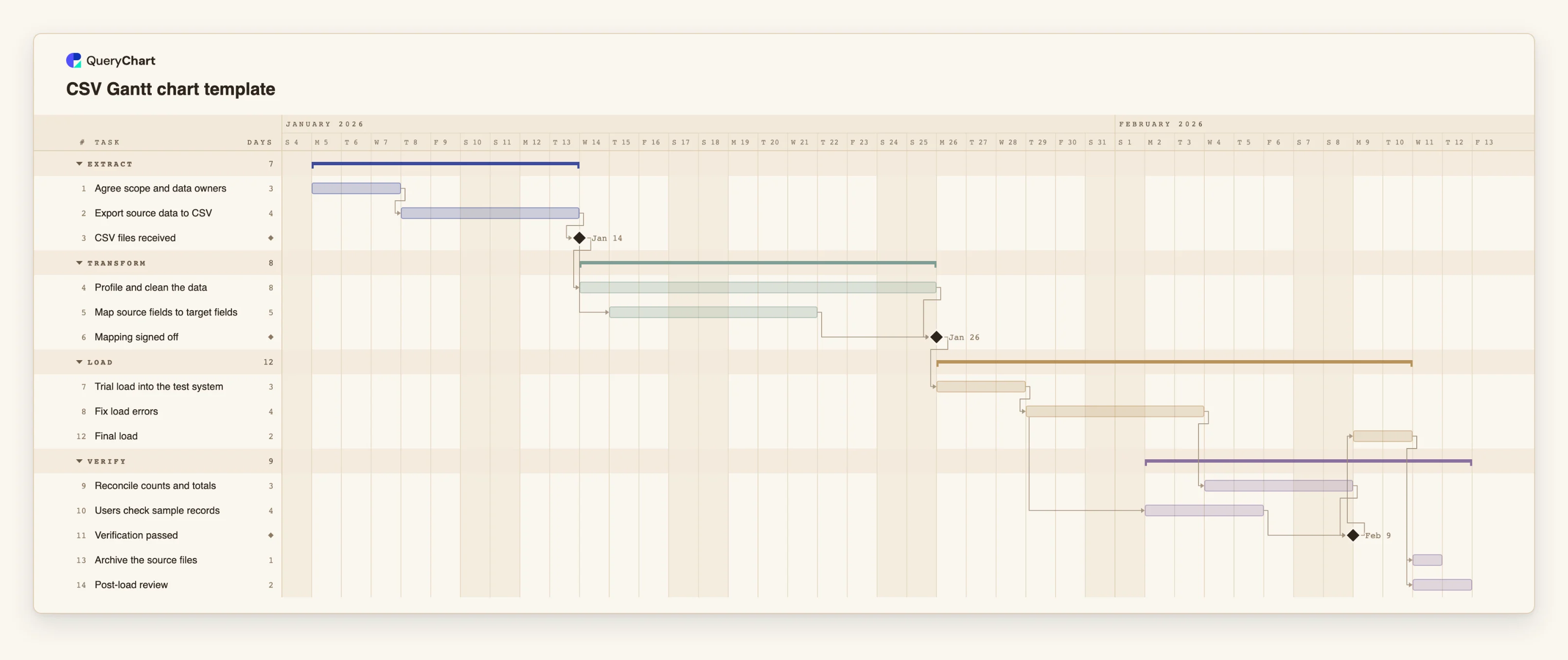
A CSV Gantt chart template: a 14-task data migration plan, the CSV that describes it (Task, Group, Duration, Depends on) and the calculated schedule. See exactly what to type, quote and paste.
What the CSV gantt chart template: the file format and the schedule it draws process is
CSV is the format a plan travels in. A project tool exports it, a colleague emails it, a spreadsheet saves it, and a Gantt chart tool is asked to read it. For a flowchart the question is how to write the arrows; for a Gantt chart it is simpler, because a plan needs only four things per task: a name, a length, a group and what it waits for. Everything else, the dates, the bars and the finish, is calculated.
This template is a data migration, a plan whose inputs are themselves CSV files: exports from the old system, cleaned, mapped to the new fields, trial-loaded, reconciled and loaded for real. The file below is the plan as a CSV, in the columns QueryChart's Gantt sheet reads when you paste it. Header names are matched by name and in any order, and at least two must be recognised. The Task column is the one that matters; Duration is in whole working days, where 0 makes a milestone; Group draws the phase bands; Depends on lists the tasks a task waits for.
Three details decide whether a CSV pastes cleanly. Depends on holds several task numbers separated by commas, so that field must be wrapped in double quotes, and a CSV writer will do this for you only if the field really is a single cell. Dates, if you add a Start or End column, are safest as yyyy-mm-dd, which is always read the same way; a date such as 3/4 is read in your locale's order. And a Status column is read as progress, which means a percentage or the word Done; other words are not understood.
There is no file upload for Gantt charts yet. Open the CSV in any text editor or spreadsheet, copy the lines including the header, and paste them into the sheet. The schedule below it is what appears.
What this flowchart covers
In this template
- Four groups, Extract, Transform, Load and Verify, with 14 tasks and two milestones: "CSV files received" and "Mapping signed off", plus "Verification passed" as the gate before the final load.
- The file as text: the CSV block under the chart, four columns, with the Depends on field quoted where it holds more than one task.
- Work that overlaps: "Map source fields to target fields" starts one working day after "CSV files received" starts, in parallel with "Profile and clean the data".
- Verification in two streams: "Reconcile counts and totals" and "Users check sample records" both follow "Fix load errors", and "Verification passed" waits for both.
- The calculated schedule: every date comes from the lengths and dependencies in the file, not from a date column.
When to use this template
- You have a plan in a CSV, from a project tool or a spreadsheet, and want to see it as a Gantt chart.
- You are generating a plan from a script or a template and need to know the exact columns and quoting.
- A paste into the Gantt sheet was partly refused and you want to see a file that works.
- You want a starting plan for a data migration, ETL or import project.
The plan, task by task
Every task in the chart with its length in working days and what it waits for. A dependency is a step number; SS is start-to-start, FF is finish-to-finish, and +n is a lag in working days.
| # | Task | Group | Working days | Depends on |
|---|---|---|---|---|
| 1 | Agree scope and data owners | Extract | 3 | |
| 2 | Export source data to CSV | Extract | 4 | 1 |
| 3 | CSV files received | Extract | Milestone | 2 |
| 4 | Profile and clean the data | Transform | 8 | 3 |
| 5 | Map source fields to target fields | Transform | 5 | 3SS+1 |
| 6 | Mapping signed off | Transform | Milestone | 4, 5 |
| 7 | Trial load into the test system | Load | 3 | 6 |
| 8 | Fix load errors | Load | 4 | 7 |
| 9 | Reconcile counts and totals | Verify | 3 | 8 |
| 10 | Users check sample records | Verify | 4 | 8SS+2 |
| 11 | Verification passed | Verify | Milestone | 9, 10 |
| 12 | Final load | Load | 2 | 11 |
| 13 | Archive the source files | Verify | 1 | 12 |
| 14 | Post-load review | Verify | 2 | 12 |
The same plan as a CSV file
Copy this into the Gantt sheet, header line included: each column is matched by its name. A Depends on cell with several tasks contains a comma, so it is quoted. The plan has no dates; add a Start column with ISO dates (2026-04-03) for a task that is fixed.
Task,Group,Duration,Depends on
Agree scope and data owners,Extract,3,
Export source data to CSV,Extract,4,1
CSV files received,Extract,0,2
Profile and clean the data,Transform,8,3
Map source fields to target fields,Transform,5,3SS+1
Mapping signed off,Transform,0,"4, 5"
Trial load into the test system,Load,3,6
Fix load errors,Load,4,7
Reconcile counts and totals,Verify,3,8
Users check sample records,Verify,4,8SS+2
Verification passed,Verify,0,"9, 10"
Final load,Load,2,11
Archive the source files,Verify,1,12
Post-load review,Verify,2,12
How it works
Write the header line first
Task, Group, Duration, Depends on. Add Start or End only for tasks with a fixed date, and Progress, Owner or Notes if you have them. Names are matched in any order; at least two columns must be recognised.
One task per line
The first task is number 1, and that numbering is what Depends on refers to. Keep tasks to a few days to a few weeks each.
Give every task a length in whole working days
Use 0 for a milestone. Hours and half days do not exist, so round up or fold a short task into its neighbour.
Write Depends on as numbers, and quote it
List the numbers of the tasks it waits for, for example 4, 5. Add SS, FF or SF for other types and +n or -n for a lag, for example 5SS+1. Because these lists contain commas, wrap the field in double quotes.
Save as UTF-8 and check the text
Open the file in a text editor and look at it once: commas as separators, quotes around any field that contains a comma, dates as yyyy-mm-dd.
Copy, paste and read what was refused
Copy all lines, paste into the first Task cell of the Gantt sheet, and read any warning. An unreadable date, an unknown task in Depends on or a dependency loop is reported and left out, never guessed.
Frequently asked questions
What columns does a CSV need to make a Gantt chart?
A task name, and a duration or start and end dates. Group, Depends on, Progress and people are optional. The header line names the columns and their order does not matter.
Why is my Depends on column broken?
Almost always because a field with several task numbers, such as 4, 5, was not quoted, so the comma split it into two columns. Wrap that field in double quotes.
Can I upload a CSV file?
There is no file upload for Gantt charts yet, so copy the rows from your CSV, header line included, and paste them into the sheet beside the chart.
Does the order of the rows matter?
Yes, in one way: a task's number is its position, and Depends on refers to that number. Reordering rows after you have written the dependencies changes what they point at, unless you refer to tasks by name.
What does the Status column do?
It is read as progress. A percentage or the word Done is understood; other words such as In progress are not, and that cell is flagged.