Excel to flowchart template (travel request and approval)
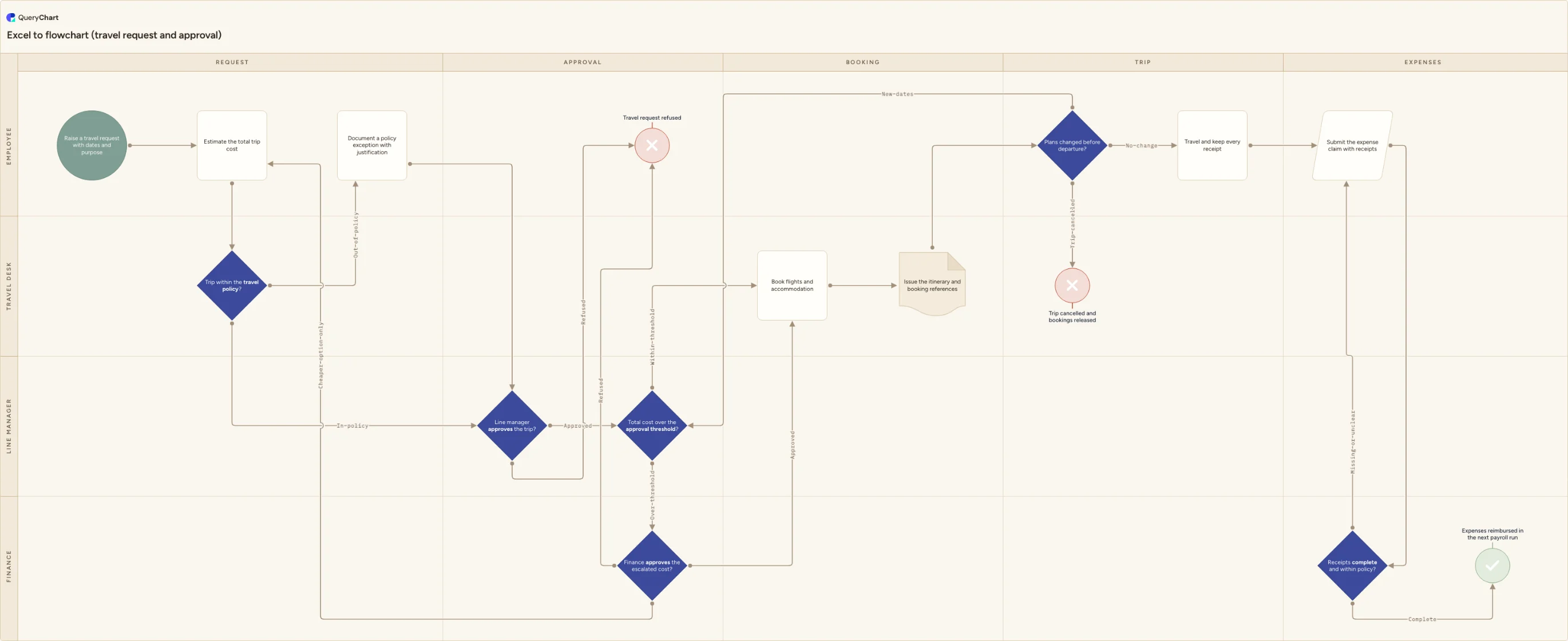
An Excel to flowchart template, shown as a cross-functional travel request and approval flow: five phases, four lanes, a policy gate, a cost threshold that escalates to finance, and a receipts check that returns incomplete claims.
What the excel to flowchart template (travel request and approval) process is
A flowchart is four columns of a table. One column holds the step. One holds the row number the step leads to. One holds the shape, which is nothing more than the step's type drawn as a silhouette. One holds the label on each exit, so a step with two exits carries two labels. Add a fifth column for the lane and a sixth for the phase and you have a cross-functional diagram on two axes instead of a straight line. Nothing else is required. Once you can see that, converting Excel to a flowchart stops being a conversion at all: the table was already the diagram, waiting for something to draw it. The table below holds a travel request and approval process, from a request with dates and purpose to a reimbursed expense claim.
Travel approval breaks at the cost estimate and at the second approver. The estimate is the figure every later gate is measured against, so a fare quoted without accommodation, subsistence and ground transport pushes a trip over a threshold weeks after somebody has already approved it. The second approver is worse, because most written policies never say whether finance is checking the budget line or re-checking the manager's judgement, so the request sits while both wait. Then there is the part nobody documents: plans change. A meeting moves, the dates move, and the request is now for a different trip at a different cost with the original approval still attached. Teams handle that by email, which is why the expense claim three weeks later is the first time anyone notices that the approved figure and the booked figure are different numbers.
The chart below runs across five phases and four lanes, and it draws the awkward routes rather than describing them in a footnote. An out-of-policy trip is not refused at the policy gate; it goes to a recorded exception first, and then to approval. Cost above the threshold escalates to finance, which can approve it, refuse it, or send it back to be re-costed. A change of dates before departure re-enters the threshold test instead of flowing straight to the trip, because new dates mean a new cost. An incomplete expense claim goes back to the employee rather than stopping. Two paths end in a refusal or a cancellation, and one ends in reimbursement.
What this flowchart covers
In this template
- Five phases across four lanes, so the same table produces both the sequence and the ownership: Request, Approval, Booking, Trip and Expenses, held by the Employee, Line manager, Travel desk and Finance lanes.
- A policy gate sitting in the Travel desk lane, "Trip within the travel policy?", whose out-of-policy exit routes to "Document a policy exception with justification" and rejoins the flow, rather than refusing the trip at that point.
- Two approvals in sequence rather than one: "Line manager approves the trip?" and then "Total cost over the approval threshold?", so only spend above the figure you set is escalated any further.
- A three-way escalation at "Finance approves the escalated cost?": approve and continue to booking, refuse outright, or send the request back to "Estimate the total trip cost" to be re-costed at a lower fare or a shorter stay.
- A post-booking change decision, "Plans changed before departure?", with three exits: travel as booked, release the bookings and end the trip, or re-enter "Total cost over the approval threshold?" with the new dates.
- A receipts check in the Finance lane, "Receipts complete and within policy?", which returns an incomplete claim to "Submit the expense claim with receipts" and only reaches "Expenses reimbursed in the next payroll run" once it is clean.
When to use this template
- You already keep the process as a table of steps in a spreadsheet, and you want the diagram that table describes instead of maintaining a separate drawing beside it.
- You drove exactly this shape from an Excel table with the Visio Data Visualizer add-in and you are trying to work out where that workflow went.
- Your travel policy exists as prose, and nobody in the company can tell you the figure at which a trip needs a second approver.
- Expense claims keep arriving that do not match what was approved, and you need to see which gate the trip got past and when the cost changed.
- You are writing a travel SOP and need the exceptions, refusals, cancellations and resubmissions drawn as routes, because those are the cases people actually ask about.
How it works
Rename the four lanes to your real roles
Employee, Line manager, Travel desk and Finance are placeholders. If bookings go through an external travel management company, give it its own lane so the handoff is visible. If you have no travel desk, move the policy check into the line manager lane and delete the lane rather than leaving it empty.
Put your own figure on the threshold
Replace "Total cost over the approval threshold?" with the number from your delegation of authority schedule and state the currency. Decide whether destination overrides cost — many policies escalate any overseas trip regardless of value — and test the estimate including any documented exception, not the fare alone.
Write your caps into the policy gate
The policy check is only as useful as what it tests. Note the written caps on the node: cabin class by flight duration, nightly accommodation limit by city, minimum advance booking window, preferred suppliers. Without them, every approver applies their own reading and the gate stops meaning anything.
Decide what finance is actually checking
The escalation has three exits on purpose: approve, refuse, and send back to be re-costed. If your finance team only ever approves or refuses, delete the re-cost branch. If they own the budget line rather than the judgement, say so on the node and record who approved it and on what date, because an audit of the claim starts there.
Repoint the change-of-plans loop if changes go further back
New dates currently re-enter the threshold test, which assumes the manager's approval still stands. If a change of dates in your organisation needs the line manager to look again, repoint that exit to "Line manager approves the trip?" instead. If your bookings are non-refundable, add a step for the change fee before the trip continues.
Set a deadline on the receipts loop
The claim currently bounces back to the employee for as long as it takes. Add the resubmission window your finance calendar needs, and define what complete means for you — an itemised VAT receipt per line rather than a card slip, foreign amounts converted at the statement rate, prepaid items excluded.
Drawing quantities instead of steps?
Converting a spreadsheet of quantities rather than steps? A Sankey diagram draws source, target and amount rows as flows.
Frequently asked questions
What are the stages of a travel request and approval process?
Five, and this chart's phase columns are named after them. Request: the employee states dates and purpose and estimates the total trip cost. Approval: the trip is checked against policy, approved by the line manager, and escalated to finance if the cost is above the threshold. Booking: the travel desk books flights and accommodation and issues the itinerary and booking references. Trip: the employee travels and keeps receipts, unless plans change first. Expenses: the claim goes in with receipts, is checked against policy, and is reimbursed in the next payroll run. The order matters more than the names — every gate is measured against the estimate made in the first phase.
Who should approve business travel, the line manager or finance?
Both, doing different jobs. The line manager approves the trip: whether it is necessary, whether the dates work, whether the person should be away. Finance approves the money above a threshold: whether the budget line carries it and whether any policy exception is acceptable. Collapsing the two into one approval is what produces the familiar argument in which nobody is sure who is holding the request. Give the manager every trip and finance only what is over your figure, name the second approver, and record the date of each approval, because the audit of the expense claim starts at the approval and not at the receipt.
What happens when travel plans change after the trip is booked?
Treat it as a new cost, not an amendment. New dates usually mean a different fare, a different length of stay and sometimes a change fee, so the trip has to be tested against the approval threshold again rather than proceeding on the strength of the original approval. That is why the change decision in this chart re-enters the threshold test instead of continuing to the trip. A cancellation is a separate exit: the bookings are released and the process ends there, which keeps cancelled trips out of the expenses phase and stops a released booking turning up in a claim.
I used to build this from an Excel table with the Visio Data Visualizer add-in. Where has that gone?
Microsoft announced the retirement of the Visio Data Visualizer add-in for Excel in November 2025 and set the service shutdown for 2 March 2026, a date it confirmed in December 2025 was unchanged. It has published nothing since either confirming the shutdown ran or reversing it, and its support pages still describe the retirement in the future tense while some marketing pages still advertise the add-in as current — which is why the situation is confusing. The route Microsoft recommends is Visio Plan 2 and the Data Visualizer templates in the Visio desktop app. This template is not a Visio file; it is the same shape, produced from rows you edit in the browser.