Basic process flowchart template
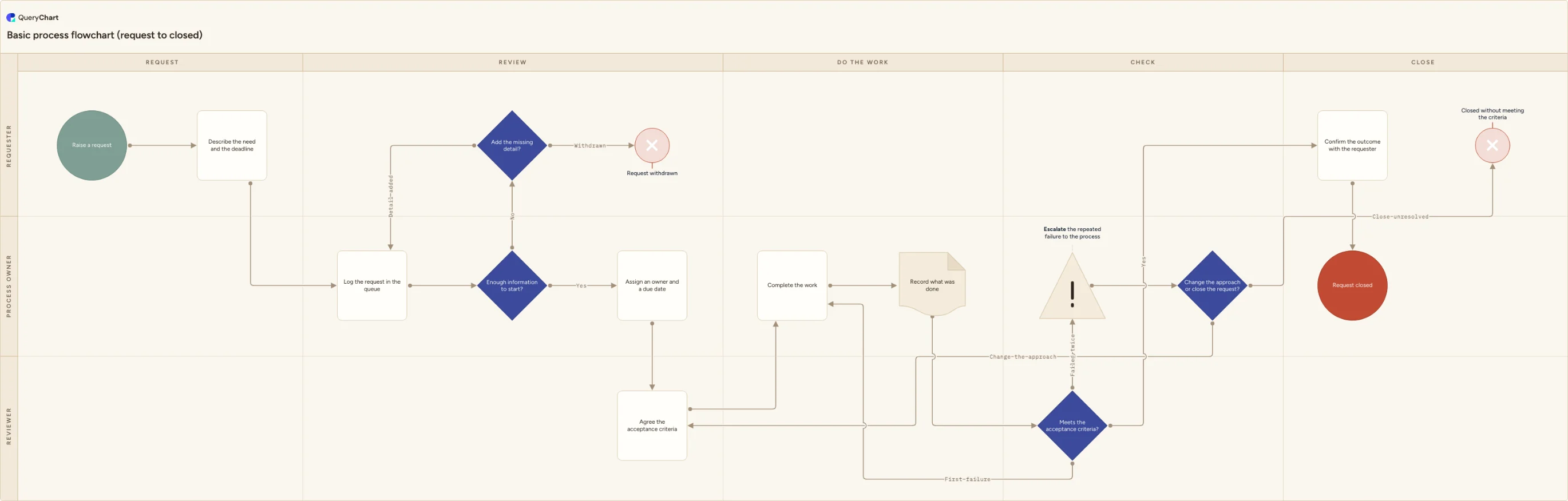
A basic process flowchart template running from request to closed: one start, four labelled decisions, a rework loop capped at the second failure, and three separate endings. The smallest complete flow you can copy and rename.
What the basic process flowchart process is
Search for a basic process flowchart template and you generally get one of two things: a blank canvas with a start shape sitting on it, or somebody else's twenty-step procedure for a business you are not in. Neither is a starting point. The blank canvas gives you no structure to argue with, and a finished chart for a different process has to be dismantled before any of it can be reused. What is useful sits in between: a skeleton short enough to read in one glance that already demonstrates every structural idea you are going to need. That is what this template is: a generic request, raised, reviewed, worked, checked and closed.
The structural mistakes in a first flowchart are almost always the same four. There is more than one starting point, so nobody can say what triggers the work. Decision arrows are unlabelled, so a diamond with two exits tells the reader that a judgement happens but not which way to go afterwards. The rework loop has no cap, so anything that fails review is sent back to be corrected forever with no route out. And there is a single ending, usually a box called Complete, which leaves every withdrawn, abandoned and unresolved case invisible. Work stops in several different ways. A chart admitting only one of them is describing a process nobody has run.
The chart below is drawn as five phases across three roles, because a process flowchart stays honest when the columns say when and the lanes say who. It runs from one start to three distinct endings, and it gets there through four labelled decisions. Two of those are the ones people leave out: a return to the requester when a request arrives without enough detail, and a rework loop that is capped, so a first review failure goes back to be redone and a second is escalated rather than sent round again. Every branch either rejoins the flow or finishes at a named terminator. Delete what you do not do, rename the rest, and it is your process.
What this flowchart covers
In this template
- Five phase columns (Request, Review, Do the work, Check and Close) crossed with three role lanes: Requester, Process owner and Reviewer.
- A single start, "Raise a request", followed immediately by "Describe the need and the deadline", so the trigger and the minimum detail a request must carry are both on the diagram rather than assumed.
- An "Enough information to start?" gate whose No branch runs to "Add the missing detail?", which either sends the request back to "Log the request in the queue" or finishes it at "Request withdrawn".
- Acceptance criteria fixed in the Reviewer lane at "Agree the acceptance criteria" before "Complete the work" begins, with "Record what was done" sitting between the work and the review so the reviewer has something to read.
- A "Meets the acceptance criteria?" decision with three labelled exits rather than two: a pass, a first failure that returns to "Complete the work", and a second failure that leaves the loop for "Escalate the repeated failure to the process owner".
- Three separate endings: "Request closed" after "Confirm the outcome with the requester", "Request withdrawn" when the missing detail never arrives, and "Closed without meeting the criteria" when "Change the approach or close the request?" resolves the escalation the other way.
When to use this template
- You have been asked to document a process for the first time, and everything you have found so far is either an empty canvas or a twenty-step flow for a business that is not yours.
- A process already runs and mostly works, but has never been drawn, so each person can describe their own part and nobody can describe the handoffs between them.
- You are teaching someone to draw flowcharts and want one small, complete example that shows a single start, labelled decision exits, a capped loop and more than one ending.
- Requests reach the person doing the work half-specified, and you need to show where they get sent back rather than quietly absorbed.
- Work keeps going round the review loop and nobody can say at which point it should be escalated instead of corrected again.
How it works
Rename the five phases to your own stages
Request, Review, Do the work, Check and Close are placeholders for intake, triage, execution, verification and closure. Replace them with the stage names your team already says out loud. If you have no verification stage at all, merge Check into Do the work rather than leaving an empty column that implies a review nobody performs.
Name the three roles, and keep the reviewer separate
Rename Requester, Process owner and Reviewer to your real roles — one lane per decision-maker, not per person. The one merge to resist is putting the reviewer and the person doing the work in the same lane. If they are the same individual, the check step is decoration, and you should say so on the chart instead of drawing a review that never fails.
Write your minimum request fields into row two
"Describe the need and the deadline" is deliberately vague because your fields are not ours. List them explicitly: what is wanted, why, the date it is needed by, who to come back to. That same list is what "Enough information to start?" tests against two rows later, so write it once in the comment field and reuse it in both places.
Set your own rework cap
The review decision escalates on the second failure. If your process genuinely allows three attempts before escalation, add a branch and say so; if it allows none, delete the return arrow to "Complete the work" and send every failure straight to escalation. What matters is that the loop has a stated exit, because an uncapped one is how work disappears for a quarter.
Decide who the escalation reaches, and what they may do
"Change the approach or close the request?" assumes somebody is allowed to close a request unresolved. If nobody in your organisation can, delete "Closed without meeting the criteria" and make the escalation always return to "Agree the acceptance criteria" — then be honest that the process has no way to stop, and name who carries that risk.
Use only the shapes you actually need
This chart uses six kinds of box and no more: a start, plain process steps, decisions, one record step, and two kinds of terminator between them covering its three endings. That is deliberate. Microsoft's guidance for its own Basic Flowchart template says any shape can carry whatever meaning is agreed on by the people who will create and read the flowcharts, and that most flowcharts tend to use only three or four of the shapes. Agree a small set, write down what each one means, and stop there.
Frequently asked questions
What are the stages of a basic process flowchart?
Five, in the general case. Intake, where the work is requested and described. Review, where somebody decides whether the request is complete enough to act on. Execution, where the work is done and recorded. Verification, where a second person tests the result against criteria agreed beforehand. Closure, where the outcome is confirmed and the request is formally shut. The chart above uses exactly those five as its phase columns — Request, Review, Do the work, Check and Close — because almost any operational process, from a maintenance job to a document change, fits that spine once you stop naming the stages after the department that owns them.
Who owns a process drawn like this?
Three roles, with three different things to own. The requester owns the information: if the request is incomplete, the process cannot start, and the chart returns it rather than guessing. The process owner owns the flow itself — the queue, the assignment, the due date, and the escalation when review fails twice. The reviewer owns the criteria and applies them, which is why the criteria are agreed in the reviewer's lane before the work begins rather than invented at the check step. Give the process owner the end-to-end accountability. Without a named one, a request that stalls between two lanes belongs to nobody, which is the most common way work is lost.
What should happen when work fails the review twice?
It should stop going round. The first failure is ordinary: the reviewer lists the specific gaps and the work returns to be redone. A second failure on the same request means something other than effort is wrong — the criteria were unclear, the approach cannot meet them, or the request itself was not achievable. Sending it round a third time repeats the same result more slowly. In this chart the second failure escalates to the process owner, who chooses between changing the approach, which returns to the point where acceptance criteria are agreed, and closing the request unresolved. Both outcomes are recorded. Neither leaves the work in limbo.
Do flowchart shapes have standard meanings?
Less than most people assume. There are widespread conventions — a rounded box for a start or end, a rectangle for a step, a diamond for a decision — and following them makes a chart easier for a stranger to read. But Microsoft's own documentation for its Basic Flowchart template states plainly that any shape can carry whatever meaning is agreed on by the people who will create and read the flowcharts, and notes that most flowcharts tend to use only three or four of the shapes. So there is no shape library to learn before you can start. Pick a handful, define them in a legend, and be consistent. Clarity comes from labelling the decision exits, not from the geometry.