Excel Process Map Template: Sample Rows and Editable Flowchart
Use an Excel process map example for budget requests and approvals. Inspect the rows, decision branches and owner lanes, then adapt the editable chart.
What the excel process map template: sample rows and editable process is
Flowchart and process map are used as though they were the same document. They are not, and the difference is the reason one of them survives contact with a question. A flowchart shows sequence and logic: this step, then that step, and a diamond where the path forks. A process map keeps all of that and adds the two things a flowchart leaves out: who owns each step, and what record the step produces. Owner is what tells you whom to ring when the work stops moving. Record is what you put in front of somebody six months later when they ask how the decision was reached. Neither is decoration, and neither can be inferred from a box that says Review.
Budget approval is where those two omissions hurt most, because the process is almost entirely made of reviews. A request goes in, nothing visible happens, and nobody can say whether it is sitting with the cost centre owner, with finance, or waiting for an agenda that has not been set. The causes repeat across organisations. Completeness is judged differently by every reviewer, so two comparable requests take two weeks and two months. The budget test is run against posted actuals rather than the balance net of commitments, so a cost centre looks affordable right up to the month it is overspent. And the authorisation itself lands in a meeting note nobody circulates, which from the requester's side is indistinguishable from silence.
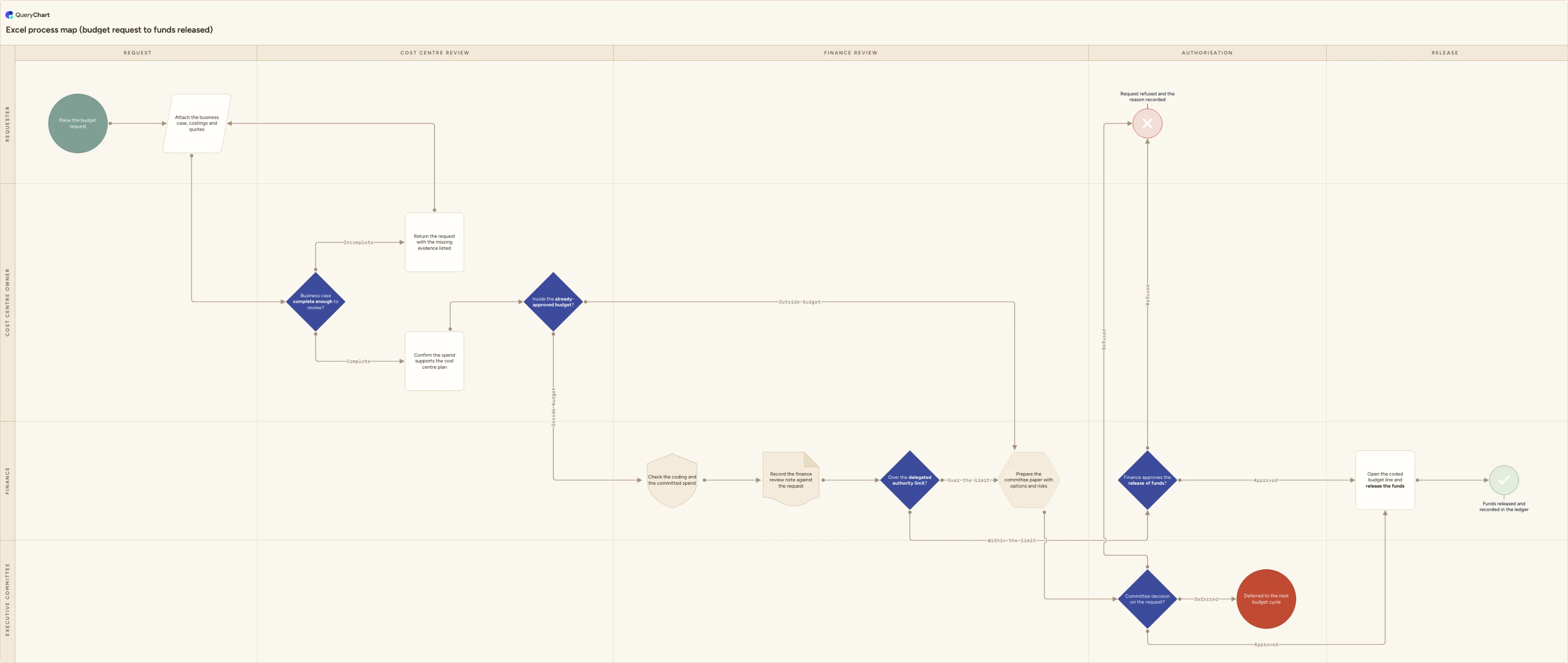
The chart below maps a budget request from submission to released funds, and it is deliberately owner-driven: four lanes for the people who actually hold the work, and five phases along the top so you can see how far a request has travelled at a glance. Three screening gates decide in turn whether the request is reviewable, whether it fits the already-approved budget, and whether it sits above the delegated authority limit. Two authorisation decisions then release the money, refuse it, or push it to the next cycle. Every reviewing step produces an artefact you could show someone later: a request pack, a returned request listing what was missing, a finance review note, a committee paper, a minute, and a ledger entry.
Prepare and convert your spreadsheet
What this flowchart covers
In this template
- Four owner lanes (Requester, Cost centre owner, Finance and Executive committee) laid across five phases: Request, Cost centre review, Finance review, Authorisation and Release.
- A completeness gate, "Business case complete enough to review?", whose Incomplete branch runs to "Return the request with the missing evidence listed" and loops back to "Attach the business case, costings and quotes" instead of ending the process.
- A budget test, "Inside the already-approved budget?", which sends anything outside the approved plan directly to "Prepare the committee paper with options and risks" and skips the finance-delegated route entirely.
- The finance review as two steps, only one of which is a record: "Check the coding and the committed spend" is the work, and "Record the finance review note against the request" is the artefact it leaves, drawn as a document shape rather than a plain process box.
- A delegation split at "Over the delegated authority limit?", where anything within the limit goes to "Finance approves the release of funds?" and anything above it joins the committee route.
- A three-way "Committee decision on the request?" ending in "Deferred to the next budget cycle" or "Request refused and the reason recorded", with approval continuing through "Open the coded budget line and release the funds" to "Funds released and recorded in the ledger".
When to use this template
- Requesters keep asking where their budget request has got to, and nobody can answer without ringing three people.
- You are writing or revising a delegation of authority schedule and need to see which decisions finance can take alone and which have to reach the committee.
- Two comparable requests took wildly different amounts of time and you cannot point at the step that explains the gap.
- A new finance lead, an auditor or a board member has asked how spend is authorised, and the honest answer is a folder of emails.
- You already have a flowchart of this process, and it shows the sequence but not who owns each step or what evidence each step leaves.
How it works
Rename the four owner lanes
Requester, Cost centre owner, Finance and Executive committee are placeholders. Name each lane after the decision it takes rather than after whoever holds it now: if a shared services desk does the coding check instead of finance, the lane belongs to the desk, and if your budget holders are department heads, say department head. A lane carrying a job title has to be redrawn every time somebody moves; a lane carrying a decision does not.
Write down what complete enough means
The gate "Business case complete enough to review?" is only useful once the bar is stated. Set it before go-live — coding and cost centre present, at least one quote dated within ninety days, the benefit expressed as a number, a named accountable person rather than a team. Put the list in the step's comment so every reviewer applies the same test.
Put your real authority limit on the diagram
Replace the generic "Over the delegated authority limit?" with your figure and your currency, for example finance up to £25,000 and the committee above it. State explicitly that the test is the whole commitment over its life rather than the first invoice, or a three-year subscription gets authorised twelve times over by the wrong person.
Decide what the budget test actually tests
"Inside the already-approved budget?" and "Check the coding and the committed spend" can each be read two ways. Decide whether you test the balance net of commitments — open requests, raised orders and accruals — or posted actuals alone, and record the choice on the step. Move the check earlier if your finance system blocks a submission outright.
Delete the authorisation branch you do not have
If every release goes to the committee regardless of value, delete "Finance approves the release of funds?" and route the within-the-limit branch to the committee paper instead. If you have no committee, delete the committee paper, the committee decision and the deferral terminator, and let the finance decision be final. Keep the refusal terminator either way — a process with no documented no is a process that just goes quiet.
Name the record each reviewing step leaves
This is the step that turns the flowchart into a process map. In each node's comment, write the artefact it produces and where it is kept: the request pack, the returned request with its missing-evidence list, the finance review note, the committee paper, the minute recording the amount actually authorised and any condition attached, and the ledger entry. If a step produces nothing, ask what it is for.
Frequently asked questions
What is the difference between a process map and a flowchart?
A flowchart answers what happens next. A process map answers that too, and adds who owns each step and what record the step produces. In practice that means two things on the page: lanes, so every box sits in someone's column, and an artefact named against each reviewing step. The distinction is operational rather than academic. When a request stalls, a flowchart tells you which step it stalled at and a process map tells you whose inbox it is in. When somebody asks how a decision was made, only the map can point at the note, the paper or the minute that shows it.
What are the stages of a budget approval process?
Five, in the order the chart shows them. Request: the requester raises it and attaches the business case, costings and quotes. Cost centre review: the budget holder checks the case is reviewable and that the spend supports the cost centre plan. Finance review: coding and committed spend are checked and a review note is recorded. Authorisation: either finance releases the funds under its delegated limit, or the executive committee takes the decision on a prepared paper. Release: the coded budget line is opened and the funds are recorded in the ledger. Ownership moves across all four lanes and never comes back to the requester, which is the structural reason a requester cannot answer "where has my request got to?" from the chart alone. Whoever holds the elapsed time has to be named somewhere outside the lanes.
What happens when a request goes over the delegated authority limit?
It leaves the finance route and joins the committee route, which is a genuinely different path rather than an extra signature. Finance prepares a paper setting out options and risks, and the committee decides one of three ways: approved, deferred to the next budget cycle, or refused with the reason recorded. A request that falls outside the already-approved budget takes the same route for the same reason. The important discipline is what the committee records — the decision, the amount actually authorised if it differs from the amount asked for, any condition attached, and who is to be told. Deferral is a real outcome here, with its own terminator, because an undated deferral behaves exactly like a refusal nobody communicated.
Which process map types does Visio include, and at which tier?
It depends on the edition, and the split is worth knowing before you plan a mapping exercise. Microsoft documents basic flowchart, cross-functional flowchart and work-flow diagram as supported in Visio Standard, Visio Professional and the subscription versions. A value stream map, a BPMN diagram or an audit diagram is documented as Visio Professional or Visio Plan 2 only — Plan 2 being list-priced at US$15 per user per month paid yearly at the time of writing. So a reader mapping a process on the general-purpose tier has three diagram types to choose from rather than eleven. This template is a QueryChart chart drawn from its own rows rather than a Visio file, and on an authorisation process the difference that matters is less the diagram than what sits around it: revision history for a Visio file is OneDrive or SharePoint file versioning, retained for 30 days and switchable off by an administrator, whereas here an approval is recorded against the revision it was given.