Product launch Gantt chart template: plan, prepare, launch
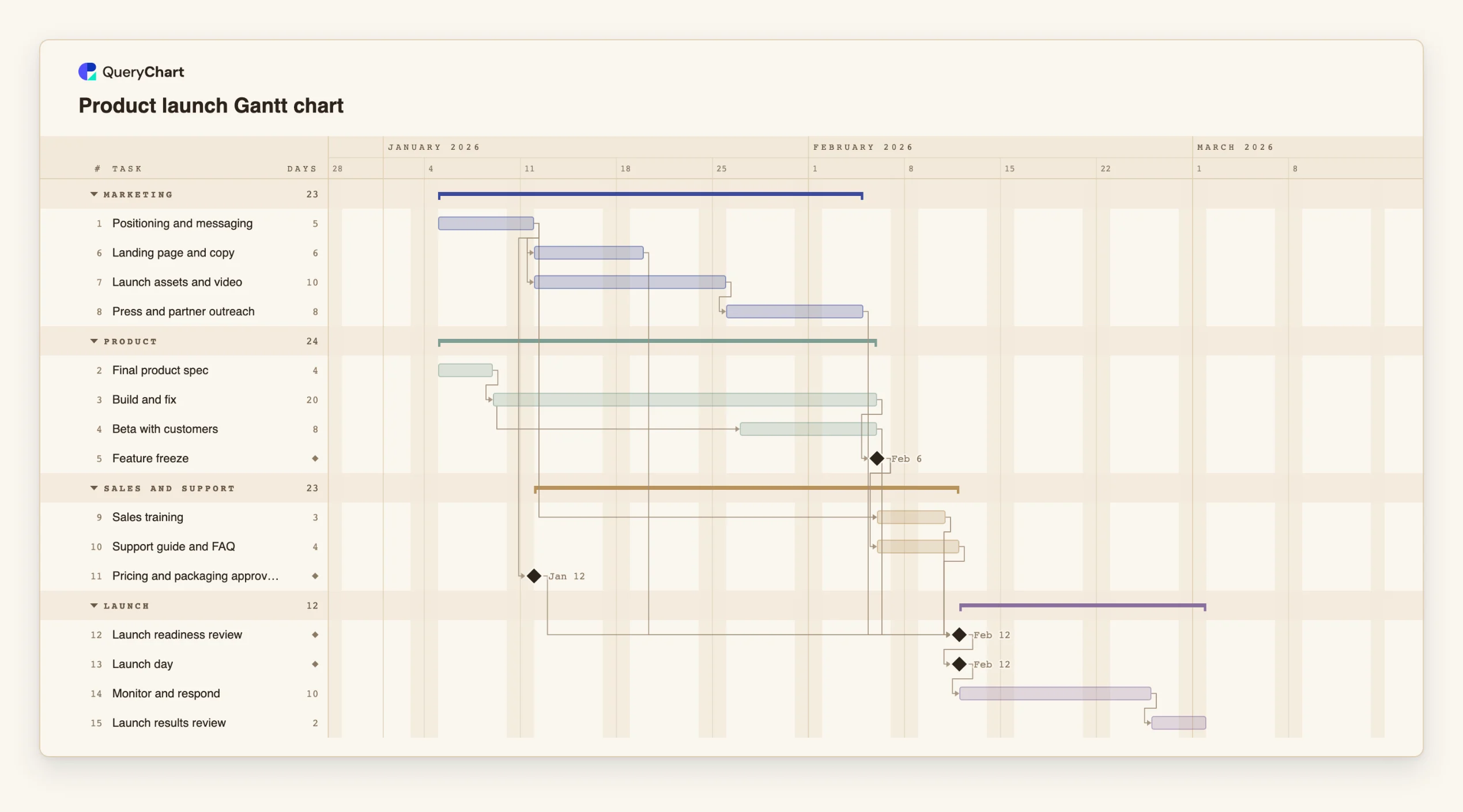
An editable product launch Gantt chart: positioning, build, marketing assets, sales enablement and launch day, with the dependencies that decide the date. Change a duration and the launch date moves.
What the product launch gantt chart template: plan, prepare, launch process is
A launch is hard to schedule because no single team owns it. Product is finishing, marketing is waiting for something to describe, sales needs to be trained on a product that is still changing, and support has not seen it at all. Each team can be on time and the launch can still be late, because the date depends on the slowest of four parallel streams and a few handoffs between them.
This template shows that structure. The product stream builds and runs a beta, marketing prepares the page, the assets and the outreach once the messaging is settled, and sales and support prepare once the feature set is frozen. "Launch readiness review" waits for all of them, and "Launch day" waits for the review. The longest chain into the review sets the date, which is why the critical path is worth switching on.
Notice what starts early. "Positioning and messaging" has no predecessor, because marketing should not wait for the build to begin, and "Beta with customers" starts while the build is still running. The plan has no fixed dates. If your launch date is fixed by an event, pin "Launch day" to it: if the work before it cannot finish in time, the task is flagged with the earliest date its dependencies allow.
For the work behind each box, see the product development process at /templates/product-development-process. For what happens to defects after launch, the incident management process at /templates/incident-management-process covers the route.
What this flowchart covers
In this template
- Four streams, Product, Marketing, Sales and support and Launch, with 15 tasks and four milestones.
- Marketing that starts at once: "Positioning and messaging" has no predecessor, and the page, the assets and the outreach follow from it.
- A beta that overlaps the build: "Beta with customers" starts twelve days into "Build and fix" rather than after it.
- Enablement from a frozen feature set: "Sales training" and "Support guide and FAQ" both wait for "Feature freeze".
- One gate before launch: "Launch readiness review" waits for the beta, the page, the outreach, the training, the support guide and the pricing, and "Launch day" waits for the review.
When to use this template
- A launch date has been promised and you need to know whether the work behind it fits.
- Marketing, sales and product each report green and the launch is still slipping.
- You want to see what happens to launch day if the build runs a week long.
- You are planning a first launch and need a list of what other teams have to finish.
The plan, task by task
Every task in the chart with its length in working days and what it waits for. A dependency is a step number; SS is start-to-start, FF is finish-to-finish, and +n is a lag in working days.
| # | Task | Group | Working days | Depends on |
|---|---|---|---|---|
| 1 | Positioning and messaging | Marketing | 5 | |
| 2 | Final product spec | Product | 4 | |
| 3 | Build and fix | Product | 20 | 2 |
| 4 | Beta with customers | Product | 8 | 3SS+12 |
| 5 | Feature freeze | Product | Milestone | 3 |
| 6 | Landing page and copy | Marketing | 6 | 1 |
| 7 | Launch assets and video | Marketing | 10 | 1 |
| 8 | Press and partner outreach | Marketing | 8 | 7 |
| 9 | Sales training | Sales and support | 3 | 1, 5 |
| 10 | Support guide and FAQ | Sales and support | 4 | 5 |
| 11 | Pricing and packaging approved | Sales and support | Milestone | 1 |
| 12 | Launch readiness review | Launch | Milestone | 4, 6, 8, 9, 10, 11 |
| 13 | Launch day | Launch | Milestone | 12 |
| 14 | Monitor and respond | Launch | 10 | 13 |
| 15 | Launch results review | Launch | 2 | 14 |
How it works
Name the real workstreams
Keep one group per team that must deliver something. Merge streams that one person runs and split any that two different teams own.
Start what can start now
Give tasks that do not need the product, such as messaging, no predecessor. Waiting for the build before starting anything else is the most common way launches slip.
Use start-to-start for overlap
Where a task can begin partway through another, such as a beta during a build, link it start-to-start with a lag in working days.
Make the readiness review a real gate
List what has to be true to launch and who decides. Link every stream to it, so a missing piece shows as the task that is late.
Pin the date only if it is fixed
If launch day is set by an event or a contract, pin it to that date; the chart flags it if the work before it cannot finish in time. If it is not fixed, let it be calculated.
Plan the weeks after launch
Keep "Monitor and respond" and "Launch results review" in the plan so the team and the review are booked.
Frequently asked questions
How do I plan a product launch with a Gantt chart?
Put each team's work in its own group, give every task a length in working days and link tasks to what they wait for. Add a readiness review that depends on every stream and a launch milestone that depends on the review. The chart then shows which stream sets the date.
What is the critical path of a product launch?
It is the longest chain of dependent tasks ending at launch day. In this template it usually runs through the build, feature freeze and enablement into the readiness review. A delay on that chain moves the launch; a delay elsewhere may not.
Can I check the plan against a fixed launch date?
Yes. Pin launch day to the date. The schedule still runs forward from the start: if the tasks before it need more time than there is, launch day is flagged with the earliest date its dependencies allow. Shorten, overlap or drop tasks on the critical path until the flag clears.
Does it include the budget?
No. This is a schedule. The template does not track cost or compare against a baseline plan.