Event planning Gantt chart template: from budget to follow-up
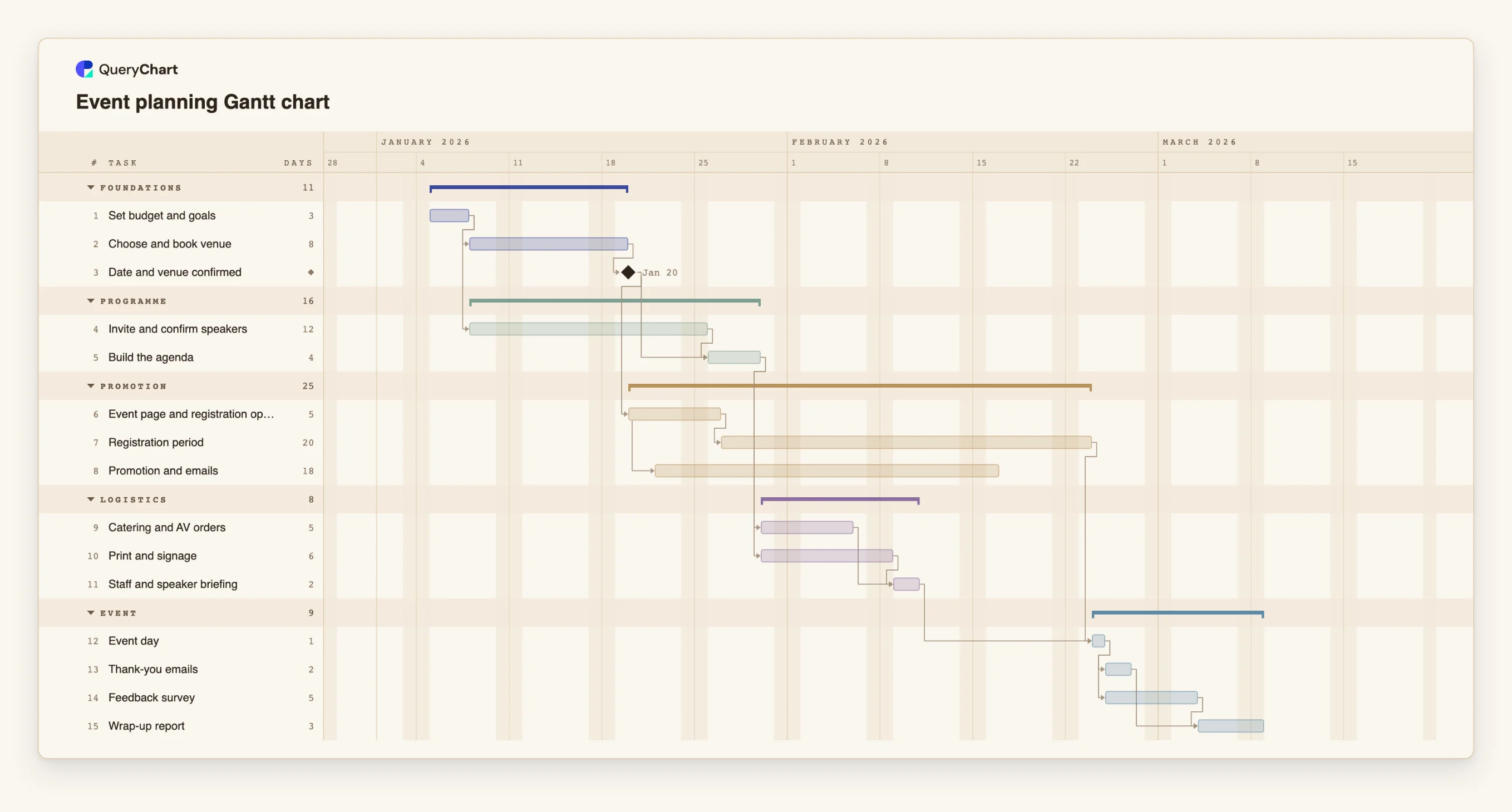
An editable event planning Gantt chart: budget, venue, speakers, registration, promotion, logistics, event day and follow-up, with dependencies and milestones. Change a duration and the dates follow.
What the event planning gantt chart template: from budget to follow-up process is
An event has the one thing most projects lack: a date that cannot move. That makes the plan a question about margin. Everything has to be finished before event day, and the useful question is not when the event will happen but how much room each preparation has before it threatens it. A Gantt chart shows which preparations sit on the chain that ends at event day and which have room.
This template has five groups: Foundations, Programme, Promotion, Logistics and Event. The venue and the date come first, because the speakers' calendars and the registration page both depend on them. Speakers and the venue are worked on together, and the agenda waits for both. Promotion starts two days after the event page opens, so it overlaps the registration period instead of following it. Catering, print and signage wait for the agenda because they depend on numbers and timings.
The "Event day" task is a single day. It waits for the briefing and for registration to close. After it, the thank-you emails and the feedback survey run side by side and the wrap-up report waits for both. To test a fixed date, pin "Event day" to it: if the preparation before it needs more working days than there are, "Event day" is flagged with the earliest date its dependencies allow.
For a recurring internal meeting, a checklist may be enough. For events with approvals, such as a budget sign-off, the approval workflow at /templates/procurement-approval-workflow shows how to route them.
What this flowchart covers
In this template
- Five groups, Foundations, Programme, Promotion, Logistics and Event, with 15 tasks and one milestone: "Date and venue confirmed".
- Programme and venue worked on together: "Invite and confirm speakers" starts after the budget, and "Build the agenda" waits for the speakers and for "Date and venue confirmed".
- Promotion that overlaps registration: "Promotion and emails" starts two days after "Event page and registration open".
- Logistics that wait for the agenda: "Catering and AV orders" and "Print and signage" both follow "Build the agenda" and feed "Staff and speaker briefing".
- Follow-up planned in advance: "Thank-you emails" and "Feedback survey" after "Event day", then "Wrap-up report".
When to use this template
- You have a fixed event date and need to know when each preparation has to start.
- Speakers, venue and promotion depend on each other and you need to see the order.
- You run the same kind of event each year and want a standard plan.
- A stakeholder asks how late a confirmation can be before the date is at risk.
The plan, task by task
Every task in the chart with its length in working days and what it waits for. A dependency is a step number; SS is start-to-start, FF is finish-to-finish, and +n is a lag in working days.
| # | Task | Group | Working days | Depends on |
|---|---|---|---|---|
| 1 | Set budget and goals | Foundations | 3 | |
| 2 | Choose and book venue | Foundations | 8 | 1 |
| 3 | Date and venue confirmed | Foundations | Milestone | 2 |
| 4 | Invite and confirm speakers | Programme | 12 | 1 |
| 5 | Build the agenda | Programme | 4 | 3, 4 |
| 6 | Event page and registration open | Promotion | 5 | 3 |
| 7 | Registration period | Promotion | 20 | 6 |
| 8 | Promotion and emails | Promotion | 18 | 6SS+2 |
| 9 | Catering and AV orders | Logistics | 5 | 5 |
| 10 | Print and signage | Logistics | 6 | 5 |
| 11 | Staff and speaker briefing | Logistics | 2 | 9, 10 |
| 12 | Event day | Event | 1 | 7, 11 |
| 13 | Thank-you emails | Event | 2 | 12 |
| 14 | Feedback survey | Event | 5 | 12 |
| 15 | Wrap-up report | Event | 3 | 13, 14 |
How it works
Set the goal and budget first
Keep them as the first task, so everything else visibly waits for them.
Confirm the date and venue as a milestone
Speakers, the registration page and the agenda all depend on it. Make it the gate it is.
Pin event day to its real date
Set the fixed start on "Event day". If the work before it cannot finish in time, the task is flagged with the earliest date its dependencies allow: shorten, overlap or drop tasks on the critical path until the flag clears.
Run promotion alongside registration
Start promotion with a start-to-start link and a small lag after the registration page opens.
Keep the logistics dependent on the agenda
Orders for catering, AV and print depend on numbers and times, so link them to the agenda.
Plan the follow-up
Keep the thank-you emails, the survey and the wrap-up report in the plan; they are the part most often skipped.
Frequently asked questions
How do I plan an event with a Gantt chart?
List the tasks from budget to follow-up, give each a length in working days and link it to what it depends on. Pin event day to its date. The chart then shows when every task must start.
Can I check the plan against a fixed event date?
Yes. Pin event day to the date. The schedule is still calculated forward from the project start: if the tasks before it need more time than is available, event day is flagged with the earliest date its dependencies allow, and if there is spare time you see a gap before it. Either way you learn what to shorten, overlap or drop.
What is the critical path of an event?
The longest chain of dependent tasks ending on event day. Here it usually runs through the venue, the agenda and the logistics.
Does it handle multi-day events?
Yes. Give the event task more than one day. Durations are in working days.