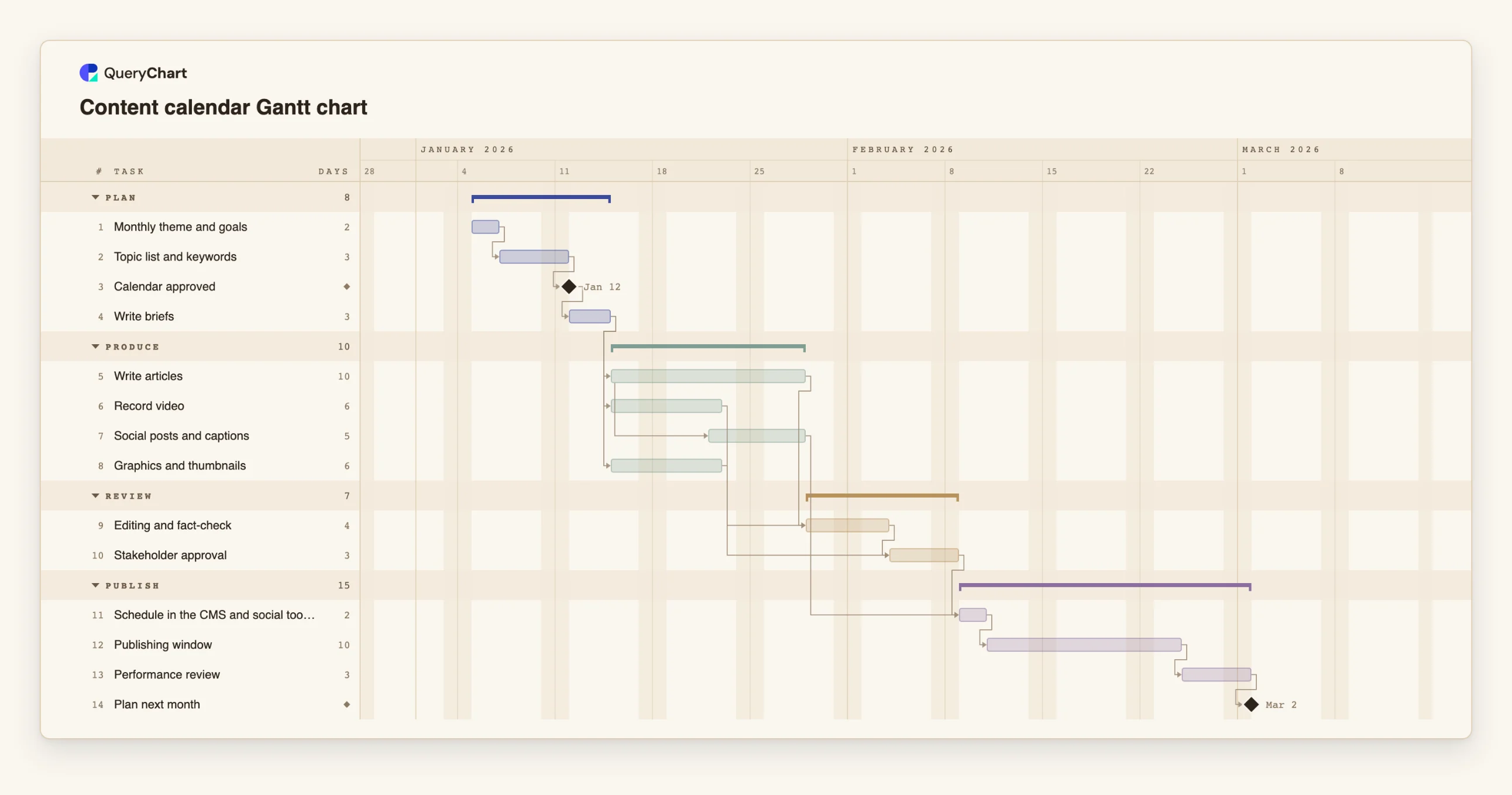
Content calendar Gantt chart template: four-week cycle
An editable content calendar Gantt chart for a monthly content cycle: planning, briefs, writing, design, review, scheduling, publishing and performance review, with dependencies and milestones.
What the content calendar gantt chart template: four-week cycle process is
A content calendar is usually a grid of dates and titles, which is the right tool for seeing what goes out when and the wrong tool for seeing what has to happen before it can. Every piece of content is a small project: a brief, a draft, a review, a visual, a slot in the schedule. When a calendar has thirty such projects in it, the question is not what is published on the fifteenth but whether the work for it can be done by then.
This template plans a four-week cycle in four phases: Plan, Produce, Review and Publish. The calendar is approved before briefs are written. Articles, video and graphics begin once the briefs exist, and social posts start five days into article writing, because captions can be drawn from draft copy. Editing waits for the articles and the video; approval waits for the editing and the graphics. Scheduling is the last step before the publishing window.
It is the same shape as the campaign plan at /templates/marketing-campaign-gantt-chart, but for continuous publishing rather than a single push. Duplicate it each month and change the numbers. If you publish daily, the publishing window is the task to stretch.
The chart plans production. It does not hold the content itself, and it is not a social scheduling tool.
What this flowchart covers
In this template
- Four phases, Plan, Produce, Review and Publish, with 14 tasks and two milestones: "Calendar approved" and "Plan next month".
- A calendar gate: "Calendar approved" follows "Topic list and keywords" and everything in production depends on the briefs that come after it.
- Parallel production: "Write articles", "Record video" and "Graphics and thumbnails" all begin after "Write briefs".
- Social posts drawn from drafts: "Social posts and captions" starts five days into "Write articles".
- A cycle that closes: "Performance review" follows "Publishing window" and leads to "Plan next month".
When to use this template
- You publish regularly and need to see whether production can keep pace with the calendar.
- Approvals hold up publishing and you want them in the plan.
- You manage a content team and need a standard monthly cycle.
- You want to show when briefs, drafts and reviews are due.
The plan, task by task
Every task in the chart with its length in working days and what it waits for. A dependency is a step number; SS is start-to-start, FF is finish-to-finish, and +n is a lag in working days.
| # | Task | Group | Working days | Depends on |
|---|---|---|---|---|
| 1 | Monthly theme and goals | Plan | 2 | |
| 2 | Topic list and keywords | Plan | 3 | 1 |
| 3 | Calendar approved | Plan | Milestone | 2 |
| 4 | Write briefs | Plan | 3 | 3 |
| 5 | Write articles | Produce | 10 | 4 |
| 6 | Record video | Produce | 6 | 4 |
| 7 | Social posts and captions | Produce | 5 | 5SS+5 |
| 8 | Graphics and thumbnails | Produce | 6 | 4 |
| 9 | Editing and fact-check | Review | 4 | 5, 6 |
| 10 | Stakeholder approval | Review | 3 | 8, 9 |
| 11 | Schedule in the CMS and social tools | Publish | 2 | 7, 10 |
| 12 | Publishing window | Publish | 10 | 11 |
| 13 | Performance review | Publish | 3 | 12 |
| 14 | Plan next month | Publish | Milestone | 13 |
How it works
Set the theme and goals first
Keep them as the first task so the topics follow from them.
Approve the calendar before briefing
Keep the approval milestone and link all briefs to it.
Produce formats in parallel
Give each format its own task so that the slowest one is visible.
Overlap social with writing
Start captions partway through drafting with a start-to-start link.
Give approval its true duration
Include the time stakeholders take. It is where content most often waits.
Close the loop
Keep the performance review and link it to the next month's planning.
Frequently asked questions
What is a content calendar Gantt chart?
A Gantt chart of the production steps behind a content calendar: briefs, drafts, review and scheduling, with the dependencies between them.
How is it different from a calendar grid?
A grid shows what is published when. A Gantt chart shows when the work for each piece has to start and what it waits for. Use both.
Can it handle daily publishing?
Yes. Lengthen the publishing window and add tasks for the pieces that need their own production.
Should I make a chart for every piece?
Not usually. Plan the cycle, and make a separate chart only for large pieces.