Gantt chart vs timeline: which one shows your plan?
A timeline shows events in order on a date axis; a Gantt chart shows tasks with durations and dependencies. See what each answers, when each fits, and how to move from one to the other.
A timeline tells people what happens and roughly when. A Gantt chart tells them how long each piece of work takes and what has to finish before the next can start. The right choice depends on which of those questions your audience is asking.
The short version
- A timeline orders events; a Gantt schedules tasks with duration and dependencies.
- Use a timeline to communicate, a Gantt to plan and coordinate work.
- A Gantt can carry timeline-style events as milestones of length zero.
- If items do not depend on each other and have no length, a timeline is enough.
- QueryChart's Gantt dates are calculated from lengths and dependencies; pin a start only where a date is fixed.
Events in order, or work with duration
A timeline is a sequence of events placed on a date axis: a launch, a deadline, a conference, a contract end. Each item is a point or a short label, and the value of the picture is order and spacing. It answers "what happens, and in what order?" Timelines suit history, announcements, roadmaps for a general audience and anything where the items do not depend on each other.
A Gantt chart is built from tasks, not events. Each task has a length, drawn as a bar, and may depend on other tasks, so moving one bar moves the ones behind it. It answers "how long will this take, what waits for what, and when does it finish?" That makes it the better tool as soon as someone has to do the work, because it shows overlap, handoffs and the chain of tasks that sets the end date.
In QueryChart a Gantt is a table of tasks with lengths in working days and a Depends on column; the dates are calculated from those. A milestone is a task of length zero, drawn as a diamond, so you can keep a timeline's key dates inside a Gantt without building two charts. If all you have is a list of dated events with no durations or dependencies, a Gantt adds structure you will not use.
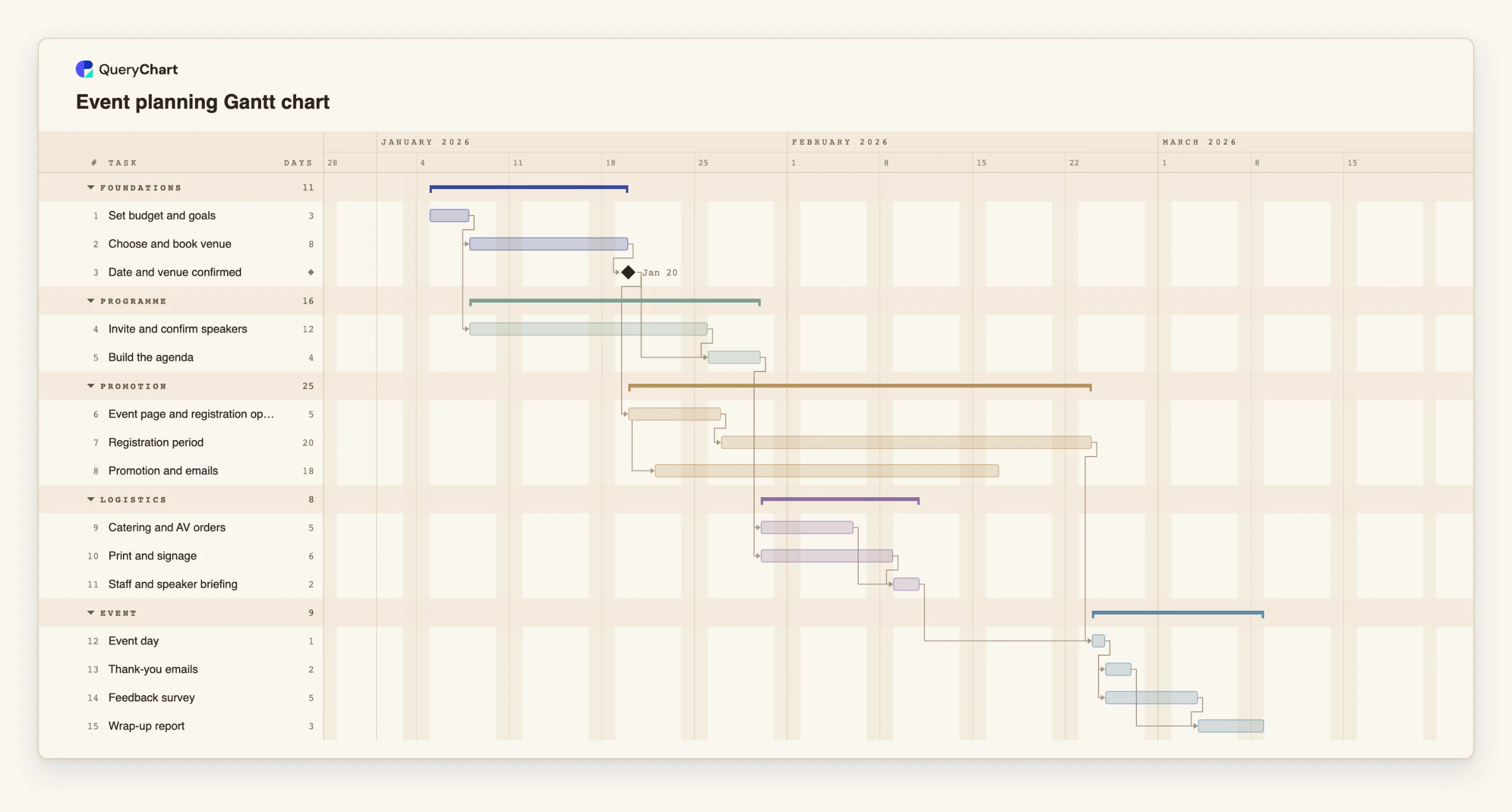
The example below is an event plan. It contains both kinds of item: tasks that take time, and milestones that behave like timeline events.
An event plan with both tasks and key dates
Fifteen rows: work that takes time, plus a milestone that marks a fixed point. Open the spreadsheet panel to see the durations.
Tasks and a milestone
"Set budget and goals" takes 3 working days and "Choose and book venue" takes 8. "Date and venue confirmed" has a length of 0, so it is a milestone: the timeline-style event inside the plan.
Work that overlaps
"Event page and registration open" takes 5 days, and "Promotion and emails" is set to start 2 days after it starts (a start-to-start link). A plain timeline would show two dated items; the Gantt shows that they overlap.
Two long activities running at once
"Registration period" takes 20 working days and "Promotion and emails" 18, while "Catering and AV orders" and "Print and signage" lead into "Staff and speaker briefing". Only a bar view shows how these stack up.
What the event day waits for
"Event day" takes 1 day and waits for both "Registration period" and "Staff and speaker briefing". After it, "Thank-you emails" and "Feedback survey" run side by side before "Wrap-up report".
How it works
List what you have to communicate
Write down the items. If each is a dated event with no length, such as a deadline or a launch, they are timeline items. If each is work that takes days and has an owner, they are tasks.
Pick the view for the audience
Choose a timeline for readers who need the key dates and a Gantt for the people doing the work. If both audiences exist, plan in the Gantt and share the key dates as a short list or an exported image.
Enter tasks with lengths
In the sheet, give each task a length in working days. Leave dates empty; they are calculated. Pin a Start only where the date is genuinely fixed.
Add the events as milestones
Give any event a Duration of 0. It is drawn as a diamond and sits in the right place because of what it depends on.
Link what depends on what
Put the numbers of the tasks a row waits for in Depends on. This is the step that turns a timeline into a schedule.
Share the right output
Share the chart as a link or export a PDF, PNG or SVG. The CSV export lists tasks with ISO dates if you want to redraw the key dates elsewhere.
Mistakes to avoid
Using a Gantt for a list of dates
If nothing has a length and nothing depends on anything, the bars are decoration. Use a simple timeline, or keep the dates as milestones in a short plan.
Using a timeline for work that has dependencies
A timeline cannot show that a slipped task moves three others. Once tasks wait on each other, put them in a Gantt.
Pinning every date
Fixing the start of every task turns the Gantt into a timeline you must move by hand. Pin only the dates that are truly fixed and let the rest calculate.
Try the event plan Gantt
Open the event plan as your own chart, replace the tasks with yours and keep the key dates as milestones.
Related guides
Frequently asked questions
Is a timeline the same as a Gantt chart?
No. A timeline orders events on a date axis. A Gantt chart shows tasks as bars with a length and links between them. A Gantt can contain milestones that look like timeline events.
Can I show a timeline in QueryChart?
Not as a separate chart type. The closest option is a Gantt made mostly of milestones, tasks of length zero drawn as diamonds, which gives you dated events in order.
Which is better for a stakeholder update?
A short timeline of key dates is often easier to read. Keep the working schedule as a Gantt and export the key milestones for the update.
Do Gantt charts show events?
Yes, as milestones. A task with a Duration of 0 is drawn as a diamond and is placed by the tasks it depends on.