Gantt chart vs roadmap, calendar, flowchart, PERT and WBS
One decision guide to the planning views: what a Gantt, roadmap, calendar, flowchart, PERT chart and work breakdown structure each answer, with a comparison table and a simple way to choose.
Most planning confusion is a mismatch between the question and the view. Each view answers one question well. Start from the question and the choice is usually short.
The short version
- Choose the view by the question: sequence, responsibility, hierarchy, time or loose ideas.
- Gantt: tasks over time with dependencies. Flowchart: steps and decisions. Swimlane: who does what.
- Org chart for hierarchy and mind map for ideas without order.
- A Gantt with phases and milestones can stand in for a simple roadmap.
- QueryChart has no PERT or WBS chart; the Gantt's dependencies and Group bands cover part of that need.
Start from the question, not the chart type
A Gantt chart answers "what has to happen over time, how long does each task take and what depends on what?" A roadmap answers "what are we aiming for in broad periods?" A calendar answers "what is on this date?" A flowchart answers "what are the steps and decisions in a process?" A PERT chart is a network of tasks and dependencies without a time scale, and a work breakdown structure (WBS) is a tree that divides a deliverable into smaller parts. They overlap, but their centre of gravity differs.
Use the question to decide. If you need to know the sequence and the decisions in a process, draw a flowchart. If you need to know who does each step, use a swimlane diagram. If you need to show reporting lines, use an org chart. If you need to schedule tasks over time, use a Gantt. If you have loose ideas and no order yet, use a mind map. In QueryChart these are separate chart types, and a Gantt can be duplicated as a flowchart and back: a flowchart's arrows become dependencies.
Two of the views above are not in QueryChart as such. There is no separate roadmap or calendar view, although a Gantt with broad phases and milestones works as a simple roadmap. There is no PERT or WBS chart; the Gantt's dependencies and critical path show the network view of a plan, and Group bands divide work into phases, but there is no outline or indentation hierarchy.
The example is a research project, which draws on several of these views at once. It is a schedule, but its steps also read as a process and its phases as a breakdown.
A research project seen as a schedule
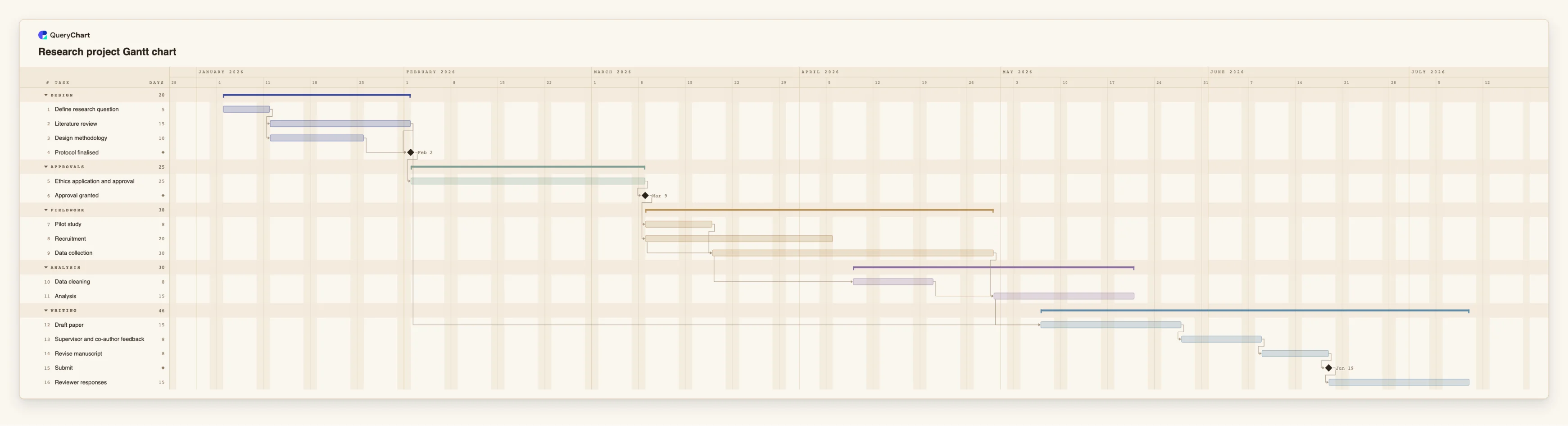
Sixteen tasks from the research question to reviewer responses. The same rows could be read as a process or a breakdown.
Question and design
"Define research question" takes 5 working days. "Literature review" (15 days) and "Design methodology" (10) then run side by side, and "Protocol finalised" is a milestone that waits for both.
Approval as a gate
"Ethics application and approval" takes 25 working days and "Approval granted" is a milestone of length 0. In a flowchart this would be a decision; in the Gantt it is a gate with a duration.
Overlapping fieldwork
"Pilot study" takes 8 days and "Recruitment" 20. "Data collection" (30 days) is set to start 5 days after recruitment starts, and "Data cleaning" starts 15 days into collection. This overlap is what a Gantt shows well.
Writing and review
"Draft paper" takes 15 days and waits for the analysis and the literature review. "Supervisor and co-author feedback" and "Revise manuscript" take 8 days each, then "Submit" and "Reviewer responses".
How it works
Write the question in one sentence
For example: when will it finish, who does what, what are the steps, who reports to whom. The sentence points to the view.
Pick the chart type
Dates and dependencies lead to a Gantt. Steps and decisions lead to a flowchart, and responsibilities to a swimlane diagram. Hierarchy leads to an org chart and loose ideas to a mind map.
Build a first version fast
For a Gantt, type tasks and lengths in the sheet and add dependencies. For other views, start from the closest template.
Check it answers the question
Show it to someone who has not seen it. If they can answer the question from the chart alone, the view is right.
Combine views only where needed
A project often needs a flowchart for the process and a Gantt for its dates. Keep each chart to one question.
Convert when the question changes
A Gantt can be duplicated as a flowchart and back, with arrows becoming dependencies, so a change of question does not mean retyping.
Mistakes to avoid
Asking one chart to answer every question
A chart that tries to show steps, owners and dates at once is hard to read. Draw two charts.
Looking for a view QueryChart does not have
There is no PERT, WBS or Kanban chart. Use the Gantt's dependencies, Group bands and critical path for the closest equivalents.
Choosing by habit
Teams default to the chart they know. Choose by the question instead; it often saves a redraw.
Try the research project Gantt
Open the research project as your own chart and see its rows as a schedule; duplicate it as a flowchart to compare.
Related guides
Frequently asked questions
Is a Gantt chart better than a flowchart?
Neither is better; they answer different questions. A Gantt shows tasks over time. A flowchart shows steps and decisions, and a swimlane diagram adds who does each one.
Can a Gantt chart work as a roadmap?
For a simple one, yes: use broad phases through Group and milestones for key dates. QueryChart has no separate roadmap view.
Does QueryChart have a PERT chart or WBS?
No. Dependencies and the critical path show the network logic of a plan, and Group bands divide work into phases, but there is no network diagram or outline hierarchy.
Can I convert between a Gantt and a flowchart?
Yes. A Gantt can be duplicated as a flowchart and back, and a flowchart's arrows become dependencies.
When should I use a mind map?
At the start, when you have loose ideas and no order. Move to a Gantt or flowchart once you know the tasks.