Milestones in a Gantt chart: what they are and where to put them
What a milestone is in a Gantt chart, how to add one, where to place milestones in a plan and how to use them as gates that mark approvals, decisions and handovers rather than work.
A milestone is a point in the plan, not a stretch of work. It marks a moment that matters, such as an approval or a handover, and gives the tasks around it something clear to aim at.
The short version
- A milestone is a task with Duration 0, drawn as a diamond.
- It can depend on tasks and be depended on, so it works as a gate.
- Place milestones at approvals, decisions and handovers; name them as outcomes.
- Keep them few. A chart full of diamonds shows nothing.
- The chart calculates the date; it does not enforce the approval.
What a milestone is, and what it is for
A milestone is a task with a length of zero. It takes no time and uses no people; it simply happens on a date. In QueryChart you create one by setting Duration to 0, and it is drawn as a diamond instead of a bar. Because it is an ordinary task in every other respect, it can depend on tasks and other tasks can depend on it, and its date is calculated from its predecessors like any other.
That is what makes it useful as a gate. When a milestone depends on several tasks and the next phase depends on the milestone, the milestone shows the single moment at which everything before it must be done. 'Programme approved', 'Design sign-off' and 'Go / no-go' work this way. They turn a long list of tasks into stages that someone can review and that a reader can follow at a glance.
The usual mistake is to use milestones for anything, which fills the chart with diamonds that say nothing. A good milestone has an owner and a yes-or-no test: it is either reached or not. Keep them few, put them where a decision, an approval or a handover changes who is working or what is allowed to start, and name them as outcomes, not as activities. Remember also that the chart cannot enforce a gate. The milestone date is calculated from the plan; whether the approval really happens is up to people.
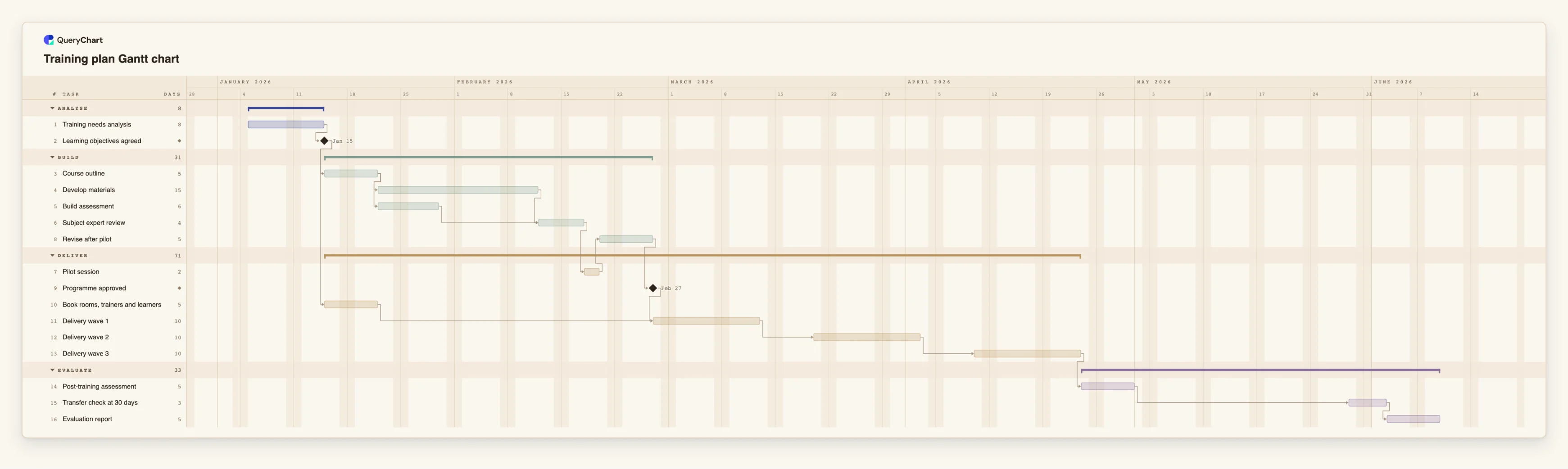
The example below is a training plan with milestones as gates at the points where the work changes character. Open the spreadsheet panel and look for rows with a duration of 0.
A training plan gated by two milestones
Sixteen tasks in four stages. Rows with a duration of 0 are the milestones; open the spreadsheet panel to find them.
A decision gate after the analysis
"Training needs analysis" takes 8 working days. "Learning objectives agreed" has a length of 0, so it is a milestone: the objectives are either agreed or not, and the course design and the logistics both wait for it.
Design work that ends in an approval
"Course outline", "Develop materials", "Build assessment", "Subject expert review", "Pilot session" and "Revise after pilot" run before "Programme approved". That milestone has no duration of its own: it falls the day revisions end and marks the moment delivery may begin.
Logistics in parallel, joined at delivery
"Book rooms, trainers and learners" lasts 5 working days and depends only on "Learning objectives agreed", so it runs alongside the design work. "Delivery wave 1" will wait for both this task and the "Programme approved" milestone.
Waves, then the checks that prove the training worked
Three delivery waves of 10 working days follow "Programme approved", each starting 5 working days after the previous one ends. "Post-training assessment" and "Transfer check at 30 days" follow, the latter after a 20-day lag, before the "Evaluation report".
How it works
Decide what counts as a milestone
List the moments where a decision, approval or handover changes what happens next. Each should be a clear yes or no and have a person who can say which. If you cannot name that person, it is probably a task.
Add the milestone as a task of length zero
Insert a row, name it as an outcome, such as 'Design signed off', and set Duration to 0. The bar becomes a diamond.
Link the work before it to the milestone
In the milestone's Depends on column, list every task that has to be finished for the gate to be passed. The milestone's date will be the latest finish among them.
Link the work after it to the milestone
In the Depends on column of each task the gate releases, enter the milestone's number. Those tasks cannot start before the gate is reached.
Pin a date only for an external milestone
If a milestone has a date you do not control, such as a trade show or a regulatory deadline, set a fixed Start on it. If that date conflicts with a dependency, the conflict is flagged, which is useful to see.
Mistakes to avoid
Naming a milestone after an activity
'Testing' is a task with a length. 'Testing complete and accepted' is a milestone. If the name describes work, give it a duration instead and add a milestone for its outcome.
Using too many milestones
If every task ends in a diamond, the diamonds stop carrying meaning. Aim for a handful across the plan, at the points a sponsor or client would want to review.
Forgetting to link the work after the gate
A milestone that nothing depends on gates nothing. Without the outgoing links, the next phase can start while the approval is still pending, at least on the chart.
Assuming the chart enforces the approval
A milestone's date is calculated from the plan. If the approval slips in real life, update the predecessors or pin the date; the chart will not stop work on its own.
Open the training plan
Open the training plan as your own chart, rename the milestones to suit your programme and link your own tasks to them.
Related guides
Frequently asked questions
How do I add a milestone in QueryChart?
Add a task and set its Duration to 0. It is drawn as a diamond. It can have predecessors and successors like any other task.
Can a milestone have a fixed date?
Yes. Set a fixed Start on it. A fixed date that conflicts with a dependency is flagged, so you can see when the work before it will not be done in time.
Does a milestone have to depend on something?
No, but a milestone that depends on nothing falls on the first day of the plan unless it has a fixed date. Most useful milestones depend on the tasks that lead to them.
Is a milestone part of the critical path?
It can be. If it sits in the longest chain it is lit with the rest when you switch on View, Critical path. See /guides/gantt-chart-critical-path.
How many milestones should a plan have?
As few as give a reviewer clear points to check: usually one at the end of each phase and at each external deadline. A long plan might have a dozen; a short one, three or four.