Gantt chart best practices: granularity, dependencies, buffers and review
Practical Gantt chart best practices: how detailed to make tasks, how to use dependencies and buffers, why to fix dates sparingly, and how often to review the plan so it stays accurate.
A Gantt chart is only as useful as it is believable. These habits keep a schedule short enough to read, honest about what depends on what, and current enough to trust.
The short version
- Size tasks to one owner and a clear finish, roughly a few days to a few weeks.
- Link only real dependencies; let the dates calculate.
- Add buffers as visible tasks or lags, with a name, not by padding every estimate.
- Fix a start date only where something outside the plan fixes it.
- Review on a set rhythm and keep the history, since there is no baseline feature.
What makes a Gantt chart worth reading
Most poor Gantt charts fail in one of two directions. Some are too coarse to act on: five bars for a six-month project, with nothing to say who is doing what this week. Others are too detailed to maintain: three hundred rows that nobody updates after the first fortnight. The practices below aim at the middle, a plan that a small group can read in a few minutes and keep current in a few more.
Think in terms of what you can control. A task should be a unit of work that one person or team can own and say is finished. A dependency should be a real constraint, not a sequence you happen to prefer. A date should be fixed only when something outside the plan fixes it. And a plan should be reviewed on a rhythm, because a schedule that is never compared with reality is a drawing, not a plan.
Know too what the tool will and will not do for you. QueryChart calculates dates from lengths and dependencies in whole working days, Monday to Friday. It does not compare against a baseline, track cost or effort, warn about overloaded people or move tasks to level the load. Good practice is partly doing by hand what a larger suite would automate.
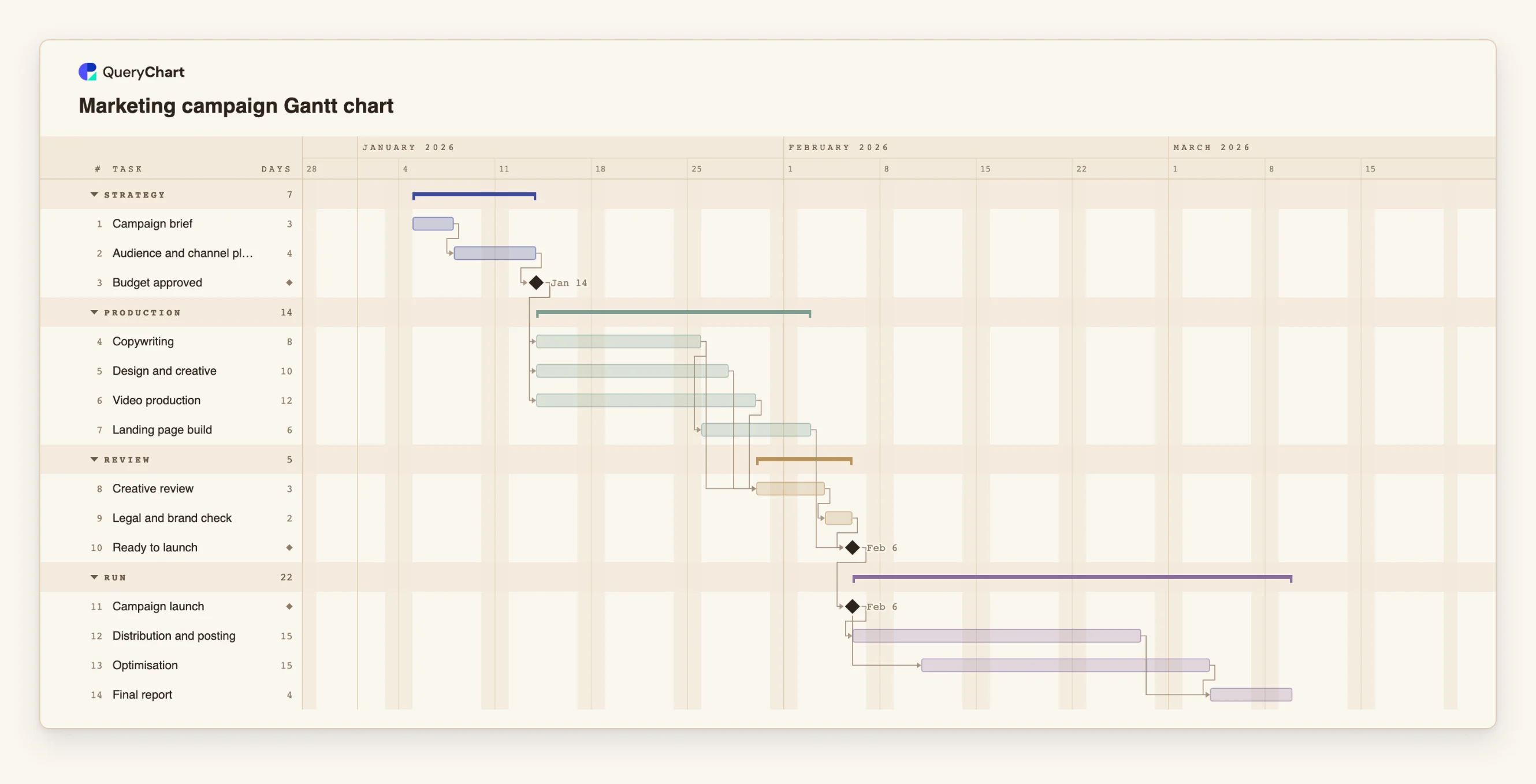
The example is a marketing campaign plan. Its tasks run from 2 to 15 working days and it uses gates, parallel streams and one overlap. Read it as a model of reasonable detail.
A campaign plan at a readable level of detail
Fourteen tasks in four stages. Task lengths range from 2 to 15 working days; open the spreadsheet panel to see them.
Short planning tasks that end in a gate
"Campaign brief" takes 3 working days and "Audience and channel plan" 4. "Budget approved" has a length of 0, so it is a milestone: nothing is produced until it is passed.
Parallel production streams
"Copywriting" (8 days), "Design and creative" (10) and "Video production" (12) all wait only for "Budget approved", so they run side by side. Each is a unit of work with an owner, not a vague 'creative' bar.
Review steps and the launch gate
"Creative review" (3 days) waits for copy, design and video, and "Legal and brand check" (2 days) follows. "Landing page build" also feeds "Ready to launch", a milestone, and "Campaign launch" follows it.
Running the campaign and closing it
"Distribution and posting" runs 15 working days. "Optimisation" starts 3 days after the launch and also runs 15, so the two overlap. "Final report" waits for both. The overlap is a start-to-start link with a lag.
How it works
Choose a level of detail you can maintain
Aim for tasks that one person or team can own and call finished, and that last from a few days to a few weeks. If a task is shorter than a day or two, merge it. If it is longer than a month, split it.
Group the tasks into phases
Use Group to draw tasks in bands with a summary bar. Phases let a reader see the shape of the project before reading any task, and let you hide detail in your head while reviewing.
Add only the dependencies that are real
For each task ask what it genuinely cannot start without. List those predecessors in Depends on. Leave the rest unlinked so the plan shows where work can run in parallel.
Make buffers visible
If you want contingency, add it as a named task before a gate, or as a lag on the link, so everyone can see it. Do not inflate every estimate quietly; padding hidden in each task gets used up task by task.
Fix a date only when the world fixes it
Pin a Start for a launch event, a contract date or a shipment. Leave everything else to be calculated. A fixed date that conflicts with a dependency is flagged, which is its useful job.
Review on a rhythm and record progress
Once a week, update Progress, check the today line against the bars, and fix lengths that were wrong. Use version history and comments to keep a record of changes, since the tool has no baseline to compare against.
Mistakes to avoid
Detail nobody will maintain
A plan of hundreds of rows goes stale in weeks and then misleads. It is better to have thirty accurate tasks than three hundred hopeful ones.
Dependencies by habit
Chaining each task to the one above it makes the plan one long line and hides parallel work. Check each link against the question: what does this really wait for?
Pinning dates everywhere
Every fixed Start freezes that task against the logic of the plan. When a predecessor slips, the pinned task does not move and the chart flags a conflict instead of showing a new date.
Expecting a baseline
QueryChart does not store a planned-versus-actual comparison. If you need to see slippage, note the finish date at each review in a comment or the notes, and use version history.
Open the campaign plan
Open the marketing campaign plan as your own chart, replace its tasks with yours and check each dependency against what the task really waits for.
Related guides
Frequently asked questions
How many tasks should a Gantt chart have?
Enough to show who owns what and where the dependencies are, and no more than you will keep up to date. For a small project that is often fifteen to forty. If you cannot maintain it weekly, it has too many.
How long should a task be?
Long enough to be a meaningful unit of work, typically from a few days to a few weeks. Tasks in QueryChart are whole working days, so half-day tasks cannot be entered.
How do I add a buffer?
Add a task named as a buffer before a milestone, or add a lag to the dependency, with a positive lag of three working days for contingency. Either way it is visible on the chart.
How often should I review the plan?
Weekly for a project that is moving, with progress updated and the today line checked against the bars. Review also whenever something changes a length or a dependency.
Can I see planned versus actual?
No. There is no baseline feature. Use progress inside each bar, the today line, comments and version history to track change. See /guides/gantt-chart-dependencies for keeping the logic clean.