Gantt chart dependencies: FS, SS, FF, SF, lag and lead explained
How dependencies work in a Gantt chart: the four types (finish-to-start, start-to-start, finish-to-finish, start-to-finish), lag and lead, when to use each and the mistakes that distort a schedule.
A dependency says when one task may start or finish in relation to another. Get the type and the lag right and the dates calculate themselves; get them wrong and the schedule looks precise while being false.
The short version
- Finish-to-start is the default; use the other three only when the work really overlaps or must end together.
- Write type and lag in Depends on: 3, 5SS+2, 8FF-1. Lag is positive, lead is negative, both in working days.
- A task with several predecessors starts when the last one allows, so the slowest link sets its date.
- A loop is detected: the closing link is drawn dashed and ignored for scheduling.
- A dependency on a task that does not exist is refused.
What a dependency is, and why the type matters
A dependency links two tasks. The task that comes first is the predecessor, the one that follows is the successor, and the link says which point of the predecessor (its start or its finish) constrains which point of the successor. In a chart where dates are calculated rather than typed, dependencies are the only thing that moves a task in time. A task with no dependency and no fixed start simply begins on the first day of the plan.
There are four types. Finish-to-start (FS) is the default: the successor starts when the predecessor has finished, as in 'paint the wall' after 'fill the cracks'. Start-to-start (SS) lets the successor begin once the predecessor has begun, which is how work that can overlap is shown. Finish-to-finish (FF) makes the successor finish when the predecessor finishes, useful for work that has to wrap up together. Start-to-finish (SF) is the rare one: the successor cannot finish until the predecessor has started, which turns up in handovers, where the old arrangement keeps running until the new one begins.
Any type can carry a lag or a lead. A lag is a positive number of working days added to the link, for example concrete that must cure for three days. A lead is a negative number, which lets the successor begin before the predecessor is done. In QueryChart you write all of this in the Depends on column: a bare number such as 3 is finish-to-start on task 3, 5SS+2 is start-to-start on task 5 with a two-working-day lag, and 8FF-1 is finish-to-finish on task 8 with a one-day lead. Lags and leads count working days, Monday to Friday, not calendar days.
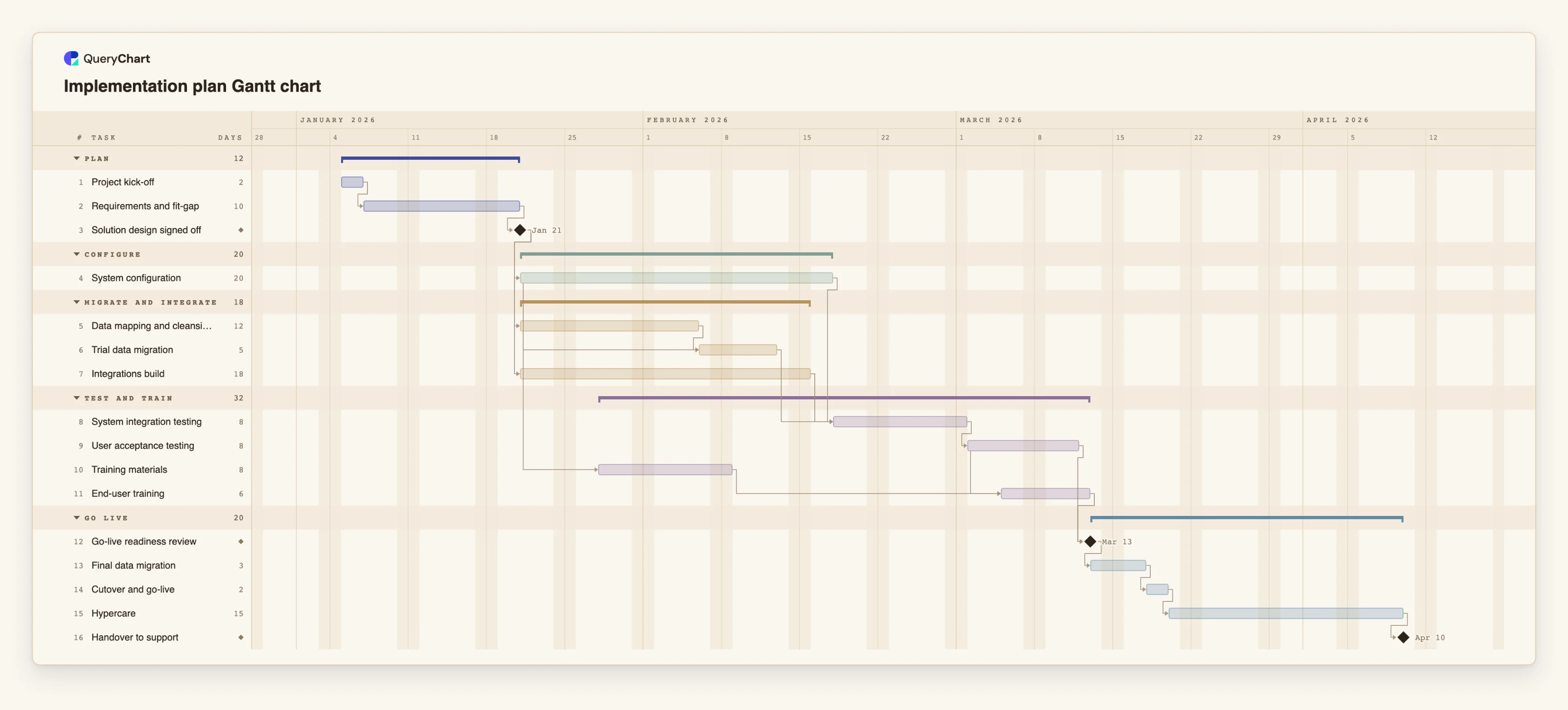
The example below is an implementation plan that uses finish-to-start for most links, start-to-start with a lag where work overlaps, and several tasks that converge on one successor. Open the spreadsheet panel and read the Depends on column against the bars.
An implementation plan with finish-to-start links and overlaps
Sixteen tasks in four stages. Open the spreadsheet panel to read the Depends on column beside the bars.
A plain chain of finish-to-start links
"Project kick-off" takes 2 working days, "Requirements and fit-gap" 10, and each starts when the one before it finishes. "Solution design signed off" has a length of 0, so it is a milestone that falls on the day requirements end.
Start-to-start with a lag
"System configuration" runs 20 working days. "Trial data migration" depends on it with a start-to-start link and a 10-day lag, so migration begins halfway through configuration, and it also waits for "Data mapping and cleansing" to finish.
Several predecessors, one successor
"System integration testing" depends on "System configuration", "Trial data migration" and "Integrations build". It starts only when the last of them finishes, so the slowest of the three decides the date. "User acceptance testing" then follows it.
Overlapping training, then a gate
"Training materials" starts 5 working days after "System configuration" starts, and "End-user training" starts 3 days after "User acceptance testing" starts. Both links are start-to-start with a lag. "Go-live readiness review" is a milestone that waits for UAT and training. This chart uses no finish-to-finish or start-to-finish links.
How it works
List the tasks and give each a length
Enter one task per row and set its Duration in working days. Dependencies attach to tasks, so the tasks need to exist, and a number of lengths changes which link is slowest.
Add finish-to-start links first
In Depends on, type the number of the task that must finish first, for example 3. This is finish-to-start and covers most of a plan. You can also type the task name, or drag from one bar to another on the chart to create the same link.
Change the type only where the work overlaps
If the second task can begin once the first has begun, write 5SS. If two tasks have to end together, write 5FF. If the successor cannot finish before the predecessor starts, write 5SF. Ask each time whether the plain finish-to-start link would be wrong, not just conservative.
Add a lag or a lead for a known gap
Append +2 for two working days of waiting, as in 5SS+2, or -1 for a one-day lead, as in 8FF-1. Use a lag for a real, named gap such as curing, notice periods or a review window.
Read the dates and check the longest chain
Look at which predecessor sets each convergence point. Select a task to light its upstream and downstream chain, or switch on View, Critical path to see the chain that sets the finish date.
Mistakes to avoid
Using start-to-start when you mean finish-to-start
Overlapping tasks shortens the plan on paper. If the second task really needs the first one's output, the overlap is false and the finish date is optimistic. Use start-to-start only where the work can truly begin early.
Hiding waiting time in a lag instead of a task
A lag of 10 days is invisible on the chart as a task, so nobody sees what is being waited for. If the wait has an owner or a name, such as a supplier lead time, make it a task and keep lags for short, mechanical gaps.
Linking everything to everything
Every extra link is a claim that one task constrains another. Link to the real predecessors only. If a task depends on two things, list both, but do not chain a task to its neighbour just because it sits next to it in the list.
Pinning a start date on a task that has predecessors
A fixed start does not move when what it depends on moves, and a fixed start that conflicts with a dependency is flagged. Pin a date only where it is genuinely fixed, such as an event, and let dependencies drive the rest.
Open the implementation plan
Open the implementation plan as your own chart, change a dependency type or a lag in the Depends on column and watch the dates move.
Related guides
Frequently asked questions
Which dependency type should I use by default?
Finish-to-start. It is the default in QueryChart and it is right whenever the second task needs the first to be complete. Switch to start-to-start, finish-to-finish or start-to-finish only when the work genuinely overlaps.
What is the difference between lag and lead?
A lag is a positive number of working days added between the linked points, so the successor waits. A lead is a negative number, so the successor may begin earlier than the plain link allows. Write them as 5SS+2 or 8FF-1.
Do lags count weekends?
No. Working days are Monday to Friday, and a lag or lead is a number of working days. A lag of 5 is one working week.
What happens if I create a loop?
The loop is detected, the link that closes it is drawn dashed, and it is not used for scheduling. A dependency on a task that does not exist is refused.
Can a task depend on a milestone?
Yes. A milestone is a task of length 0, so it can be a predecessor like any other. This is how a sign-off or decision gates the work after it. See /guides/gantt-chart-milestones for where to place them.