Gantt chart data format: columns, dates and durations
The columns a QueryChart Gantt reads, the header names it recognises, the date and duration formats it accepts, and how Depends on is written, with a sample table and what it becomes.
A Gantt chart built from a table is only as good as the table. This guide lists the columns QueryChart reads, the names it accepts for them, and exactly how dates, durations and dependencies are written, so a pasted table arrives the way you meant it.
The short version
- Task is the only column that creates a task; a pasted row with no task name is not added.
- Duration is whole working days (Monday to Friday); 0 is a milestone, and hours are refused.
- Depends on takes task numbers or names with an optional type and lag, such as 3, 5SS+2 or 7FF-1.
- Write dates as 2026-10-20: it reads the same in every language, while 3/4/2026 follows your QueryChart language.
- A cell that cannot be read is refused on its own, with a message; it never becomes a guess.
What the Gantt sheet reads
The Gantt sheet has ten columns: Task, Start, Finish, Duration, Depends on, Progress, Group, People, Notes and Link. Only Task is needed to make a task. Everything else is optional, and the one thing you usually leave empty is Start: with no fixed date, each task starts when what it depends on allows, and the dates are calculated from the lengths and the links.
When you paste a table whose first line names its columns, QueryChart matches each column by name, in any order, and does not write the header line itself. The names are forgiving about case and punctuation, so "Start date", "start-date" and "START DATE" are the same, and "% Complete" is read as "complete". Task is also called Name, Activity, Title or Item. Start is also Begin or From. Finish is also End, Due or To, with or without "date". Duration is also Days or Length. Depends on is also Predecessors, Dependencies or After. Progress is also Complete, Done or Status. Group is also Phase, Section, Lane, Category, Stage or Workstream. People is also Owner, Assigned to, Assignee or Resource. Notes is also Note, Comments or Description, and Link is also URL. The names in your QueryChart language work too.
At least two columns of the first line must be recognised, otherwise the block is treated as plain data and lands in the sheet by position, header and all. A column named twice keeps the first, and a column the sheet does not know is skipped and listed in a message, so nothing is dropped silently. Each cell is checked on its own: a value that cannot be read is refused with a message naming the column and the task number, and the rest of the paste goes in.
The rules below are worth knowing because a date read the wrong way would move a whole plan. The sheet reads a numeric date in the order of your language, so use the year-first form to be safe, and it refuses a value it cannot read at all. The example is the project Gantt chart template, whose Duration and Depends on cells show the formats in use. For the process view of the same job, see the flowcharts at /templates/project-change-request-process and /templates/project-closure-process, and for getting a table in, see /guides/how-to-create-a-gantt-chart-from-excel-or-csv.
One table, read column by column
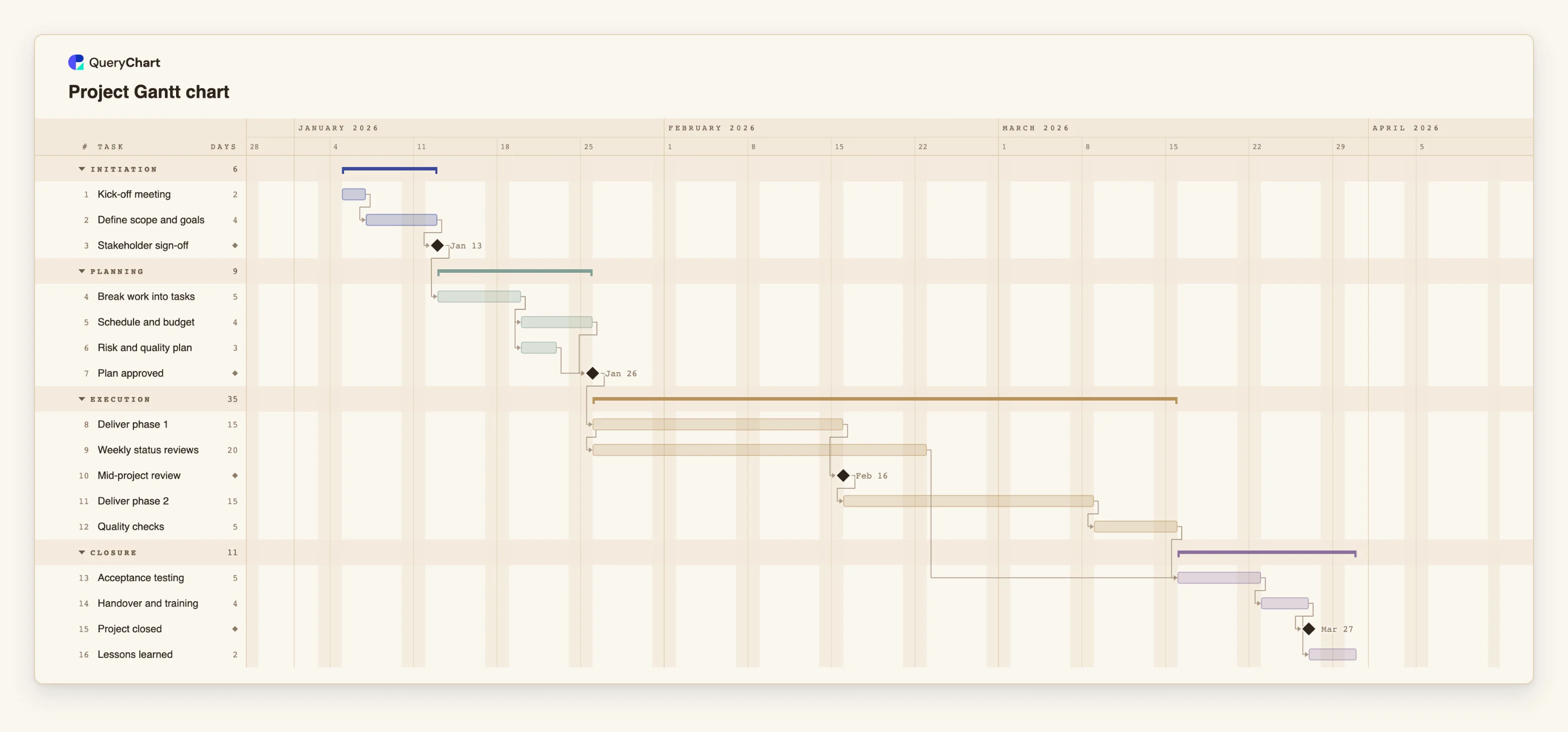
Sixteen tasks in four groups. Durations are illustrative. Open the spreadsheet panel to see the Duration and Depends on cells for each stage.
Task, Duration and the default link
"Kick-off meeting" has Duration 2, "Define scope and goals" has 4, and "Stakeholder sign-off" has 0, which makes it a milestone. Their Depends on cells read 1 and 2, so each task follows the one before. No Start is set, so no date is fixed.
Several predecessors in one cell
"Break work into tasks" depends on 3. "Schedule and budget" (4 days) and "Risk and quality plan" (3) both depend on 4, so they run side by side. The milestone "Plan approved" has Depends on 5, 6 and waits for the longer of the two.
A type and a lag
"Deliver phase 1" lasts 15 days and depends on 7. "Weekly status reviews" lasts 20 days and depends on 8SS, a start-to-start link, so it begins when phase 1 begins. "Mid-project review" is a milestone that depends on 8.
The whole table
"Acceptance testing" has Depends on 9, 12, so it waits for "Weekly status reviews" and "Quality checks" and the later one decides. "Handover and training" lasts 4 days, then "Project closed" (0) and "Lessons learned" (2) both depend on 14.
How it works
Lay out one task per row, with a header line
Put the column names in the first row and one task in every row below it. Use the names above. Do not leave blank rows, merge cells, or put a phase title on a row of its own, because every row with a name becomes a task. Put the phase in the Group column instead.
Write durations in working days
Use a whole number: 5, 5d or 5 days. A week is 1w or 1 week and counts as one working week. 1w 2d is allowed, and 1.5w is rounded to whole days. 0 or the word milestone makes a milestone. Half days, 2.5 and hours such as 8h are refused, so convert them first.
Write dates as year-month-day
2026-10-20 is read the same way whatever the language of your account. Month names also work: 20 Oct 2026, Oct 20, 2026 or 20 October. A weekday in front is ignored. A date without a year takes the year nearest the plan's start, and a two-digit year means 20xx.
Know how numeric dates are read
A date such as 3/4/2026 is read in the order of your QueryChart language: month first in English, day first in Danish, German, Spanish and French. It is not flagged, so the same table can read differently for two people. A year first, as in 2026/4/3, is always year-month-day. Prefer the ISO form.
Write Depends on by number or by name
List the tasks a task waits for, separated by commas: 3, 5. A number is the task's row number in the chart, not its row in the file you copied from. A name must match a whole task name and be unique, and a name that contains a comma cannot be used. Add a type after the task (FS, SS, FF or SF) and a lag in working days: 5SS+2, 7FF-1, 4+1w.
Choose between Start, Finish and Duration
Leave Start empty unless a date is genuinely fixed; a fixed start that conflicts with a dependency is flagged. Finish is the last working day and sets the duration from the task's start, so paste it together with Start or give Duration instead. If a row has both Duration and Finish, Finish wins.
Mistakes to avoid
Pasting Finish without Start
Without a Start, a pasted Finish is measured from where the task falls when the cell is read. Dependencies are applied after the dates, so the task has not yet been pushed back by what it waits for, and the duration comes out too long or too short. Paste Duration instead, or Start and Finish together.
Counting rows in the file, not tasks
Depends on numbers refer to task numbers in the chart. A header row, blank rows or phase rows in your source shift them. If your table has any of these, use task names in Depends on, or check the numbers after pasting.
Trusting a status column
A column named Status is read as progress, but only a number from 0 to 100, with or without %, or the word done. "In progress" and "Not started" are refused. Decimal progress such as 0.5 is refused too, so write 50.
Expecting a date column to hold the plan
The dates in a Gantt are an output of lengths and links. If you paste a Start into every row, every task is pinned and a change in one task moves nothing else. Pin only the dates that are fixed from outside.
Open the project Gantt chart
Open the project template, look at the Duration and Depends on cells, and paste your own table over them.
Related guides
Frequently asked questions
Which columns can I paste into a QueryChart Gantt?
Task, Start, Finish, Duration, Depends on, Progress, Group, People, Notes and Link. Put the names in the first line and QueryChart matches them in any order, as long as at least two are recognised. Columns it does not know are skipped and listed.
Which date formats are accepted?
ISO (2026-10-20), a year first with slashes or dots, numeric dates in the order of your QueryChart language, and month names with a day and optionally a year. Dates with a time, Excel serial numbers, quarters and phrases such as next Friday are refused.
Can I use half days or hours?
No. The Gantt counts whole working days, Monday to Friday, with no holidays. Hours are refused, and a fractional number of days is refused. Round up to the day, or split the work into tasks of whole days.
What happens to a cell that cannot be read?
It is refused on its own and nothing is written for that cell. The rest of the paste goes in, and one message names the column and the task number, for example that Start in row 4 is not a date. Fix the source cell and paste that column again.
Can I get the data back out?
Yes. The Gantt exports to CSV with the task, dates in ISO, duration, dependencies and progress, and to PDF, PNG and SVG. See /guides/how-to-create-a-gantt-chart-from-excel-or-csv for the route in.