How to schedule a hiring plan with interviews and notice periods
Schedule a hire on a Gantt chart: interview rounds that run in parallel, a work sample, a notice period that cannot be shortened, and a start date you can compare with the date the team needs.
A hiring plan has stages you control and waits you do not. This guide shows how to schedule both on a Gantt chart so the start date you promise is one the plan supports.
The short version
- Give the long waits, such as the notice period, their own tasks and lengths.
- Let screening start while applications are open with a start-to-start link and a lag.
- Run interview rounds and a work sample in parallel; the decision waits for the later one.
- Pin a start date only if it is agreed, and read the conflict warning if the plan cannot reach it.
- Durations are working days, Monday to Friday, so convert calendar notice periods before entering them.
Planning the waits, not just the stages
Hiring is easy to list and hard to date. The stages are familiar, but the time between an approved role and a first day is mostly made of waits: the application window, interviewers finding a slot, and a notice period the new employee must serve. If the plan treats those waits as short, or leaves them out, the start date will be wrong before the first application arrives.
The method is to enter each stage with a length in working days, link it to what it waits for, and give the waits their own tasks. Interview rounds and a work sample that can happen at the same time are given the same predecessor, so they run side by side and the decision waits for the later of the two. Screening can start while applications are still coming in, using a start-to-start link with a lag, rather than waiting for the window to close.
Dates are then calculated forward from the start of the plan. If you need a particular first day, compare the finish date with the date you need; do not shorten the notice period on paper. If the candidate has agreed a date, you can pin it. The chart will flag it when the earlier steps cannot reach it and name the earliest date they allow.
The example is the hiring plan Gantt chart template at /templates/hiring-plan-gantt. This guide is about how to schedule it. For the process and who does what at each step, see the flowchart at /templates/recruitment-process.
One hire, from approved role to start date
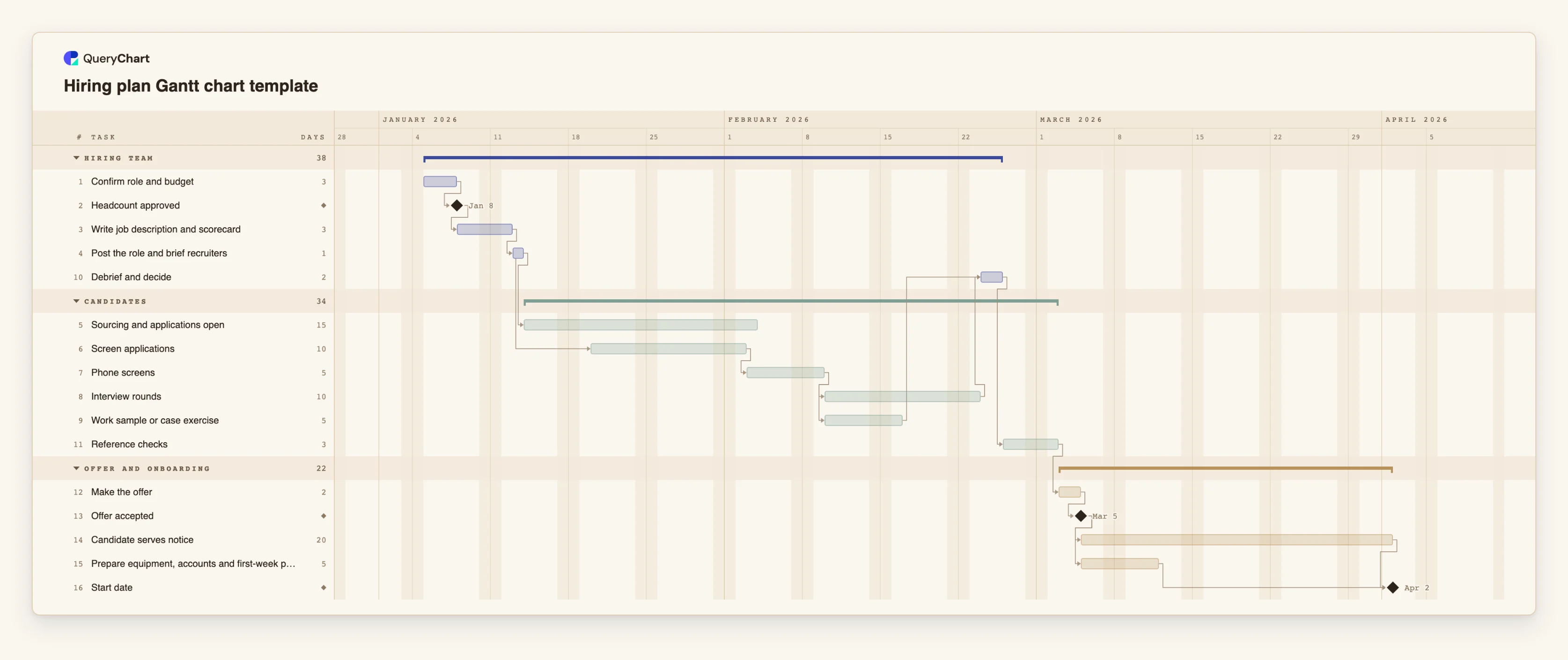
Sixteen tasks in three groups. Durations are illustrative working days. Open the spreadsheet panel to see the rows behind each stage.
Approval and posting
"Confirm role and budget" (3 working days) leads to the milestone "Headcount approved". "Write job description and scorecard" (3) and "Post the role and brief recruiters" (1) follow it in turn. Nothing can be posted before the approval.
Screening starts while applications are open
"Sourcing and applications open" runs for 15 days after the posting. "Screen applications" (10) is start-to-start with a lag of 5 working days after "Post the role and brief recruiters", so early applicants are not left waiting. "Phone screens" (5) follow.
Interviews and a work sample in parallel
"Interview rounds" (10) and "Work sample or case exercise" (5) both follow "Phone screens". "Debrief and decide" (2) waits for both, so the interviews, the longer of the two, set when the decision can be made.
Offer, then the wait that cannot be shortened
"Reference checks" (3) lead to "Make the offer" (2) and the milestone "Offer accepted". Nothing after that milestone depends on the hiring team's speed.
Notice period and preparation
"Candidate serves notice" is 20 working days and "Prepare equipment, accounts and first-week plan" is 5. Both start at "Offer accepted", and the milestone "Start date" waits for both. With the critical path on, the notice period is the chain that sets the date.
How it works
Enter the stages in the order they happen
List the tasks from approval to start date, give each a length in working days and link it to the one before. Use milestones of length 0 for events outside the team's control, such as approval and acceptance.
Give each wait its own task
Make the application window and the notice period tasks with lengths. A wait that is only a gap between two tasks cannot be seen or changed.
Convert notice to working days
The calendar is Monday to Friday and has no holidays. A notice of one month is about 20 working days; a longer one needs a larger number. Check the contract and add days for holidays yourself.
Overlap what can overlap
Start screening a few days after posting with a start-to-start link such as 4SS+5, and give interviews and the work sample the same predecessor. Make the decision depend on both.
Check the date and the critical path
Read the finish date of the Start date milestone and compare it with the date the team needs. Turn on the critical path in the View menu to see whether interviewing or the notice period is the limit.
Pin a date only when it is agreed
If the candidate has agreed a start, set it as the fixed Start of the milestone. If the earlier steps cannot reach it, the task is drawn where you put it and the dependency is flagged with the earliest date allowed.
Mistakes to avoid
Counting notice in calendar days
A notice period of 30 days is not 30 working days. Convert it, and remember that the chart has no holiday calendar, so add days for public holidays or leave.
Waiting for the window to close
If screening is linked to the finish of sourcing, the plan adds the whole window to the date. Link it to the start with a lag instead.
Promising a date from the hiring team's own steps
Interviews are the part you control. The date a new hire starts is usually decided later by their notice. Quote the date the chart gives for the Start date milestone, not for the offer.
Putting candidates in the plan
The chart is a schedule for the process. Keep names, CVs and interview notes in your applicant system and use the plan for stages and dates.
Open the hiring plan Gantt chart
Open the hiring plan, set your own notice period and see the start date move.
Related guides
Frequently asked questions
How long does a hiring plan usually take?
It depends on the role, the market and the candidate's notice. The template's durations are illustrative. Replace them with your own typical times; the notice period and the application window are usually the longest.
How do I model a candidate who can start earlier than their notice?
Shorten the notice task to the days agreed, or pin the Start date milestone to the agreed day. A pinned date earlier than the plan allows is drawn where you put it and flagged as a conflict.
How do I plan several hires for the same role?
Copy the tasks for each hire and group them by hire or by stage. If they share the posting and screening, share those tasks and branch after the debrief.
Can the plan send reminders to interviewers?
No. QueryChart does not send reminders from a Gantt chart. You can name the interviewer in People, and share the link so they can see the dates.
What should happen after the start date?
The first weeks are a separate plan. See /templates/employee-onboarding-gantt-chart for the schedule and /templates/employee-onboarding-process for the steps.