Renovation Gantt chart template: design to handover
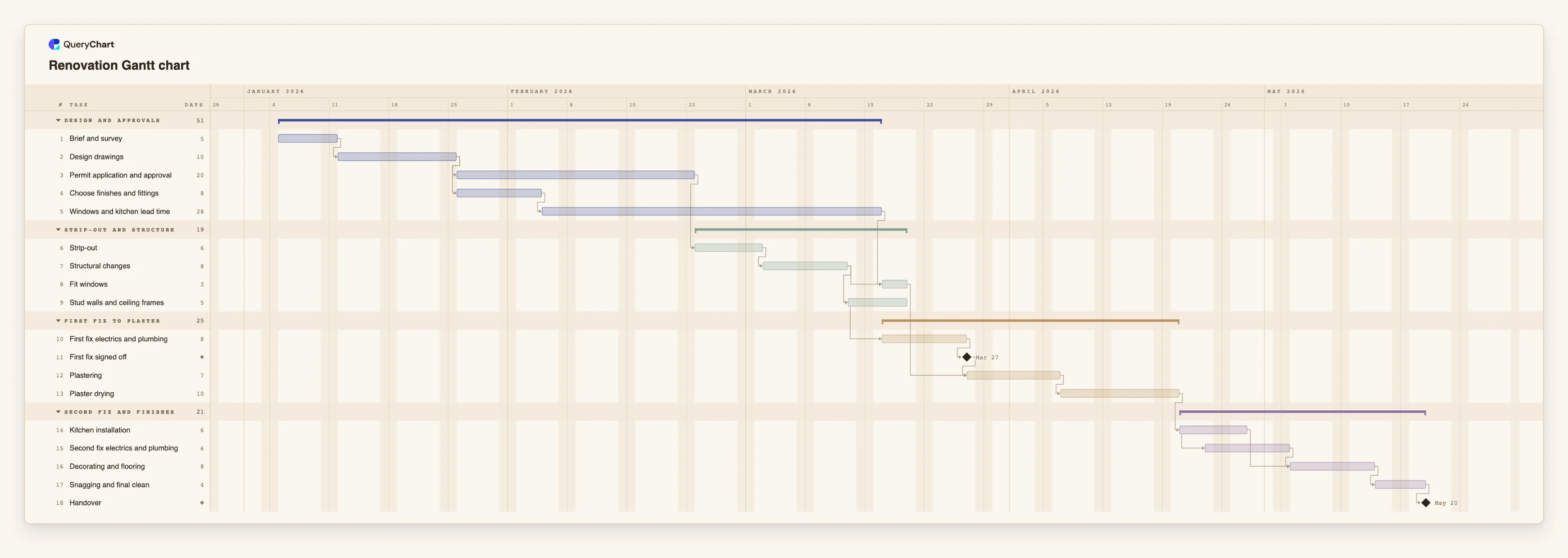
An editable renovation Gantt chart: design, permits, strip-out, structure, first fix, plaster, second fix, finishes and snagging, with trades that overlap and wait on deliveries.
What the renovation gantt chart template: design to handover process is
A renovation is a short sequence of trades with long waits between them. Strip-out has to come before structure, structure before first fix, first fix before plaster, and plaster has to dry before the kitchen goes in. Within that order some work overlaps, and some of the longest waits have nothing to do with the builder: a permit, a window order, a kitchen with a lead time. A list of rooms and jobs hides this. A timeline lays out what waits for what.
This template has four phases: Design and approvals, Strip-out and structure, First fix to plaster, and Second fix and finishes. "Brief and survey" is the only starting task. "Permit application and approval" (20 working days) and "Choose finishes and fittings" (8) both follow "Design drawings". "Windows and kitchen lead time" is 28 working days and follows the choice of finishes: it covers ordering and waiting, and is not work on site.
On site, "Strip-out" waits for the permit, then "Structural changes". "Fit windows" waits for the structural work and for the lead time, and "Stud walls and ceiling frames" follows the structure. "First fix electrics and plumbing" starts two working days after the framing starts, and the "First fix signed off" milestone follows it. "Plastering" waits for that sign-off and for the windows, then "Plaster drying" (10 working days) has to pass before "Kitchen installation".
"Second fix electrics and plumbing" starts three working days after the kitchen installation starts. "Decorating and flooring" waits for both, then "Snagging and final clean" and the "Handover" milestone. With the illustrative durations the delivery path is longer than the permit path, so switch on the critical path to see which one sets the date. Typical failure points are ordering the kitchen after the plan is approved, plastering before the windows are in, and treating the drying time as slack. All durations are illustrative.
A timeline schedules trades. It does not replace the permit, building inspections or your contractor's own programme, and it does not say who is responsible for what on site. For a larger new-build programme, see the construction template at /templates/construction-gantt-chart. For the risks and changes that hit a renovation, see /templates/project-risk-management-process and /templates/project-change-request-process.
What this flowchart covers
In this template
- Four phases, Design and approvals, Strip-out and structure, First fix to plaster and Second fix and finishes, with 18 tasks and two milestones: "First fix signed off" and "Handover".
- Two waits outside the builder's control: "Permit application and approval" (20 working days) and "Windows and kitchen lead time" (28).
- A start-to-start overlap in the structure: "First fix electrics and plumbing" starts two working days after "Stud walls and ceiling frames" starts.
- A join before plaster: "Plastering" waits for "First fix signed off" and for "Fit windows", and "Fit windows" waits for the structure and the delivery.
- A drying period planned as a task, "Plaster drying" (10 working days), then "Kitchen installation" with "Second fix electrics and plumbing" starting three days after it starts.
When to use this template
- You are planning a home, flat or small building renovation and want the order of trades and the waits in one view.
- You need to show a client or contractor why the finish date moves when a delivery or a permit is late.
- You are deciding when to order windows and a kitchen so that they arrive when the site is ready.
- You want to compare the finish date with the date you need to move back in, and see which task changes it.
The plan, task by task
Every task in the chart with its length in working days and what it waits for. A dependency is a step number; SS is start-to-start, FF is finish-to-finish, and +n is a lag in working days.
| # | Task | Group | Working days | Depends on |
|---|---|---|---|---|
| 1 | Brief and survey | Design and approvals | 5 | |
| 2 | Design drawings | Design and approvals | 10 | 1 |
| 3 | Permit application and approval | Design and approvals | 20 | 2 |
| 4 | Choose finishes and fittings | Design and approvals | 8 | 2 |
| 5 | Windows and kitchen lead time | Design and approvals | 28 | 4 |
| 6 | Strip-out | Strip-out and structure | 6 | 3 |
| 7 | Structural changes | Strip-out and structure | 8 | 6 |
| 8 | Fit windows | Strip-out and structure | 3 | 5, 7 |
| 9 | Stud walls and ceiling frames | Strip-out and structure | 5 | 7 |
| 10 | First fix electrics and plumbing | First fix to plaster | 8 | 9SS+2 |
| 11 | First fix signed off | First fix to plaster | Milestone | 10 |
| 12 | Plastering | First fix to plaster | 7 | 8, 11 |
| 13 | Plaster drying | First fix to plaster | 10 | 12 |
| 14 | Kitchen installation | Second fix and finishes | 6 | 13 |
| 15 | Second fix electrics and plumbing | Second fix and finishes | 6 | 14SS+3 |
| 16 | Decorating and flooring | Second fix and finishes | 8 | 14, 15 |
| 17 | Snagging and final clean | Second fix and finishes | 4 | 16 |
| 18 | Handover | Second fix and finishes | Milestone | 17 |
How it works
Put in the order that cannot change
Keep strip-out, structure, first fix, plaster, second fix and decorating as a chain. Change only the durations at first.
Add the waits as tasks
Replace the 20 days of the permit and the 28 days of "Windows and kitchen lead time" with the quoted times, and keep "Plaster drying" as its own task.
Mark where trades overlap
Use start-to-start with a lag, for example 10SS+2, where one trade can start soon after another starts. Do not overlap trades that need the same space at the same time.
Add a sign-off before the next trade
Keep "First fix signed off" as a milestone and make plastering depend on it. Add a similar milestone before decorating if an inspection is needed.
Group by phase and add the people
Use the four phases as groups, put the contractor or trade in People, and write measurements, product codes and deposit dates in the task notes.
Share, export and update progress
Share the chart with the client and trades, record progress as the work happens, and export a PDF to keep with the contract.
Frequently asked questions
Can I use this for a single-room renovation?
Yes. Delete the tasks you do not need, for example "Structural changes" or "Fit windows", and shorten the durations. Keep the waits for deliveries and drying, because they are often the longest part.
How do I show that a trade is working on one room while another starts?
Use a start-to-start link with a lag, or split the work into room-by-room tasks. The chart does not level work between people, so check that the same crew is not planned in two places.
Does the chart track cost?
No. It plans time. Keep quotes and costs in your own budget, and use the task notes for references.
Does this replace a contractor's programme?
No. It is a planning view you can edit and share. The contractor's programme, the permit conditions and any required inspections still apply.