How to plan a home or building renovation on a Gantt chart
Plan a renovation on a Gantt chart: put permits, deliveries and drying time in as waits, sequence the trades, add sign-offs, and see which delay decides the handover date.
A renovation runs late when the trades turn up before the thing they need has arrived. This guide shows how to lay a renovation out so that deliveries, permits and drying time are on the plan, not in someone's head.
The short version
- Enter the trades as a fixed chain first, then add the waits.
- Plan permits, deliveries and drying as tasks with their own length.
- Start ordering from the choice of finishes, not from the day the site opens.
- Use start-to-start links for trades that overlap, and milestones for sign-offs.
- A schedule does not replace permits, inspections or the contractor's programme.
Sequence the trades, then the waits
Renovation schedules are usually kept as a list of jobs by room. That is a good way to track what has been done and a poor way to plan, because the order of the work is set by the building, not the room. Strip-out comes before structure, structure before first fix, first fix before plaster. The list does not say that plastering cannot start until the windows are in, or that the kitchen cannot go in until the plaster has dried.
The method here is to enter the trades as a chain first, with realistic lengths, and then add what you wait for: the permit, the window and kitchen order, the drying. These waits are tasks with a length in working days, not effort. They are often the longest part of the plan, and they start early, since a kitchen cannot be ordered before the finishes are chosen. Once they are in, the finish date is calculated and you can see whether it is the builder or the deliveries that set it.
Overlaps need the same care. A plumber can often start soon after the framing starts, but not before it. Use a start-to-start link with a lag for that, not a date typed in. See /guides/gantt-chart-dependencies for the link types and /guides/gantt-chart-milestones for sign-offs. For a larger build, /guides/construction-schedule-gantt-chart covers the programme at building scale.
The plan schedules work. It does not replace the permit, the inspections your area requires, or your contractor's own programme. The example below builds the renovation template in stages. Durations are illustrative: use the quotes you have been given.
A renovation, built in stages
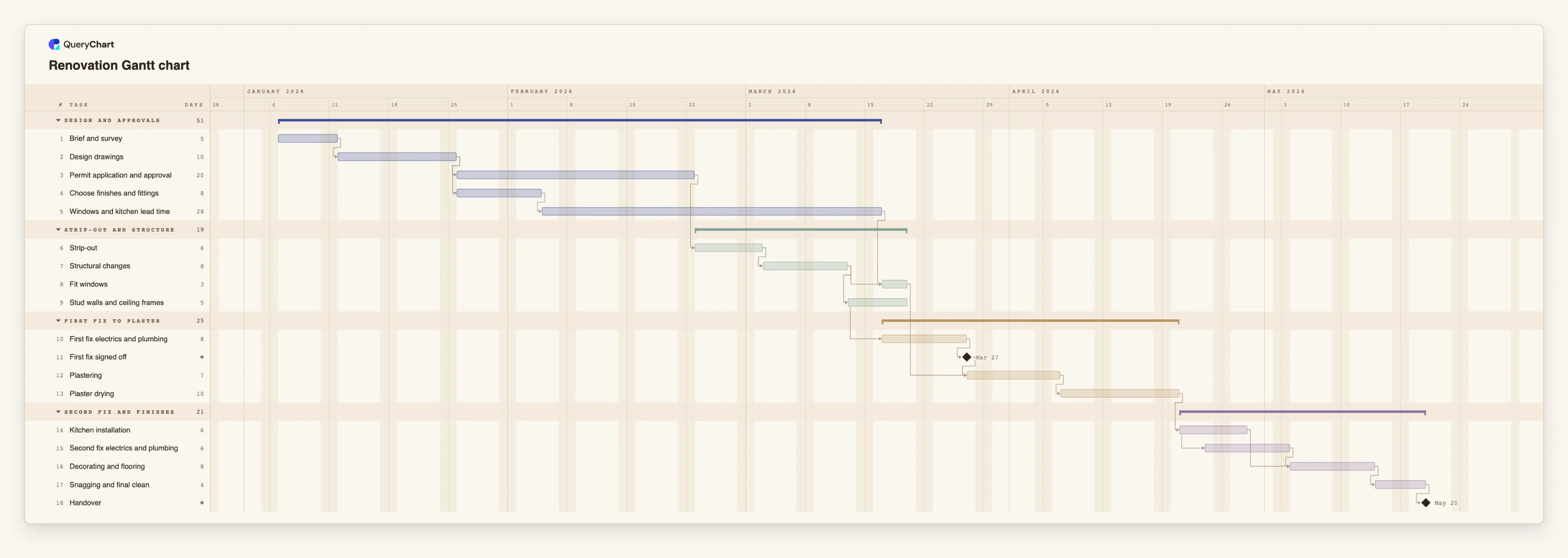
Eighteen tasks in four phases. Durations are illustrative; set your own. Open the spreadsheet panel to see the rows behind each stage.
Design, permit and the order
"Brief and survey" (5 working days) and "Design drawings" (10) come first. "Permit application and approval" (20) and "Choose finishes and fittings" (8) both follow the drawings. "Windows and kitchen lead time" is 28 days and follows the finishes.
Strip-out and structure
"Strip-out" (6) waits for the permit, then "Structural changes" (8). "Fit windows" (3) waits for the structure and for "Windows and kitchen lead time". "Stud walls and ceiling frames" (5) follows the structure.
First fix, plaster and drying
"First fix electrics and plumbing" (8) starts two days after the framing starts. "First fix signed off" is a milestone. "Plastering" (7) waits for it and for "Fit windows"; "Plaster drying" (10) follows.
Kitchen, second fix and handover
"Kitchen installation" (6) follows drying. "Second fix electrics and plumbing" (6) starts three days after it starts. "Decorating and flooring" waits for both, then "Snagging and final clean" (4) and the "Handover" milestone.
How it works
List the trades in the order the building needs
Add strip-out, structure, framing, first fix, plaster, kitchen, second fix, decorating and snagging as tasks, each depending on the one before. Give each a length in working days.
Add what you wait for
Add the permit, and a task for the order lead time of windows and the kitchen. Make the fitting depend on both the work before it and the delivery.
Start the order from the finishes
Link the order to the choice of finishes, not to the start of the site work. Then the deliveries are in the plan from the beginning.
Mark the overlaps and the sign-offs
Use start-to-start with a lag, for example 12SS+2, where a trade can start soon after another begins. Add a milestone for first fix sign-off before plastering.
Add drying and curing as tasks
Give plaster drying, and any similar wait, its own task. Do not hide it in the length of the next trade.
Check the critical path and share
Switch on the critical path in the View menu, compare the finish date with the date you need to move in, and share the chart with the client and trades.
Mistakes to avoid
Ordering after the site opens
If the kitchen and windows are ordered when work starts, the lead time lands in the middle of the build. Order them from the choice of finishes.
Treating drying as slack
A wait that nobody can speed up looks like spare time on a chart without a task for it. Keep drying and curing as tasks so the next trade cannot start early.
Overlapping trades in the same space
A start-to-start link says when a trade can start, not whether there is room for it. QueryChart does not check crews or space, so look at overlapping tasks yourself.
Treating the plan as the contractor's programme
Your plan is a view you can edit and share. The permit conditions, required inspections and the contract still apply, so keep them referenced in the task notes.
Open the renovation Gantt chart
Open the renovation template, enter your quotes and lead times and see which delivery sets the handover date.
Related guides
Frequently asked questions
Can I plan for a move-in date?
QueryChart schedules forwards, so compare the finish date with the date you need. A fixed Start on a task shows the earliest allowed date if a dependency conflicts.
Does it show the budget?
No. It plans time only. Keep costs and quotes in your own budget and put references in the task notes.
Can I split the work by room?
Yes. Use rooms as groups, or add room names to the task names. The chart does not level work between crews, so check that two rooms are not planned for the same people at the same time.
Is there a template for a larger build?
Yes. /templates/construction-gantt-chart covers design to handover for a building project, and /guides/construction-schedule-gantt-chart explains it.