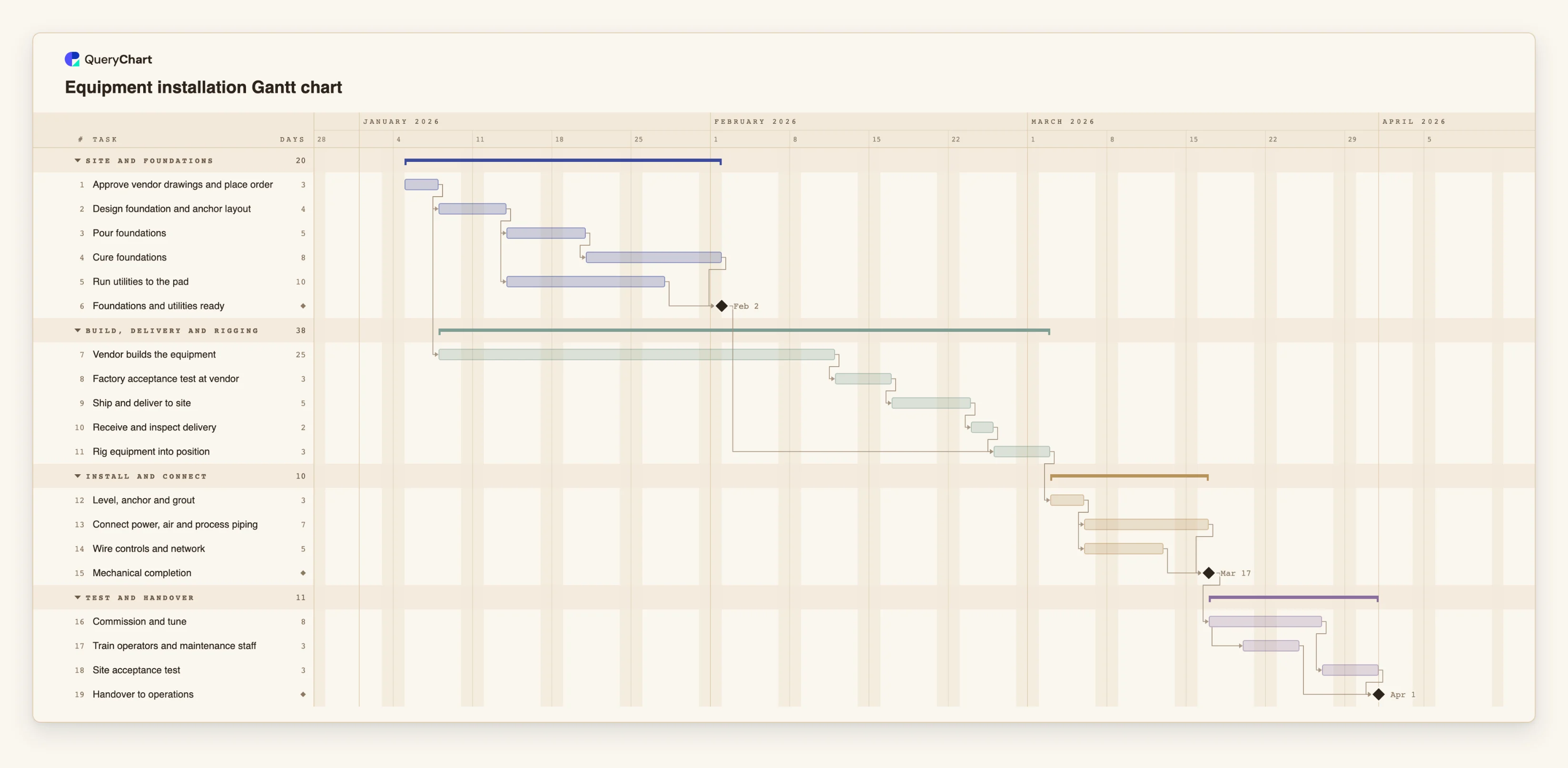
Equipment installation Gantt chart template with FAT and SAT
An editable equipment installation Gantt chart: foundations and utilities, vendor build and FAT, delivery and rigging, install and connect, commissioning, site acceptance test and handover, with dependencies.
What the equipment installation gantt chart template with FAT and SAT process is
Installing a large machine is two schedules that meet on one day. At the vendor, the equipment is built and tested. At your site, the foundations are poured and cured and the utilities are run to the pad. The day the machine is ready to be lifted into place is set by whichever finishes later, and the usual surprise is that the long wait, the vendor's build, is not on your site. Plans that show only the site work look short, then stall.
This template has four phases: Site and foundations, Build, delivery and rigging, Install and connect, and Test and handover. It has 19 tasks and three milestones. "Approve vendor drawings and place order" is the only starting task. "Design foundation and anchor layout" follows it, then "Pour foundations" (5 working days) and "Cure foundations" (8) in sequence, while "Run utilities to the pad" (10) runs beside them. The "Foundations and utilities ready" milestone waits for both.
In parallel, "Vendor builds the equipment" (25 working days) starts as soon as the order is placed, and "Factory acceptance test at vendor" (3) and "Ship and deliver to site" (5) follow it. With these illustrative lengths the site is ready on working day 20, while the delivery is inspected on day 38. That is 18 working days of slack on the site work, and the build is what sets the date. Shorten the build and the foundations become the limit; the chart shows where that switch happens. "Rig equipment into position" waits for both the delivery inspection and the ready milestone.
After rigging, "Level, anchor and grout" (3) is followed by two streams, "Connect power, air and process piping" (7) and "Wire controls and network" (5), which meet at the "Mechanical completion" milestone. "Commission and tune" (8) comes next. "Train operators and maintenance staff" starts 3 working days into commissioning, so the people learn on a machine that is running. "Site acceptance test" follows commissioning, and "Handover to operations" waits for the test and the training. All durations are illustrative. Concrete cure time, vendor lead time and commissioning length vary a lot with the equipment, so set your own.
A timeline schedules the work. It does not make an installation safe, correct or accepted: that depends on the method statements, the permits, the tests and the sign-offs your site and your contract require. For the process logic, see the equipment commissioning process at /templates/equipment-commissioning-process, the equipment qualification process at /templates/equipment-qualification-process and the instrument installation SOP at /templates/instrument-installation-and-commissioning-sop. For a wider site schedule, see /templates/construction-gantt-chart.
What this flowchart covers
In this template
- Four phases, Site and foundations, Build, delivery and rigging, Install and connect, and Test and handover, with 19 tasks and three milestones: "Foundations and utilities ready", "Mechanical completion" and "Handover to operations".
- Two schedules that meet: "Pour foundations", "Cure foundations" and "Run utilities to the pad" on site, "Vendor builds the equipment" at the vendor, and "Rig equipment into position" waiting for both.
- The delivery wait in the plan: "Factory acceptance test at vendor" and "Ship and deliver to site" follow the 25-day build, then "Receive and inspect delivery".
- Two install streams that join at "Mechanical completion": "Connect power, air and process piping" and "Wire controls and network", both after "Level, anchor and grout".
- Commissioning with overlap: "Train operators and maintenance staff" starts 3 working days into "Commission and tune", then "Site acceptance test" and "Handover to operations".
When to use this template
- You are planning the install of a production line, press, furnace, compressor, lab instrument or other large equipment with foundations and utilities.
- You want to see whether the vendor's lead time or your site work sets the rigging date.
- A project manager, plant engineer or supplier asks when the equipment is expected to run and what it is waiting for.
- You want to compare plans, for example a shorter cure, a second crew for the install or an earlier training date.
The plan, task by task
Every task in the chart with its length in working days and what it waits for. A dependency is a step number; SS is start-to-start, FF is finish-to-finish, and +n is a lag in working days.
| # | Task | Group | Working days | Depends on |
|---|---|---|---|---|
| 1 | Approve vendor drawings and place order | Site and foundations | 3 | |
| 2 | Design foundation and anchor layout | Site and foundations | 4 | 1 |
| 3 | Pour foundations | Site and foundations | 5 | 2 |
| 4 | Cure foundations | Site and foundations | 8 | 3 |
| 5 | Run utilities to the pad | Site and foundations | 10 | 2 |
| 6 | Foundations and utilities ready | Site and foundations | Milestone | 4, 5 |
| 7 | Vendor builds the equipment | Build, delivery and rigging | 25 | 1 |
| 8 | Factory acceptance test at vendor | Build, delivery and rigging | 3 | 7 |
| 9 | Ship and deliver to site | Build, delivery and rigging | 5 | 8 |
| 10 | Receive and inspect delivery | Build, delivery and rigging | 2 | 9 |
| 11 | Rig equipment into position | Build, delivery and rigging | 3 | 6, 10 |
| 12 | Level, anchor and grout | Install and connect | 3 | 11 |
| 13 | Connect power, air and process piping | Install and connect | 7 | 12 |
| 14 | Wire controls and network | Install and connect | 5 | 12 |
| 15 | Mechanical completion | Install and connect | Milestone | 13, 14 |
| 16 | Commission and tune | Test and handover | 8 | 15 |
| 17 | Train operators and maintenance staff | Test and handover | 3 | 16SS+3 |
| 18 | Site acceptance test | Test and handover | 3 | 16 |
| 19 | Handover to operations | Test and handover | Milestone | 17, 18 |
How it works
Plan the vendor and the site as two streams
Keep "Vendor builds the equipment" as a long task in its own band, and the foundations and utilities as separate tasks on site. Set the lengths from the vendor's quote and your contractor's programme.
Respect the cure
"Cure foundations" is a waiting period, not work. Set its length from the concrete specification and keep it between "Pour foundations" and "Foundations and utilities ready".
Add the vendor's acceptance test as a task
"Factory acceptance test at vendor" sits before shipping. If you will send people to witness it, add them in People and make the shipping depend on the test.
Join the install streams
Link both "Connect power, air and process piping" and "Wire controls and network" to "Mechanical completion", so the milestone moves with the slower one.
Overlap training and commissioning
Keep "Train operators and maintenance staff" start-to-start with "Commission and tune" with a lag. Change the lag to the point at which the machine is stable enough to teach on.
Check the critical path and share
Turn on the critical path in the View menu to see whether the build or the site work sets the handover date. Share the chart with the contractor and the vendor and export a PDF for the project file.
Frequently asked questions
What is the difference between FAT and SAT?
A factory acceptance test is run at the vendor's site before shipping, a site acceptance test is run on your site after installation and commissioning. Both are usually defined in the contract. The chart schedules them; it does not define the test or decide whether it passes.
Does the chart make the installation compliant or safe?
No. A timeline schedules the work. Safety, permits, isolation procedures and sign-offs come from your site rules, your contract and the competent people involved, and should be recorded in your own systems.
Can I use fixed dates for the delivery?
Yes. Give "Ship and deliver to site" a fixed Start if the vendor has confirmed a date. If the dates before it can only finish later, the chart flags the conflict, which shows early that the date cannot be met.
What about installing several machines?
Duplicate the phases for each machine, or group the tasks by machine, and link shared tasks such as the utilities run and the training.