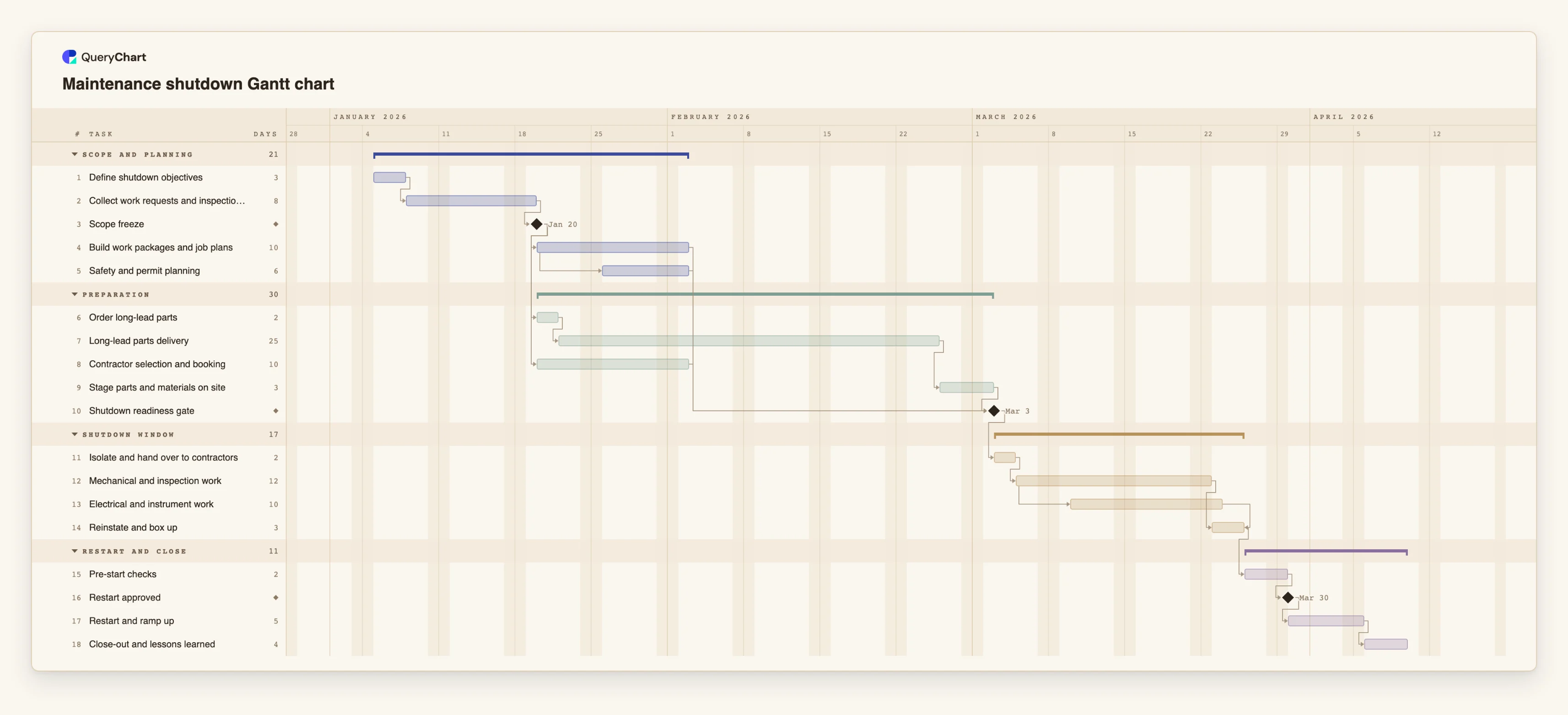
Maintenance shutdown Gantt chart template: freeze to restart
An editable maintenance shutdown Gantt chart: scope freeze, long-lead parts, contractors, a readiness gate, the shutdown window and restart, with dependencies, overlaps and milestones.
What the maintenance shutdown gantt chart template: freeze to restart process is
A planned shutdown is decided long before it starts. Once the scope is fixed, the date of the shutdown window is mostly set by the slowest thing that has to be ready: a part with a long lead time, a contractor who has to be booked, a permit plan that has to be written. A list of jobs with a start date for the outage does not show which of these is the one holding the date. A timeline does, because each task waits for what it depends on and the dates are calculated.
This template has four phases: Scope and planning, Preparation, Shutdown window, and Restart and close. "Define shutdown objectives" is the only starting task. "Collect work requests and inspections" follows it, and the "Scope freeze" milestone follows that. Three things start from the freeze: "Build work packages and job plans" (10 working days), "Order long-lead parts" and "Contractor selection and booking" (10). "Safety and permit planning" starts four working days after the packages start, because the permit plan can begin once the first packages exist.
"Long-lead parts delivery" is 25 working days and is waiting time, not effort. Once it ends, "Stage parts and materials on site" takes 3 more. The "Shutdown readiness gate" milestone waits for the packages, the safety and permit planning, the contractors and the staged parts, so it is set by whichever finishes last. With the illustrative durations the parts path is the longest, which is the point: switch on the critical path and shorten the packages, and the gate date does not move.
In the window, "Isolate and hand over to contractors" comes first. "Mechanical and inspection work" (12 working days) follows it. "Electrical and instrument work" (10) starts three working days after the mechanical work starts, and "Reinstate and box up" finishes together with it. Then "Pre-start checks", the "Restart approved" milestone, "Restart and ramp up" and "Close-out and lessons learned". Plans of this kind go wrong when the scope is reopened after the freeze, when parts are ordered on the day the work is approved, and when the restart is given the time that is left over. All durations are illustrative.
A timeline schedules the work. It does not make the work safe, replace isolation and permit-to-work procedures, or show that anyone is competent to do a job. Those belong in your safety management system and on the permits themselves. For the process behind the plan, see the shutdown process at /templates/maintenance-shutdown-process and the turnaround SOP at /templates/turnaround-shutdown-service-sop.
What this flowchart covers
In this template
- Four phases, Scope and planning, Preparation, Shutdown window and Restart and close, with 18 tasks and three milestones: "Scope freeze", "Shutdown readiness gate" and "Restart approved".
- A freeze that drives the plan: "Build work packages and job plans", "Order long-lead parts" and "Contractor selection and booking" all follow "Scope freeze".
- A waiting period shown as a task: "Long-lead parts delivery" (25 working days), then "Stage parts and materials on site" (3).
- A start-to-start overlap in planning: "Safety and permit planning" starts four working days after "Build work packages and job plans" starts.
- A parallel shutdown window: "Electrical and instrument work" starts three working days after "Mechanical and inspection work", and "Reinstate and box up" finishes with it, followed by "Pre-start checks" and "Restart approved".
When to use this template
- You are planning a turnaround, outage or annual shutdown and need to see which preparation task decides the start of the window.
- You want to show management or contractors when the scope must be frozen for the shutdown date to hold.
- Long-lead parts, contractor booking and permits all have to be ready on the same day and you need to see which one is late.
- You want to compare the finish date with the date production needs the plant back, and see what moves it.
The plan, task by task
Every task in the chart with its length in working days and what it waits for. A dependency is a step number; SS is start-to-start, FF is finish-to-finish, and +n is a lag in working days.
| # | Task | Group | Working days | Depends on |
|---|---|---|---|---|
| 1 | Define shutdown objectives | Scope and planning | 3 | |
| 2 | Collect work requests and inspections | Scope and planning | 8 | 1 |
| 3 | Scope freeze | Scope and planning | Milestone | 2 |
| 4 | Build work packages and job plans | Scope and planning | 10 | 3 |
| 5 | Safety and permit planning | Scope and planning | 6 | 4SS+4 |
| 6 | Order long-lead parts | Preparation | 2 | 3 |
| 7 | Long-lead parts delivery | Preparation | 25 | 6 |
| 8 | Contractor selection and booking | Preparation | 10 | 3 |
| 9 | Stage parts and materials on site | Preparation | 3 | 7 |
| 10 | Shutdown readiness gate | Preparation | Milestone | 4, 5, 8, 9 |
| 11 | Isolate and hand over to contractors | Shutdown window | 2 | 10 |
| 12 | Mechanical and inspection work | Shutdown window | 12 | 11 |
| 13 | Electrical and instrument work | Shutdown window | 10 | 12SS+3 |
| 14 | Reinstate and box up | Shutdown window | 3 | 12, 13FF |
| 15 | Pre-start checks | Restart and close | 2 | 14 |
| 16 | Restart approved | Restart and close | Milestone | 15 |
| 17 | Restart and ramp up | Restart and close | 5 | 16 |
| 18 | Close-out and lessons learned | Restart and close | 4 | 17 |
How it works
Fix the scope and make it a milestone
Keep "Scope freeze" as its own milestone and make the work packages, the parts order and the contractor booking depend on it. Changes after the freeze then become visible changes to the dates.
Enter the real lead time for parts
Replace the 25 working days in "Long-lead parts delivery" with the supplier's quoted time. If several parts are late in different ways, give each its own task.
Set the readiness gate from your criteria
"Shutdown readiness gate" waits for four tasks. Add or remove tasks to match what must be true before isolation starts, and write the criteria in the task notes.
Break the window into the jobs that really overlap
Use start-to-start links, such as 12SS+3, where trades can start once access exists, and finish-to-finish where work must end together before box-up.
Give restart its own time
Keep "Pre-start checks", the approval milestone and "Restart and ramp up" as separate tasks with their own lengths, so squeezing the window does not quietly squeeze the restart.
Add owners, share and export
Put the responsible person in People, share the chart with contractors and planners, and export a PDF for the shutdown pack.
Frequently asked questions
Does a shutdown timeline make the work safe?
No. A timeline schedules work. Safety depends on isolation, permits, competent people and your safety management system, not on the plan having dates.
Can I plan the shutdown to a fixed start date?
Yes. Give "Isolate and hand over to contractors" a fixed Start. QueryChart flags a fixed start that conflicts with a dependency and names the earliest allowed date, which shows whether the preparation can be ready in time.
How do I show a permit or approval that takes time?
Add it as a task with its own length in working days, and make the work that needs it depend on it. Use a milestone of length 0 if the approval is only a decision.
Does the chart handle weekend and 24-hour shutdown work?
No. Durations are whole working days, Monday to Friday, with no calendars for shifts or holidays. For a short window with shift work, plan the hours in your own schedule and use the chart for the surrounding preparation.