How to plan a maintenance shutdown on a Gantt chart
Plan a maintenance shutdown on a Gantt chart: freeze the scope, show long-lead parts and contractors as waits, add a readiness gate, and see which preparation task sets the start of the window.
Most of a shutdown schedule is the preparation, not the shutdown. This guide shows how to put the preparation on a Gantt chart so that you can see which task decides when the window can open.
The short version
- Make the scope freeze a milestone and hang the packages, parts and contractors from it.
- Enter long-lead parts as a task with the supplier's lead time, not as a date.
- Use a readiness gate that waits for every item the window depends on.
- Use start-to-start and finish-to-finish links for trades that overlap in the window.
- A schedule plans the work; it does not make it safe or replace permits and isolation.
Plan the weeks before the window
A shutdown date is usually chosen for production reasons, and the plan is then built to fit. The trouble is that the date is only as good as the slowest preparation task, and in a shutdown that is rarely the work itself. It is the part that takes ten weeks to arrive, the contractor who has to be booked, or the permit plan that nobody started because the scope was still moving. A task list with a start date for the outage does not show which of these is late.
The method here is to plan from the scope freeze forward. Everything that is decided by the scope, the work packages, the parts order, the contractor booking, hangs from one milestone. Each of them has a length and something it waits for. A readiness gate waits for all of them, and the window waits for the gate. With dependencies entered, the earliest date the window can open is calculated, and you can compare it with the date production needs.
Two kinds of task need care. A delivery is waiting time, not effort, and should be a task with the supplier's quoted length. And an overlap, such as electrical work starting once mechanical access exists, should be a start-to-start link with a lag, not two tasks with the same start date typed in. See /guides/gantt-chart-dependencies for the link types and /guides/gantt-chart-critical-path for how to read the chain that sets the date.
A schedule shows when work is meant to happen. It does not make the work safe, and finishing the preparation on time does not replace isolation, permit-to-work or competence checks. The example below builds the maintenance shutdown template in stages. For the process and the roles, see /templates/maintenance-shutdown-process and /templates/turnaround-shutdown-service-sop.
A shutdown plan, built in stages
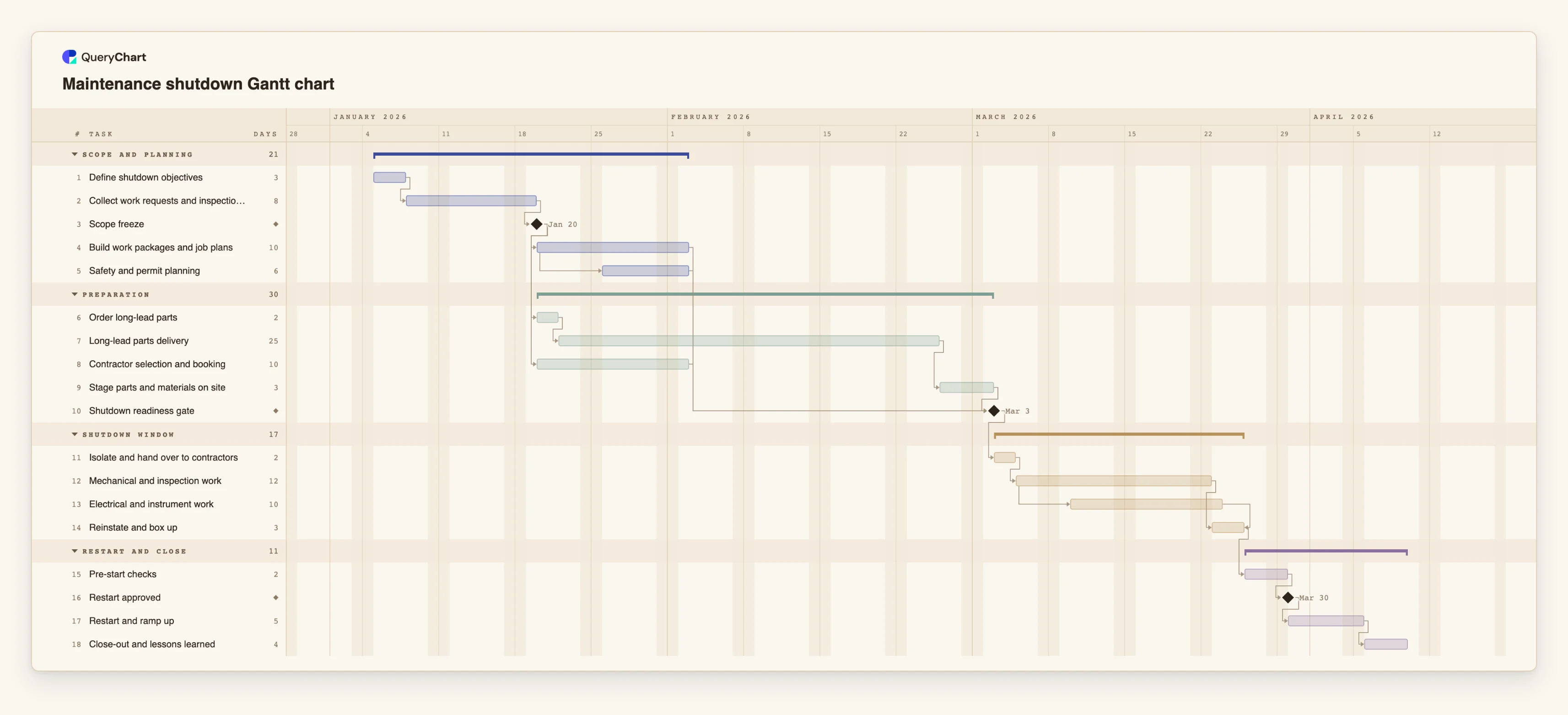
Eighteen tasks in four phases. Durations are illustrative; set your own. Open the spreadsheet panel to see the rows behind each stage.
Scope, then the freeze
"Define shutdown objectives" (3 working days) is followed by "Collect work requests and inspections" (8) and the "Scope freeze" milestone. "Build work packages and job plans" (10) follows the freeze, and "Safety and permit planning" starts four days after it starts.
Parts, contractors and the gate
"Order long-lead parts" and "Contractor selection and booking" both follow "Scope freeze". "Long-lead parts delivery" is 25 working days, then "Stage parts and materials on site" takes 3. "Shutdown readiness gate" waits for four tasks.
The window
"Isolate and hand over to contractors" (2) comes first, then "Mechanical and inspection work" (12). "Electrical and instrument work" (10) starts three days after the mechanical work starts, and "Reinstate and box up" finishes with it.
Restart is its own phase
"Pre-start checks" (2 working days) lead to the "Restart approved" milestone. "Restart and ramp up" takes 5 and "Close-out and lessons learned" 4. Restart has its own length so a short window cannot quietly shorten it.
How it works
Start from the scope freeze
Add the objectives, the collection of work requests and a freeze milestone. Make the work packages, the parts order and the contractor booking depend on the milestone.
Enter each wait as a task
For every part with a long lead time, add a task with the supplier's quoted time in working days. Add the booking time of each contractor in the same way.
Build the readiness gate
Add a milestone that depends on every preparation task the window needs. Use the notes to write the criteria, such as packages approved and parts on site.
Draw the overlaps in the window
Link trades with start-to-start and a lag, for example 12SS+3, and use finish-to-finish where the work must end together before box-up.
Plan the restart explicitly
Add pre-start checks, an approval milestone and a ramp-up task after the window, each with its own length.
Check the critical path and share
Switch on the critical path in the View menu to see what sets the gate date, compare the finish with the date you need, and share the chart with planners and contractors.
Mistakes to avoid
Reopening the scope after the freeze
Work added late changes the packages, the permits and sometimes the parts. If you add a task after the freeze, link it to the freeze and see which dates move before agreeing.
Ordering parts on the day of approval
A part with a long lead time is a task of its own and should start from the freeze. If it starts from a later approval, the window date is already too early.
Giving the restart the leftover time
If the window is fixed and the restart is not planned, the restart is squeezed. Keep the checks, the approval and the ramp-up as separate tasks with real lengths.
Treating the schedule as a safety plan
A dated plan does not make isolation, permits or competence checks happen. Keep those in your procedures and refer to them in the task notes.
Open the shutdown Gantt chart
Open the maintenance shutdown template, enter your lead times and see which task sets the readiness gate.
Related guides
Frequently asked questions
How do I plan around a fixed shutdown date?
QueryChart schedules forwards. Give "Isolate and hand over to contractors" a fixed Start and the chart names the earliest allowed date if the preparation cannot be ready by then. Alternatively compare the finish date with the date you need.
Can I plan the hours of a short outage?
No. Durations are whole working days, Monday to Friday. For a window measured in hours or shifts, keep the shift plan in your own schedule and use the chart for the preparation and the restart.
Can I paste a work list from a spreadsheet?
Yes. Copy the rows, with a first line naming columns such as Task, Duration and Depends on, and paste them into the sheet. There is no file upload for Gantt charts.
Where is the process behind the schedule?
In the flowchart templates. /templates/maintenance-shutdown-process shows the steps and decisions, and /templates/turnaround-shutdown-service-sop covers the procedure.