Order fulfillment process flowchart template
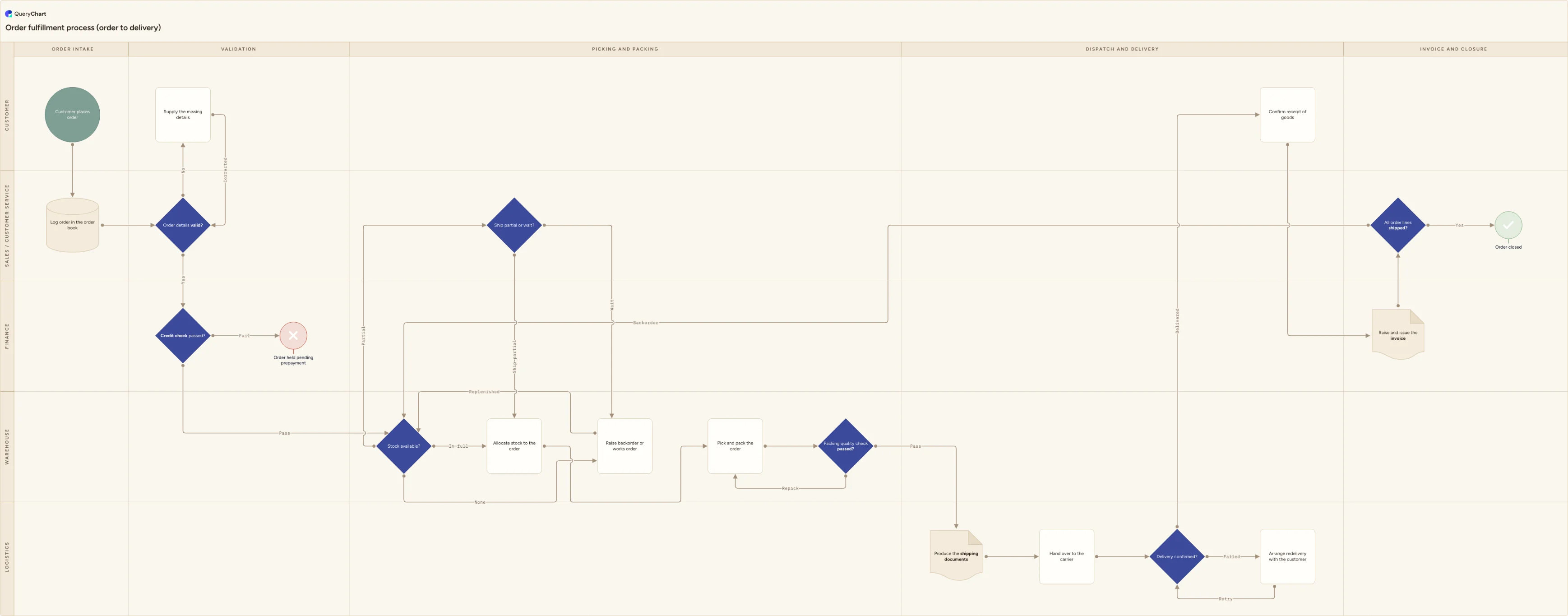
A five-lane order fulfillment process flowchart: validation, credit check, stock allocation, picking and packing, dispatch, delivery, invoice and closure.
What the order fulfillment process flowchart process is
Order fulfillment, also written fulfilment, is the work between a customer placing an order and the invoice going out. The order is captured and validated, the customer's credit is checked, stock is allocated or put on backorder, the goods are picked, packed and checked, shipping paperwork is produced, a carrier delivers, and the order is invoiced and closed. Five functions touch it and none of them sees the whole thing, which is why the process usually looks fine in each team's own view and still misses the delivery date.
Three failure points account for most of the damage. Stock that the system says is available and the shelf says is not, which turns into a short pick discovered at the packing bench. Partial shipments agreed verbally with the customer and then never recorded, so the remainder becomes invisible until the customer chases it. And failed deliveries, where a driver leaves a card and the order falls out of every queue because nobody owns the redelivery. A flowchart that draws only the happy path is no use against any of them.
This template maps the flow across five lanes, Customer, Sales / customer service, Finance, Warehouse and Logistics, over five phases from order intake to invoice and closure. It includes the branches most fulfilment procedures leave undocumented: a three-way stock decision, an explicit partial-shipment conversation, a repack loop after a failed packing check, a redelivery path for failed deliveries, and a closure gate that keeps a part-shipped order open until the outstanding lines have actually gone.
Continue the process
What this flowchart covers
In this template
- Five swimlanes, Customer, Sales / customer service, Finance, Warehouse and Logistics, laid out across five phases: Order intake, Validation, Picking and packing, Dispatch and delivery, and Invoice and closure.
- Intake and validation: the order is logged in the order book, then an "Order details valid?" gate sends incomplete orders back to the customer for the missing details instead of letting them reach the warehouse queue and stall there.
- A credit check in the Finance lane with a real failure branch, so a failed check puts the order on hold pending prepayment rather than quietly progressing it to allocation. The step carries a note on checking the limit against open orders, not just the posted ledger balance.
- A three-way "Stock available?" decision: in-full orders go straight to allocation, no-stock orders raise a backorder or works order that loops back once replenished, and short lines route to a "Ship partial or wait?" decision owned by customer service.
- Picking, packing and a "Packing quality check passed?" gate with a repack loop, so a failed check returns to the pick face rather than reaching the carrier as a customer-facing error.
- Dispatch through closure: shipping documents, carrier handover, a "Delivery confirmed?" gate with a redelivery path for failed attempts, customer confirmation of receipt, invoice raised, then an "All order lines shipped?" gate that sends outstanding lines back to the stock check before the order can be closed.
When to use this template
- You are writing a fulfilment SOP or a warehouse operating procedure and need the cross-team handoffs on one page rather than three separate team checklists that quietly disagree with each other.
- Orders are going out short or late and you need to establish whether the failure sits in validation, credit, allocation, picking or the carrier handover before you start fixing anything.
- You are configuring order management in an ERP or WMS and want the process agreed first, so the tool encodes decisions your organisation has actually made about allocation rules, credit blocks and backorder handling.
- Partial shipments and backorders are handled informally by whoever answers the phone, and outstanding lines keep going missing between the part-delivery and the invoice.
- New customer service or warehouse staff need to know what a credit hold, a backorder and a failed delivery mean for the order in front of them, and who owns it next.
How it works
Rename the lanes to your real teams
Replace Customer, Sales / customer service, Finance, Warehouse and Logistics with the functions you genuinely have. If one team owns both picking and dispatch, merge those lanes instead of pretending the handoff exists. If you use a third-party logistics provider, give the 3PL its own lane so the boundary of your control is visible. Keep the count at or below five or the chart stops being readable.
Write in your own credit and stock rules
The credit check and the stock decision are where your policy lives. State the credit limit basis, who can release a held order, and whether allocation is at order entry or at pick. Put the actual numbers and role names in the step comments, not in a separate policy nobody opens.
Decide the partial-shipment policy explicitly
The "Ship partial or wait?" decision assumes you ask the customer. If your policy is to ship partial by default above a fill-rate threshold, or never to split without written agreement, change the branch labels and note the rule. Also decide who pays the second freight charge, because that is the argument the step exists to prevent.
Attach the systems and documents to each step
Add the system of record and the paperwork to the steps that produce something: order book, allocation, pick list, packing list, delivery note, carrier label, proof of delivery, invoice. Cross-border shipments need the commercial invoice and commodity codes added at the shipping documents step.
Walk it with the people who do the work, then publish it
Take the chart to the warehouse floor and the service desk and follow two or three live orders through it, including one that went wrong. Fix the chart, not the story. If it becomes a controlled procedure, route it through approval so the version people work from is the version that was authorised, and keep the change history.
Frequently asked questions
What are the steps in the order fulfillment process?
Order received and logged, order details validated, credit check, stock availability check, allocation or backorder, picking, packing and a quality check, shipping documentation, carrier handover, delivery confirmation, invoice raised, and order closed. The steps that separate a working process from a paper one are the exception branches: what happens when details are missing, credit fails, stock is short, packing fails the check, or delivery fails.
What is the difference between the order fulfillment process and order-to-cash?
Order fulfillment covers order capture through delivery and invoicing. Order-to-cash is the wider finance cycle and continues past the invoice into payment collection, cash application, dunning for overdue accounts, and revenue recognition. This chart stops where fulfilment stops, at the invoice raised and the order closed, so it stays owned by operations rather than by the finance ledger.
How should partial shipments and backorders be handled?
Treat them as a decision, not a workaround. Ask the customer before splitting an order, because a split means a second delivery and a second freight charge that someone has to accept, and record the answer against the order line. Then keep the order open: in this chart the "All order lines shipped?" gate routes outstanding lines back to the stock check rather than letting closure happen while a backorder is still live.
Does this template help with ISO 9001?
It gives you a documented process to start from, which is not the same as compliance. Two clauses are genuinely relevant: 8.6, release of products and services, expects planned verification that requirements have been met before release plus records of who authorised it, which maps to the packing quality check and the shipping documents step; and 8.5.1, controlled production and service provision. You still need the underlying records, and an auditor will want evidence that operations follow the chart.
Where this process fits
In most operations this process follows Customer credit approval process flowchart (limit and terms) and hands off to Proof of delivery process flowchart (ePOD capture to invoice).
It is one step in Order-to-cash.
Step 1: Customer credit approval process flowchart (limit and terms)
Customer credit approval process flowchart: application and entity checks, bureau report and trade references, scoring, the delegated authority ladder, security, the ERP limit, and periodic review.
Step 2: Order fulfillment process flowchart template You are here
A five-lane order fulfillment process flowchart: validation, credit check, stock allocation, picking and packing, dispatch, delivery, invoice and closure.
Step 3: Proof of delivery process flowchart (ePOD capture to invoice)
Proof of delivery process flowchart template: delivery attempt, signature or PIN capture, damage annotated on the receipt, POD upload and match, portal release, invoicing on the POD, disputes and retention.
Step 5: Accounts receivable process flowchart (invoice to cash)