Warehouse Order Picking Process
Warehouse order picking process template covering SKU, location and lot scans, quantity confirmation, short-stock handling, reserve replenishment, allocation correction, and packing handoff.
What the warehouse order picking process is
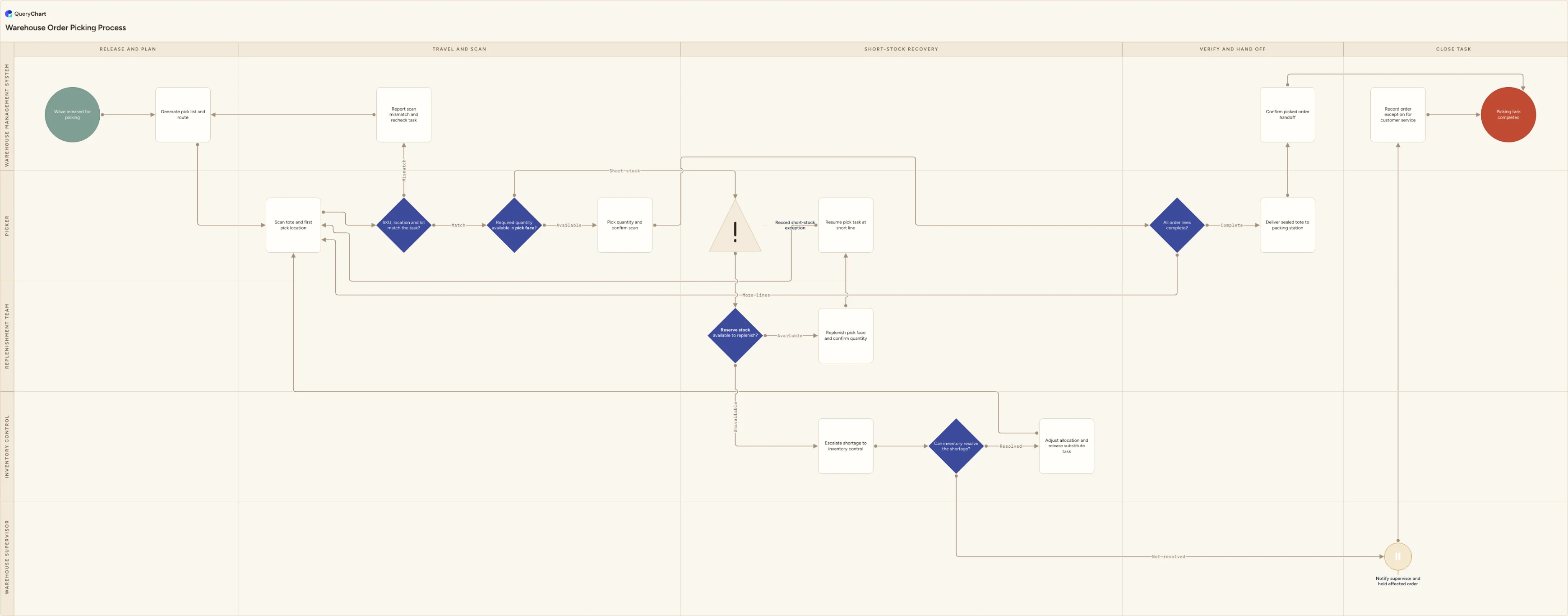
Order picking is the warehouse-floor control between an allocated order and a tote a packer can trust. A released wave creates a pick list and route, but the picker still has to prove that the SKU, location and lot in front of them match the task, take the required quantity, and repeat that check for every line. This template makes those checks visible rather than treating the pick route as proof of correctness. It also distinguishes a short pick from an empty location: a picker records the actual shortage, a replenishment team checks reserve availability, and inventory control owns a shortage that the warehouse cannot solve by moving reserve stock.
The exception routes are the point of the chart. A scan mismatch returns to the task before stock is picked. A short pick can trigger a confirmed reserve replenishment and resume at the affected line, or it can expose an allocation, stock-record or supply problem that needs inventory control. If inventory can resolve it, a substitute or corrected task returns to the picker; if it cannot, the affected order is held and customer service receives a documented exception rather than discovering the issue after packing. The final handoff only occurs when every line is complete and the tote is sealed for packing.
What this flowchart covers
In this template
- Five swimlanes for the Warehouse management system, Picker, Replenishment team, Inventory control and Warehouse supervisor from wave release through packing handoff.
- A SKU, location and lot verification decision at the pick face, with a scan-mismatch loop that rebuilds the task before any unverified product enters the tote.
- A required-quantity gate that records a real short-stock exception rather than letting the picker decide silently whether a partial line is acceptable.
- Reserve-stock availability, replenishment and resume-at-line routing, with inventory control handling unavailable reserve stock, allocation corrections and substitute tasks.
- An order-line completion check followed by a sealed-tote handoff to packing, or a supervised hold and customer-service exception when a shortage cannot be resolved.
When to use this template
- You are documenting a picking SOP for single-order, batch, zone or wave picking and need one route that applies regardless of how the work is released.
- Wrong SKU, lot or quantity errors are escaping the pick face and you need the verification scan to be a mandatory decision rather than a training reminder.
- Short picks are being resolved by informal substitutions, skipped lines or last-minute messages to packing instead of a visible replenishment and allocation process.
- You are configuring WMS exception codes and need to agree which team owns a pick-face shortage, reserve replenishment, inventory adjustment and customer-order hold.
How it works
Set the release method for your operation
Rename the wave-release and route steps for the way work actually reaches a picker: single order, batch, zone, cluster or wave. Keep the verification and short-stock controls even if a voice, mobile or paper system changes how the task is presented.
Define the pick confirmation data
Specify whether the picker must confirm SKU, location, lot, serial number, expiry date, unit of measure and quantity. Make the system reject a mismatch where possible, and state the rare circumstances in which a supervisor may approve an override.
Write the short-stock trigger
Decide whether a short pick means no stock in the location, less than the requested quantity, damaged stock, a lot that fails its allocation rule, or any of those. Give each condition an exception code so inventory control can see which failures are caused by replenishment, master data or physical accuracy.
Connect reserve replenishment to the pick task
State who may release reserve stock, which scan confirms the replenishment, and when the picker may return to the line. If replenishment cannot cover the shortage, route the decision to allocation or customer service rather than asking the picker to choose a substitute.
Measure the exceptions after launch
Review scan mismatches, short picks, replenishment response time and held orders by SKU and location. Repeated exceptions in one bin can signal a slotting or cycle-count problem; repeated exceptions on one item can signal a replenishment parameter or supply problem.
Frequently asked questions
What are the steps in a warehouse order picking process?
The WMS releases a wave and generates a pick list and route. The picker scans the tote and pick location, verifies the SKU, location and applicable lot, then checks whether the required quantity is available. A complete quantity is picked and confirmed; a short quantity becomes an exception. Reserve stock is checked for a replenishment, and an unavailable reserve balance goes to inventory control for an allocation correction, substitute task or held order. The picker repeats the route until all lines are complete, then delivers the sealed tote to packing and the system records the handoff.
What should happen when the pick face has insufficient stock?
The picker should record the actual short-stock exception rather than borrow an unverified item or silently ship a partial order. A replenishment team checks whether released reserve stock can be moved to the pick face and confirms the replenished quantity before the picker resumes the line. If reserve stock is unavailable, inventory control must decide whether the record is wrong, another approved stock source exists, a substitution is allowed or the order must be held. That keeps a physical stock problem from turning into an undocumented promise to the customer.
Why verify SKU, location and quantity during picking?
Each check catches a different error. The SKU check stops a visually similar or adjacent item from entering the tote; the location check detects a misplaced pallet or incorrect task; the quantity check catches a partial pick, unit-of-measure error or count problem. When the WMS records the confirmation at the point of pick, the warehouse can trace where an error was caught and investigate repeated failures by location, product or shift instead of relying on a final packing check to find every mistake.
Where this process fits
In most operations this process follows Warehouse Replenishment Process and hands off to Warehouse Packing Process.
It is one step in Warehouse outbound.
Step 1: Warehouse Replenishment Process
Warehouse replenishment process template covering pick-face thresholds, reserve-stock availability, source verification, movement, pick-face scan confirmation, variance correction, and stock-out escalation.
Step 2: Warehouse Order Picking Process You are here
Warehouse order picking process template covering SKU, location and lot scans, quantity confirmation, short-stock handling, reserve replenishment, allocation correction, and packing handoff.
Step 3: Warehouse Packing Process
Warehouse packing process template: verify every picked item, select packaging, add inserts and documents, capture dimensions when needed, label and check parcels.
Step 4: Warehouse Shipping Process