Inventory Discrepancy Investigation
Inventory discrepancy investigation template for recounting, stock and order holds, movement tracing, manager approval before correction and verified release.
What the inventory discrepancy investigation process is
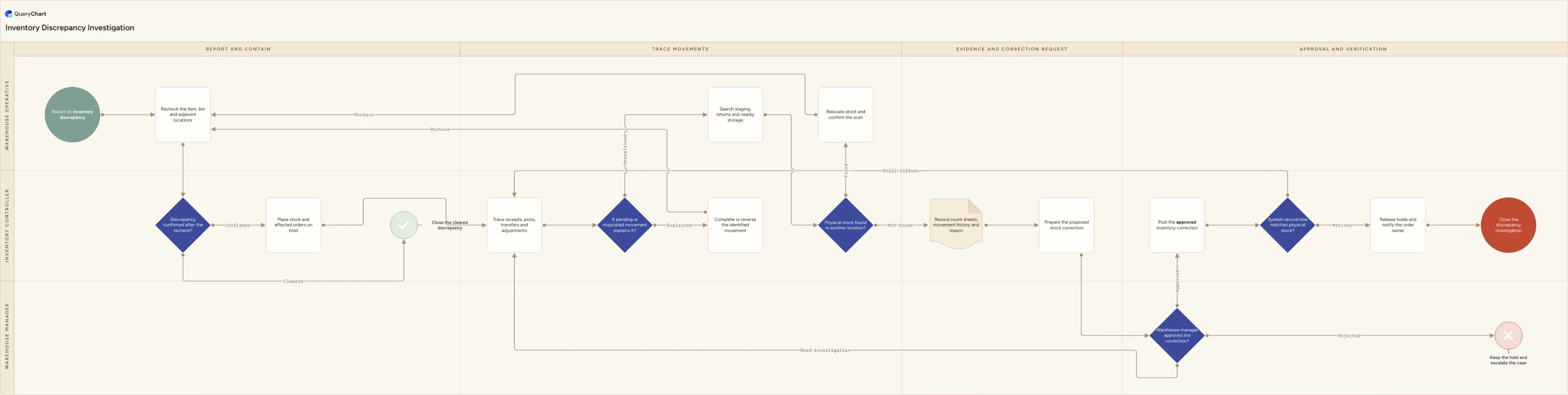
An inventory discrepancy is a case to investigate, not simply a number to overwrite. This template starts with a recheck of the item, bin and adjacent locations, then places confirmed discrepancies on hold so stock cannot be picked or allocated while its history is under review. The Inventory controller traces receipts, picks, transfers and adjustments for a pending or misposted movement. If one explains the difference, the team completes or reverses that movement and rechecks the stock. If not, the warehouse searches staging, returns and nearby storage before treating the discrepancy as an unexplained loss or gain.
Only after the movement trace and physical search fail does the controller create the correction request with count sheets, movement history and a reason. "Warehouse manager approves the correction?" is deliberately before "Post the approved inventory correction", not an audit after the stock record changes. An approver can send the case back for investigation or reject the correction while keeping the hold in place. The final comparison, "System record now matches physical stock?", protects against a correction entered against the wrong item, location or quantity. Tailor the hold status, correction authority, escalation route and evidence requirements to the controls in your warehouse and ERP.
What this flowchart covers
In this template
- A confirmed-discrepancy gate after a recheck of the item, bin and adjacent locations, so cleared reports are closed without opening an unnecessary investigation
- The "Place stock and affected orders on hold" step, which stops disputed inventory from being allocated or shipped while the case is still open
- A transaction trace for receipts, picks, transfers and adjustments, where "Complete or reverse the identified movement" returns to the recheck instead of creating a compensating stock correction
- A physical search of staging, returns and nearby storage, followed by documented count sheets, movement history and an explicit reason for any proposed correction
- Manager approval before posting, then a "System record now matches physical stock?" verification before holds are released and the investigation is closed
When to use this template
- A picker, count team or customer-service colleague reports that the available balance does not match stock they can physically locate
- An order is at risk because stock may be missing, incorrectly located or tied up in an unconfirmed receipt, transfer or return
- You need to ensure inventory corrections are supported by movement history and manager approval rather than used to close unexplained discrepancies quickly
- Your warehouse needs one investigation path that joins stock containment, order holds, movement tracing and location-release checks
How it works
Define what opens a discrepancy case
Set the reports that start this process, such as a count variance, failed pick, negative balance or customer claim. Require the item, lot where relevant, location, quantity and reporting time so the first recheck is specific.
Configure stock and order holds
Map the chart's hold step to real WMS and ERP statuses. State who can place and release each hold, and ensure an affected order cannot bypass the investigation through another allocation or manual shipment path.
List the movement sources to trace
Include receipts, picks, replenishments, transfers, returns, production issues and manual adjustments that apply to your operation. Give investigators a defined look-back period and a place to attach movement evidence.
Set correction approval evidence
Name the recount, search result, movement history, value and reason code the manager must see before approving a correction. The person requesting or entering the correction should not be the only person validating it.
Verify before releasing holds
After an approved correction, compare the updated record with the physical result and confirm that orders and stock can safely return to normal allocation. Route a failed verification back to the movement trace rather than closing it as an administrative error.
Frequently asked questions
What should happen first when an inventory discrepancy is found?
Recheck the specific item and location, including adjacent bins where mis-slots commonly occur. Once the difference is confirmed, place the relevant stock and affected orders on hold before investigating. This preserves the quantity and order impact being investigated instead of allowing normal warehouse activity to change them underneath the case.
Why trace movements before correcting inventory?
Many discrepancies are transaction timing or posting errors rather than missing stock. A receipt, transfer, replenishment or pick that is physically complete but still open in the system should be completed or reversed, then verified by recount. Posting a stock correction over it can produce a second variance when the original transaction is eventually processed.
Who should approve an inventory correction?
An independent manager or other role designated by the organization's inventory-control policy should approve it before it is posted. This template assigns that check to the Warehouse manager. The approver needs enough evidence to distinguish a true unexplained variance from a location error, pending movement or incomplete recount.
Where this process fits
In most operations this process follows Cycle Counting Process.
Comes before
- Cycle Counting Process — Cycle counting process template for blind counts, independent recounts, movement investigation, approval-controlled corrections and verified location release.