Short Pick Process
Short pick process template for checking an empty pick face, wrong item or damaged stock, replenishing from reserve and escalating order risk.
What the short pick process is
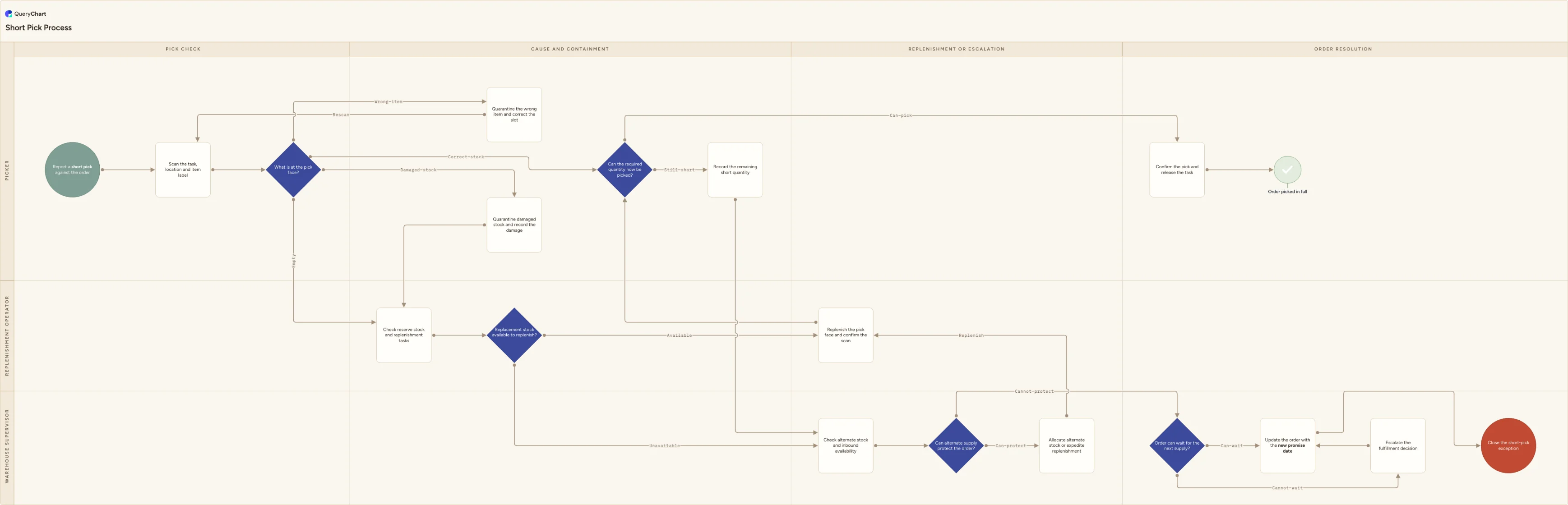
A short pick is not one condition with one fix. The picker first scans the task, location and item label, then uses "What is at the pick face?" to distinguish an empty pick face, a wrong item, damaged stock and correct stock that is simply insufficient for the order. A wrong item is quarantined and the slot is corrected before the task is scanned again. Damaged stock is quarantined and recorded before the replenishment team looks for replacement stock. An empty face is checked against reserve stock and open replenishment work, so the warehouse can repair the availability problem instead of just marking the order short.
Where replacement or alternate stock is available, the template routes it through a confirmed replenishment scan and tests whether the required quantity can now be picked. Where supply cannot protect the order, the Warehouse supervisor checks whether it can wait for the next supply, updates the promise date, or escalates the fulfillment decision. This keeps the warehouse's physical resolution separate from the service commitment made to the customer. Rename the roles, supply sources, shortage codes and escalation rules to match your WMS, replenishment model and customer-service agreement.
What this flowchart covers
In this template
- A first scan of the task, location and item label before a short pick is classified, so a stale task or misread label does not trigger unnecessary replenishment
- The four-way "What is at the pick face?" decision, separating an empty face, wrong item, damaged stock and insufficient correct stock rather than treating every short pick as an empty bin
- A wrong-item quarantine and slot-correction loop, plus a damaged-stock quarantine that preserves the evidence before reserve stock is used as a replacement
- Reserve and alternate-stock checks, with "Replenish the pick face and confirm the scan" returning stock to the task only after the WMS can see it
- A supply-risk escalation that either protects the order through alternate stock or updates the promise date after a supervisor fulfillment decision
When to use this template
- Pickers regularly reach locations where the WMS expects more stock than they can pick, and you need a consistent response rather than an ad hoc short confirmation
- Your warehouse needs different actions for an empty face, a wrong SKU in the slot and damaged units that must not be sent or replenished
- Reserve stock, alternate locations or inbound stock can sometimes save an order, but nobody has a clear trigger to try them before escalating
- Customer commitments are being changed without a documented warehouse assessment of whether replenishment or alternate supply can still protect the order
How it works
Define the short-pick trigger
Set the scanner action or task status that opens the exception, and require the picker to scan the location and item before selecting a cause. Do not allow a generic short code to hide a wrong item or damage condition.
Map each pick-face condition to a real action
Link empty, wrong-item and damaged-stock outcomes to the correct WMS status, quarantine area and replenishment workflow. A wrong SKU needs slot correction; damaged stock needs a controlled hold; neither should be replenished as if the face were merely empty.
Set reserve and alternate-supply rules
Name the reserve locations, substitute rules, inbound receipts and transfer sources that a replenishment operator may use. Include any lot, expiry, allocation or customer restrictions that make stock unavailable even when it exists physically.
Require replenishment confirmation
Keep the task open until the replenishment scan confirms stock in the pick face. That scan is what makes the replacement available to the picking workflow and gives the picker a controlled point to try the task again.
Define the order-risk escalation
Set who decides whether an order can wait, ship partial, use a substitute or receive a new promise date. Give Customer service the approved message and timing, while the warehouse keeps responsibility for the stock facts behind it.
Frequently asked questions
What is a short pick in a warehouse?
A short pick occurs when the picker cannot pick the quantity the order or task requests from its assigned location. The immediate symptom can have different causes: the pick face is empty, the wrong item is stored there, stock is damaged, a task is inaccurate, or the correct item is present but insufficient. The cause determines the right resolution.
Should damaged stock be handled as an empty pick face?
No. Damaged stock needs to be quarantined and recorded so it is not picked, replenished or allocated elsewhere by mistake. The process can then look for reserve or alternate supply, but that replacement is a response to the damage exception, not proof that the damaged units never existed.
When should a short pick be escalated?
Escalate when reserve, alternate and inbound supply cannot protect the order, or when the required service commitment cannot wait for replenishment. The warehouse supervisor should provide the supply facts and fulfillment options; the authorized service or operations role then decides the customer commitment, substitution or other commercial response.