How to Create an Org Chart from Excel: Employee–Manager Example
A personnel spreadsheet becomes an org chart when each employee row has a stable ID and a Reports to value pointing to its manager's ID. Explore the exact example table and editable org tree below.
How to Create an Org Chart from Excel: Employee–Manager Example
Illustrative, editable whole-company structure. Adapt roles and relationships to your organization.
About this company template
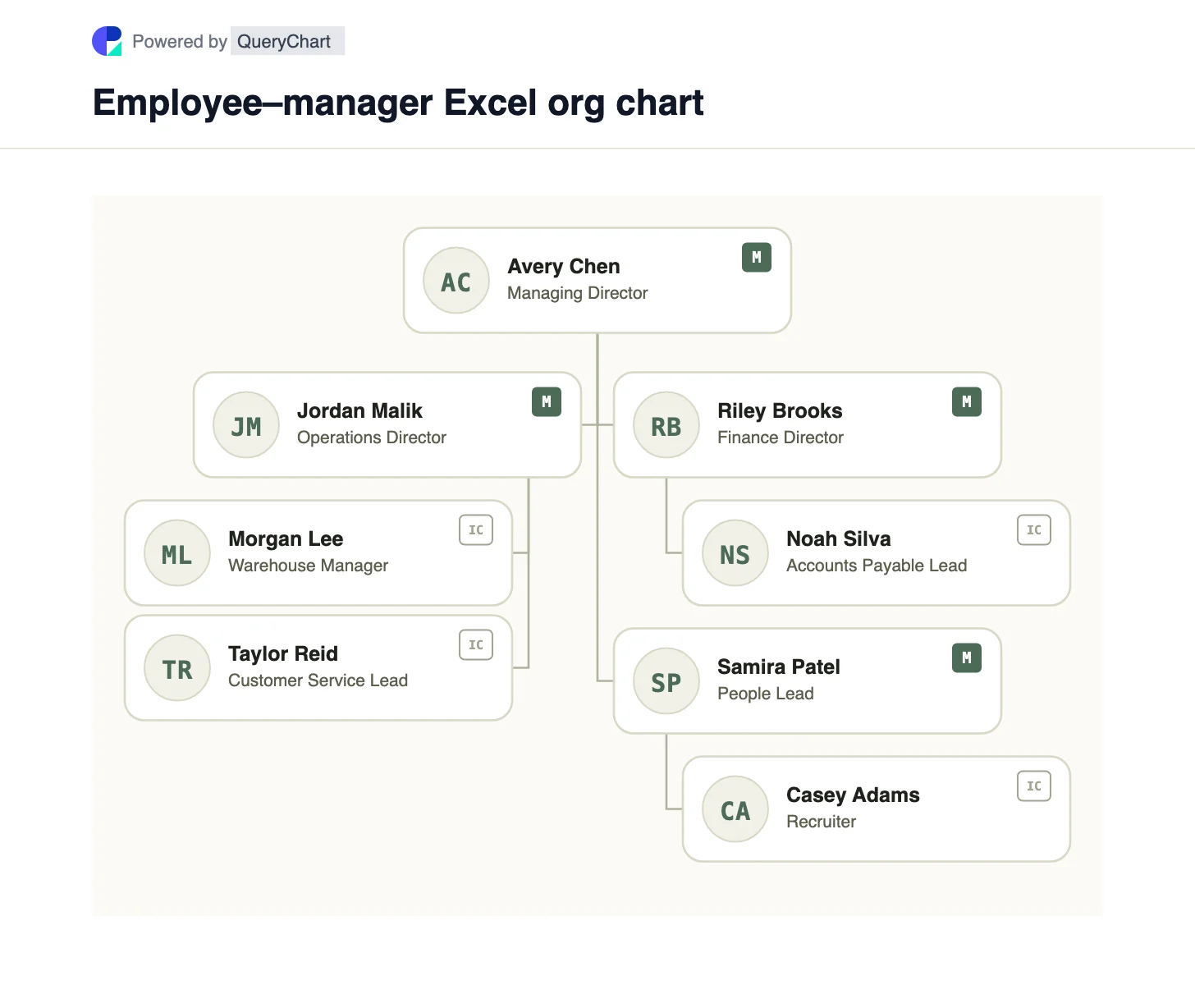
This sample starts with eight fictional employees. E100 is the sole root, so its Reports to cell is blank. E110, E120 and E130 report to E100; each lower-level row points to one of those managers. The identifiers are stable keys, not row numbers, so sorting the Excel table does not change who reports to whom.
For a native Visio chart, Microsoft's Organization Chart Wizard can read an existing Excel workbook. Its source needs an employee name, a unique identifier and a reports-to field containing the manager's identifier. Map those columns in the wizard and let Visio generate shapes and connectors. This is the Organization Chart Wizard, not the retired Data Visualizer add-in inside Excel. QueryChart's OrgSheet tree shown above is a separate editable example built from the same relationships; copy the template and adapt the people and reporting lines there.
Check the table before drawing: every non-root manager ID must exist in the Employee ID column, IDs must be unique, and following Reports to repeatedly must reach E100 without a cycle. A department name is a useful label but does not replace the manager key. See /guides/how-to-create-org-chart-from-excel-in-visio for the Microsoft procedure.
Example Excel reporting table
Each Reports to value matches another row's Employee ID. The top role has a blank Reports to cell.
| Employee ID | Name | Title | Reports to | Department |
|---|---|---|---|---|
| E100 | Avery Chen | Managing Director | Executive | |
| E110 | Jordan Malik | Operations Director | E100 | Operations |
| E120 | Riley Brooks | Finance Director | E100 | Finance |
| E130 | Samira Patel | People Lead | E100 | People |
| E111 | Morgan Lee | Warehouse Manager | E110 | Operations |
| E112 | Taylor Reid | Customer Service Lead | E110 | Operations |
| E121 | Noah Silva | Accounts Payable Lead | E120 | Finance |
| E131 | Casey Adams | Recruiter | E130 | People |
How the employee IDs become reporting lines
Avery Chen sits at the top because E100 has no manager value. Jordan, Riley and Samira have E100 in Reports to, so they form the first level beneath Avery. Morgan and Taylor sit below Jordan; Noah sits below Riley; Casey sits below Samira.
The QueryChart chart is an org tree: a parent row connects to each direct report by the report's stable ID. It is not a flowchart with a Start shape or a process sequence. Open the template to change a person's manager and review the resulting tree.
If an HR export uses manager names instead of IDs, match names only when they are unique. Two employees can have the same name; a stable employee key avoids attaching a report to the wrong person.
Lead role
Avery Chen
Illustrative top employee — The only row with a blank Reports to value.
How to adapt this structure
A stable key separates a reporting relationship from the order of rows in Excel.
The visible chart and the table can be checked against one another: each non-root row should have one incoming management line.
Design tradeoffs
- Employee IDs remain valid when names change or rows are sorted.
- You must validate missing manager IDs and cycles before treating the generated tree as correct.
What this chart shows
- This is an illustrative eight-person dataset.
- The chart uses the QueryChart org-tree renderer.
- One blank Reports to value defines the root.
- Department is descriptive; Reports to defines the hierarchy.
Related process templates
Related company structures
Frequently asked questions
Which Excel columns are essential?
Use a person name, a unique Employee ID and a Reports to value containing the manager's ID. Keep the root's Reports to cell blank.
Is the Visio Data Visualizer add-in required?
No. Microsoft's separate Organization Chart Wizard can generate an org chart from Excel data in Visio desktop. The Excel Data Visualizer add-in was retired.
Can I upload this Excel table directly to this org-tree template?
This page provides a matching sample table and editable QueryChart tree. Adapt the template's people and reporting lines in OrgSheet; it does not claim one-click Excel-to-org-tree import.
Use this org chart template
Open this illustrative tree and replace the names, titles and reporting lines with your own validated data.