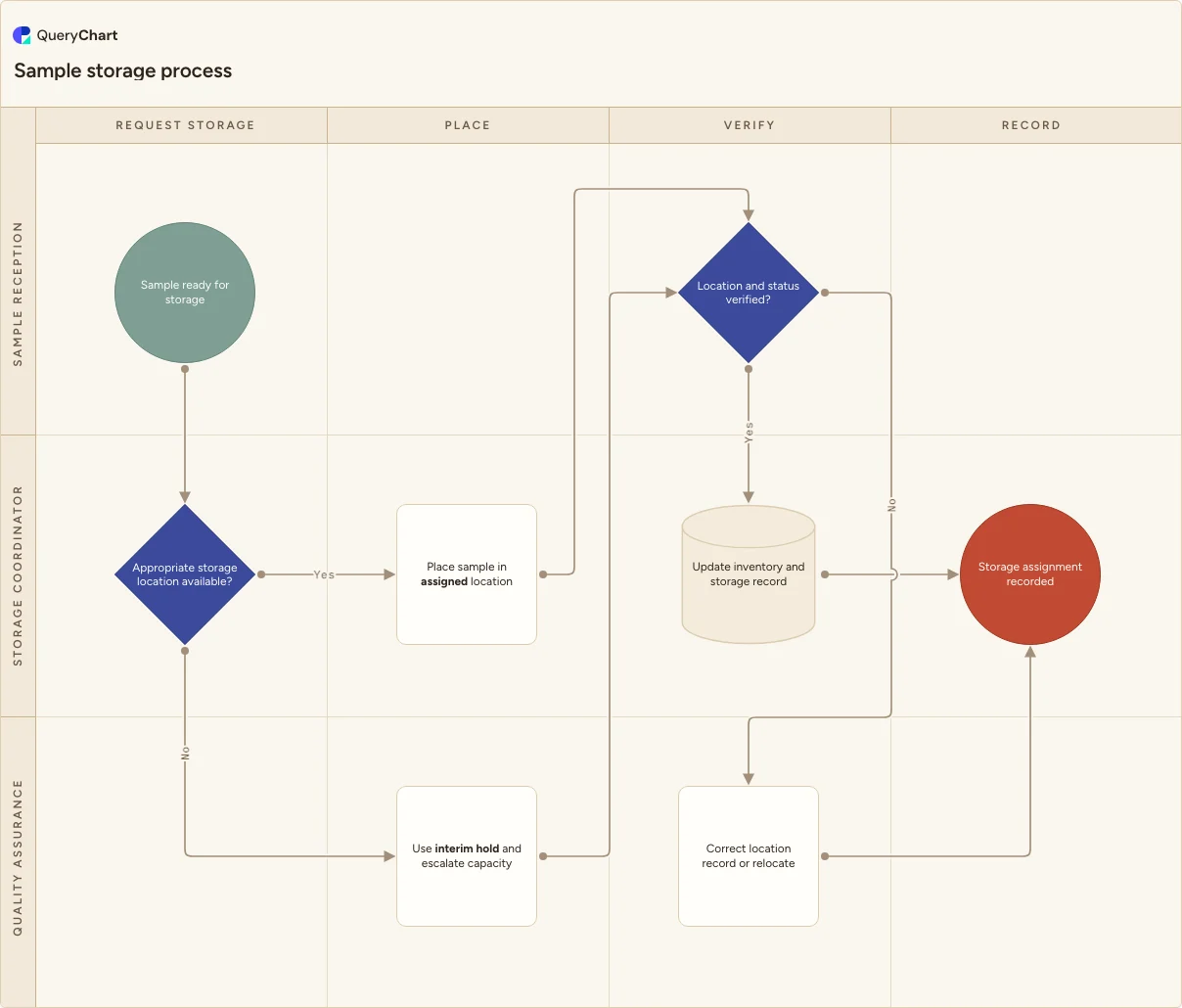
Sample storage process flowchart
An editable sample storage workflow for assigning a suitable location, using interim holds when capacity is unavailable, verifying location and status, and updating inventory records.
What the sample storage process is
The chart follows a sample from a storage request to a verified location and inventory update. It is intended to be edited for the storage conditions, location rules and systems your laboratory has actually approved.
The workflow draws two useful exception paths: capacity or location suitability can trigger an interim hold and escalation, while a location-record mismatch requires correction or relocation before the storage assignment is closed.
This template does not establish compliance with any standard or regulation. Confirm the storage conditions, monitoring, access controls, hold locations and review roles that apply at your site before making it effective.
What this flowchart covers
In this template
- Four stages from storage request through an updated inventory record.
- A labelled decision that tests whether an appropriate storage location is available.
- An interim-hold and capacity-escalation route for unavailable locations.
- A location-and-status verification gate before closing the assignment.
- Editable roles for reception, storage coordination and quality oversight.
When to use this template
- You receive, retain or stage samples in more than one storage area or status.
- You need to define what happens when a sample cannot be placed in its intended location.
- You are aligning physical storage, inventory records and sample handoffs in one editable map.
How it works
Map approved storage classes
Replace the general location decision with the storage classes, access rules and availability checks your laboratory uses. Include named interim locations where they are part of the real process.
Connect location to the record
Identify the inventory system, log or scan event that records a placement. Define which status fields must change with the physical move.
Define capacity escalation
Name who decides what happens when no suitable location is available and how the sample remains visible while that decision is open.
Test a mismatch
Walk a sample that is found in the wrong location through the chart and add the actual investigation, correction and review steps your team performs.
Frequently asked questions
What does a sample storage process flowchart cover?
It covers assigning a sample to a suitable location, handling an unavailable location through a controlled interim route, checking the stored sample against its recorded status and closing with an inventory update or correction.
What should happen if the intended storage location is unavailable?
Use the interim hold or alternate process your site has defined, record the sample's current status and escalate the capacity or suitability decision to its owner. Do not place it in an unrecorded temporary location.
Why verify the location after storage?
A physical placement and an inventory entry can disagree. Comparing the location and status before close helps reveal a wrong placement, a missed update or a sample that should still be held.
Where this process fits
In most operations this process follows Sample labeling process flowchart and hands off to Sample retention process flowchart.
It is one step in Sample lifecycle.
Step 3: Sample receipt process flowchart
Step 4: Sample log-in process flowchart
Step 5: Sample labeling process flowchart
An editable sample labeling workflow for using source records, creating traceable labels, checking label-to-sample matches, correcting discrepancies and recording label status.
Step 6: Sample storage process flowchart You are here
An editable sample storage workflow for assigning a suitable location, using interim holds when capacity is unavailable, verifying location and status, and updating inventory records.
Step 7: Sample retention process flowchart
An editable sample retention workflow for reviewing retention records, identifying retained samples, deciding whether an approved disposition can proceed, continuing secure retention and recording the review.