Electrical Engineering & Design Change SOP
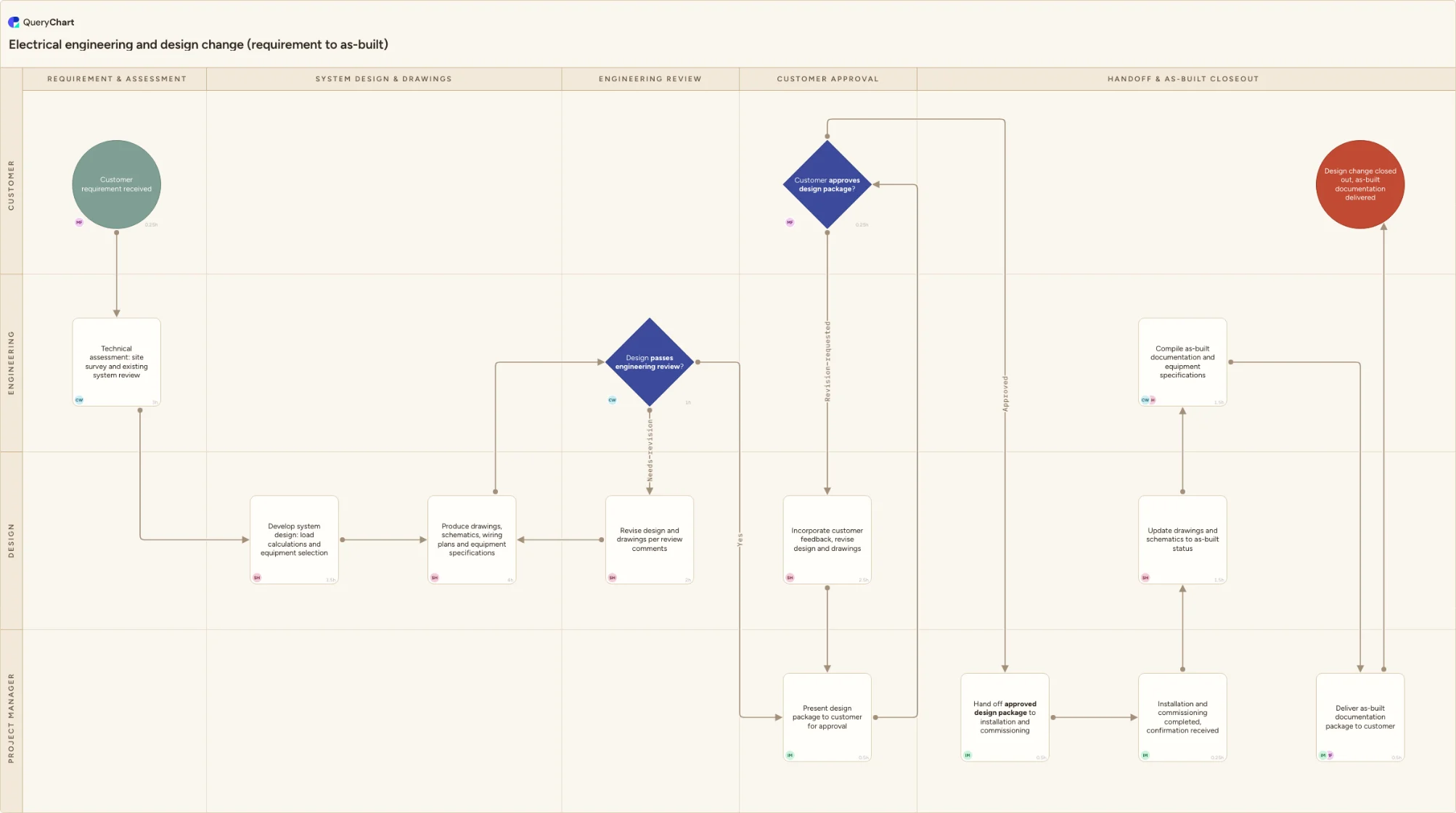
An electrical engineering and design change SOP for Scanel: technical assessment, system design, drawings and schematics, an engineering review, and a customer-approval gate on the design before installation and commissioning begin.
What the electrical engineering & design change SOP process is
Most of Scanel's SOPs start from a scope that is already fixed: install this cabling, commission this switchboard, service this EEx motor. This chart is upstream of all of them. It is what runs when the customer doesn't have a scope yet, they have a requirement, a new consumer to add, a switchboard to replace, a system to modify, and Scanel's design office has to turn that requirement into the drawings, schematics, wiring plans and equipment specifications that a field crew can actually build from. That is why the chart starts at "Customer requirement received" rather than at a drawing, and why "Technical assessment: site survey and existing system review" comes before a single line is drawn: on a vessel or an offshore installation, the existing cable routes, the available deck or compartment space and the condition of the equipment already in place are not things a design office can assume from the customer's own description of the system.
The two decision points in this chart exist because a design office's mistakes are expensive in a specific, delayed way: a design error doesn't fail during design, it fails during installation, once cable is run or a panel is fitted, or worse, during commissioning, once the customer is already expecting to energize. "Design passes engineering review?" is the internal check, a second qualified engineer looking at class or flag rules, ATEX zoning where relevant, load calculations and equipment selection, not just whether the drawings are complete, before the design ever reaches the customer; a fail routes to "Revise design and drawings per review comments" and back through drafting rather than letting a design an engineer hasn't actually signed off on go out under the company's name. "Customer approves design package?" is the second and, for this SOP, the load-bearing one: it is the gate that has to happen before installation starts, not after, because a design disagreement that surfaces once equipment has been ordered against a bill of materials, or fitted against a wiring plan, costs far more to unwind than a disagreement caught on a drawing. A revision request here routes to "Incorporate customer feedback, revise design and drawings" and back through presentation, so the design that goes to installation is one the customer has actually signed off on, not one Scanel assumed they'd accept.
The chart deliberately hands off rather than absorbing the work on either side of the approval gate. "Hand off approved design package to installation and commissioning" is where this SOP stops owning the job: the approved drawings, schematics, wiring plans and equipment specifications pass into the Marine Electrical Installation SOP and, where the change requires it, the Electrical System Commissioning SOP, and this chart does not repeat their installation or test steps in any detail, it only records that the handoff happened and that a confirmation came back. What this SOP does keep is the paper trail on the far side: "Update drawings and schematics to as-built status" and "Compile as-built documentation and equipment specifications" close the loop the design office opened at intake, so the package the customer eventually keeps reflects what was actually built, not only what was originally drawn. Every row also carries a named owner and an hours figure through the built-in People and Workload columns, so the workload BI panel can show Simon Haven's drafting hours clustering across "System Design & Drawings" while Camille Ward's review hours, lighter individually, are the two rows in the chart where a design cannot move forward without her sign-off.
What this flowchart covers
In this template
- Intake and technical assessment, from "Customer requirement received" through "Technical assessment: site survey and existing system review", so the design that follows is built on a surveyed system rather than the customer's own description of it
- Design and drafting in the "Design" lane: "Develop system design: load calculations and equipment selection" and "Produce drawings, schematics, wiring plans and equipment specifications", the two rows that turn a requirement into a buildable package
- The internal engineering review gate: "Design passes engineering review?" branches to "Revise design and drawings per review comments" and back through drafting on anything short of a clean pass, before the design ever reaches the customer
- The customer-approval gate on the design itself: "Customer approves design package?" branches to "Incorporate customer feedback, revise design and drawings" rather than letting installation start on a design the customer hasn't actually signed off on
- Handoff to installation and commissioning and the return loop for as-built documentation: "Hand off approved design package to installation and commissioning" through "Update drawings and schematics to as-built status" and "Compile as-built documentation and equipment specifications" to "Deliver as-built documentation package to customer"
- Named owners and hours on every row via the People and Workload columns, so the workload BI panel can show Simon Haven's drafting hours clustering across "System Design & Drawings" while Camille Ward's review hours mark the two rows a design cannot pass without her sign-off
When to use this template
- A customer wants a new or modified electrical system designed, diagrams, schematics, wiring plans or equipment specifications, rather than a defined scope they've already engineered themselves and just want installed
- You need a documented gate that catches a design disagreement before equipment is ordered or fitted, instead of discovering it during installation or at the moment the customer expects to energize
- You're standardising the handoff between Scanel's design office and its field SOPs so a field crew never starts work from a drawing the customer hasn't actually approved
- You're onboarding a new design or drafting engineer and need a reference for exactly which checks happen before a design reaches the customer and which happen after it's approved
- A completed installation revealed deviations from the original design and you need a consistent place for those changes to be reflected in as-built drawings before the documentation package goes to the customer
How it works
Replace the lanes with your actual design-office roles
This chart uses Customer, Engineering, Design and Project Manager. If your design office splits load calculations from drafting itself, or splits the ATEX/zoning check out of the general engineering review, give that role its own lane rather than folding it into Design or Engineering.
Put your own review criteria on the engineering-review gate
"Design passes engineering review?" needs a stated checklist, class or flag rules, ATEX zoning, load calculations, equipment ratings, not just a second engineer's general impression. Write the actual criteria into the row's comment field so the reviewer isn't relying on memory of what a passing design looks like.
Name who has the authority to sign off the customer-approval gate
"Customer approves design package?" is the one decision in this chart where letting an unsigned design through is expensive later: once equipment is ordered or installation starts, unwinding a disagreement costs far more than catching it here. Attach a named role, not just a title, so there's no ambiguity about who can send the design out to installation.
Set People and Workload on every row before you rely on the BI panel
The workload panel can only total hours for rows that carry them. Fill in People and Workload for each step as you adapt the chart, using realistic effort hours rather than elapsed time, so a design running through two review cycles actually shows up as extra hours for the right engineer.
Decide exactly where this SOP hands off to your other SOPs
"Hand off approved design package to installation and commissioning" is a boundary, not a detailed step: it should name the Marine Electrical Installation SOP and, where re-commissioning is required, the Electrical System Commissioning SOP, rather than trying to describe their steps inside this chart.
Frequently asked questions
What triggers the start of the electrical engineering and design change process?
The process starts at "Customer requirement received": the customer has a system they want designed or changed, a new consumer, a replaced switchboard, a modified distribution system, but no engineered scope yet. That's what separates this SOP from Marine Electrical Installation SOP, which starts from a scope the customer has already had engineered.
Why does the design get reviewed internally before it goes to the customer?
"Design passes engineering review?" is a second qualified engineer checking the design against class or flag rules, ATEX zoning where relevant, load calculations and equipment selection, not just whether the drawings are complete. A fail routes to "Revise design and drawings per review comments" and back through drafting, so what reaches the customer at "Present design package to customer for approval" is a design Scanel's own engineering has already stood behind.
Why is customer approval a decision gate here instead of a sign-off at the end of the job?
Because by the time a job reaches its end, equipment has usually already been ordered against the design's bill of materials and installation may already be underway. "Customer approves design package?" sits before "Hand off approved design package to installation and commissioning" precisely so a design disagreement surfaces on a drawing, where it's cheap to resolve, rather than after equipment has been bought or fitted, where it isn't.
Does this SOP cover the installation and testing work itself?
No. "Hand off approved design package to installation and commissioning" is deliberately a handoff, not a detailed step: the installation work belongs to the Marine Electrical Installation SOP and the test and energization work belongs to the Electrical System Commissioning SOP. This chart only records that the handoff happened and that a confirmation came back, at "Installation and commissioning completed, confirmation received", before picking the as-built documentation back up.
What happens to the drawings if the field crew deviates from the approved design during installation?
That's what "Update drawings and schematics to as-built status" and "Compile as-built documentation and equipment specifications" exist to capture: any deviations logged during installation are folded into the documentation package before "Deliver as-built documentation package to customer", so the customer keeps a record of what was actually built rather than only what was originally drawn.
Where this process fits
In most operations this process hands off to Marine Electrical Installation SOP.
Comes after
- Marine Electrical Installation SOP — A marine electrical installation SOP for Scanel: engineering review, material verification, work preparation, hands-on installation, a workmanship inspection gate, de-energized checks, documentation and handover to commissioning.