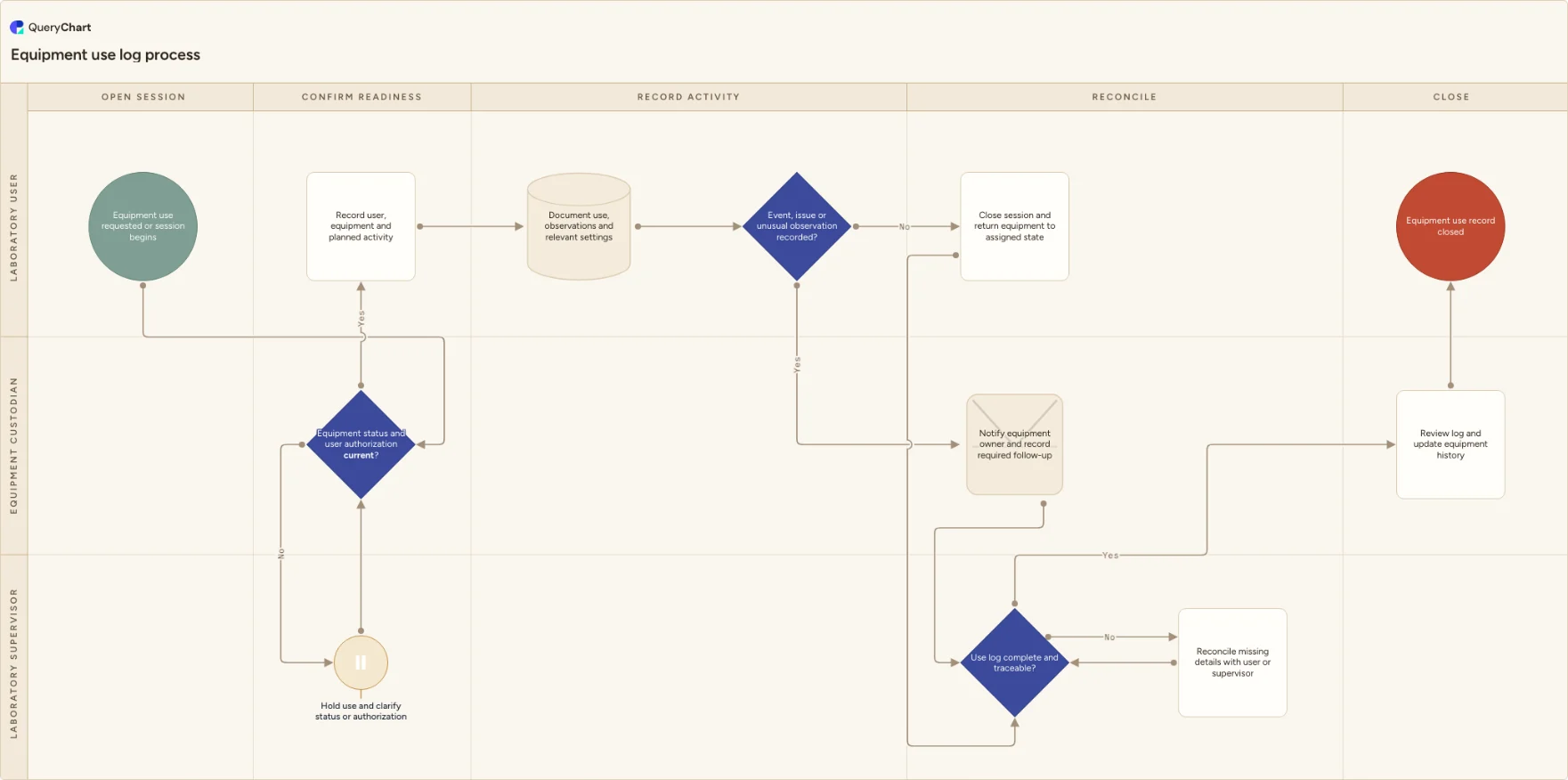
Equipment use log process flowchart
An equipment use log workflow for confirming asset status and user authorization, recording planned activity and observations, escalating events, reconciling missing details and updating history.
What the equipment use log process is
This template begins at the point a session is requested or opened and checks the two prerequisites that are easy to lose in a paper or shared log: the equipment's current status and the user's current authorization. It then captures the planned activity and observations while they are still close to the work.
An event or unusual observation does not simply become a note at the bottom of the page. The chart routes it to the equipment owner for follow-up, while an incomplete log returns for reconciliation before history is updated. Adapt the fields and evidence to the instruments, systems and activities your laboratory uses.
What this flowchart covers
In this template
- Five stages from opening a session through a reviewed equipment-history update.
- A status-and-authorization check before a user starts the planned activity.
- A separate route for an event, issue or unusual observation recorded during use.
- A reconciliation loop for missing log details before the session record closes.
- Editable user, custody and supervisory swimlanes for paper, electronic or hybrid logs.
When to use this template
- You need an editable process for shared instruments where users record bookings, use sessions or operating observations.
- You want the response to a logbook exception to be visible before a session is considered complete.
- You are replacing a free-form equipment log with a clearer ownership and review workflow.
How it works
Choose the session fields
Replace the general activity and observation fields with the identifiers, settings, checks or references your users genuinely need to record. Do not copy fields from another instrument where they do not help reconstruct the work.
Define readiness at the point of use
Name the status source and authorization record that a user checks before starting. If booking software, a label or a separate training record provides the evidence, show that handoff in the chart.
Assign event follow-up
Specify what types of observation require notification, who owns the follow-up and how the event links back to the use record. Test an incomplete log and an unusual observation with real users before adopting the process.
Frequently asked questions
What does an equipment use log process flowchart cover?
It covers the session from a status and authorization check through recording the activity, observations and any event, then log reconciliation and equipment-history update. It shows that a use record is not complete until missing details and required follow-up have an owner.
What should be checked before a user starts equipment?
The template uses a decision for the current equipment status and user authorization because the exact evidence differs by site. Connect that decision to the status label, register, booking system, training record or other source your local procedure uses.
How should a use-log exception be handled?
Record the facts during or immediately after the session, notify the role that owns the equipment or follow-up, and link the outcome to the log. Keep a missing detail or unresolved observation visible rather than allowing a later history review to infer what happened.
Where this process fits
In most operations this process follows Equipment status labeling process flowchart and hands off to Laboratory equipment cleaning process flowchart.
It is one step in Laboratory equipment.
Step 3: Equipment status labeling process flowchart
An equipment status labeling workflow for confirming identity and status basis, selecting usable label information, applying and verifying labels, resolving discrepancies and updating the equipment register.
Step 4: Equipment use log process flowchart You are here
An equipment use log workflow for confirming asset status and user authorization, recording planned activity and observations, escalating events, reconciling missing details and updating history.
Step 5: Laboratory equipment cleaning process flowchart
A laboratory equipment cleaning workflow for confirming method and status, preparing equipment, performing cleaning, checking condition and records, rework, readiness review and log updates.