Laboratory equipment inventory process flowchart
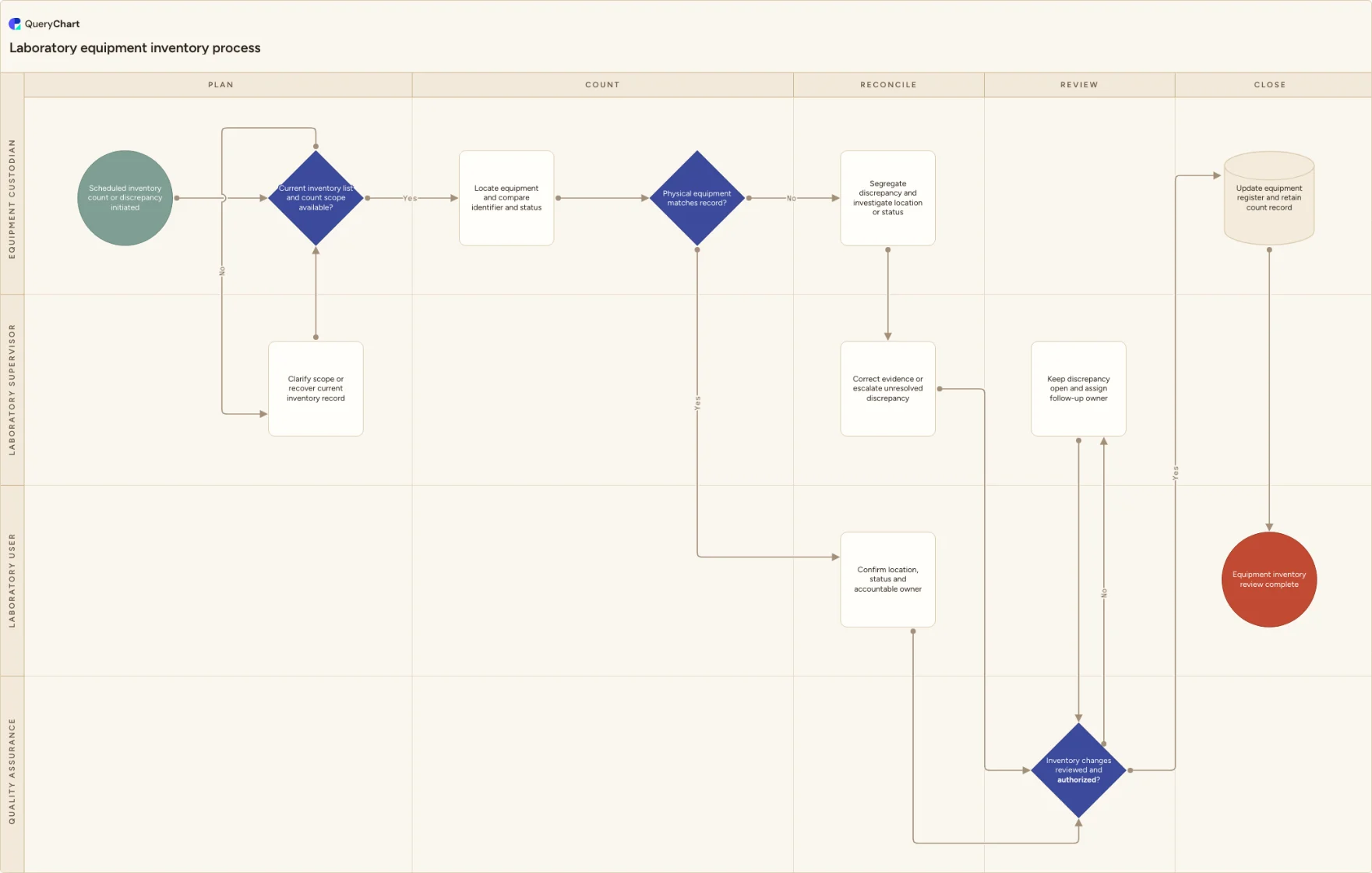
A laboratory equipment inventory workflow for defining count scope, locating assets, comparing identifiers and status, investigating discrepancies, authorizing changes and updating the equipment register.
What the laboratory equipment inventory process is
This template can start with a scheduled count or an individual discrepancy. Before anyone counts, it confirms that the current inventory list and scope are available, preventing an outdated export or unclear boundary from becoming the reference record by accident.
The physical comparison produces either a confirmed location and owner or a visible discrepancy investigation. Changes do not reach the register until they are reviewed and authorized; an unresolved discrepancy remains assigned for follow-up. Adapt the count cadence, fields, review roles and status controls to your asset-management practice.
What this flowchart covers
In this template
- Five stages from inventory planning through a retained count record and updated register.
- A scope-clarification loop for a missing or outdated inventory list.
- A physical-to-record comparison for equipment identity and current status.
- A discrepancy route that separates evidence correction from unresolved follow-up.
- An authorization gate before inventory changes are committed to the equipment register.
When to use this template
- You conduct periodic equipment counts or need a documented response to a missing, moved or incorrectly labeled asset.
- A laboratory wants one process that connects physical verification to accountable ownership and register updates.
- You are improving an inventory review that currently relies on informal spreadsheets, local knowledge or untracked corrections.
How it works
Set count scope and source records
Define whether the process covers a room, department, asset class or full register, and identify the current list used as the count baseline. Add the owner who can resolve an unclear scope before counting starts.
Choose the comparison fields
Specify the identifiers, location, status, accountable owner and other fields that the physical check compares. Use the fields that help the next user locate and assess the asset, not a generic inventory sheet.
Control discrepancy closure
Name how evidence is corrected, who authorizes a register change and how an unresolved discrepancy remains visible with a follow-up owner. Test the route with a moved asset and one whose status conflicts with the record.
Frequently asked questions
What does a laboratory equipment inventory process flowchart cover?
It covers preparing a current inventory list and count scope, locating equipment, comparing physical identity and status with the record, investigating differences, authorizing changes and retaining the completed count record. It can be used for a planned count or an individual discrepancy.
Why check the inventory scope before counting?
A count cannot be reliably reconciled if teams disagree about which assets, locations or record version it includes. The opening decision gives the laboratory a controlled way to recover the current list or clarify the boundary before a discrepancy is created from incomplete information.
What should happen to an unresolved inventory discrepancy?
Keep it visible in the controlled record, preserve any appropriate asset status and assign a follow-up owner. The discrepancy should not be closed merely because a count cycle ends; the eventual evidence or decision should link back to the original comparison.
Where this process fits
In most operations this process follows Equipment qualification process flowchart and hands off to Equipment status labeling process flowchart.
It is one step in Laboratory equipment.
Step 1: Equipment qualification process flowchart
An equipment qualification workflow for defining intended use, planning evidence, checking installation, executing qualification, resolving gaps, authorizing status and recording limitations.
Step 2: Laboratory equipment inventory process flowchart You are here
A laboratory equipment inventory workflow for defining count scope, locating assets, comparing identifiers and status, investigating discrepancies, authorizing changes and updating the equipment register.
Step 3: Equipment status labeling process flowchart
An equipment status labeling workflow for confirming identity and status basis, selecting usable label information, applying and verifying labels, resolving discrepancies and updating the equipment register.