CSV swimlane flowchart template (campaign approval)
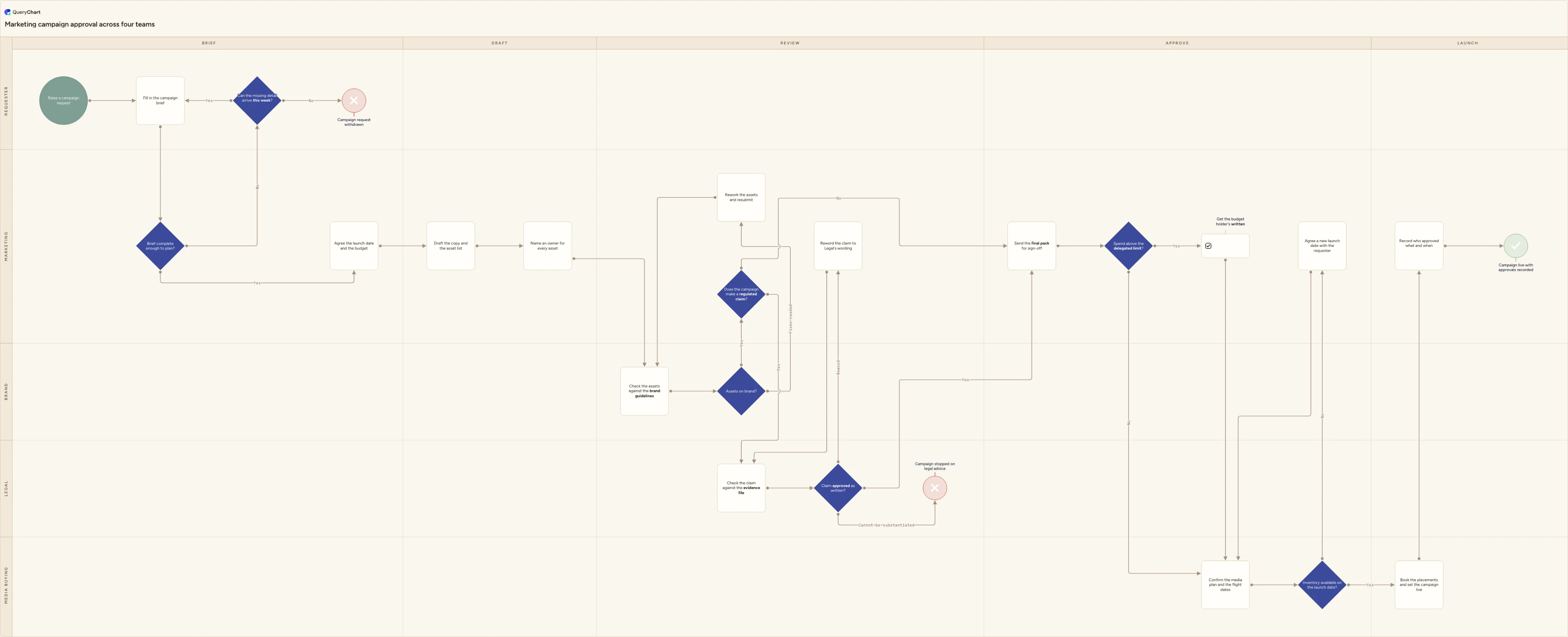
A CSV of campaign steps drawn as a swimlane flowchart: marketing approval across Requester, Marketing, Brand, Legal and Media buying, with the export's owner column read as a lane so every handoff is visible.
What the CSV swimlane flowchart template (campaign approval) process is
A CSV is what comes out of a system, not what you work in. It has no formulas, no sheets, no cell formatting and no merged headers: one header line, then one line per record, fields separated by a delimiter and wrapped in double quotes only when a field contains that delimiter itself. That flatness is why it imports cleanly and also why it carries no structure of its own: nothing in the file says which column is a step, which is a person, and which is a due date somebody added for a report last quarter. QueryChart resolves that by matching header names rather than column positions. Rename the headers your export already has to Box text, Line to, Line text, Shape, Horizontal lane and Vertical lane, drop the file onto the spreadsheet area of the editor, and every other column comes along untouched and unused.
The column that decides whether you get a swimlane chart or a flat one is the owner column, and almost every export has it under some name: Owner, Assignee, Responsible, Team, Approver. In the source system it is a filter. On a chart it is a position on the page, and that changes what it tells you. A list sorted by owner shows you four blocks of tasks. The same rows with that column renamed Vertical lane show you the moments where work leaves one team and arrives at another, which is where campaigns actually stop. Two rules make the import behave: lanes are keyed by their label, so Legal, legal and Legal Team become three lanes rather than one, and a row with an empty lane cell carries no lane, so the handoff it represents vanishes even though its box is still drawn.
The chart below is a marketing campaign approval, five stage columns wide and five team lanes deep, and it is deliberately drawn so that no team can complete it alone. A requester raises and briefs; Marketing plans, drafts and reworks; Brand checks the assets; Legal is entered only when the campaign makes a claim that needs evidence; Media buying confirms inventory and books. Fifteen of its connectors cross a lane boundary, and each of those crossings is a place where a campaign can wait a week. Two decisions carry limits you are meant to overwrite with your own (a spend threshold and a definition of a regulated claim) and three separate endings record how a campaign really stops: live, withdrawn, or stopped on legal advice.
What this flowchart covers
In this template
- Five stage columns (Brief, Draft, Review, Approve and Launch) crossed with five team lanes: Requester, Marketing, Brand, Legal and Media buying. In the file those two axes are nothing more than two text columns, Horizontal lane and Vertical lane, and no other column decides which lane a row belongs to.
- The owner column read as a lane rather than as a step. "Name an owner for every asset" is the row where that column gets filled in, and it asks for one named person per asset because a team mailbox in an owner cell produces a lane nobody can be asked about.
- The first crossing, drawn rather than assumed: "Check the assets against the brand guidelines" moves the work out of Marketing into Brand, and the fixes branch of "Assets on brand?" hands it back to "Rework the assets and resubmit" in the Marketing lane, so a single round of comments crosses the boundary twice.
- Legal entered by condition, not by habit. "Does the campaign make a regulated claim?" is the only route into that lane, and "Claim approved as written?" carries three labelled exits: approved, a reword that returns to "Check the claim against the evidence file", and "Campaign stopped on legal advice" when the claim cannot be evidenced at all.
- A spend gate that keeps sign-off in one place: "Spend above the delegated limit?" routes anything over your own threshold through "Get the budget holder's written approval" before the media plan is touched, and everything under it straight to Media buying.
- Booking and closure with a loop back across lanes: "Inventory available on the launch date?" sends a No to "Agree a new launch date with the requester" in the Marketing lane, and the run ends at "Campaign live with approvals recorded" after "Record who approved what and when", or earlier at "Campaign request withdrawn".
When to use this template
- You have a CSV export from a project tool, a campaign tracker or a ticket queue, no editor open, and someone has asked you to show the approval process.
- Four or more teams touch a campaign and the export's owner column is the only record of who did what, filtered rather than drawn.
- Campaigns keep stalling between teams and nobody can name the handoff, because a list shows where each task stopped but not which boundary it stopped at.
- Legal is being asked to clear a claim days before launch, and you want the point where that review is supposed to start marked on a diagram.
- An agency, an auditor or a regulator has asked who approved a specific claim, and the answer currently lives in a chain of messages rather than in a process.
The CSV that produces this diagram
One row per step. The numbers in Line to are row numbers — that is what draws the connectors, and it is the column most files are missing.
| # | Shape | Box text | Line to | Line text | Horizontal lane | Vertical lane |
|---|---|---|---|---|---|---|
| 1 | Start | Raise a campaign request | 2 | Brief | Requester | |
| 2 | Process | Fill in the campaign brief | 3 | Brief | Requester | |
| 3 | Decision | Brief complete enough to plan? | 6, 4 | Yes, No | Brief | Marketing |
| 4 | Decision | Can the missing detail arrive this week? | 2, 5 | Yes, No | Brief | Requester |
| 5 | Reject | Campaign request withdrawn | Brief | Requester | ||
| 6 | Process | Agree the launch date and the budget | 7 | Brief | Marketing | |
| 7 | Process | Draft the copy and the asset list | 8 | Draft | Marketing | |
| 8 | Process | Name an owner for every asset | 9 | Draft | Marketing | |
| 9 | Process | Check the assets against the brand guidelines | 10 | Review | Brand | |
| 10 | Decision | Assets on brand? | 12, 11 | Yes, Fixes needed | Review | Brand |
| 11 | Process | Rework the assets and resubmit | 9 | Review | Marketing | |
| 12 | Decision | Does the campaign make a regulated claim? | 13, 17 | Yes, No | Review | Marketing |
| 13 | Process | Check the claim against the evidence file | 14 | Review | Legal | |
| 14 | Decision | Claim approved as written? | 17, 15, 16 | Yes, Reword, Cannot be substantiated | Review | Legal |
| 15 | Process | Reword the claim to Legal's wording | 13 | Review | Marketing | |
| 16 | Reject | Campaign stopped on legal advice | Review | Legal | ||
| 17 | Process | Send the final pack for sign-off | 18 | Approve | Marketing | |
| 18 | Decision | Spend above the delegated limit? | 19, 20 | Yes, No | Approve | Marketing |
| 19 | Approval | Get the budget holder's written approval | 20 | Approve | Marketing | |
| 20 | Process | Confirm the media plan and the flight dates | 21 | Approve | Media buying | |
| 21 | Decision | Inventory available on the launch date? | 23, 22 | Yes, No | Approve | Media buying |
| 22 | Process | Agree a new launch date with the requester | 20 | Approve | Marketing | |
| 23 | Process | Book the placements and set the campaign live | 24 | Launch | Media buying | |
| 24 | Stored data | Record who approved what and when | 25 | Launch | Marketing | |
| 25 | Success | Campaign live with approvals recorded | Launch | Marketing |
#,Shape,Box text,Line to,Line text,Horizontal lane,Vertical lane
1,Start,Raise a campaign request,2,,Brief,Requester
2,Process,Fill in the campaign brief,3,,Brief,Requester
3,Decision,Brief complete enough to plan?,"6, 4","Yes, No",Brief,Marketing
4,Decision,Can the missing detail arrive this week?,"2, 5","Yes, No",Brief,Requester
5,Reject,Campaign request withdrawn,,,Brief,Requester
6,Process,Agree the launch date and the budget,7,,Brief,Marketing
7,Process,Draft the copy and the asset list,8,,Draft,Marketing
8,Process,Name an owner for every asset,9,,Draft,Marketing
9,Process,Check the assets against the brand guidelines,10,,Review,Brand
10,Decision,Assets on brand?,"12, 11","Yes, Fixes needed",Review,Brand
11,Process,Rework the assets and resubmit,9,,Review,Marketing
12,Decision,Does the campaign make a regulated claim?,"13, 17","Yes, No",Review,Marketing
13,Process,Check the claim against the evidence file,14,,Review,Legal
14,Decision,Claim approved as written?,"17, 15, 16","Yes, Reword, Cannot be substantiated",Review,Legal
15,Process,Reword the claim to Legal's wording,13,,Review,Marketing
16,Reject,Campaign stopped on legal advice,,,Review,Legal
17,Process,Send the final pack for sign-off,18,,Approve,Marketing
18,Decision,Spend above the delegated limit?,"19, 20","Yes, No",Approve,Marketing
19,Approval,Get the budget holder's written approval,20,,Approve,Marketing
20,Process,Confirm the media plan and the flight dates,21,,Approve,Media buying
21,Decision,Inventory available on the launch date?,"23, 22","Yes, No",Approve,Media buying
22,Process,Agree a new launch date with the requester,20,,Approve,Marketing
23,Process,Book the placements and set the campaign live,24,,Launch,Media buying
24,Stored data,Record who approved what and when,25,,Launch,Marketing
25,Success,Campaign live with approvals recorded,,,Launch,Marketing
How it works
Open the CSV in a text editor before you open it anywhere else
Look at three things on the first two lines. The delimiter: exports from systems set to a European locale use semicolons, not commas, and a semicolon file pasted into a comma importer arrives as one long column. The encoding: if an accented character shows as two symbols, the file is not UTF-8 and needs re-exporting or converting. And the quoting: any field that itself contains the delimiter must be wrapped in double quotes, which is what stops a step called "Draft, review and send" from becoming two columns.
Rename the export's headers to the editor's
The import matches header names, not positions, so this is the whole mapping job and you do it in the header row. Task or Step becomes Box text. Type or Category becomes Shape. Stage, Phase or Status becomes Horizontal lane. Owner, Assignee or Team becomes Vertical lane. Leave everything else alone — ticket ids, dates, cost centres are carried through and ignored, so you do not have to strip the file down before importing it.
Decide which column is really the lane
Exports usually offer two candidates, an individual and a team. Choose the one whose values you want to see as bands across the page. Named individuals give you a lane per person, which on a campaign of any size produces twenty thin lanes and no readable handoffs; the team column gives you four or five. Then normalise the spelling in that column before importing, because lanes are keyed by the label, so Legal and Legal Team are two lanes and one of them will look empty.
Add the two columns your export does not have
A task list records what happened, not what leads to what, so no export has edges in it. Line to holds the row numbers a row connects to, comma-separated, and Line text holds the connector labels in matching order — "4,5" against "Yes,No". Fill these in last, after the rows are in the order you want, and remember they are positions: inserting a row above shifts every number below it, so add rows at the end while you are still wiring.
Set the lane on every row, including the ones you would rather not
A handoff is only visible if the two rows either side of it sit in different lanes, so the rework and reroute rows matter most. "Rework the assets and resubmit" is in Marketing even though it happens during Brand review, and "Agree a new launch date with the requester" is in Marketing even though Media buying raised the problem. Put each row in the lane of whoever does the work, not whoever asked for it, and the delays show up as long connectors.
Overwrite the two thresholds with your own numbers
"Spend above the delegated limit?" ships without a figure and "Does the campaign make a regulated claim?" ships without a definition, because both are yours. Write the currency amount on the first and, on the second, list what counts: a price, a comparison, a health or environmental statement, a superlative. Undefined, the first diamond sends either everything or nothing to the budget holder, and the second is answered differently by every person who reaches it.
Frequently asked questions
What columns does a CSV need before it can become a swimlane flowchart?
Four are doing the work and two more make it a swimlane. Box text is the label inside the box. Line to is the row number or numbers that row connects to, comma-separated. Line text is the connector labels in matching order. Shape names the box type — Start, Process, Decision, End, Success, Reject and a longer list beyond those. Horizontal lane and Vertical lane place the row in the grid. That is the whole contract: the import matches on these header names rather than on column positions, extra columns are carried and ignored, and anything you do not supply simply defaults, so a file with only Box text and Line to still imports as a plain unlaned chart.
How do you turn an owner column into a swimlane?
Rename the header to Vertical lane and fix the values. Every distinct string in that column becomes a lane, keyed by its label, which produces the two problems worth knowing about in advance. Spelling variants split a lane in three: Legal, legal and Legal Team will all be drawn. And blank cells produce rows with no lane, which is worse than it sounds on a swimlane chart, because the point of the drawing is the boundary a row sits on and a row with no lane crosses nothing. Sort the file by that column first, read the distinct values, decide the four or five you want, and replace the rest before importing. It is faster than fixing lanes in the editor afterwards.
Who owns a marketing campaign approval process?
Marketing owns the flow; nobody owns all of it. That split is the reason to draw it as lanes rather than as a checklist. Marketing owns the brief, the draft, every rework and the record of approvals at the end, so the campaign always comes back to one lane between checks. Brand owns the guidelines and applies them, which is why the brand check is a separate lane and not a step Marketing performs on itself. Legal owns whether a claim can be evidenced, and is entered by a decision rather than by courtesy, so the lane stays empty on campaigns that make no claim. Media buying owns inventory and the flight dates, which is the only lane that can say a launch date is impossible. The requester owns the facts in the brief and, at the top of the chart, the decision to withdraw.
My CSV imports as one long column, or the accented characters are wrong. What happened?
Two different faults, both in the file rather than in the process. One long column means the delimiter is not the one being parsed — most often a semicolon, which is what exports produce when the source system or the machine that ran the export is set to a locale where the comma is the decimal separator. Re-export choosing comma-separated, or replace the semicolons in a text editor once you have checked no field contains one. Mangled accents mean the encoding is not UTF-8: a file saved as Windows-1252 or Latin-1 shows a single accented letter as two characters. Both faults survive a trip through a spreadsheet program silently, which is why it is worth opening a CSV in a plain text editor once before you import it.
What breaks if I add a row in the middle after wiring it up?
Every connector below the insertion point, and nothing tells you. Line to holds row numbers, which are positions rather than identities, so inserting a row at position 8 makes the old row 8 into row 9 while every Line to value still points at 8. The chart still draws — it just draws the wrong edges, and an edge pointing at a row that no longer exists is dropped with no message at all. Two habits avoid it. While you are building from a CSV, append new rows at the bottom and wire them by number rather than inserting them in reading order. Once the chart is in the editor, add and reorder rows there instead, because the editor keeps the connections attached as positions shift.