CSV decision tree template (refund eligibility)
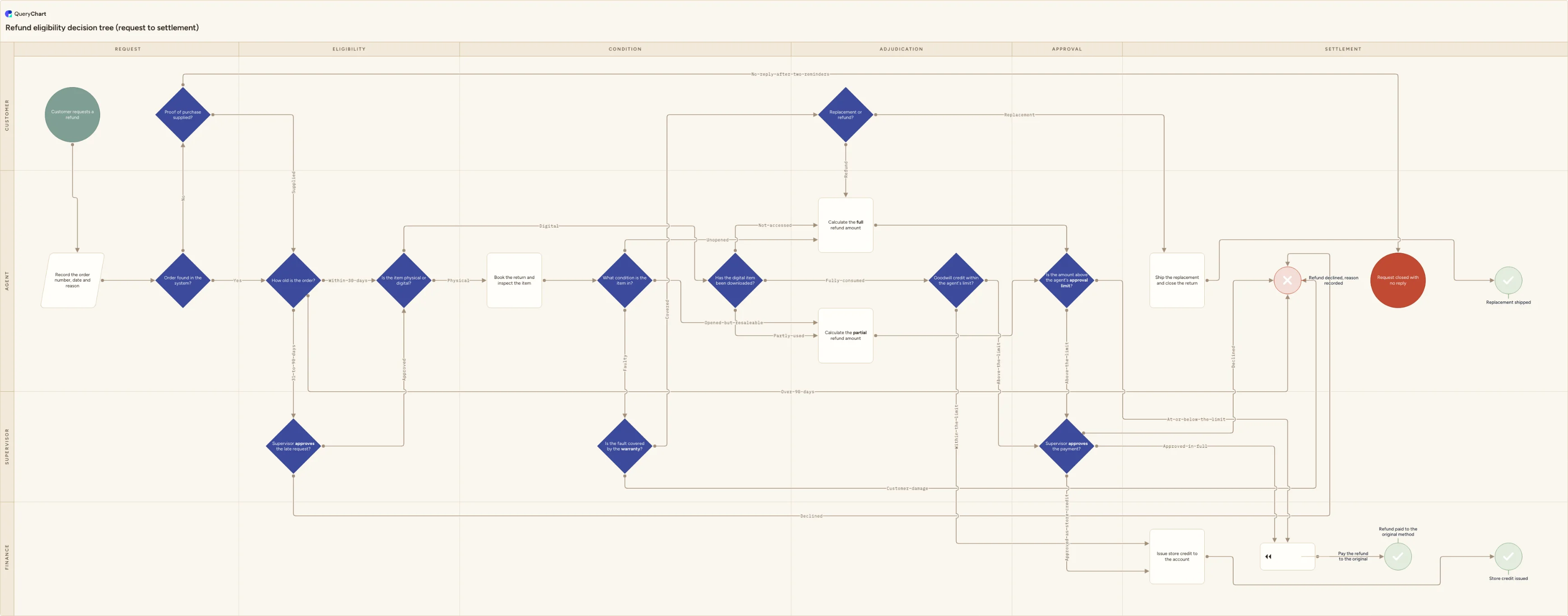
A refund eligibility decision tree built from a CSV export: 25 rows, 12 labelled decisions, four of them three-way, and five separate endings. Shows how Line to and Line text pair up position by position.
What the CSV decision tree template (refund eligibility) process is
A CSV is what comes out of a system, not what you work in. Refund requests arrive as an export from a helpdesk, an order management tool or a payment processor: one header line, one row per request, a delimiter between the fields, and nothing else. No formulas, no second sheet, no cell formatting, no colour marking the ones that were escalated. That flatness is why a CSV moves between systems that agree on nothing else, and it is also why a decision tree written as a CSV has to carry its structure in named columns instead of in the geometry of a picture.
Four columns do the work here and the rest of the sheet is optional. Shape says what the box is: Start, Decision, Process, Success, Reject, End. Box text is the question or the step. Line to holds the row numbers this row leads to, comma-separated. Line text holds the branch labels, comma-separated, in the same order. That last clause is the whole format. Row 5 of the chart below asks how old the order is; its Line to cell reads 7,6,21 and its Line text cell reads Within 30 days,31 to 90 days,Over 90 days, so the first number takes the first label, the second takes the second and the third takes the third. Nothing binds a label to a number except its position in the list, which is why a decision tree survives being a text file at all and why one stray comma inside a label breaks a branch.
Import matches header names, not column positions, so an export can keep the columns you do not use: Ticket ID, Assignee, Created at and the rest are carried along and ignored. Drop the .csv onto the spreadsheet area of the editor, or paste the CSV text into it. The tree below is a refund policy drawn the way a policy is actually applied: six columns of depth crossed with four lanes, from the customer's request to one of five endings, with twelve labelled decisions between them and no loop anywhere. A refund request is judged once. What varies is which of the five endings it reaches, and this chart's job is to make each of those five reachable by exactly one stated route.
What this flowchart covers
In this template
- Six depth columns (Request, Eligibility, Condition, Adjudication, Approval and Settlement) crossed with four lanes: Customer, Agent, Supervisor and Finance. A row's Horizontal lane cell says how deep in the tree it sits, its Vertical lane cell says who answers it.
- Twelve decision rows out of twenty-five, opening with two intake gates before any policy is applied: "Order found in the system?", and when it is not, "Proof of purchase supplied?" with a second exit for the customer who stops replying.
- The pairing rule shown on a three-way branch. Row 5, "How old is the order?", carries Line to 7,6,21 and Line text Within 30 days,31 to 90 days,Over 90 days: three numbers, three labels, matched by position and by nothing else.
- Two sub-trees hanging off "Is the item physical or digital?". A physical return goes through "Book the return and inspect the item" and "What condition is the item in?"; a digital one skips both and answers "Has the digital item been downloaded?" from the access log.
- Escalation as a lane rather than a footnote: "Supervisor approves the late request?" for the middle age band, "Is the amount above the agent's approval limit?" routing on a currency figure, and "Supervisor approves the payment?" giving the supervisor a third exit: store credit instead of cash.
- Five separate endings: "Refund paid to the original method", "Store credit issued", "Replacement shipped", "Refund declined, reason recorded" and "Request closed with no reply": so an abandoned request stops being counted as an open one.
When to use this template
- Your refund rules exist as a policy paragraph and a shared inbox, and nobody can say what happens to an item returned on day 45.
- You have a CSV export of open refund requests and you want the decision tree your agents are already applying from memory.
- Two agents give two different answers to the same case, and the disagreement turns out to be about a threshold nobody has written down.
- Escalations reach a supervisor with no stated reason, so each one is argued from the beginning instead of from the branch that produced it.
- A chargeback dispute or an audit asks you to show which rule was applied to one specific order, and the rule only exists in an email thread.
The CSV that produces this diagram
One row per step. The numbers in Line to are row numbers — that is what draws the connectors, and it is the column most files are missing.
| # | Shape | Box text | Line to | Line text | Horizontal lane | Vertical lane |
|---|---|---|---|---|---|---|
| 1 | Start | Customer requests a refund | 2 | Request | Customer | |
| 2 | Input | Record the order number, date and reason | 3 | Request | Agent | |
| 3 | Decision | Order found in the system? | 5, 4 | Yes, No | Request | Agent |
| 4 | Decision | Proof of purchase supplied? | 5, 22 | Supplied, No reply after two reminders | Request | Customer |
| 5 | Decision | How old is the order? | 7, 6, 21 | Within 30 days, 31 to 90 days, Over 90 days | Eligibility | Agent |
| 6 | Decision | Supervisor approves the late request? | 7, 21 | Approved, Declined | Eligibility | Supervisor |
| 7 | Decision | Is the item physical or digital? | 8, 11 | Physical, Digital | Eligibility | Agent |
| 8 | Process | Book the return and inspect the item | 9 | Condition | Agent | |
| 9 | Decision | What condition is the item in? | 12, 13, 10 | Unopened, Opened but resaleable, Faulty | Condition | Agent |
| 10 | Decision | Is the fault covered by the warranty? | 14, 21 | Covered, Customer damage | Condition | Supervisor |
| 11 | Decision | Has the digital item been downloaded? | 12, 13, 15 | Not accessed, Partly used, Fully consumed | Condition | Agent |
| 12 | Process | Calculate the full refund amount | 16 | Adjudication | Agent | |
| 13 | Process | Calculate the partial refund amount | 16 | Adjudication | Agent | |
| 14 | Decision | Replacement or refund? | 19, 12 | Replacement, Refund | Adjudication | Customer |
| 15 | Decision | Goodwill credit within the agent's limit? | 18, 17 | Within the limit, Above the limit | Adjudication | Agent |
| 16 | Decision | Is the amount above the agent's approval limit? | 20, 17 | At or below the limit, Above the limit | Approval | Agent |
| 17 | Decision | Supervisor approves the payment? | 20, 18, 21 | Approved in full, Approved as store credit, Declined | Approval | Supervisor |
| 18 | Process | Issue store credit to the account | 24 | Settlement | Finance | |
| 19 | Process | Ship the replacement and close the return | 25 | Settlement | Agent | |
| 20 | Compensation | Pay the refund to the original payment method | 23 | Settlement | Finance | |
| 21 | Reject | Refund declined, reason recorded | Settlement | Agent | ||
| 22 | End | Request closed with no reply | Settlement | Agent | ||
| 23 | Success | Refund paid to the original method | Settlement | Finance | ||
| 24 | Success | Store credit issued | Settlement | Finance | ||
| 25 | Success | Replacement shipped | Settlement | Agent |
#,Shape,Box text,Line to,Line text,Horizontal lane,Vertical lane
1,Start,Customer requests a refund,2,,Request,Customer
2,Input,"Record the order number, date and reason",3,,Request,Agent
3,Decision,Order found in the system?,"5, 4","Yes, No",Request,Agent
4,Decision,Proof of purchase supplied?,"5, 22","Supplied, No reply after two reminders",Request,Customer
5,Decision,How old is the order?,"7, 6, 21","Within 30 days, 31 to 90 days, Over 90 days",Eligibility,Agent
6,Decision,Supervisor approves the late request?,"7, 21","Approved, Declined",Eligibility,Supervisor
7,Decision,Is the item physical or digital?,"8, 11","Physical, Digital",Eligibility,Agent
8,Process,Book the return and inspect the item,9,,Condition,Agent
9,Decision,What condition is the item in?,"12, 13, 10","Unopened, Opened but resaleable, Faulty",Condition,Agent
10,Decision,Is the fault covered by the warranty?,"14, 21","Covered, Customer damage",Condition,Supervisor
11,Decision,Has the digital item been downloaded?,"12, 13, 15","Not accessed, Partly used, Fully consumed",Condition,Agent
12,Process,Calculate the full refund amount,16,,Adjudication,Agent
13,Process,Calculate the partial refund amount,16,,Adjudication,Agent
14,Decision,Replacement or refund?,"19, 12","Replacement, Refund",Adjudication,Customer
15,Decision,Goodwill credit within the agent's limit?,"18, 17","Within the limit, Above the limit",Adjudication,Agent
16,Decision,Is the amount above the agent's approval limit?,"20, 17","At or below the limit, Above the limit",Approval,Agent
17,Decision,Supervisor approves the payment?,"20, 18, 21","Approved in full, Approved as store credit, Declined",Approval,Supervisor
18,Process,Issue store credit to the account,24,,Settlement,Finance
19,Process,Ship the replacement and close the return,25,,Settlement,Agent
20,Compensation,Pay the refund to the original payment method,23,,Settlement,Finance
21,Reject,"Refund declined, reason recorded",,,Settlement,Agent
22,End,Request closed with no reply,,,Settlement,Agent
23,Success,Refund paid to the original method,,,Settlement,Finance
24,Success,Store credit issued,,,Settlement,Finance
25,Success,Replacement shipped,,,Settlement,Agent
How it works
Export the requests, then keep four columns
Take the export you already have and rename its headers to Shape, Box text, Line to and Line text. Add Horizontal lane and Vertical lane if you want the depth and the roles drawn as lanes, and Line style only if you want a branch coloured. Everything else in the export can stay where it is: import matches on header names, so column order does not matter and unrecognised columns are carried and ignored rather than rejected.
Make the header row the first line of the file
Reporting tools often write a title line, a date stamp or a blank row above the headers. A CSV has no concept of a title, so line one is read as the header row whatever it says, and a file whose first line is Report generated 12/03 imports with one column called Report generated 12/03. Open the file in a text editor and delete everything above the headers, plus any trailing blank lines at the bottom, which arrive as empty rows.
Number the rows before you write Line to
Line to holds positions, not names or ids: 7 means the seventh data row, counting from 1 under the header. Write the whole tree out in the order you want it first, then fill in the numbers. If you sort or reorder the file afterwards, every number in the column still points at a position and now points at the wrong row, and nothing about the file looks wrong. Sorting a CSV of steps is the fastest way to silently rewire a tree.
Pair Line to and Line text one for one
The two cells are read as two lists and matched by position, so they must have the same number of entries: 7,6,21 with Within 30 days,31 to 90 days,Over 90 days. There are two layers of commas here and only the outer one can be escaped. A field containing a comma is quoted in the file, which is why the box text Record the order number, date and reason is fine; a branch label containing a comma is not rescued by quoting, because the label list is split on commas after the quotes come off. Write Opened but resaleable, never Opened, resaleable.
Put your own numbers into the three thresholds
Three rows carry a figure this template only guesses at. The age bands on the request are 30 and 90 days; replace them with your published window and with the range a supervisor may still approve. The agent approval limit is a currency amount, not a judgement, and it should sit where the tail of large refunds escalates without turning the supervisor lane into a queue. And partly used needs a definition for digital goods — one download, one lesson watched, one licence key revealed.
Check the delimiter and the encoding before you import
Look at line one in a plain text editor. Semicolons between the headers mean the file was saved by an application using a European list separator, and read as comma-separated it collapses into a single column. Save it as UTF-8 as well: an export written in a legacy codepage turns £, é and — into replacement characters that then sit inside your box labels, and a UTF-8 byte order mark can attach itself to the first header so that Shape stops matching the Shape column.
Frequently asked questions
How do you write a three-way branch in a CSV?
The same way you write a two-way one, with one more entry in each of the two cells. On row 5 of this chart the Line to cell reads 7,6,21 and the Line text cell reads Within 30 days,31 to 90 days,Over 90 days. The first number pairs with the first label, the second with the second, the third with the third. There is no limit implied by the format and nothing in it assumes yes and no, which matters for a real policy: age bands, item condition and a supervisor's options are rarely binary, and forcing them into nested yes/no diamonds doubles the number of rows without adding a single rule. Four of this chart's twelve decisions have three exits.
What happens if Line to and Line text have different numbers of entries?
The pairing is by position, so a missing label does not leave a gap where it was — it pulls every later label one place forward onto the wrong arrow. Drop the Yes from a three-branch row and the second branch is labelled with what belonged to the first. The reason this is worth checking by hand is that neither cell is malformed on its own: both are ordinary comma-separated text, both survive any CSV parser, and the file gives you no signal at all. Count the commas in the two cells of every decision row before you import, and treat a decision whose arrows are not all labelled as a bug rather than a style choice.
Why does my CSV import as a single column?
Almost always the delimiter. Saving a sheet as CSV uses the list separator configured for the machine's locale, so a file produced on a machine set to a European locale is semicolon-delimited while still being called .csv. Read as comma-separated, each line is one field and you get one very wide column. Open the file in a plain text editor and look at the header line: if the separators are semicolons or tabs, re-export with commas or replace them. Do the same check for the encoding at the same time, because an accented character rendered as a pair of stray symbols in the text editor will be stored exactly that way in your box labels.
Do I have to delete the columns my helpdesk export adds?
No. Import matches header names rather than column positions, so Ticket ID, Assignee, Created at, Channel and anything else in the export are carried through and ignored. Two practical consequences: you do not need to reorder anything before importing, and you can keep the reference data next to the process so a row remains traceable to the ticket it came from. The one thing to check is that you have not accidentally left two columns with the same header, which is easy to do when an export names a column Notes and the sheet already has one.
How is a CSV decision tree different from building the same thing in Excel?
A CSV has no formulas, no sheets, no cell types and no formatting, so nothing in the file can compute a branch or hide a rule in a conditional format. Everything the tree does has to be written literally in Line to and Line text, which is a limitation when you are editing and a benefit when someone else has to read it or diff it in version control. It is also worth remembering what a CSV is for: it is what a system gives you on the way out. Nobody maintains a policy in one. Export it, import it once, and from then on edit the chart and the sheet together rather than round-tripping the text file.