How to create a process for ISO 13485
ISO 13485 makes the records evidence for a regulator: verification against the design input, validation against the user's need, a transfer gate, and a rationale on every kill branch.
A process for ISO 13485 is a documented procedure whose outputs are regulatory evidence: risk feeds every stage, each design output is verified against its input, and the device is then validated in use.
The short version
- Verification tests the output against the design input; validation tests the device against user need.
- Every kill, reject and rework branch carries a recorded rationale: a stopped route is still evidence.
- Design transfer is a gate: the specification has to be manufacturable, not merely correct.
- Where 9001 lets an organisation decide, 13485 names a documented procedure clause by clause.
- Risk is an input to each stage rather than a register reviewed once at the business case.
Verification and validation are two boxes
ISO 13485 is built on ISO 9001 and diverges on two things that change how a process gets drawn. Risk is not a way of thinking here, it is a file, traceable from intended use through hazards to residual risk, and consulted at each stage. And the records are not written for the organisation's own improvement: an inspector reads them years later, without the people who made the decisions. A process that is adequate under 9001 and silent about why an option was rejected is incomplete under 13485.
Verification and validation are not two names for testing. One asks about the specification, the other about the user, and each is recorded against its own acceptance criteria, which is why merging them into one testing row is the commonest design-control finding there is. A merged box yields one outcome where the design file needs two, and an outcome nobody can attach to a requirement is not evidence it was met. Most inherited development flows sit in that state, this page's example among them.
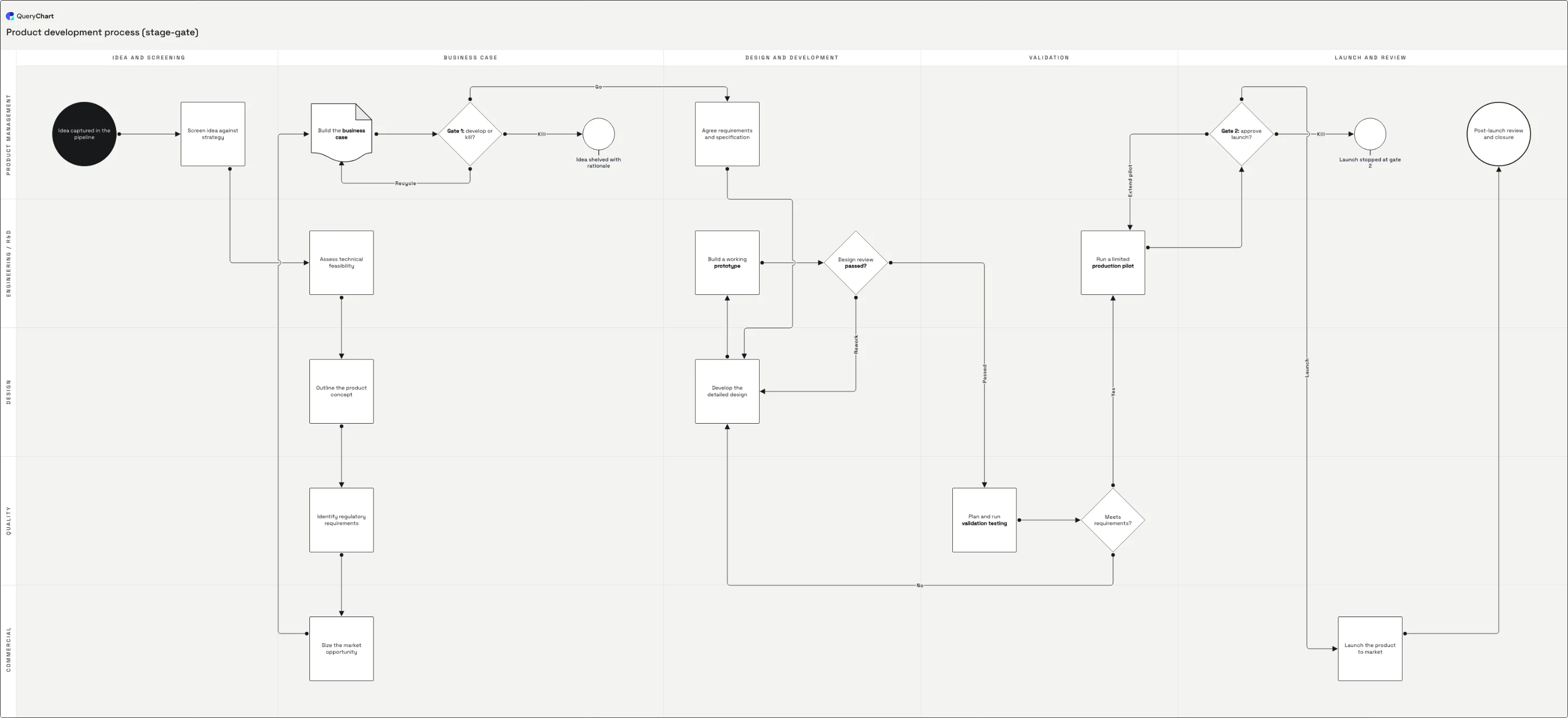
The example below is a general stage-gate development flow, and it carries exactly one testing row: "Plan and run validation testing". Nothing in it verifies a design output against the specification, which is that collapse in its purest form, so read the chart as the before state and add the row it lacks after "Build a working prototype". What it does get right is the stopping routes: two failures return to "Develop the detailed design", and each gate keeps a Reject row whose job is to hold a reason.
Take an idea to a transferable design
A stage-gate development flow with one testing row and no verification step. Read it as the before state, then add the box it is missing.
Regulation is a design input
Idea, screen, feasibility, concept, then "Identify regulatory requirements". It sits in the Quality lane while the business case is still being built rather than after a design exists. Intended use and the applicable regulation are inputs to be verified against later, not a review at the end.
A kill needs a reason on file
"Gate 1: develop or kill?" arrives with both stopping routes drawn: "Recycle" returns the case to "Build the business case" and "Kill" ends at "Idea shelved with rationale", a box whose purpose is its last word. "Go" arrives in the next stage. A gate that can only be passed is a milestone.
Two tests, one row on the chart
Rework goes back: "Design review passed?" sends it to "Develop the detailed design", and its "Passed" branch straight into "Plan and run validation testing". That row is the validation; no row verifies the output against the specification, and "Meets requirements?" fails back to the design too.
Transfer is a gate, not a handover
Design transfer belongs at "Run a limited production pilot": the point at which a design that works has to be shown to be manufacturable on the line that will make it. "Gate 2: approve launch?" then sends "Extend pilot" back to that pilot and "Kill" to "Launch stopped at gate 2".
How it works
Write the design inputs first
Intended use, user needs, the applicable regulatory requirements, and the risk controls that follow from them. These are the things verification will later be tested against, so a vague input makes verification unfalsifiable. An input that cannot be shown to have been met is an input that gets argued about at the audit.
Decide which records the file must hold
List them before drawing anything: review minutes naming the functions present, verification and validation protocols and results, the rationale behind each rejected option, transfer evidence, and the risk file at each stage. The map's job is to show where each of those is produced, so every record needs a row producing it.
Type the stages in, then add the missing test
One row per stage in the Box text column. Then add the row this example does not have: a verification step after "Build a working prototype", its Line to pointing at the design review, so the review reads verification results and "Plan and run validation testing" is left answering the user's question alone.
Give every gate a branch that stops it
Each gate takes Decision in the Shape column, with its outcomes in Line text in the order the numbers appear in Line to. Give the stopping outcome a Reject row of its own instead of an arrow into space: in a design file the route that was not taken is evidence somebody will have to read.
Check reviewer independence in the lanes
13485 wants each design review to include representatives of the functions concerned and someone independent of the stage under review. Typing every owner into the Vertical lane column makes that checkable: in the example "Design review passed?" sits in the Engineering / R&D lane, beside the prototype it is reviewing.
Trace one requirement through the file
Take one design input (a requirement from "Identify regulatory requirements") and follow it forward. It should reach a row that verifies it against the specification, a row that validates it in use, and a review that read both results. A requirement reaching only one of the three is the gap an inspector finds.
Mistakes to avoid
Merging verification and validation
Verification and validation answer different questions against different acceptance criteria and produce separate records. Merged, the file cannot show which requirement a passing result satisfied, and that is the finding.
Gates nobody can fail
Where no branch leaves a gate except the one that continues, the review is a status meeting. The kill and rework routes are what make it a control, and the reasoning behind them belongs in the design file.
Mistaking a handover for transfer
Sending drawings to manufacturing is not transfer. Transfer is the demonstration that the specification can be produced repeatably with the process, equipment and people that will produce it, and it has an acceptance record.
Assessing risk once, at the concept
A risk assessment written at the concept stage and never reopened cannot account for what the design became. Consult the risk file at every stage the design changes, and record what the change did to it.
Create your own design control process
Open the stage-gate example as your own chart, add the verification row it is missing, and give every gate a recorded outcome.
Related guides
Frequently asked questions
What is the difference between verification and validation?
Verification asks whether a design output meets the design input specified for it: a measured dimension against a drawing, a tested output against a stated requirement. Validation asks whether the resulting device meets user needs and intended use, under conditions representing actual use and on product made by the intended process. Verification can pass on a device that is wrong for its user; validation is what catches that. ISO 13485 requires plans, records and conclusions for both, separately.
What does ISO 13485 clause 7.3 require?
Planning, documented design inputs and outputs, reviews at planned stages, verification, validation, transfer, control of design changes, and a design and development file per device type or family. Each of those is a record obligation as much as an activity. The clause also requires the inputs to include applicable regulatory requirements and the outputs of risk management, which is what separates a 13485 development process from a stage-gate process with a quality step added to it.
What is design transfer in ISO 13485?
Design transfer is the verified translation of a design into production specifications: procedures, tooling, inspection methods, training and acceptance criteria that let the device be made repeatably. The standard requires transfer procedures with records verifying that design outputs are suitable for manufacturing before production begins. Treating it as the moment drawings reach the plant is why first production lots fail for reasons no prototype ever showed.
Is ISO 13485 stricter than ISO 9001 about procedures?
Yes, deliberately. ISO 9001:2015 lets an organisation decide what documented information it needs; ISO 13485:2016 names documented procedures clause after clause (design and development, purchasing, production control, complaint handling, corrective action) and keeps the quality manual requirement that 9001 dropped. The practical consequence is that a process map here is not optional supporting material: it is part of the procedure a regulator asks to see, at the revision that applied.