How to schedule a budget planning cycle with a Gantt chart
Schedule the annual budget cycle in working days: guidance issue, department submissions, review rounds, consolidation and approval, and see how one late submission moves the approval date.
A budget calendar usually lists one date per step. A Gantt chart shows how each step depends on the one before it, so you can see what a late submission or a second review round does to the approval date.
The short version
- Make guidance issue, submissions received and budget approved milestones so the dates are results.
- Overlap finance support with department drafting rather than queueing it after.
- Model each review round as a task that waits for the previous one.
- Test what an extra round does to the approval date before promising one.
- A timeline schedules the cycle; it does not set targets or check numbers.
From a budget calendar to a budget timeline
The calendar that goes out with budget guidance is usually fixed before anyone has submitted anything. It says when departments submit, when reviews happen and when leadership decides. Those dates are promises, and the promises are made without a model of what depends on what. When a department is late, the question is which later dates are really affected, and a list of dates cannot answer it.
The approach here is to describe the cycle as phases with dependencies. Guidance is built and issued. Departments draft while finance supports them. Submissions are checked and then loop through review and revision. Finance consolidates, leadership reviews and approves, and the approved budgets are communicated and loaded. Each of those is a task with a length in working days and something it waits for. The approval date becomes a result, not an input.
Two things make a budget schedule different from other project plans. The review rounds repeat, so adding a round is a real change to the finish date, not a note in the margin. And a lot of the work is support: finance answers questions while departments write, which is parallel work that should overlap, not queue. See /guides/gantt-chart-dependencies for start-to-start and finish-to-finish links.
A timeline schedules the budget process. It does not set targets, test assumptions or check numbers, and it is not financial advice. For who approves what, see /templates/annual-budget-process and /templates/budget-approval-workflow. The example below builds the budget planning template in stages with illustrative durations.
A budget cycle, built in stages
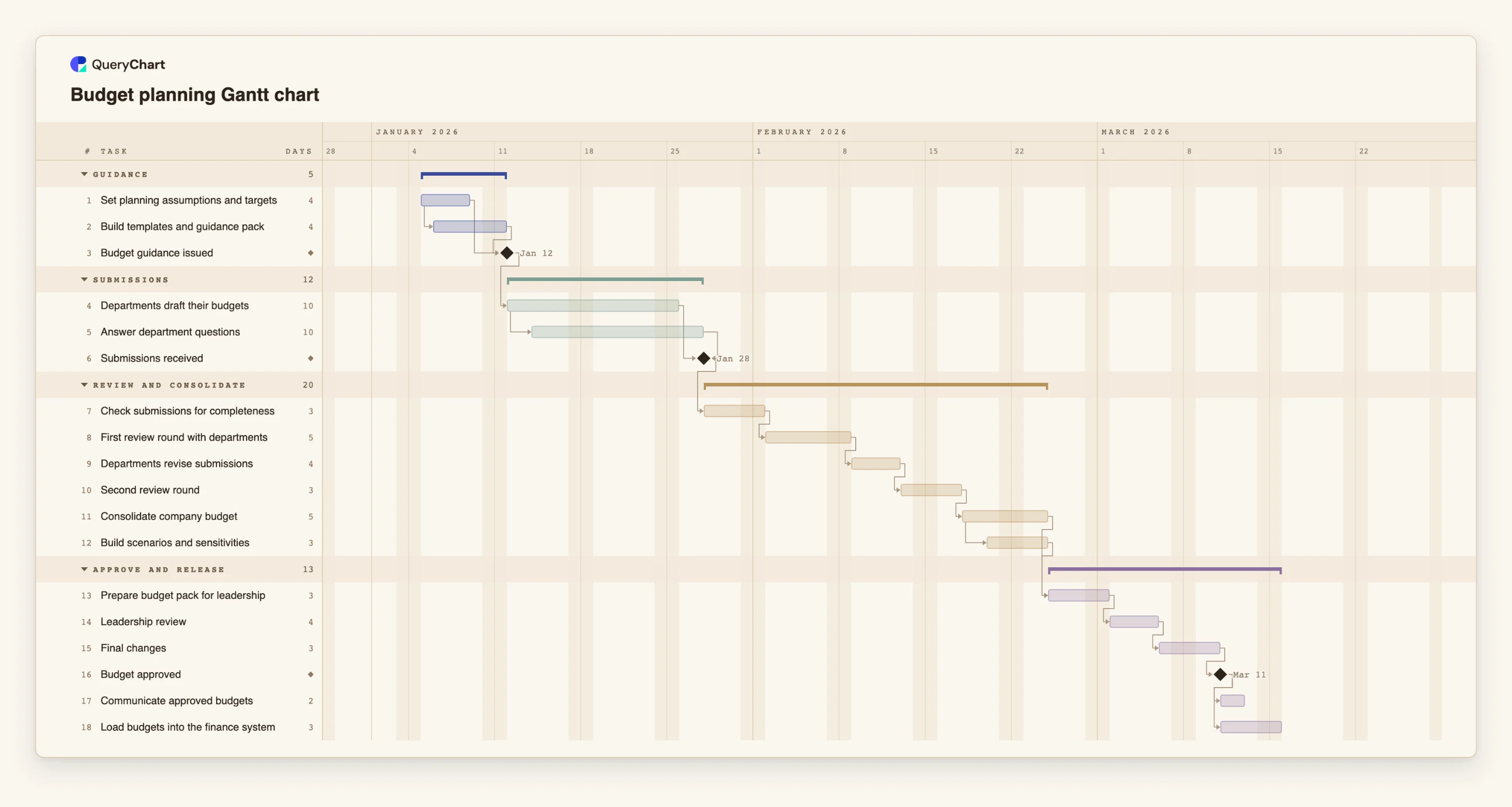
Eighteen tasks in four phases. Durations are illustrative working days; set your own. Open the spreadsheet panel to see the rows behind each stage.
Guidance and submissions
"Build templates and guidance pack" starts one working day after "Set planning assumptions and targets" starts, and "Budget guidance issued" waits for both. "Departments draft their budgets" takes 10 days, "Answer department questions" starts two days after it and also runs 10, and "Submissions received" waits for both.
Review rounds
"Check submissions for completeness" (3 days) is followed by "First review round with departments" (5), "Departments revise submissions" (4) and "Second review round" (3). Each waits for the one before, so an added round moves everything after it.
Consolidation and the leadership pack
"Consolidate company budget" takes 5 days. "Build scenarios and sensitivities" starts two working days after consolidation starts, and "Prepare budget pack for leadership" (3 days) waits for both.
Approval and release
"Leadership review" (4 days) and "Final changes" (3) lead to the "Budget approved" milestone. "Communicate approved budgets" (2 days) and "Load budgets into the finance system" (3) then run side by side.
How it works
List the phases of your cycle
Write the stages you really run: guidance, submissions, review, consolidation, approval, release. Each becomes a group, and the hand-offs between them become milestones.
Enter lengths from experience
Give every task a length in whole working days from the last cycle. Treat the numbers as estimates and change them as the cycle goes on.
Link each task to what it waits for
Fill in Depends on. Use start-to-start with a lag where support or scenario work really overlaps, and finish-to-start for the gates.
Add the review rounds you run
Add one pair of tasks, review and revise, for each round. The chart shows how much each round adds to the approval date.
Compare the finish date with the date you need
Read the finish date of the approval milestone. If it is later than the date you need, switch on View, Critical path to see the chain to shorten, or pin a Start where a date is fixed.
Share it with the department heads
Share the chart, put owners in People, update progress as submissions arrive and export a PDF for the guidance pack.
Mistakes to avoid
Fixing the approval date first
If the approval date is entered as a fact, nothing in the plan can disagree with it. Let the dates come from the durations and then compare the result with the date you need.
Treating review as one task
Two rounds with revision between them take more than twice one round. Model each round, so a request for another one has a visible cost.
Queueing support after drafting
Questions arrive while departments write. If finance support is scheduled after drafting it adds time that does not exist in practice.
Forgetting weekends and holidays
QueryChart schedules Monday to Friday and has no holiday calendar. Add a day to a task where a public holiday falls inside it.
Open the budget planning Gantt chart
Open the budget planning template, change the durations to yours and see when approval is realistic.
Related guides
Frequently asked questions
Can I plan a rolling forecast this way?
Yes. Shorten each task, drop the second review round and reuse the chart each period.
How do I add a department?
Add a task under the Submissions group for each department, link it to the guidance milestone and to the submissions milestone. The group summary shows the whole span.
Can I paste in a budget calendar I already have?
Copy the rows and paste them into the sheet. If the first line names columns such as Task, Duration and Depends on, each column is matched by name. There is no file upload for Gantt charts yet.
Does the chart show budget amounts?
No. QueryChart schedules the cycle in working days. It does not track cost or budget figures; keep those in your finance system.
Where is the approval process itself?
In the flowchart templates. See /templates/budget-approval-workflow and /templates/annual-budget-process, and /templates/year-end-close-gantt for the close that follows the year.