How to schedule trial loads, reconciliation and the freeze
Schedule a data migration on a Gantt chart: overlap profiling and mapping, plan trial load cycles with fixes between them, gate cutover on reconciliation and size the source freeze.
Most data migration delays come from the trial loads and the freeze. This guide shows how to plan trial load cycles, make reconciliation a gate and size the source freeze so the cutover date can be defended.
The short version
- Overlap profiling and mapping so early findings change the mapping before it is approved.
- Run cleansing and script building in parallel, and start the first trial load on partly cleansed data if that is realistic.
- Plan two or more trial loads with a fix task between each pair.
- Make reconciliation sign-off a milestone that the freeze waits for.
- Give the source freeze its own task and length so the business impact can be discussed.
Planning the loads, not just the migration
A plan with a single task called "migrate data" cannot be wrong in an interesting way. The ways data migrations actually slip are specific: the first trial load shows rejects the profile did not predict, a mapping decision changes after cleansing has started, reconciliation turns up a difference nobody can explain, or the freeze needed for the final load is longer than the business accepted. Each of these is a task with a length and a dependency, and each can be planned.
The method is to schedule the loop, not the straight line. Profile and map with overlap so that early findings feed the mapping. Build scripts while data is being cleansed. Plan at least two trial loads with a fix task between them, because the second is the one that tells you whether the first fixes worked. Make reconciliation a milestone that the cutover plan waits for, and put the freeze in as a task with its own length, so its cost to the business is visible before anyone agrees to it.
A Gantt chart shows how these pieces push each other. A third trial load moves the sign-off, the sign-off moves the freeze, and the freeze moves the go-live date. It does not show whether the data is right. That evidence is the output of your reconciliation and validation work and belongs in your project record, with a reference in the task notes.
The example builds the data migration template in stages. Durations are illustrative. For the decisions and rollback logic drawn as a flowchart, see /templates/data-migration-process.
A data migration plan, built in stages
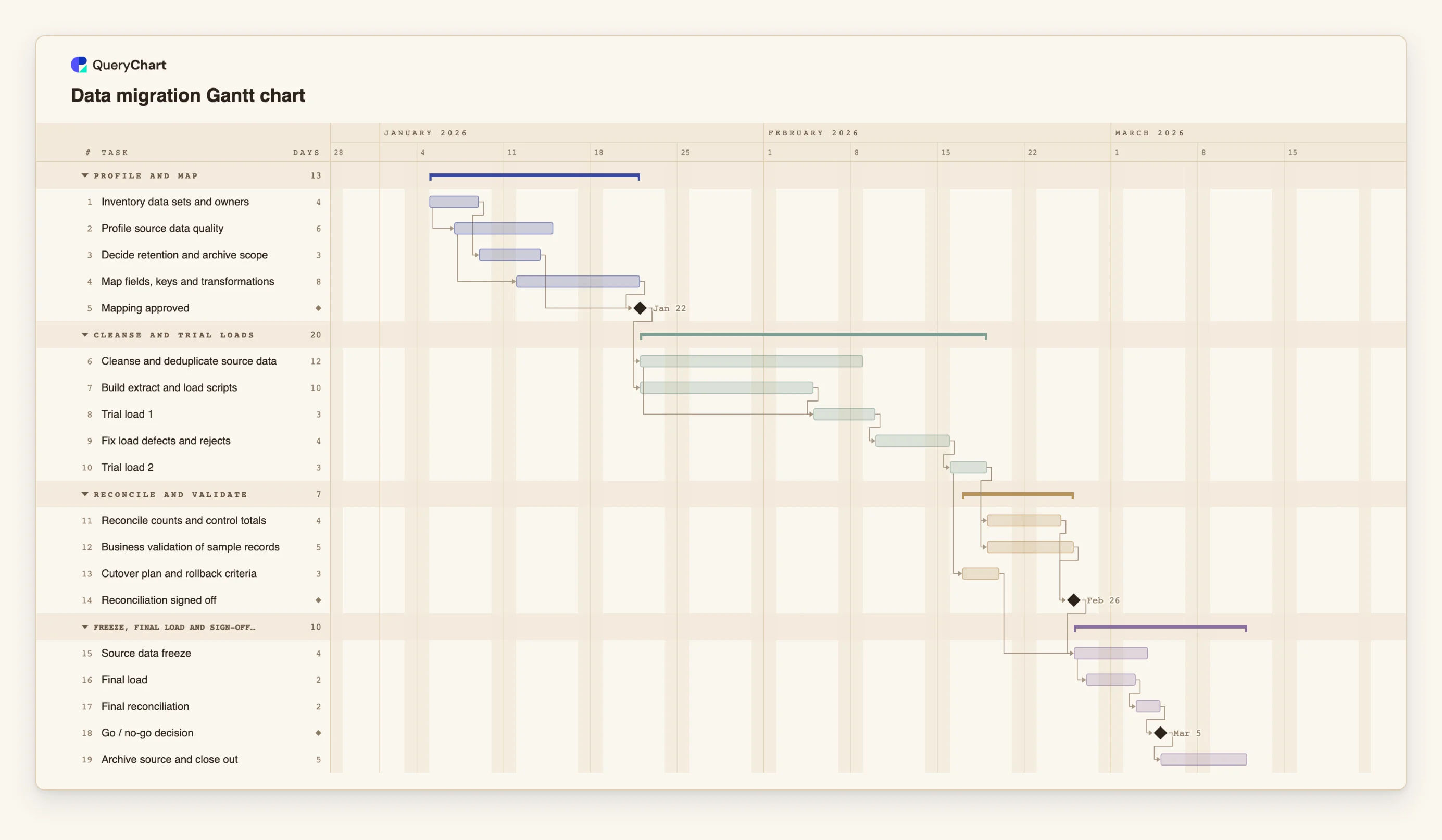
Nineteen tasks in four phases. Durations are illustrative; set your own. Open the spreadsheet panel to see the rows behind each stage.
Inventory, profile and map with overlap
"Profile source data quality" starts two working days after "Inventory data sets and owners" starts, and "Map fields, keys and transformations" starts three working days after profiling starts. "Mapping approved" waits for the mapping and for "Decide retention and archive scope".
Cleansing, scripts and two trial loads
"Cleanse and deduplicate source data" (12 working days) and "Build extract and load scripts" (10) both follow "Mapping approved". "Trial load 1" starts five working days into cleansing, then "Fix load defects and rejects" (4) and "Trial load 2".
Reconciliation as a gate
"Reconcile counts and control totals" (4 working days) and "Business validation of sample records" (5) both follow "Trial load 2". "Cutover plan and rollback criteria" starts one working day after the trial load starts. "Reconciliation signed off" waits for the first two.
Freeze, final load and sign-off
"Source data freeze" (4 working days) waits for the sign-off and the cutover plan. The final load starts one working day after the freeze starts. "Final reconciliation" and the "Go / no-go decision" follow, then "Archive source and close out".
How it works
Overlap profiling and mapping
Start profiling a few days into the inventory and mapping a few days into profiling, for example 2SS+3. Findings from the profile then change the mapping while it is still open.
Gate the build on an approved mapping
Put a milestone of length 0 between mapping and everything built on it. Include the retention decision in the same milestone so you do not map data you will not move.
Plan the trial load cycle
Add a trial load, a fix task and a second trial load. If you expect more cycles, duplicate the pair. Set the lengths from your volumes, not from the example.
Run reconciliation and business validation side by side
Both follow the last trial load and both feed a sign-off milestone. Write the acceptance criteria, such as which counts and totals must match, in the task notes before the load runs.
Size the freeze from the final load
Add the freeze as a task, start the final load a day into it with a start-to-start link, and follow it with the final reconciliation. Lengthen the load and see how long the freeze must be.
Share it with the business owners
Put the data owner in People, share the chart, and export a PDF for the cutover record. Update progress as work is done.
Mistakes to avoid
Planning a single trial load
One trial load leaves no way to see whether the fixes worked. Plan at least two, with the fix task between them, and add a third if the first shows many rejects.
Freezing before reconciliation is signed off
A freeze that starts on a date, not on the sign-off, can begin while differences are still unexplained. Make the freeze depend on the sign-off milestone.
Hiding the freeze in the load
If the freeze is not its own task, nobody can see its length until the final week. Put it in the chart, so the business can agree to a window while there is time to change it.
Taking an on-time plan for correct data
The chart shows that reconciliation was planned and done. Whether the data is correct is shown by the counts, totals and samples you record.
Open the data migration Gantt chart
Open the data migration template, change the trial load lengths and see the go-live date move.
Related guides
Frequently asked questions
How many trial loads do I need?
It depends on the volumes, the quality of the source and how stable the mapping is. Two with a fix between them is a common minimum to plan. Add more pairs if the first load is likely to show many rejects.
Where does data cleansing belong in the plan?
After the mapping is approved, in parallel with building the scripts, so that cleansing rules follow the mapping. The first trial load can start on partly cleansed data if that is realistic for your source.
Can I paste a task list from a spreadsheet?
Yes. Copy the rows and paste them into the sheet. If the first line names columns such as Task, Duration and Depends on, each column is matched by name. There is no file upload for Gantt charts yet.
Does the chart check reconciliation results?
No. It schedules the reconciliation tasks and the sign-off. The results belong in your project record.
Where can I see the path that sets the go-live date?
Use View, then Critical path, to light the chain of tasks that sets the finish date. See /guides/gantt-chart-critical-path.