How to plan an ERP implementation on a Gantt chart, module by module
Plan an ERP implementation on a Gantt chart: fit-gap, overlapping module builds, repeated data loads, UAT cycles, a cutover rehearsal and hypercare, with the dependencies that set the go-live date.
An ERP plan is a set of cycles, not a straight line. This guide shows how to lay out fit-gap, module builds, data loads and test cycles so the go-live date comes from the dependencies and not from a hope.
The short version
- Plan by module and by cycle: loads and test rounds are tasks, not footnotes.
- Overlap module builds with start-to-start links, not by shortening the durations.
- Let the later data load wait for the last module it has to populate.
- Gate go-live on the rehearsal and on training, so a late rehearsal moves the decision.
- Treat cycle counts as assumptions and read their cost off the finish date.
Plan the cycles, not just the phases
The usual ERP plan has five phases and a go-live date. It is easy to present and it hides the work that actually decides the date: how many times the data will be loaded, how many rounds of user testing the business will need, and whether the cutover has been rehearsed. When those are missing from the schedule they still happen. They happen after the plan has said go-live is close.
The method here is to plan by module and by cycle. Finance or the core ledger is configured first and sets the start of the other modules. Each following module overlaps its predecessor, because configuration teams can work in parallel but not all at once. Data is loaded in at least two cycles, with the later one waiting for the last module it must populate. Testing is a sequence of cycles with a repair task between them, and training and the rehearsal both gate the go-live decision.
Treat the number of cycles as an assumption you can change. A clean data source and a small scope may need one load and one UAT cycle. A multi-entity group with years of legacy data may need more. Adding a cycle to the chart shows the cost in working days at once, which is easier to discuss with a steering group than a general worry about quality.
This guide is about the schedule. The same shape fits a CRM or any packaged business system, and the product name changes nothing in the dependency logic. For a shorter, single-pass plan see /guides/implementation-plan-timeline-gantt-chart. For the process steps, decisions and roles behind each phase, see /templates/enterprise-software-implementation-process and /templates/data-migration-process.
An ERP rollout, built in stages
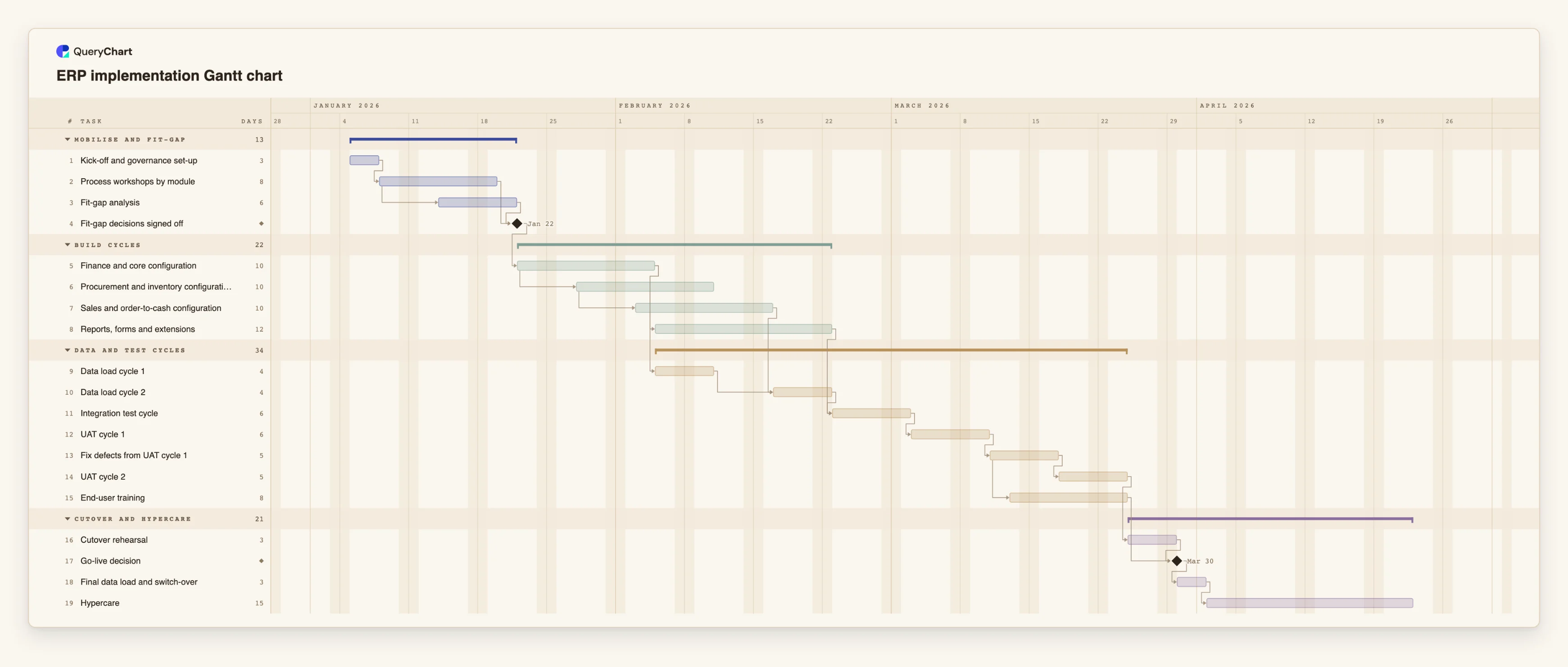
Nineteen tasks in four phases. Durations are illustrative; set your own. Open the spreadsheet panel to see the rows behind each stage.
Fit-gap before any build
"Process workshops by module" takes 8 working days. "Fit-gap analysis" (6) starts four working days after the workshops start, and the "Fit-gap decisions signed off" milestone waits for both.
Modules built in overlapping cycles
"Finance and core configuration" (10 days) comes first. "Procurement and inventory configuration" starts four working days after it starts, and "Sales and order-to-cash configuration" four after that. "Reports, forms and extensions" (12) follows finance.
Repeated loads and test cycles
"Data load cycle 2" waits for "Data load cycle 1" and for the sales configuration. "Integration test cycle" waits for the second load and the extensions. Then "UAT cycle 1", "Fix defects from UAT cycle 1" and "UAT cycle 2" run in sequence, with "End-user training" starting two days after the fixes start.
Rehearse, decide, switch over
"Cutover rehearsal" follows the second UAT cycle. The "Go-live decision" milestone waits for the rehearsal and for "End-user training". "Final data load and switch-over" takes 3 days and "Hypercare" 15.
How it works
List the modules in the order they depend on each other
Put the ledger or core first and ask of each other module what it needs from the ones before. Create one configuration task per module.
Overlap builds with start-to-start links
If the next module can begin four days after the previous one starts, write that as 5SS+4 in Depends on. Do not shorten the durations to fake the overlap.
Add each data load and the task it waits for
Make the first load follow the core configuration. Make the last load depend on the last module it must populate, so a late module moves the load.
Add the test cycles with a repair task between them
Link integration testing, the first UAT cycle, the repair task and the second cycle in a chain. Decide how many cycles you assume and add or remove rows to match.
Gate go-live on the rehearsal and on training
Add a milestone of length 0 for the go-live decision and link the rehearsal and training to it. Follow it with the final load, the switch-over and hypercare.
Check the critical path and compare with the date you need
Switch on the critical path from the View menu, read the finish date, and compare it with the date the business needs. Change a cycle count or a dependency and see what moves.
Mistakes to avoid
One load and one test cycle
A plan with a single data load and a single round of testing assumes nothing is found. Plan at least a first and second load and a fix task between test cycles, then adjust to your data.
Starting the build before the gaps are decided
If configuration begins before the fit-gap is signed off, decisions are made in the build. Keep a sign-off milestone and make the build depend on it.
Treating training as the last task
Training scheduled after the go-live decision leaves users untrained on the day. Link it as a predecessor of the decision and start it once the fixes are in.
Reading the plan as readiness
A chart that shows every task on time says nothing about the quality of the data or the configuration. Keep test results and defect counts in your project records.
Open the ERP implementation Gantt chart
Open the ERP template, change the modules and cycle counts to yours and see the go-live date move.
Related guides
Frequently asked questions
How many data load cycles should an ERP plan have?
It depends on how clean the source data is and how many systems feed the new one. The template uses two, with illustrative durations. Add a cycle for each source that needs significant cleansing.
Can I plan a rollout by country or business unit?
Yes. Repeat the build, load and test tasks for each wave, group them by wave, and link the second wave's first task to the first wave's go-live or to an earlier milestone if work can overlap.
Does this work for a CRM or other system?
Yes. The dependency structure of configure, load, test, rehearse and go live is the same. Rename the module tasks to match your system and keep the cycles you expect.
Can QueryChart track the budget or effort per module?
No. It has durations in working days, owners, progress and notes. Cost and effort tracking belong in your finance or project tool.
How is the rehearsal different from UAT?
UAT tests that the business can do its work in the system. The rehearsal tests the cutover itself: the final load, the sequence of switch-over steps and how long they take. Plan them as separate tasks.