How to plan cloud migration waves and cutover on a Gantt chart
Plan a cloud migration on a Gantt chart: map dependencies, split workloads into waves, build the landing zone in parallel, rehearse the cutover and schedule decommissioning after hypercare.
The hard part of a cloud migration timeline is deciding what moves together and what each wave waits for. This guide shows how to turn a workload inventory into waves, a landing zone, a rehearsed cutover and a retirement date.
The short version
- Trace dependencies while discovery is running, so workloads that must move together are known before the waves are fixed.
- Treat the landing zone as its own stream with a ready milestone that the first wave waits for.
- Run a pilot wave first and put a task for lessons learned between it and the larger waves.
- Overlap later waves with a start-to-start link, but never start a wave before its rehearsal inputs exist.
- Decommission the source after a hypercare period, and check the retirement date against your contract dates.
From a workload list to a wave plan
A workload inventory is a list. A migration plan is an order. The difference is dependencies: an application cannot move before the database it calls, a batch job cannot move before the file share it writes to, and nothing moves before the place it is going to exists. Teams that skip this step end up with waves that look tidy on a slide and fail on the first weekend, because half of a wave's connections were left behind.
The method here has three moves. First, trace dependencies while discovery is still running, so groups of workloads that must move together appear early. Second, make the landing zone a separate stream of work with its own tasks and a ready milestone, rather than a line at the top of the plan. Third, put the source environment's retirement behind a hypercare period, so the question of when it can be switched off has a visible answer.
A Gantt chart helps with the part a list cannot show: which date moves when another one does. If the network build takes four days longer, the pilot wave moves, then every wave after it, then the retirement date. If discovery finds a tangled application, the wave plan changes before the landing zone does. The chart does not tell you which strategy suits a workload or whether the target is secure. It schedules the work you have decided on.
The example builds the cloud migration template in stages. Durations are illustrative. For the process rather than the schedule, see the deployment process at /templates/software-deployment-process and the recovery process at /templates/disaster-recovery-process.
A cloud migration plan, built in stages
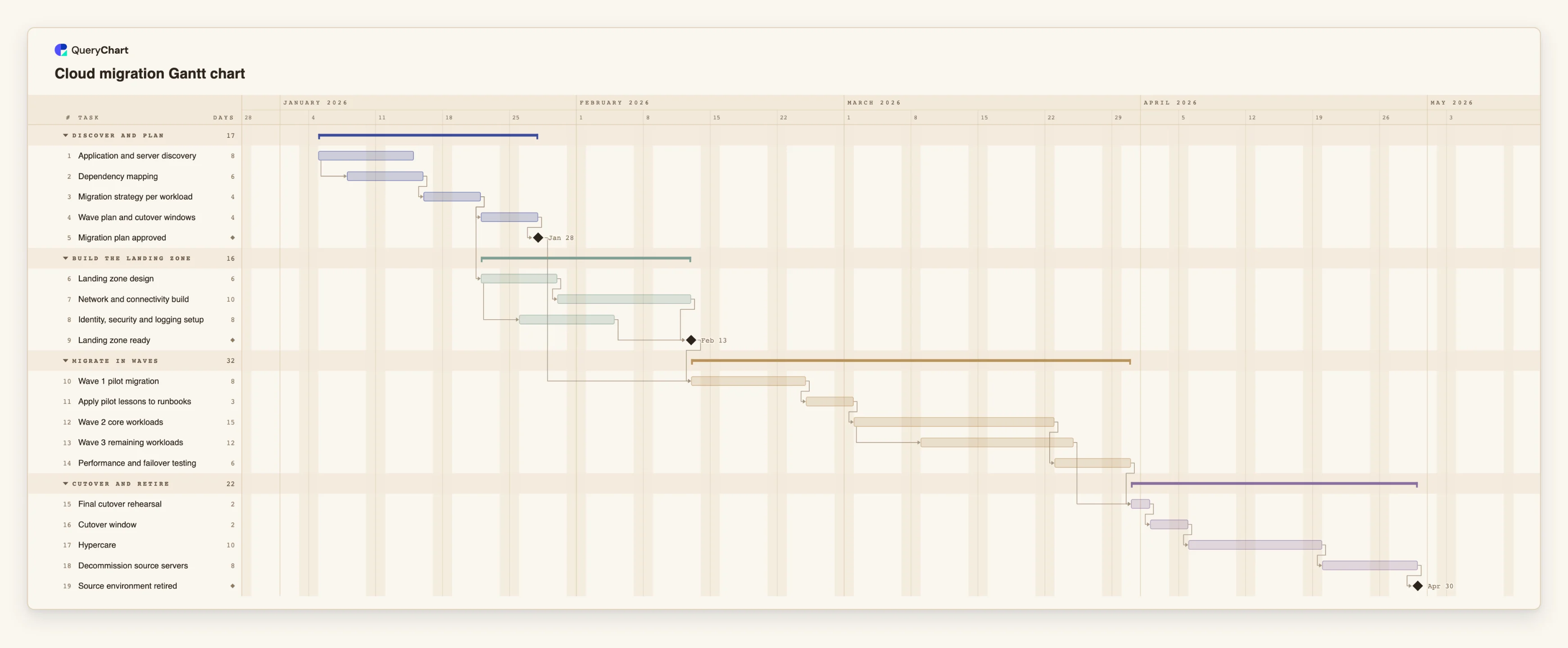
Nineteen tasks in four phases. Durations are illustrative; set your own. Open the spreadsheet panel to see the rows behind each stage.
Discovery, dependencies and the wave plan
"Application and server discovery" takes 8 working days. "Dependency mapping" starts three working days after it starts, so tracing begins on the first findings. "Migration strategy per workload" and "Wave plan and cutover windows" follow, ending at the "Migration plan approved" milestone.
The landing zone, built beside the plan
"Landing zone design" starts once the strategy is known, not when the plan is approved. "Network and connectivity build" takes 10 working days and "Identity, security and logging setup" takes 8, starting two working days after the design starts. "Landing zone ready" waits for both.
Pilot first, then the larger waves
"Wave 1 pilot migration" (8 working days) waits for "Migration plan approved" and "Landing zone ready". "Apply pilot lessons to runbooks" follows it, then "Wave 2 core workloads" (15). "Wave 3 remaining workloads" starts five working days after wave 2 starts, and "Performance and failover testing" follows wave 2.
Rehearse, cut over, then retire
"Final cutover rehearsal" waits for wave 3 and for the testing. The "Cutover window" is 2 working days, "Hypercare" is 10, and "Decommission source servers" (8) follows it, ending at the "Source environment retired" milestone.
How it works
Start dependency mapping before discovery ends
Add "Dependency mapping" as its own task and link it start-to-start with discovery, for example 1SS+3. The first findings are enough to start, and the groups that must move together appear weeks sooner.
Make the landing zone a stream with a milestone
Give the landing zone design, network and identity work their own tasks, join them in a milestone of length 0, and make the first wave depend on it as well as on the approved plan.
Size waves by dependency groups
Put workloads that depend on each other in the same wave. Give each wave a task, and use the Group field to keep the waves, the landing zone and the cutover in separate bands.
Run a pilot and plan what you will change
Make wave 1 small, and add a task after it for changes to runbooks and tooling. Later waves depend on that task, so the time it takes shows up in the dates.
Overlap waves with a lag
Where a later wave can begin while an earlier one runs, use a start-to-start link with a lag, such as 12SS+5. Check that the people and the target capacity are there, because the chart does not check them.
Put retirement behind hypercare
Add hypercare as a task with a length that matches how long you want the source kept as a fallback, and make decommissioning follow it. Compare the finish date with the date you need.
Mistakes to avoid
Starting the pilot when the paperwork is ready
A signed plan is not a ready target. If wave 1 depends only on the approval, a late network build surprises everyone. Make the first wave wait for both the plan and the landing zone.
Waves split by team instead of by dependency
Moving everything one team owns on the same day often splits an application from its database. Split by what talks to what, and check the groups against the dependency mapping.
Switching off the source at cutover
If decommissioning starts at cutover, the fallback ends before the problems have appeared. Keep hypercare between them and give it a real length.
Treating the plan as a decision record
The chart shows when work is meant to happen. Strategy choices, security reviews and test results belong in your own records and change process, with a reference in the task notes.
Open the cloud migration Gantt chart
Open the cloud migration template, change the wave lengths to yours and see the retirement date move.
Related guides
Frequently asked questions
How many waves should a migration have?
It depends on the number of workloads and how tightly they depend on each other. The template uses three as an illustration. Add or remove wave tasks to match your groups.
Can I plan around a data centre exit date?
Compare the finish date of the retirement milestone with the date you need. If it is later, change a length or a dependency. Use a fixed Start only for dates that are genuinely fixed, such as a freeze; the chart flags a fixed start that conflicts with a dependency.
Does the chart track cost or capacity?
No. QueryChart schedules tasks, dependencies and progress. It does not track cost, effort or resource load, so keep those in the tool you already use.
Can I paste my workload list into the chart?
Yes. Copy rows from Excel, Sheets or a CSV and paste them into the sheet. If the first line names columns such as Task, Duration and Depends on, each column is matched by name.
Where do I see which tasks set the end date?
Switch on View, then Critical path, to light the chain of tasks that sets the finish date. See /guides/gantt-chart-critical-path for how to read it.