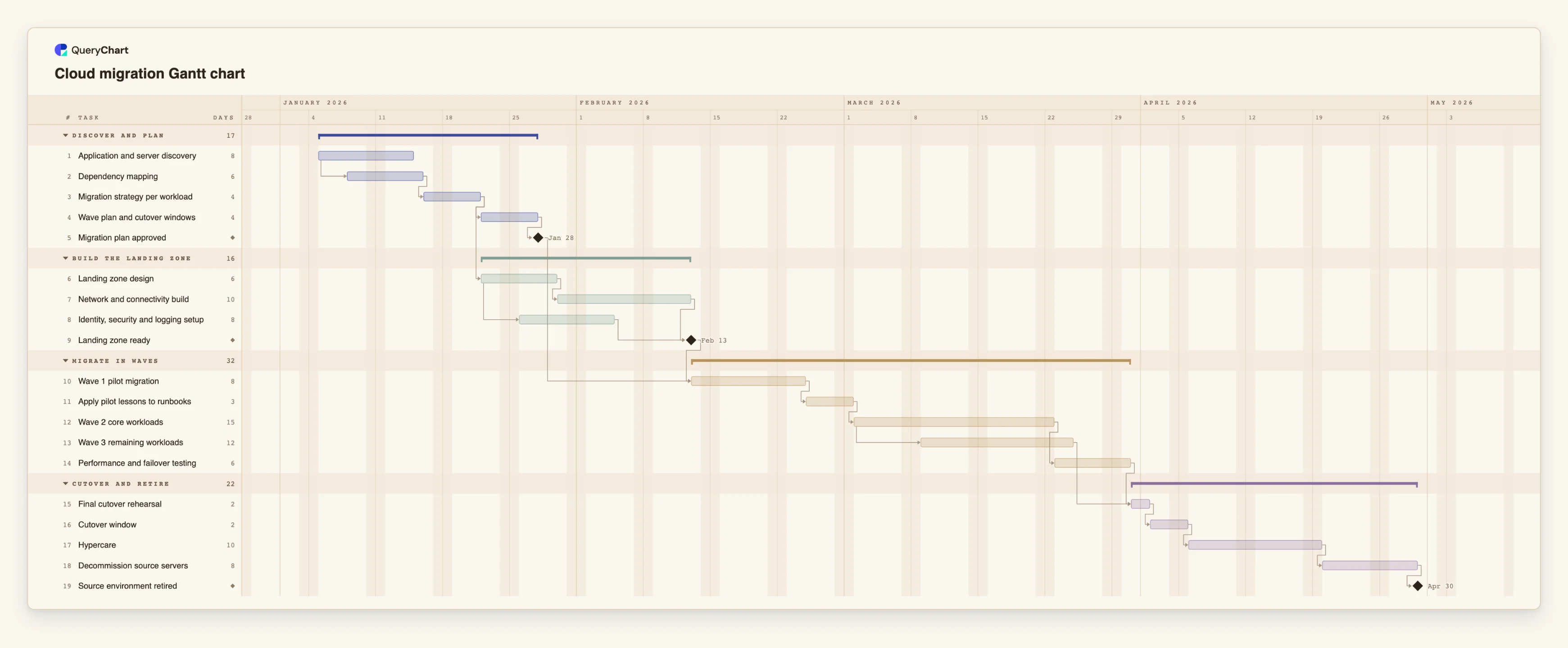
Cloud migration Gantt chart template with waves and cutover
An editable cloud migration Gantt chart: discovery, dependency mapping, a landing zone built in parallel, migration waves, cutover rehearsal, hypercare and decommissioning, with dependencies and milestones.
What the cloud migration gantt chart template with waves and cutover process is
A cloud migration is several projects sharing one deadline. Discovery and planning decide what moves and in what order. The landing zone, the network, identity and logging that workloads will land in, can be built at the same time. The waves then move workloads in batches, and the source environment cannot be switched off until the last wave has run in production for a while. A plan that lists these as one sequence overstates the length. A plan that treats them as independent hides the points where one waits for another.
This template has four phases: Discover and plan, Build the landing zone, Migrate in waves, and Cutover and retire. "Application and server discovery" is the only starting task. "Dependency mapping" starts three working days after discovery starts, because the first findings are enough to begin tracing connections, and "Migration strategy per workload" follows it. From there the plan splits. "Wave plan and cutover windows" leads to the "Migration plan approved" milestone, while "Landing zone design" starts as soon as the strategy is known and runs in parallel with the wave plan.
Inside the landing zone, "Network and connectivity build" (10 working days) and "Identity, security and logging setup" (8) both follow the design, and the second starts two working days after the design starts. "Landing zone ready" waits for both. "Wave 1 pilot migration" cannot start until both "Migration plan approved" and "Landing zone ready" are done, which is where plans of this kind most often slip: the paperwork is finished and the target is not, or the reverse. "Apply pilot lessons to runbooks" sits between the pilot and "Wave 2 core workloads", and "Wave 3 remaining workloads" starts five working days after wave 2 starts, so the last wave overlaps the core one.
After the waves, "Performance and failover testing" and wave 3 must both be done before "Final cutover rehearsal", then the "Cutover window", "Hypercare" (10 working days) and "Decommission source servers". "Source environment retired" is the closing milestone. All durations are illustrative. A real estate has workloads that cannot move together, licences with their own end dates and change freezes that this chart does not know about, so replace the lengths and the wave split with your own. A timeline schedules the work. It does not make a migration safe, secure or cost-effective, and it does not replace the runbooks, test results and approvals that your change process requires. For the process side, see the deployment process at /templates/software-deployment-process, the recovery process at /templates/disaster-recovery-process and the change process at /templates/it-change-management-workflow.
What this flowchart covers
In this template
- Four phases, Discover and plan, Build the landing zone, Migrate in waves and Cutover and retire, with 19 tasks and three milestones: "Migration plan approved", "Landing zone ready" and "Source environment retired".
- A start-to-start overlap in discovery: "Dependency mapping" starts three working days after "Application and server discovery" starts, before discovery is finished.
- A landing zone built beside the planning: "Landing zone design" follows "Migration strategy per workload" and runs in parallel with "Wave plan and cutover windows", with "Identity, security and logging setup" starting two working days after the design starts.
- A join that gates the first wave: "Wave 1 pilot migration" waits for both "Migration plan approved" and "Landing zone ready", then "Apply pilot lessons to runbooks" comes before "Wave 2 core workloads".
- Overlapping waves and a safe tail: "Wave 3 remaining workloads" starts five working days after wave 2 starts, and "Decommission source servers" waits for the 10-day "Hypercare".
When to use this template
- You are moving servers or applications to a cloud provider and need to show when planning, the landing zone, each wave and the cutover fall.
- You need to explain to a steering group or application owners why wave 1 cannot start until the landing zone is ready, whatever the plan says.
- You are asked how long the source environment has to stay switched on, for example because of a data centre or hosting contract end date.
- You want to test what happens to the retirement date if the network build or a wave takes longer than planned.
The plan, task by task
Every task in the chart with its length in working days and what it waits for. A dependency is a step number; SS is start-to-start, FF is finish-to-finish, and +n is a lag in working days.
| # | Task | Group | Working days | Depends on |
|---|---|---|---|---|
| 1 | Application and server discovery | Discover and plan | 8 | |
| 2 | Dependency mapping | Discover and plan | 6 | 1SS+3 |
| 3 | Migration strategy per workload | Discover and plan | 4 | 2 |
| 4 | Wave plan and cutover windows | Discover and plan | 4 | 3 |
| 5 | Migration plan approved | Discover and plan | Milestone | 4 |
| 6 | Landing zone design | Build the landing zone | 6 | 3 |
| 7 | Network and connectivity build | Build the landing zone | 10 | 6 |
| 8 | Identity, security and logging setup | Build the landing zone | 8 | 6SS+2 |
| 9 | Landing zone ready | Build the landing zone | Milestone | 7, 8 |
| 10 | Wave 1 pilot migration | Migrate in waves | 8 | 5, 9 |
| 11 | Apply pilot lessons to runbooks | Migrate in waves | 3 | 10 |
| 12 | Wave 2 core workloads | Migrate in waves | 15 | 11 |
| 13 | Wave 3 remaining workloads | Migrate in waves | 12 | 12SS+5 |
| 14 | Performance and failover testing | Migrate in waves | 6 | 12 |
| 15 | Final cutover rehearsal | Cutover and retire | 2 | 13, 14 |
| 16 | Cutover window | Cutover and retire | 2 | 15 |
| 17 | Hypercare | Cutover and retire | 10 | 16 |
| 18 | Decommission source servers | Cutover and retire | 8 | 17 |
| 19 | Source environment retired | Cutover and retire | Milestone | 18 |
How it works
Replace the discovery and planning lengths
Set the lengths of "Application and server discovery", "Dependency mapping" and "Migration strategy per workload" from the size of your estate. Keep the start-to-start link if tracing can begin before discovery ends.
Build the landing zone beside the plan
Keep "Landing zone design" and "Wave plan and cutover windows" as parallel tasks. Add tasks for anything else the target needs, such as shared services, and link them to "Landing zone ready".
Gate wave 1 on both sides
"Wave 1 pilot migration" depends on "Migration plan approved" and "Landing zone ready". Lengthen the network build and see which one sets the pilot start.
Split the waves to match your workloads
Rename or duplicate the wave tasks for your own groups of workloads. Use a lag on the start-to-start link where a later wave can begin while an earlier one is still running.
Add cutover, hypercare and decommissioning
Set "Hypercare" to how long you want the source kept as a fallback. Check the date "Source environment retired" gives you against any contract or licence end date you must meet.
Add owners, share and export
Put the responsible team in People, notes such as runbook references in the task notes, share the chart with the application owners and export a PDF for the change record.
Frequently asked questions
Does this chart choose a migration strategy for me?
No. It schedules the work. The task "Migration strategy per workload" is where you decide, for each workload, whether to move it as it is, change it or replace it. The chart only shows what waits for that decision.
Can I plan around a data centre contract end date?
Compare the finish date of "Source environment retired" with the date you need. If it is later, change a length or a dependency and watch the date move. A fixed Start is for dates that are genuinely fixed, such as a change freeze, and the chart flags one that conflicts with a dependency.
Are the working days real calendar days?
They are Monday to Friday. The chart has no holiday calendar, so add a task or lengthen a duration where a holiday or a freeze period falls.
How is this different from the data migration chart?
This one moves workloads and environments. The data migration chart at /templates/data-migration-gantt covers profiling, mapping, trial loads and reconciliation of the data itself. A large programme can use both.
Where is the flowchart for the same work?
The deployment process at /templates/software-deployment-process and the recovery process at /templates/disaster-recovery-process draw the decisions and handoffs. For a broader programme plan, see /templates/implementation-plan-gantt-chart.