Software deployment process flowchart: build to production
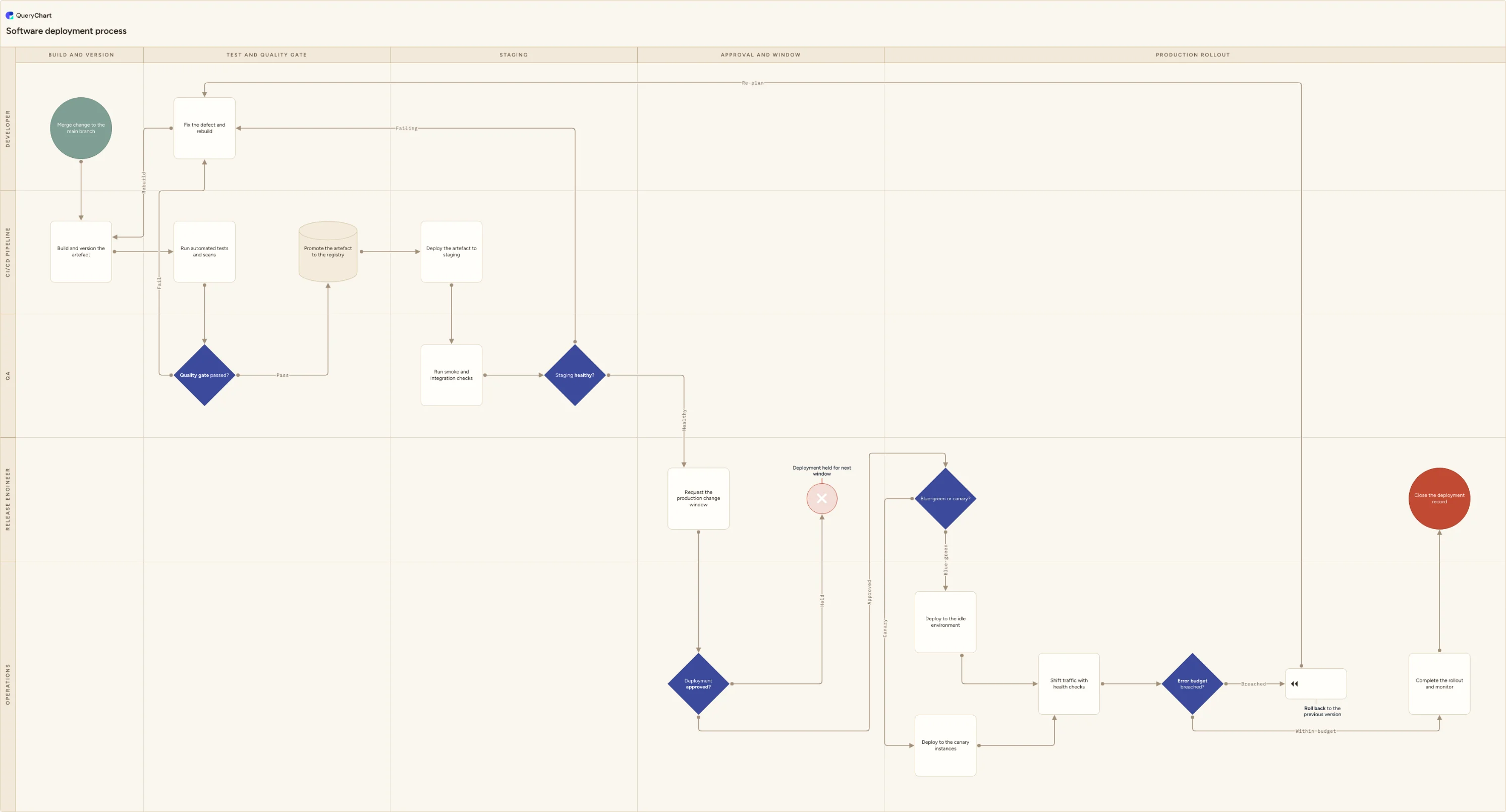
A software deployment process flowchart: build and version the artefact, quality gate, registry promotion, staging checks, canary rollout, automatic rollback.
What the software deployment process flowchart: build to production process is
A software deployment process is the mechanics of getting one build artefact onto running infrastructure. It starts at a merge and ends either with a version fully rolled out or with a rollback to the previous one. That makes it deliberately narrower than release management, which decides what belongs in a release, when scope freezes, and whether the organisation is ready to ship. Release management answers whether and what; deployment answers how. If the diagram you need contains a scope freeze, UAT sign-off and a go/no-go meeting, you want the release process. If it contains an artefact version, a registry, a traffic shift and a rollback trigger, you are in the right place. It is not IT change management either: the change window and the approval that opens it appear here as two steps, not as the subject, because this chart assumes an approval route already exists and shows where the deployment waits for it.
Most deployment incidents trace back to a small number of undrawn assumptions. The artefact is rebuilt per environment, so what passed the tests is not quite what reached production. Staging drifted away from production configuration months ago, so a green smoke run proves less than people think. The rollout has no defined step size or bake time, so all the traffic moves at once and the first sign of trouble is the support queue. And the rollback trigger is a person watching a dashboard rather than a threshold the pipeline can evaluate on its own, which turns a fast, boring rollback into a debate. Drawing the flow as swimlanes makes it obvious which of these steps you have automated and which still depend on someone remembering.
This template is a working deployment flow across five lanes, Developer, CI/CD pipeline, QA, Release engineer and Operations, laid out over five phases from build to production rollout. It draws the three loops that usually go undocumented: the quality gate that returns a failing build to the developer instead of letting it move on, the staging check that does the same before anyone books a change window, and the automatic rollback that sends a breached rollout back to the same defect-fixing step. It also shows the deployment strategy as a decision rather than an assumption, so blue-green and canary sit on the chart as two named routes that rejoin at a shared traffic-shift and health-check path.
What this flowchart covers
In this template
- Build and version across the first two lanes: a developer merges to the main branch, then the CI/CD pipeline builds the artefact once and stamps it with the commit it came from, so every later environment deploys that same artefact.
- The quality gate: the pipeline runs the automated tests and scans, then QA owns the "Quality gate passed?" decision, which routes a failure to "Fix the defect and rebuild" rather than forward.
- Promotion and staging as distinct steps: the artefact is promoted to the registry, deployed to staging by the pipeline, then checked by QA with smoke and integration tests before the "Staging healthy?" decision, whose failing branch also returns to defect fixing.
- Approval with a real negative outcome: the release engineer requests a production change window, Operations makes the "Deployment approved?" call, and a refusal ends the attempt at "Deployment held for next window" instead of quietly going ahead.
- The deployment strategy drawn as a decision: "Blue-green or canary?" splits into deploying to the idle environment or to the canary instances, and both branches rejoin at "Shift traffic with health checks".
- Rollback and completion in the Operations lane: an "Error budget breached?" decision sends a failing rollout to "Roll back to the previous version" and back into defect fixing, while a healthy one completes the rollout, monitors it and closes the deployment record.
When to use this template
- Documenting how a build actually reaches production for a team whose deployment steps live in a pipeline config file and a few people's heads.
- Agreeing the rollback trigger before you need it, so the call is a measured threshold rather than a judgement made under pressure at the worst moment.
- Onboarding engineers, QA analysts and on-call staff who need to know which gate they own and what happens downstream when they hold it.
- Deciding per service whether you deploy blue-green or canary, and recording that choice where the people running the deployment can see it.
- Answering an auditor's or a customer's question about how a change is tested, authorised and reversed, alongside your change management procedure.
How it works
Rename the lanes to your real roles
Replace Developer, CI/CD pipeline, QA, Release engineer and Operations with the roles you actually have. Many teams have no release engineer, in which case merge that lane into whoever owns production rather than leaving an empty band. Keep the CI/CD pipeline as its own lane even though it is automation, because the point of the chart is to show which steps a machine performs and which a person still performs.
Say what the artefact is and where it lives
Write down the artefact type (container image, package, bundle), the versioning scheme, how the version is derived from the commit, which registry holds it and how long it is retained. Then state the rule the rest of the chart depends on: build once and promote the same artefact, never rebuild per environment. If your pipeline currently rebuilds, mark that on the diagram, because it breaks the link between what was tested and what shipped.
Define what each gate actually checks
"Quality gate passed?" is only as useful as its definition. State which test suites must be green, what flake or coverage tolerance you accept, which security and dependency scans block the build, and who may override a red result. Do the same for the staging smoke and integration checks, and list the known differences between staging and production (data volume, third-party sandboxes, scaled-down infrastructure) so everyone knows what a healthy staging run does and does not prove.
Fix the change window and who opens it
Record when deployments may run, who approves them, and what happens to a deployment that is not approved. Note whether this deployment type is pre-authorised under a standing change model or needs an individual approval each time, and name the person who can approve one outside normal hours. If a held deployment simply waits for the next window, say how long the artefact stays valid before it must be rebuilt and retested.
Pick a strategy per service and write the rollout steps
Choose blue-green or canary for each service and put the choice on the chart. Then write the mechanics: the traffic increments, how long you observe between them, which health checks run at each step, and what the canary is compared against. Handle database changes separately, because a schema migration is usually the reason a rollback is not just a switch back; separating expand and contract migrations from the code deployment keeps the old version runnable.
Make the rollback trigger measurable, then publish the chart
Replace "someone notices" with a signal the pipeline can evaluate: error rate or latency against the service level objective, over a stated observation window, with an agreed action. Rehearse the rollback so you know how long it takes. Then share the diagram next to the runbook, capture sign-off from the people named in it, keep one current version, and review it after any deployment that went badly.
Frequently asked questions
What is the difference between a deployment process and a release process?
The release process decides what ships and whether it should: which changes are in scope, when scope freezes, who signs off UAT, and whether the go/no-go call is yes. The deployment process is the mechanics underneath that: build an artefact once, version it, promote it, verify it in staging, move it onto production infrastructure and roll it back if it misbehaves. The relationship is not one to one. A single release can involve several deployments, and plenty of deployments happen with no release attached, for example when code ships behind a feature flag and is enabled later. This template covers the mechanics; if you need scope freeze, UAT sign-off and a go/no-go gate, use the software release process template instead.
What are the stages of a software deployment process?
Five stages cover most teams. Build and version: merge the change, build the artefact once from a clean checkout and stamp it with its commit. Test and quality gate: run the automated tests and scans, and send failures back to the developer rather than forward. Staging: promote the artefact to the registry, deploy it to staging and run smoke and integration checks against it. Approval and window: request the production change window and get the deployment approved, or hold it for the next one. Production rollout: deploy blue-green or canary, shift traffic in steps with health checks, roll back automatically if the error budget is breached, otherwise complete the rollout, monitor it and close the deployment record.
Should we deploy blue-green or canary?
Blue-green runs two production environments and switches traffic between them, so the previous version stays warm and switching back is close to instant. The cost is roughly double capacity during the deployment, and every user moves at the moment of the cutover, so a problem that only appears under real traffic hits everyone at once. Canary sends a small share of real traffic to the new version first, which surfaces problems synthetic checks miss, but it needs traffic routing and metrics that can be sliced by version, it takes longer, and it knowingly exposes some users to a version you are not yet confident in. Neither one solves database changes: both assume the previous version can still run against the current schema, which is why migrations are usually split into expand and contract steps that are deployed separately.
When should a deployment roll back automatically?
When a signal the pipeline can evaluate on its own crosses an agreed threshold, not when someone interprets a dashboard. In practice that means error rate, latency or a named business transaction measured against the service level objective over a defined observation window, with the rollout paused or reversed automatically if the error budget burn is worse than the agreed limit. Two things make this work. First, rehearse the rollback so you know it functions and how long it takes. Second, keep the deployment reversible by separating irreversible steps, chiefly schema migrations and one-way data changes, from the code deployment, otherwise the automation will attempt a rollback the data cannot support.
Where does approval fit if we deploy several times a day?
Approving each deployment individually does not scale, and a process people cannot follow gets bypassed. The usual answer is to authorise the route rather than the instance: define this deployment type as a pre-approved standard change, with the pipeline's gates, tests and automatic rollback as the control, and reserve individual approval for changes that fall outside that model, such as schema migrations or anything touching a restricted environment. That is where the "Deployment approved?" decision sits in this chart, and it is why the held branch is drawn. Frameworks such as SOC 2 (criterion CC8.1) and ISO/IEC 27001's change management control expect changes to production to be authorised, tested and documented; they do not require a human signature on every deployment. A diagram is not evidence in itself, but the deployment records, test results and approvals it produces are what an assessor asks to see.
Where this process fits
In most operations this process follows Change management process flowchart (ITIL).
Comes before
- Change management process flowchart (ITIL) — An ITIL change management process flowchart covering RFC intake, standard, normal and emergency triage, CAB approval, scheduling, rollout and rollback.