Budget planning Gantt chart template for the annual budget cycle
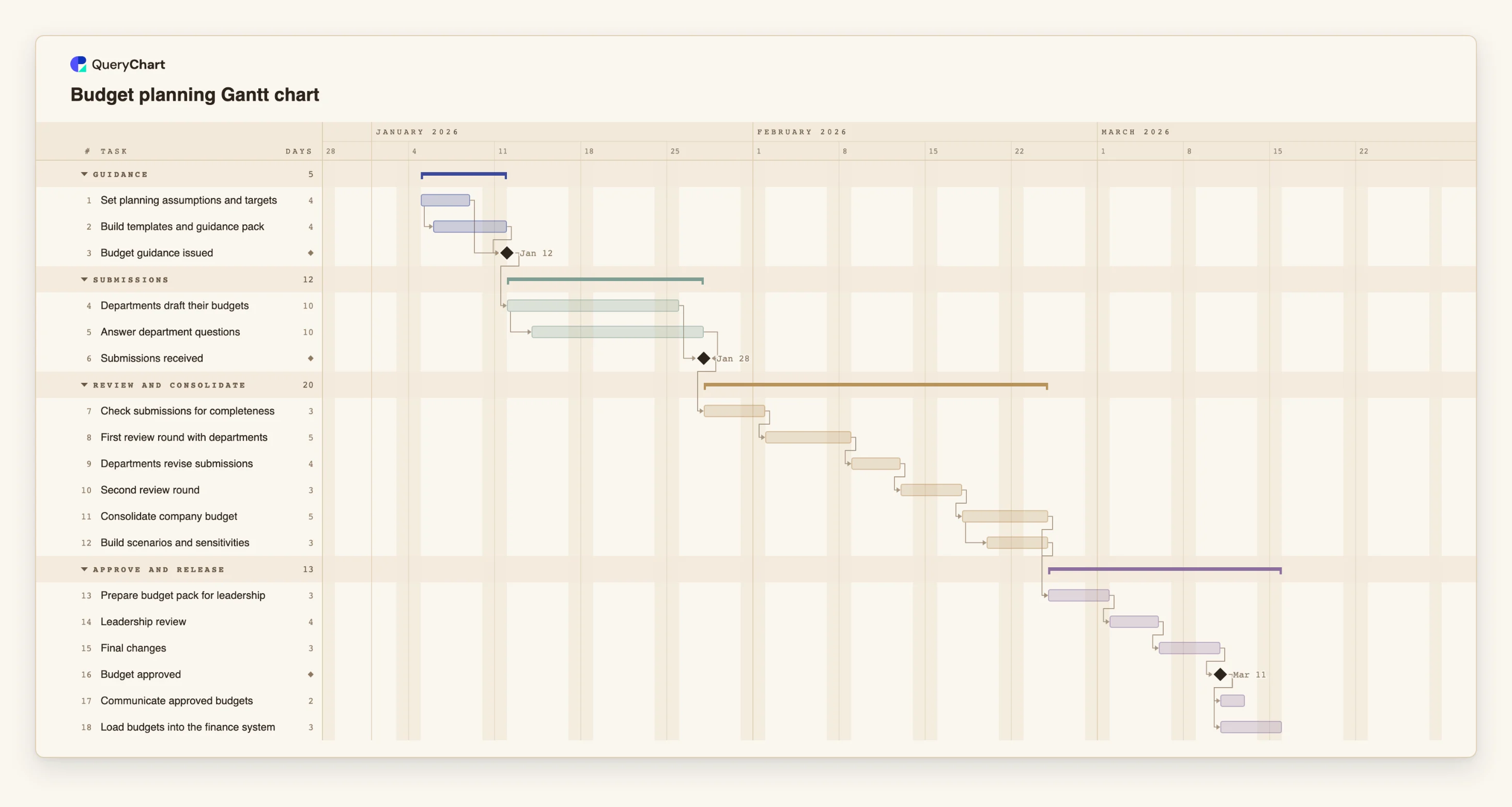
An editable budget planning Gantt chart: guidance issue, department submissions, review rounds, consolidation, leadership review and approval, with dependencies and milestones in working days.
What the budget planning gantt chart template for the annual budget cycle process is
A budget cycle is mostly waiting: finance waits for departments, departments wait for guidance, and leadership waits for a consolidated view. The calendar that goes out with the guidance usually lists one date per step, set in advance. When the submissions come in late, nobody can see which later dates are really affected. A timeline connects them, so a late submission moves the review rounds, the consolidation and the approval date together.
This template has four phases: Guidance, Submissions, Review and consolidate, and Approve and release. "Set planning assumptions and targets" and "Build templates and guidance pack" overlap: the pack starts one working day after the assumptions start. "Budget guidance issued" is a milestone that waits for both. "Departments draft their budgets" takes 10 working days, and "Answer department questions" starts two working days after it starts and runs for 10 days, so finance support continues for the whole drafting window and a little beyond. "Submissions received" waits for the drafts and finishes with the support task.
The review phase is where cycles usually run over. "Check submissions for completeness" is followed by "First review round with departments", "Departments revise submissions" and "Second review round", each waiting for the one before. Then "Consolidate company budget" takes 5 days, and "Build scenarios and sensitivities" starts two working days after consolidation starts. "Prepare budget pack for leadership" waits for both. "Leadership review", "Final changes" and the "Budget approved" milestone follow, then "Communicate approved budgets" and "Load budgets into the finance system" run side by side.
All durations are illustrative and in working days, Monday to Friday, with no holiday calendar. Add a second revision round if your organisation needs one: the plan will show how far it moves the approval date. This is a scheduling template, not financial advice, and it does not set targets, test assumptions or check the numbers. For the process and the decisions, see /templates/annual-budget-process and /templates/budget-approval-workflow, and for the matching close see /templates/year-end-close-gantt.
What this flowchart covers
In this template
- Four phases, Guidance, Submissions, Review and consolidate and Approve and release, with 18 tasks and three milestones: "Budget guidance issued", "Submissions received" and "Budget approved".
- A guidance overlap: "Build templates and guidance pack" starts one working day after "Set planning assumptions and targets" starts, and both feed "Budget guidance issued".
- Finance support alongside drafting: "Answer department questions" starts two working days after "Departments draft their budgets" starts, and "Submissions received" finishes with it.
- Two review rounds in sequence: "First review round with departments", "Departments revise submissions" and "Second review round", before "Consolidate company budget".
- A start-to-start overlap in consolidation ("Build scenarios and sensitivities") and two release tasks that follow "Budget approved": "Communicate approved budgets" and "Load budgets into the finance system".
When to use this template
- You are planning the annual or a half-year budget cycle and want the calendar to follow from the dependencies.
- You need to show departments and leadership when guidance goes out, when submissions are due and when approval is realistic.
- You want to see what an extra review round does to the approval date before you promise one.
- You run a smaller budget, such as a project or a department budget, and want a structure to shorten.
The plan, task by task
Every task in the chart with its length in working days and what it waits for. A dependency is a step number; SS is start-to-start, FF is finish-to-finish, and +n is a lag in working days.
| # | Task | Group | Working days | Depends on |
|---|---|---|---|---|
| 1 | Set planning assumptions and targets | Guidance | 4 | |
| 2 | Build templates and guidance pack | Guidance | 4 | 1SS+1 |
| 3 | Budget guidance issued | Guidance | Milestone | 1, 2 |
| 4 | Departments draft their budgets | Submissions | 10 | 3 |
| 5 | Answer department questions | Submissions | 10 | 4SS+2 |
| 6 | Submissions received | Submissions | Milestone | 4, 5FF |
| 7 | Check submissions for completeness | Review and consolidate | 3 | 6 |
| 8 | First review round with departments | Review and consolidate | 5 | 7 |
| 9 | Departments revise submissions | Review and consolidate | 4 | 8 |
| 10 | Second review round | Review and consolidate | 3 | 9 |
| 11 | Consolidate company budget | Review and consolidate | 5 | 10 |
| 12 | Build scenarios and sensitivities | Review and consolidate | 3 | 11SS+2 |
| 13 | Prepare budget pack for leadership | Approve and release | 3 | 11, 12 |
| 14 | Leadership review | Approve and release | 4 | 13 |
| 15 | Final changes | Approve and release | 3 | 14 |
| 16 | Budget approved | Approve and release | Milestone | 15 |
| 17 | Communicate approved budgets | Approve and release | 2 | 16 |
| 18 | Load budgets into the finance system | Approve and release | 3 | 16 |
How it works
Start with assumptions and the guidance pack
Keep "Set planning assumptions and targets" and "Build templates and guidance pack" overlapping, and change the lag to suit. "Budget guidance issued" is a milestone so the issue date is a result of the work.
Size the submission window from the departments
Set "Departments draft their budgets" to the time you will really give them. Keep "Answer department questions" beside it so finance support is visibly planned.
Plan the review rounds you actually run
Delete the second round if you only do one, or copy the pair to add a third. Each round is a task that waits for the one before it, so the approval date moves with them.
Add owners and notes
Put the person responsible in People for each task, and use the task notes for the template version, the targets or the sign-off rule.
Check the finish date against the date you need
Read the finish date of "Budget approved" and compare it with the date you need. If it is later, switch on View, Critical path to see the chain to shorten.
Share and export
Share the chart with the department heads, update progress as submissions arrive and export a PDF for the budget pack.
Frequently asked questions
Does this template tell us what the budget should be?
No. It schedules the budget cycle. Targets, assumptions and numbers are yours, and the template is not financial advice.
Can I fix the date by which departments must submit?
Yes. Pin a Start on "Departments draft their budgets" if the start date is fixed. The chart flags a fixed start that conflicts with a dependency, and you can compare the finish date with the date you need.
How do I add a department?
Add a task for each department under the Submissions phase, link each to "Budget guidance issued" and to "Submissions received". The group summary bar then shows the span of all the submissions.
Can I use it for a rolling forecast?
Yes, as a repeating schedule. Shorten each task, drop the second review round and reuse the chart each period. QueryChart does not keep a baseline, so export a PDF if you want to keep an earlier plan.
Where are the approvals and the process decisions?
In the flowchart templates. See /templates/annual-budget-process and /templates/budget-approval-workflow for who approves what and in which order.