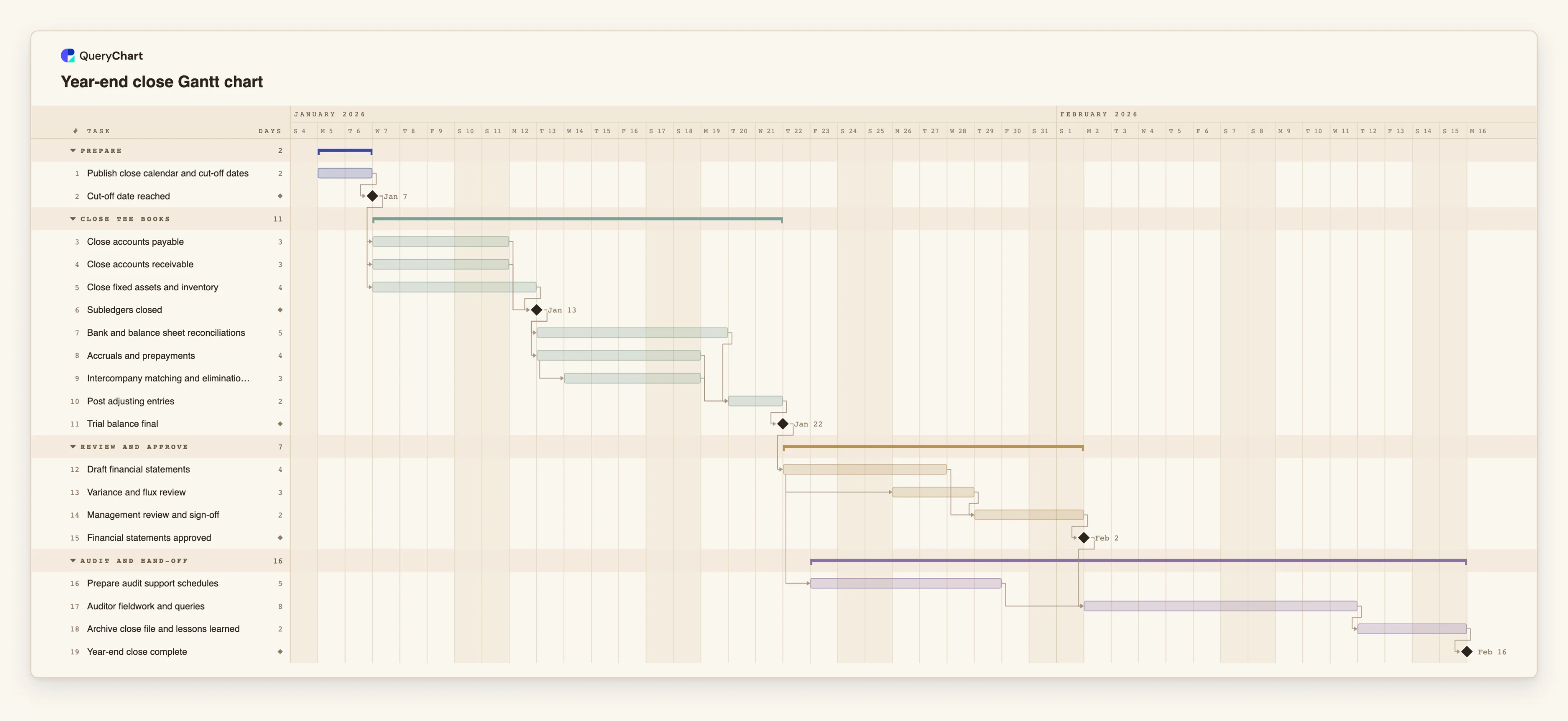
Year-end close Gantt chart template for finance teams
An editable year-end close Gantt chart: cut-offs, subledger close, reconciliations, accruals, review and audit hand-off in working days. The same shape works for a monthly close.
What the year-end close gantt chart template for finance teams process is
A close is a chain of dependencies that finance teams usually manage from a checklist and a shared calendar. The checklist says what is due. It does not show that reconciliations cannot start until the subledgers are closed, or that the draft statements wait for a final trial balance. When one of those slips, the checklist still looks fine until the day the next step cannot start. A timeline shows which dates move when another one does.
This template has four phases: Prepare, Close the books, Review and approve, and Audit and hand-off. "Publish close calendar and cut-off dates" is the only starting task, and "Cut-off date reached" is a milestone. Three tasks then run side by side: "Close accounts payable" (3 working days), "Close accounts receivable" (3) and "Close fixed assets and inventory" (4). "Subledgers closed" is a milestone that waits for all three.
After that, "Bank and balance sheet reconciliations" (5 days) and "Accruals and prepayments" (4) both follow the milestone. "Intercompany matching and eliminations" starts one working day after "Accruals and prepayments" starts. "Post adjusting entries" waits for all three, and "Trial balance final" follows it. In the review phase, "Variance and flux review" starts two working days after "Draft financial statements" starts, and "Management review and sign-off" waits for both.
"Prepare audit support schedules" starts one working day after the draft statements start, so the schedules are built while the statements are still being reviewed. "Auditor fieldwork and queries" (8 days) waits for the "Financial statements approved" milestone and for the schedules. "Archive close file and lessons learned" and the "Year-end close complete" milestone finish the plan. All durations are illustrative and are in working days, Monday to Friday. The chart has no holiday calendar, so add a day to a task where a public holiday falls inside it.
Plans of this kind go wrong when the cut-off is treated as a date instead of a dependency, when reconciliations are scheduled before the subledgers are really closed, and when the audit hand-off is planned for the day after sign-off. A timeline schedules the work. It does not make the numbers right, and it makes no claim about an accounting standard or a statutory deadline. For a monthly close, keep the same structure and shorten each task. For the process logic see /templates/month-end-close-process, /templates/account-reconciliation-process and /templates/financial-reporting-process.
What this flowchart covers
In this template
- Four phases, Prepare, Close the books, Review and approve and Audit and hand-off, with 19 tasks and five milestones, including "Cut-off date reached", "Subledgers closed", "Trial balance final", "Financial statements approved" and "Year-end close complete".
- Three subledger closes in parallel: "Close accounts payable" (3 working days), "Close accounts receivable" (3) and "Close fixed assets and inventory" (4), joined at "Subledgers closed".
- Reconciliations and accruals side by side after the subledgers, with "Intercompany matching and eliminations" starting one working day after "Accruals and prepayments" starts, all feeding "Post adjusting entries".
- A review overlap: "Variance and flux review" starts two working days after "Draft financial statements" starts, and "Management review and sign-off" waits for both.
- An audit hand-off that is planned early: "Prepare audit support schedules" starts one working day after the draft starts, and "Auditor fieldwork and queries" (8 days) waits for approval and the schedules.
When to use this template
- You run the year-end or a month-end close and want one dated view of cut-off, subledgers, reconciliations, review and the audit.
- You want to show the controller or the auditors which tasks decide the close date and which have slack.
- You are shortening the close and want to see what happens to the finish date if reconciliations or accruals take longer.
- You are starting a first formal close calendar and want a structure to adjust rather than a blank page.
The plan, task by task
Every task in the chart with its length in working days and what it waits for. A dependency is a step number; SS is start-to-start, FF is finish-to-finish, and +n is a lag in working days.
| # | Task | Group | Working days | Depends on |
|---|---|---|---|---|
| 1 | Publish close calendar and cut-off dates | Prepare | 2 | |
| 2 | Cut-off date reached | Prepare | Milestone | 1 |
| 3 | Close accounts payable | Close the books | 3 | 2 |
| 4 | Close accounts receivable | Close the books | 3 | 2 |
| 5 | Close fixed assets and inventory | Close the books | 4 | 2 |
| 6 | Subledgers closed | Close the books | Milestone | 3, 4, 5 |
| 7 | Bank and balance sheet reconciliations | Close the books | 5 | 6 |
| 8 | Accruals and prepayments | Close the books | 4 | 6 |
| 9 | Intercompany matching and eliminations | Close the books | 3 | 8SS+1 |
| 10 | Post adjusting entries | Close the books | 2 | 7, 8, 9 |
| 11 | Trial balance final | Close the books | Milestone | 10 |
| 12 | Draft financial statements | Review and approve | 4 | 11 |
| 13 | Variance and flux review | Review and approve | 3 | 12SS+2 |
| 14 | Management review and sign-off | Review and approve | 2 | 12, 13 |
| 15 | Financial statements approved | Review and approve | Milestone | 14 |
| 16 | Prepare audit support schedules | Audit and hand-off | 5 | 12SS+1 |
| 17 | Auditor fieldwork and queries | Audit and hand-off | 8 | 15, 16 |
| 18 | Archive close file and lessons learned | Audit and hand-off | 2 | 17 |
| 19 | Year-end close complete | Audit and hand-off | Milestone | 18 |
How it works
Set the cut-off as a milestone
Keep "Cut-off date reached" as a 0-day milestone after "Publish close calendar and cut-off dates". If the cut-off is a fixed date, pin a Start on it. The chart flags a fixed start that conflicts with a dependency.
Enter your subledgers
Rename or add tasks beside "Close accounts payable", "Close accounts receivable" and "Close fixed assets and inventory", and give each your own duration. They all link to "Subledgers closed".
Link reconciliations to the milestone
Reconciliations and accruals wait for "Subledgers closed". Add one task per reconciliation family if they have different owners, and link each to "Post adjusting entries".
Use overlaps where the work really overlaps
"Intercompany matching and eliminations" is a start-to-start dependency with one working day of lag on accruals. Change the lag or switch to finish-to-start if your team cannot start until accruals are done.
Plan the review and the audit hand-off together
Keep "Prepare audit support schedules" starting while the draft is under review. Replace the 8 days of "Auditor fieldwork and queries" with the time your auditors give you.
Switch on the critical path, then share
Use View, Critical path to see the chain that sets the finish date. Put owners in People, share the chart with the team and export a PDF for the close file.
Frequently asked questions
Can I use this for a monthly close?
Yes. Keep the structure and shorten each task. A monthly close usually has fewer reconciliations and no audit phase, so delete the last phase or keep it for the quarterly review.
Does the chart know about public holidays?
No. QueryChart schedules in Monday to Friday working days and has no holiday calendar. Add a day to a task that spans a holiday, or pin a Start where a date is fixed.
Does a close timeline make our accounts correct or compliant?
No. A timeline schedules the work. The accuracy of the numbers, the accounting policies and any statutory deadline depend on your finance team and your advisers, not on a plan having dates.
How do I compare the finish date with the date I need?
Read the finish date of "Year-end close complete" and compare it with the date you need. If it is later, switch on the critical path to see which chain to shorten.
Can I paste in our existing close checklist?
Yes. Copy the rows from a spreadsheet and paste them into the sheet. If the first line names columns such as Task, Duration and Depends on, each column is matched by name. There is no file upload for Gantt charts yet.