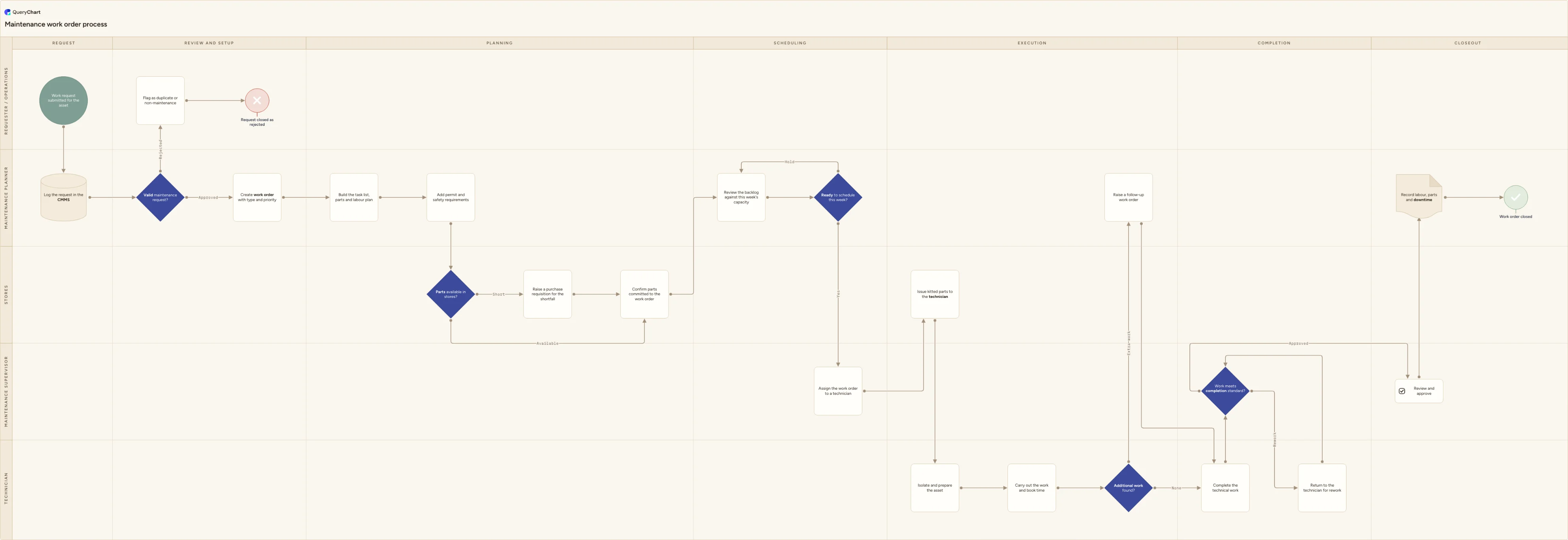
Maintenance work order process flowchart (request to close-out)
Maintenance work order process flowchart template: request approval, work order creation with type and priority, parts availability, weekly scheduling, execution, additional work handling and costed close-out.
What the maintenance work order process flowchart (request to close-out) process is
A maintenance work order is the record a CMMS builds around one job, and this chart follows that record rather than the technical fault behind it: the trigger is simply a work request, raised by anyone who spots something wrong or something due. From there the chart tracks every state the work order passes through. A planner reviews the request and approves or rejects it, an approved request becomes a work order carrying a type and a priority, the job is planned with a task list, parts and permit requirements, checked against stores, and reviewed into the week's schedule. A technician is assigned, isolates and prepares the asset, carries out the work booking time as it goes, and if the job turns up work outside its original scope that gets raised as its own follow-up work order rather than absorbed into this one. A supervisor signs the completed work off against a standard before the costs are reviewed, the labour, parts and downtime are recorded, and the work order closes.
This chart is not about why the work is needed. It picks up once a request exists and never asks whether the trigger was a schedule, a condition-monitoring alert or an operator noticing a fault; that triage, and the planned-versus-breakdown split it produces, belongs to a generic equipment maintenance process, and a known defect found during an inspection with its own run-to-plan-or-stop-now decision belongs to a corrective maintenance process. It is also not a parts-sourcing chart: 'Parts available in stores?' is a single gate here, and the supplier selection, expediting and goods-receipt detail behind a shortfall belongs to a dedicated spare parts request process. What this chart owns is the administrative backbone of the work order itself, the state every job passes through as a record regardless of what kind of work it is, which is why it reads the same for a five-minute adjustment and a three-day overhaul. Adapt the type list, priority scheme and permit rules to your own safety and isolation procedures before you rely on it.
Four decisions carry the record through its lifecycle. 'Valid maintenance request?' sits with the planner because request quality is a gatekeeping job, not a technical one, and it keeps duplicate or non-maintenance tickets from clogging a backlog meant for real work. 'Parts available in stores?' and 'Ready to schedule this week?' sit in the Stores and planner lanes and work together: a shortfall does not stop the work order, it reschedules it, and the backlog review is drawn as a loop precisely because most work orders pass through it more than once before a slot is found. 'Additional work found?' sits with the technician mid-job and is the fork that keeps scope creep off the original job's booked hours by spinning it out as a separate work order rather than letting the numbers drift. The final sign-off, 'Work meets completion standard?', deliberately sits with the supervisor rather than the technician who did the work, the same separation of doing and approving that shows up wherever a chart has anything worth signing off.
What this flowchart covers
In this template
- Five swimlanes (Requester / operations, Maintenance planner, Maintenance supervisor, Technician and Stores) across seven phases: Request, Review and setup, Planning, Scheduling, Execution, Completion and Closeout
- A 'Valid maintenance request?' decision that separates genuine work from duplicate or non-maintenance tickets before a work order is even created, with the rejected path notifying the requester rather than silently vanishing
- Work order creation carrying a type and a priority as the two fields everything downstream reads off, drawn as placeholders for you to replace with your own scheme rather than a fixed list
- A 'Parts available in stores?' decision where a shortfall raises a purchase requisition instead of stalling the job, and both branches converge on the same 'confirm parts committed' step before scheduling
- A 'Ready to schedule this week?' loop back onto the backlog review itself, modelling the reality that a work order is often assigned a week, held, and reviewed again rather than scheduled on its first pass
- An 'Additional work found?' decision that raises a separate follow-up work order instead of absorbing extra scope, and a 'Work meets completion standard?' supervisor sign-off with a rework loop ahead of a costed, recorded close
When to use this template
- You are configuring work order types, priorities and approval rules in a new or replacement CMMS and want the lifecycle agreed first
- Requests are piling up unreviewed and nobody can say which were approved, which were rejected, and which were simply forgotten
- Jobs keep slipping week to week and you need to see where the backlog review and the parts gate actually sit in the process
- Technicians are folding extra work into the original job and the booked labour and cost figures no longer mean anything
- A manager or auditor has asked how a work order moves from a raw request to a closed, costed record
How it works
Rename the lanes to your roles
Replace Requester / operations, Maintenance planner, Maintenance supervisor, Technician and Stores with the roles that genuinely exist on your site. On a small team the planner and supervisor are often the same person: merge those lanes rather than drawing a handoff that never happens in practice.
Define what makes a request valid
Write down what 'Duplicate' and 'Not maintenance' actually mean for your CMMS, who reviews incoming requests, and how a rejected requester is told and why. A request category with no owner is the usual reason a backlog fills with tickets nobody will ever action.
Fix your work order type and priority scheme
Replace the placeholder types (preventive, corrective, project, safety) and priority levels with the ones your CMMS actually uses, and state who is allowed to raise or change a priority. This single field is what most scheduling and reporting downstream is filtered on.
Set the parts gate and shortfall rule
Decide what 'available' means (on the shelf versus on order with a confirmed date), who raises the requisition for a shortfall, and when a shortfall is worth expediting ahead of the supplier's normal lead time rather than just rescheduling the job.
Agree the weekly scheduling cadence
State when the backlog review happens, who attends, and what makes a held work order come back for review rather than sitting untouched. The loop on this chart only works if someone is actually running that meeting on a fixed day.
Decide the rule for work found mid-job
Agree how much extra work a technician may fold into the current job before it has to be raised as its own follow-up work order, and who has to approve that call on the spot. Without a rule here, every technician draws that line differently.
Walk it against a closed work order
Pull two or three recently closed work orders, one that ran straight through and one that was held or reworked, and trace them against the chart. Any step people describe from memory that is not drawn here, or drawn but never actually followed, is the finding worth fixing before you publish it.
Frequently asked questions
What are the steps in the maintenance work order process?
A request is logged in the CMMS and the planner checks whether it is valid, rejecting duplicates or non-maintenance tickets to the requester. An approved request becomes a work order with a type and a priority, and the planner builds a task list with parts, labour and permit needs. Stores confirm whether parts are available, raising a requisition for any shortfall, and the work order is reviewed into the week's schedule, looping back if held rather than slotted in. The supervisor assigns a technician, who isolates and prepares the asset, carries out the work booking time, and raises a separate follow-up work order for anything outside the original scope. The supervisor signs the completed work off against a standard, sending it back for rework if it fails, before costs are reviewed and the labour, parts and downtime are recorded against the closed work order.
What is the difference between a work request and a work order?
A work request is the raw ask: something an operator, tenant or colleague noticed, with no promise yet that it will be actioned. A work order is what a request becomes once it has been reviewed, accepted as genuine maintenance work, and given a type and a priority in the CMMS. Only a work order carries a task list, a schedule slot, booked labour and parts and a cost record; a request that is rejected as a duplicate or as not maintenance never becomes one. Treating the two as the same thing is what makes a backlog report unreliable, because unreviewed requests and committed work order end up counted together.
Who owns the maintenance work order process?
Ownership is distributed by design rather than sitting with one role. The planner owns request triage, work order creation and the weekly scheduling decision; the supervisor owns technician assignment and the final sign-off that the completed work meets standard; the technician owns execution and the call on whether extra work found mid-job needs its own follow-up order; and stores own the parts availability gate. A maintenance manager or reliability lead typically owns the process as a whole, meaning the definitions behind each decision and the record it produces, even though no single person touches every step.
How often should the maintenance work order backlog be reviewed?
Most maintenance teams run a fixed weekly review, which is what the 'Ready to schedule this week?' loop on this chart represents, because it lines up with how shift and production plans are usually built a week at a time. Higher-priority or safety-related work orders are typically reviewed more often, sometimes daily, so they are not left waiting for the next weekly cycle. There is no single correct cadence; what matters is that a review actually happens on a fixed schedule with a named owner, because a backlog that is only reviewed 'when someone gets to it' is the most common reason work orders stall for weeks without anyone noticing.
What records does a closed work order need?
At minimum, a closed work order should carry what was actually done against the original task list, the labour hours and who performed them, the parts consumed against the work order, any downtime incurred, and the outcome of the completion sign-off. Where the work spun off a follow-up work order for additional scope found mid-job, the two should reference each other so the history is traceable. That record is what a manager reviews for cost overruns, what an auditor asks to see as evidence the process was followed, and what a technician planning the next similar job will actually read, so treat completeness as the point of closing a work order, not paperwork tacked onto the end of it.
Where this process fits
In most operations this process hands off to Preventive maintenance process flowchart (scheduled PM).
It is one step in Maintenance.
Step 1: Maintenance work order process flowchart (request to close-out) You are here
Maintenance work order process flowchart template: request approval, work order creation with type and priority, parts availability, weekly scheduling, execution, additional work handling and costed close-out.
Step 2: Preventive maintenance process flowchart (scheduled PM)
Preventive maintenance process flowchart template: interval or meter trigger, planned work order, parts kit, isolation, PM task list, test and handback.
Step 3: Corrective maintenance process flowchart (planned repair of a known defect)
Step 5: Equipment failure investigation process flowchart (RCFA)