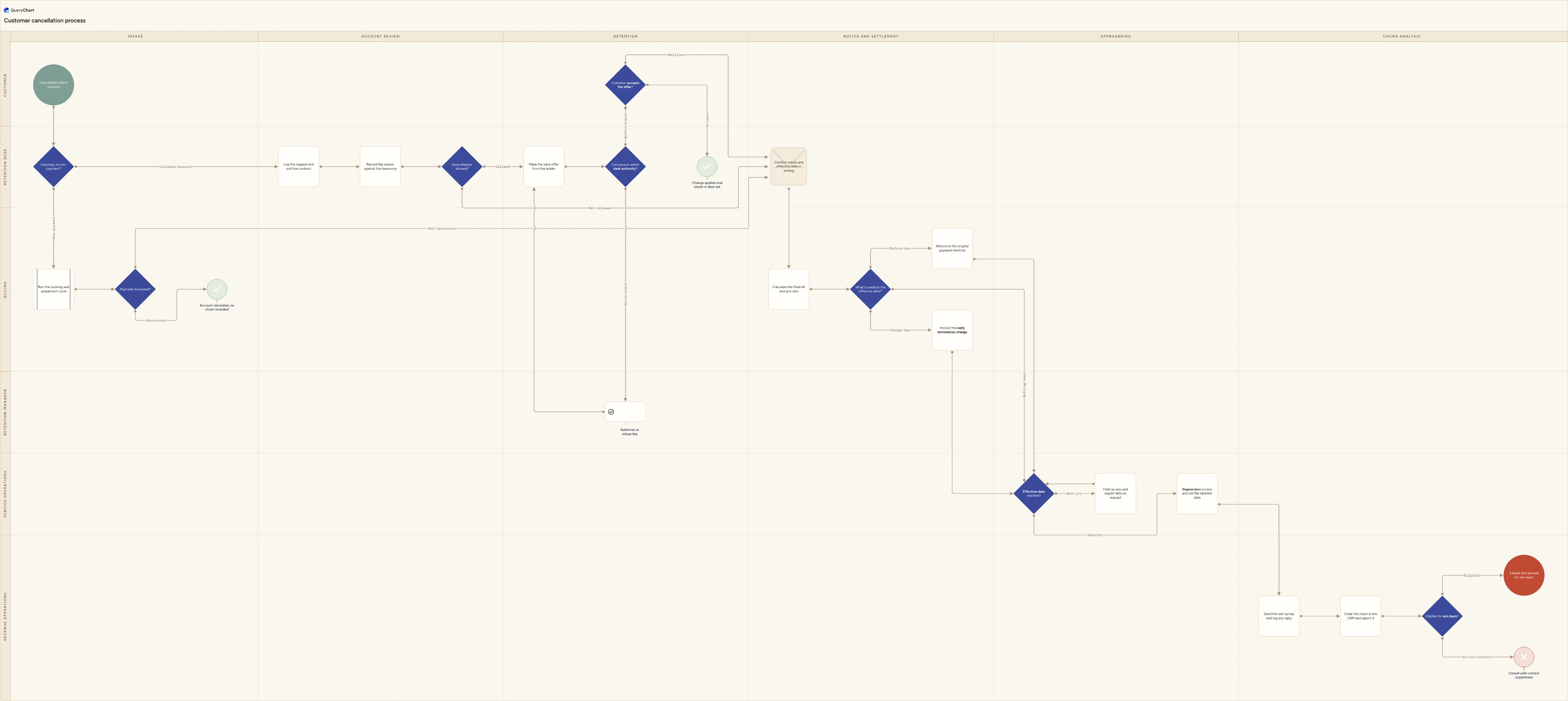
Customer cancellation process flowchart (request to account closed)
Customer cancellation process flowchart: contract terms and notice period, reason coded before any save attempt, the offer ladder and its limits, final billing, data export, deprovisioning and churn coding.
What the customer cancellation process flowchart (request to account closed) process is
Cancellation is the process most subscription businesses have never written down, which is why it is the one that generates the complaints. The request arrives somewhere other than the cancel button, sits for four days, and is answered by whoever picks it up with a discount they invented. Nobody records why the customer is leaving until after the offer has been made, by which point the answer is always price. The notice period is read for the first time when the customer disputes the final invoice. Access is switched off the afternoon the request lands, even though the account is paid up for another six weeks, so a customer who had left calmly now has a ticket open and something to say publicly. Then the churn is booked as one number that mixes people who chose to leave with people whose card expired. None of that is a judgement call gone wrong. Each one is a step nobody was ever assigned, in a process that exists as a habit rather than as a procedure.
This chart covers the cancellation of a live subscription or contracted service, from the moment intent is received to the point the churn is coded and the account is either queued for win-back or suppressed. It is not the refund process: money back on a transaction, eligibility windows, goodwill approval and chargebacks are at /templates/customer-refund-process, and this chart calls on that work only for the pro-rata refund at the end. It is not a complaint or an escalation. A customer who is angry rather than leaving belongs in /templates/customer-complaint-process or, if it needs to travel upwards, /templates/customer-complaint-escalation, and a broken service that has generated a case belongs in /templates/customer-support-escalation-process. It is not a renewal decision taken calmly ahead of expiry: that is /templates/contract-renewal-process, which fires on a horizon alert rather than on a request in flight and is drawn from the other side of the table, where you are the customer deciding whether to keep paying. Recovering money still owed after the account closes hands over to /templates/accounts-receivable-process. And it is the far end of /templates/customer-onboarding-process: the accounts, integrations and licences set up there are what get unwound here.
Three things most written cancellation procedures leave implicit are drawn as decisions. "Save attempt allowed?" is answered in the Account review phase, before the offer ladder rather than inside it, and it is where the once-only rule lives: an account that has already been saved with an offer, one in an open billing dispute, or one whose customer has asked not to be pitched goes straight to notice. "Concession within desk authority?" separates what an agent may give away from what needs a manager, so the offer ladder has a written ceiling instead of a mood. And "Effective date reached?" is a real gate with a holding loop behind it, because the single most damaging habit in this process is deprovisioning on the request date. The involuntary route is drawn too: "Voluntary or non-payment?" splits a failed payment into its own dunning path that either reinstates the account or joins the same notice and offboarding spine, so non-payment cannot be reported as if the customer chose to leave.
What this flowchart covers
In this template
- Six swimlanes (Customer, Retention desk, Retention manager, Billing, Service operations and Revenue operations) laid across six phases: Intake, Account review, Retention, Notice and settlement, Offboarding and Churn analysis.
- Intake from any channel, splitting at "Voluntary or non-payment?" so a failed payment runs its own dunning and suspension cycle and either reaches "Account reinstated, no churn recorded" or rejoins the main flow at the written confirmation.
- Account review before any negotiation: "Log the request and pull the contract" for minimum term, notice period and auto-renewal, then "Record the reason against the taxonomy", then the "Save attempt allowed?" gate that enforces one save offer per account.
- A retention lane with a ceiling on it: "Make the save offer from the ladder", a "Concession within desk authority?" check that routes anything larger to the retention manager and back for a revised offer, and a customer decision that either ends at "Change applied and check-in date set" or proceeds.
- Notice and settlement: "Confirm notice and effective date in writing", the final bill and pro-rata calculation, and a three-way "What is owed at the effective date?" covering a refund, an early termination charge, or nothing owed.
- Offboarding and closure: an "Effective date reached?" loop that holds access and keeps the data export available until the date arrives, "Deprovision access and set the deletion date", the exit survey, churn coding in the CRM, and an "Eligible for win-back?" split into a queued account or one closed with contact suppressed.
When to use this template
- You are writing a cancellation policy or a churn playbook and need one picture of who receives the request, who may discount, who bills and who switches the service off.
- Your churn number is a single figure, and nobody can tell you how much of it is customers choosing to leave and how much of it is cards that expired.
- Agents are giving away different discounts to save the same kind of account, and there is no written limit on what the desk may offer without a manager.
- Customers keep saying they cancelled earlier than your records show, and the notice period and effective date are argued case by case rather than confirmed in writing.
- You are configuring a billing, CRM or provisioning system and want the hand-offs between retention, billing and service operations agreed before anything is automated.
How it works
Rename the lanes to your own teams
Replace Customer, Retention desk, Retention manager, Billing, Service operations and Revenue operations with the functions you actually have. Small organisations usually merge the retention desk into support and give the manager lane to whoever owns the revenue number; a self-serve product may have no retention desk at all, in which case the offer ladder becomes screens in the cancel flow. Merge a lane out rather than leaving it empty. Leave the Customer lane alone, though: it carries two boxes, the request and the answer to the offer, and everything after them happens to the account rather than with the customer.
Write the reason taxonomy before you touch the offers
"Record the reason against the taxonomy" is worthless until the list exists and is short enough to choose from. Eight to twelve codes is usually enough: price, missing capability, poor service or reliability, low usage, budget cut, project or contract ended, internal build, moved to a named competitor, business closed or acquired. Add one free-text box and make the code mandatory before the case can advance. Then decide who reviews the distribution and how often, because a taxonomy nobody reads back drifts into whichever option is first in the dropdown.
Build the offer ladder and put a ceiling on it
List the rungs in order of what they cost you, not what they feel like: a pause or plan downgrade, a term extension at a lower rate, service credits or added scope, then a straight price discount. Against "Concession within desk authority?" write the desk's limit as a percentage of annual value and a maximum term, and name who approves each step above it. Record the exclusions that make "Save attempt allowed?" a no, then measure what each rung actually holds on to, by reason code, so the ladder is ordered by evidence rather than by whichever concession the desk finds easiest to give away.
Settle the notice rules and the effective date
Decide what starts the notice clock — the date intent was received, not the date the case was opened — and whether the period runs in calendar months or to the next billing date. Say what happens when notice is served after the auto-renewal cut-off, because that is the case that produces disputes. Then fix the contents of "Confirm notice and effective date in writing": the dates, the service level until closure, the expected final amount, the export route and the deletion date. Consumer cancellation rights in your market may override a longer contractual notice period, so check them.
Set the deprovisioning and retention clocks
Turn "Deprovision access and set the deletion date" into a checklist covering user accounts, API keys and tokens, integrations, single sign-on assignments, shared content, mailing lists and any hardware or licence issued with the service. Decide what is retained after closure, on what lawful basis and for how long — billing records normally outlive the account for tax reasons while personal data should not — and schedule the erasure rather than leaving it to a manual decision months later. Say who confirms it was done and where that confirmation is recorded.
Agree the churn definitions, then walk it through and publish it
Fix how voluntary and involuntary churn are counted, which date a cancellation is attributed to, and how a downgrade or pause is treated, before anyone builds the report. Write the suppression rules behind "Eligible for win-back?" and the minimum quiet period before a former customer is contacted again. Then walk the finished chart through with a retention agent, someone from billing and whoever runs provisioning, correct it to what they actually do rather than what the policy says, and publish that revision while keeping the earlier ones so anyone opening it later knows which version they are reading.
Frequently asked questions
What are the steps in a customer cancellation process?
Receive the cancellation request through whatever channel it arrives on and log it with a timestamp; pull the contract to establish the minimum term, notice period and auto-renewal date; record the reason against a fixed taxonomy before any offer is made; check whether a save attempt is allowed at all; make one offer from the retention ladder, escalating to a manager if the concession exceeds desk authority; either implement the agreed change and set a check-in date, or confirm the notice period and the effective date in writing; calculate the final bill and settle it, which means a pro-rata refund, an early termination charge or nothing owed at all; hold access and keep the data export available until the effective date; deprovision then rather than on the request date, and set the deletion date; send an exit survey; code the churn in the CRM and report it; and finally decide whether the account is eligible for a win-back campaign or should be suppressed. The order matters more than the list: capturing the reason before the offer, and the effective date before the deprovisioning, are what stop the process going wrong.
How is this different from a customer refund process flowchart?
A refund process settles one payment. It asks whether the request falls inside the refund policy and window, whether a manager will approve a goodwill exception, whether the original payment has settled and has not already been refunded, and whether a chargeback is running in parallel — and it ends when the money is back with the customer. That is the ground covered at /templates/customer-refund-process. A cancellation process ends a relationship, and the money is only one leg of it. This chart handles contractual notice, the minimum term and auto-renewal, the retention offer and who may authorise it, the effective date, deprovisioning, data export and deletion, the exit survey, and how the churn is coded and reported. They meet at one point: "What is owed at the effective date?" may produce a refund, and issuing it is refund work. If you are deciding whether to give money back on a transaction, use the refund template. If you are ending a subscription or a contract, use this one and let it call on the refund chart for that single step.
Should you make a save offer to every customer who cancels?
No, and this chart puts the question before the offer rather than after it. "Save attempt allowed?" excludes several groups: an account that already accepted a save offer on an earlier cancellation, a customer who has asked not to be pitched, an account inside an open billing or service dispute where a discount reads as a settlement, and a business that has closed, been acquired or lost the budget entirely. Offering into those cases wastes the desk's time and irritates people who have already made a decision. The commercial reason for the once-only rule is simpler. A customer saved on price alone tends to return to the same conversation a term later at the new, lower number, so a business that discounts every cancellation is not retaining revenue, it is repricing its book one account at a time. Report the save rate and the average concession by reason code and the pattern becomes visible quickly.
When should a cancelled customer lose access to the service?
On the effective date, which is the end of the paid period or the end of the contractual notice period, not the day the request was submitted. This chart draws that as a decision, "Effective date reached?", with a holding loop behind it that keeps the account live and the data export available until the date arrives. Cutting access early is the most common failure in the process and it is expensive out of proportion to the saving: the customer has already paid for the time, usually still needs to extract their data, and a quiet departure turns into a support ticket, a chargeback or a public review. The exceptions are narrow and should be named separately — non-payment after dunning has run its course, a breach of terms, or fraud — and they should be decided by someone with the authority to make that call, not by whoever processed the cancellation.
What is the difference between voluntary and involuntary churn?
Voluntary churn is a customer deciding to leave. Involuntary churn is an account closing because a payment failed and was never recovered — an expired or replaced card, a declined transaction, a lapsed mandate, an invoice lost inside a purchase-to-pay system. They look identical in a single churn figure and have nothing in common underneath it. Voluntary churn is answered with product, service and pricing work; involuntary churn is answered with payment plumbing such as an account updater, better retry timing and dunning messages that actually get read, and a surprising share of it is recoverable. That is why the chart splits them at "Voluntary or non-payment?" in the intake phase and gives the non-payment route its own dunning and suspension cycle, ending either at reinstatement with no churn recorded or joining the same notice and offboarding spine. Code the two separately in the CRM and report them separately, or the recoverable half will stay hidden inside the average.
Where this process fits
In most operations this process follows Customer churn save process flowchart (immediate intervention) and hands off to Customer refund process flowchart (request to money returned).
It is one step in Customer lifecycle.
Step 1: Sales lead qualification process flowchart: MQL to SAL
Step 3: Sales handoff process flowchart (closed won to customer success)
Step 6: Customer support escalation process flowchart (tier 1 to tier 2)
Swimlane customer support escalation process flowchart: first-line attempt, documented tier 2 handover, severity and SLA check, engineering escalation.
Step 7: Customer cancellation process flowchart (request to account closed) You are here
Customer cancellation process flowchart: contract terms and notice period, reason coded before any save attempt, the offer ladder and its limits, final billing, data export, deprovisioning and churn coding.
Step 8: Customer churn process flowchart (save play to win-back)
Customer churn process flowchart template: risk signal, save play, retained or churn decision, exit interview, offboarding handoff, win-back eligibility and churn analysis feedback loop.