CSV organizational chart template (approval authority by reporting line)
Turn an HRIS CSV export into a flowchart of who may sign what. The manager_id column becomes an escalation ladder, three authority limits sit on the decisions, and self-approval, delegation and cross-charging each get a route.
What the CSV organizational chart template (approval authority by reporting line) process is
A CSV out of an HRIS is plain text and nothing more. One header row, one row per person, a comma between fields, a quote around any field that contains a comma, and whatever character encoding the exporting system chose when nobody was watching. There are no formulas in it, no second sheet, no cell formatting, no merged headers. It is what comes out of a system rather than something you work in, which is why it usually arrives in an email attachment named export_20260806.csv and is opened once. What it does carry is the only thing a hierarchy needs: an employee_id column, and a manager_id column whose value is another row's employee_id.
Drawn as a tree, that file is a headcount picture. QueryChart has a dedicated org-chart editor for exactly that, and if what you want is boxes and names and team sizes, use it: this template is not a replacement for it and does not pretend to be. The question this page answers is a different one, and it is the one people bring to an org chart far more often: a request has been raised, who signs it, and what happens when the amount is above that person's limit. That is a route through the hierarchy rather than a shape of it, so it is a flowchart. Reporting relationships become escalation edges, and the decisions on them are authority thresholds.
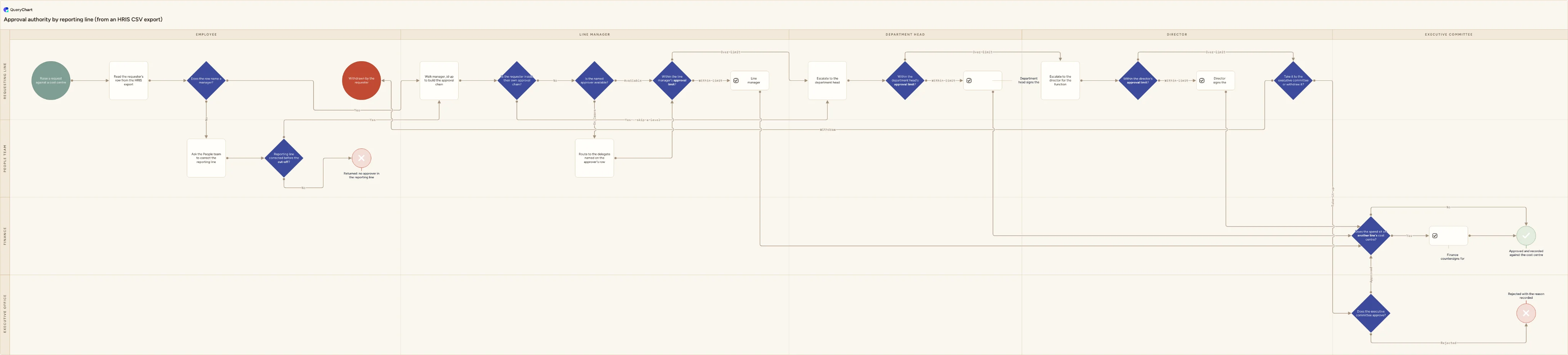
The chart below reads left to right as authority rises: five columns from Employee to Executive committee, crossed with four functional lanes, so a box's column says who may sign at that point and its lane says which line of the business is acting. In QueryChart's spreadsheet view each of those boxes is one row, and the columns are Shape, Box text, Line to, Line text, Horizontal lane and Vertical lane. Line to holds row numbers, not names: the row a step hands off to, comma-separated when there is more than one, with Line text carrying the branch labels in matching order. That is the one thing to get right when you reshape an export by hand: the numbers are positions in the sheet, so inserting a row above renumbers everything below it.
Ten decisions and four endings. Two of those decisions exist because of what HRIS exports actually contain rather than what they should: a row with no manager named at all, and a requester who turns out to sit inside their own approval chain. Two more exist because a reporting line and a budget are different structures: an approver on leave, and spend that lands on a cost centre belonging to another director. Every route finishes somewhere named: approved and recorded, rejected with a reason, withdrawn, or returned because the file never produced an approver.
What this flowchart covers
In this template
- Five authority columns (Employee, Line manager, Department head, Director and Executive committee) crossed with four functional lanes: Requesting line, Finance, People team and Executive office. A box's column is the level that may sign at that point, not the department the person belongs to.
- The join the whole chart routes on: "Read the requester's row from the HRIS export" takes employee_id, full_name, job_title, manager_id and cost_centre, and "Walk manager_id up to build the approval chain" follows manager_id from row to row until it reaches a row whose manager_id is blank.
- What an export does when a row is orphaned. "Does the row name a manager?" sends a blank manager_id to "Ask the People team to correct the reporting line", then to "Reporting line corrected before the cut-off?", which either rejoins the chain or finishes at "Returned: no approver in the reporting line".
- Two guards the file cannot apply for you: "Is the requester inside their own approval chain?", whose skip branch jumps straight to "Escalate to the department head", and "Is the named approver available?", whose on-leave branch goes through "Route to the delegate named on the approver's row".
- The escalation ladder itself ("Within the line manager's approval limit?", "Within the department head's approval limit?" and "Within the director's approval limit?") each with an over-limit branch to the next level, ending at "Take it to the executive committee or withdraw it?" when the director's limit is passed.
- Four recorded endings rather than one: "Approved and recorded against the cost centre" after "Does the spend sit on another line's cost centre?" has optionally routed through "Finance countersigns for the owning cost centre", plus "Rejected with the reason recorded", "Withdrawn by the requester" and the returned-to-People-team ending.
When to use this template
- Somebody has sent you an HRIS or payroll CSV and asked for an approval matrix, and you have no editor open and no idea which of its forty columns matter.
- Your delegation of authority policy states the amounts but not the route, so nobody can say which person a request reaches after their own manager is over limit.
- Requests are quietly self-approved because the requester is also the manager the reporting line names, and no step in the current process notices.
- Approvals stall whenever somebody is on leave, because the delegate is recorded in the HRIS and nowhere in the process that reads it.
- An auditor has asked you to evidence who could approve a given amount on a given date, and the only artefact you have is a spreadsheet of names.
The CSV that produces this diagram
One row per step. The numbers in Line to are row numbers — that is what draws the connectors, and it is the column most files are missing.
| # | Shape | Box text | Line to | Line text | Horizontal lane | Vertical lane |
|---|---|---|---|---|---|---|
| 1 | Start | Raise a request against a cost centre | 2 | Employee | Requesting line | |
| 2 | Process | Read the requester's row from the HRIS export | 3 | Employee | Requesting line | |
| 3 | Decision | Does the row name a manager? | 6, 4 | Yes, No | Employee | Requesting line |
| 4 | Process | Ask the People team to correct the reporting line | 5 | Employee | People team | |
| 5 | Decision | Reporting line corrected before the cut-off? | 6, 22 | Yes, No | Employee | People team |
| 6 | Process | Walk manager_id up to build the approval chain | 7 | Line manager | Requesting line | |
| 7 | Decision | Is the requester inside their own approval chain? | 8, 12 | No, Yes - skip a level | Line manager | Requesting line |
| 8 | Decision | Is the named approver available? | 10, 9 | Available, On leave | Line manager | Requesting line |
| 9 | Process | Route to the delegate named on the approver's row | 10 | Line manager | People team | |
| 10 | Decision | Within the line manager's approval limit? | 11, 12 | Within limit, Over limit | Line manager | Requesting line |
| 11 | Approval | Line manager signs the request | 19 | Line manager | Requesting line | |
| 12 | Process | Escalate to the department head | 13 | Department head | Requesting line | |
| 13 | Decision | Within the department head's approval limit? | 14, 15 | Within limit, Over limit | Department head | Requesting line |
| 14 | Approval | Department head signs the request | 19 | Department head | Requesting line | |
| 15 | Process | Escalate to the director for the function | 16 | Director | Requesting line | |
| 16 | Decision | Within the director's approval limit? | 17, 18 | Within limit, Over limit | Director | Requesting line |
| 17 | Approval | Director signs the request | 19 | Director | Requesting line | |
| 18 | Decision | Take it to the executive committee or withdraw it? | 20, 25 | Take it up, Withdraw | Director | Requesting line |
| 19 | Decision | Does the spend sit on another line's cost centre? | 21, 23 | Yes, No | Executive committee | Finance |
| 20 | Decision | Does the executive committee approve? | 19, 24 | Approved, Rejected | Executive committee | Executive office |
| 21 | Approval | Finance countersigns for the owning cost centre | 23 | Executive committee | Finance | |
| 22 | Reject | Returned: no approver in the reporting line | Employee | People team | ||
| 23 | Success | Approved and recorded against the cost centre | Executive committee | Finance | ||
| 24 | Reject | Rejected with the reason recorded | Executive committee | Executive office | ||
| 25 | End | Withdrawn by the requester | Employee | Requesting line |
#,Shape,Box text,Line to,Line text,Horizontal lane,Vertical lane
1,Start,Raise a request against a cost centre,2,,Employee,Requesting line
2,Process,Read the requester's row from the HRIS export,3,,Employee,Requesting line
3,Decision,Does the row name a manager?,"6, 4","Yes, No",Employee,Requesting line
4,Process,Ask the People team to correct the reporting line,5,,Employee,People team
5,Decision,Reporting line corrected before the cut-off?,"6, 22","Yes, No",Employee,People team
6,Process,Walk manager_id up to build the approval chain,7,,Line manager,Requesting line
7,Decision,Is the requester inside their own approval chain?,"8, 12","No, Yes - skip a level",Line manager,Requesting line
8,Decision,Is the named approver available?,"10, 9","Available, On leave",Line manager,Requesting line
9,Process,Route to the delegate named on the approver's row,10,,Line manager,People team
10,Decision,Within the line manager's approval limit?,"11, 12","Within limit, Over limit",Line manager,Requesting line
11,Approval,Line manager signs the request,19,,Line manager,Requesting line
12,Process,Escalate to the department head,13,,Department head,Requesting line
13,Decision,Within the department head's approval limit?,"14, 15","Within limit, Over limit",Department head,Requesting line
14,Approval,Department head signs the request,19,,Department head,Requesting line
15,Process,Escalate to the director for the function,16,,Director,Requesting line
16,Decision,Within the director's approval limit?,"17, 18","Within limit, Over limit",Director,Requesting line
17,Approval,Director signs the request,19,,Director,Requesting line
18,Decision,Take it to the executive committee or withdraw it?,"20, 25","Take it up, Withdraw",Director,Requesting line
19,Decision,Does the spend sit on another line's cost centre?,"21, 23","Yes, No",Executive committee,Finance
20,Decision,Does the executive committee approve?,"19, 24","Approved, Rejected",Executive committee,Executive office
21,Approval,Finance countersigns for the owning cost centre,23,,Executive committee,Finance
22,Reject,Returned: no approver in the reporting line,,,Employee,People team
23,Success,Approved and recorded against the cost centre,,,Executive committee,Finance
24,Reject,Rejected with the reason recorded,,,Executive committee,Executive office
25,End,Withdrawn by the requester,,,Employee,Requesting line
How it works
Fix the export before you touch the chart
Open the CSV in a plain text editor, not a spreadsheet, and look at the first line. If the fields are separated by semicolons, a European locale exported it and most importers will read the whole file as one column. If the first header cell looks like employee_id with an invisible character in front of it, that is a UTF-8 byte order mark and it will stop the header matching. Check that any field containing a comma is wrapped in double quotes, and that employee ids with leading zeros survived — a spreadsheet round trip is where those usually die.
Reduce the export to the five columns that route
employee_id, full_name, job_title, manager_id and cost_centre. Delete nothing in the source file; take a copy. Then check two things a tree drawing would also need: that exactly one row has a blank manager_id, and that no manager_id names an employee_id absent from the file. A manager who left last month is still named on twelve rows and is the most common reason a chain stops halfway.
Reshape it into the editor's columns
QueryChart imports by header name, so the columns to produce are Shape, Box text, Line to, Line text, Horizontal lane and Vertical lane. Box text is the label in the box, Shape is Process, Decision, Start, End, Success or Reject, and the two lane columns place the box. Line to is the row number of the next step, comma-separated for a decision, with Line text carrying the matching branch labels in the same order. Drop the file onto the spreadsheet area of an open chart, or paste the CSV text into it.
Type your real approval limits onto the three decisions
"Within the line manager's approval limit?" and its two siblings are deliberately unnumbered, because the amounts are not in any HRIS export — they come from a delegation of authority policy. Write the currency figure into each decision's box text, and note in the box comment which policy version it came from and when it was last reviewed. A ladder with no numbers on it routes nothing.
Decide what a blank delegate means
The on-leave branch assumes the approver's row carries a delegate or acting_manager value. Decide now what happens when it is empty: escalate a level automatically, or hold the request and notify the People team. Both are defensible. Leaving it undecided means the request sits with a named owner who is not reading it, which is indistinguishable from being lost.
Keep this apart from the headcount org chart
The same export can produce two artefacts, and they answer different questions. A tree drawn in QueryChart's org-chart editor shows who reports to whom and how many people sit under each manager. This flowchart shows how a request travels through that tree. Do not try to make one document do both — the tree will grow decision diamonds it cannot explain, and the flowchart will grow every employee who never approves anything.
Frequently asked questions
What columns does the HRIS export actually need?
Five. employee_id, a stable identifier for each person. manager_id, holding the employee_id of that person's manager, which is the column the hierarchy lives in. full_name and job_title, which become the text people read on the boxes. And cost_centre, which is what makes the cross-charge decision answerable at all. Everything else in a payroll or HRIS export — salary band, start date, location, contract type, national insurance number — is either irrelevant to routing or is data you should not be pasting into a diagram. Take a copy of the file, keep those five, and leave the original alone.
Why does my CSV open as a single column?
Because the delimiter is not a comma. Exports generated under a European locale routinely use a semicolon, since the comma is the decimal separator there, and a file full of semicolons read as comma-separated is one field per line. Two other common causes: the file was saved as UTF-16 rather than UTF-8, so every character is followed by a null byte and nothing matches, or the first header cell carries a byte order mark that silently makes employee_id a different string from employee_id. Open the file in a plain text editor and look at line one before blaming the importer.
Is this the same as an org chart?
No, and it is worth being exact about the difference. An org chart is a tree: it answers who reports to whom, how deep the structure goes and how many people sit under each manager, and QueryChart has a dedicated org-chart editor that draws exactly that from the same export. This template is a flowchart. It answers a routing question — this request needs approving, whose signature does it need, and where does it go when that person is over their limit, absent, or the requester themselves. The tree is the input. The flowchart is what you do with it. Most organisations need both, drawn separately.
What breaks when the file is imported?
Three things, and only one of them is loud. The Line to column holds row numbers rather than step names, so an edge pointing at a row that does not exist is dropped with no message at all and the box simply sits there unconnected. Inserting a row renumbers every row beneath it, which is why it is safer to append and repoint than to insert. And a shape name the editor does not recognise normalises to Process, so a mistyped Decision becomes a rectangle with its branch labels still attached to its arrows. Check the diamonds after any import; they are where a silent failure shows first.
How do you set the approval limits?
From a written delegation of authority policy, not from the org chart. The org chart tells you the order of the levels; the policy tells you the amount at each one, and the two are maintained by different people. Three practical rules. Give every level a stated figure, including the top one, so there is no amount that nobody may approve. Make the bands non-overlapping, so exactly one level is the lowest that can sign a given amount. And state whether a request may be split, because a policy with a limit and no anti-splitting clause is a limit on paperwork rather than on spend.