How to write an SOP
Write a standard operating procedure that names its trigger, owner, decision criteria, exception routes and required records. Follow a worked incident-response example.
To write an SOP, define when it starts and ends, put one observable action in each step, name who performs it, state the criteria at every decision and identify the record that proves it was done.
The short version
- Define a single trigger, result and accountable owner before writing steps.
- Use one observable action per numbered step and name the role that performs it.
- Put criteria on decisions and write the route for each outcome.
- Name the record produced at each control point.
- Give the issued SOP an owner, approval, version and review trigger.
Write for the person doing the work
Start with one procedure and one reader. An incident responder needs a sequence they can follow during a shift, not a description of the department's policy. Name the event that starts the work, the result that ends it and the role responsible for each action. If a second trigger needs a different route, it may need a separate SOP.
Draft the ordinary path first, then ask what the worker does when an input is missing, a threshold is exceeded or the first attempt fails. Write a decision as a question with a testable criterion. 'Escalate if needed' leaves the most consequential choice undefined; 'Escalate when the response deadline is at risk' gives the worker a rule to apply.
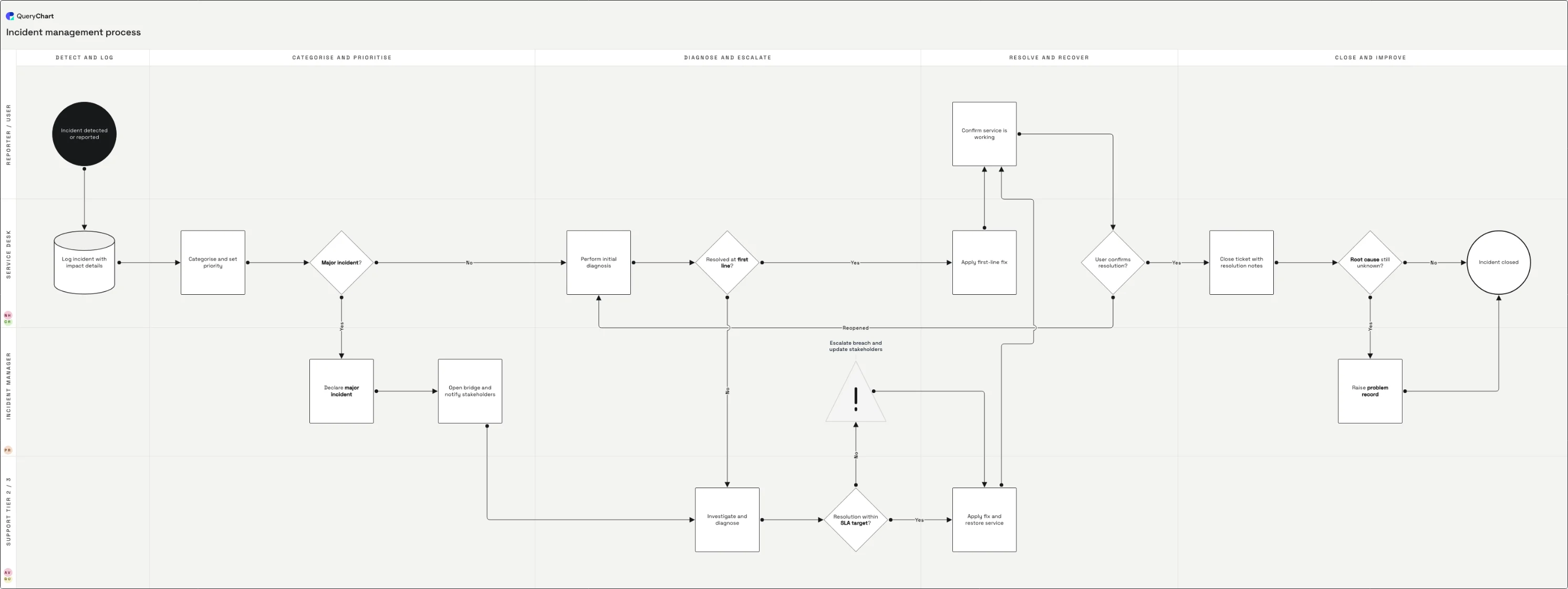
The incident example below makes that distinction visible. Its major-incident decision changes the route, its SLA check triggers escalation and its unresolved-cause branch produces a problem record. The same rows can be read as a diagram or procedure text. The companion guide to creating an SOP flowchart focuses on diagram notation; this guide focuses on the instructions and evidence the SOP must contain.
A procedure for handling an incident
Follow an incident from detection to closure. The procedure view uses the same steps as the QueryChart diagram.
Define the entry condition
The procedure begins when an incident is detected. Logging impact and priority creates a record before anyone starts investigating.
State the decision rule
The major-incident question divides urgent response from routine diagnosis. A usable SOP states who makes that call and what evidence they use.
Handle deadlines and failed fixes
The SLA branch names when to escalate. If a fix cannot be confirmed, the route returns to diagnosis rather than closing an unresolved incident.
Close with evidence
Closure notes and a problem record for an unknown cause make the outcome reviewable after the immediate response is over.
How it works
Set the boundary
Write one sentence for the trigger and one for the completed state. Name the process owner and the role that will use the SOP. Split procedures with different triggers instead of hiding them in one document.
Interview the person doing the work
Ask them to walk through a recent case. Record the actions in their actual order, including what they checked and which system or form they used. Compare the account with the existing policy before issuing the SOP.
Write numbered, observable actions
Begin each step with a verb and assign it to a role. Replace 'ensure appropriate handling' with the actual check, action and record. Keep one action per step so it can be revised without renumbering an entire paragraph.
Write decisions and exceptions
Turn each 'if' into a question, define its criterion and describe every outcome. Include rejected, incomplete and retry routes. Draw these branches in QueryChart to check that none stops without a next action or an ending.
Review, approve and issue
Have a practitioner test the steps against a real case and have the accountable owner approve the issued version. Record the version and review trigger, then withdraw superseded copies from the place of use.
Mistakes to avoid
Writing policy instead of instructions
A rule such as 'incidents must be handled promptly' does not tell the responder what to do. Put the rule in the policy and write the action, timing and record in the SOP.
Leaving exceptions to memory
A procedure that only works when all inputs arrive and the first fix succeeds fails at the moment someone needs it most. Test a missing input and a failed fix before approval.
Related QueryChart feature
Open the incident SOP example
Inspect the steps in procedure and diagram views, then adapt them to your own response process.
Related guides
Frequently asked questions
What should an SOP include?
Include the purpose and scope, trigger, owner, numbered actions, decision criteria, exception routes, required records, approval, version and review trigger. The exact document wrapper can vary; the procedure must remain executable.
Does an SOP need a flowchart?
No. A short linear procedure can work as numbered text. A flowchart helps when decisions, loops or handoffs make the route hard to follow in prose. Keep the text and diagram in agreement.
Who should approve an SOP?
The accountable process owner should approve the issued procedure after someone who performs the work has tested it. A document controller can manage numbering and distribution, but that does not replace the owner's approval of the instructions.