How to map a process before automation
Map a current workflow, its owners, decisions, exceptions and input data before specifying automation. See a worked access-request process.
Before automating a process, map what triggers it, who owns each step, which rules change its route, what data is required and how exceptions are resolved.
The short version
- Map the current process before proposing a future automated route.
- Record inputs, owner, rule, output and evidence for each decision.
- Include missing data, rejection, retry and manual escalation routes.
- Mark which steps a person must still approve or verify.
- Review the map with the people who actually perform the work.
Choosing documentation tools
Make the rules visible before choosing an automation tool
An automation project fails when the happy path is encoded and the exceptions remain in people's heads. Map a recent real case first. Mark every place where someone checks an input, makes a judgement, waits for approval or sends work back. The map becomes a testable description of the process an automation system would have to support.
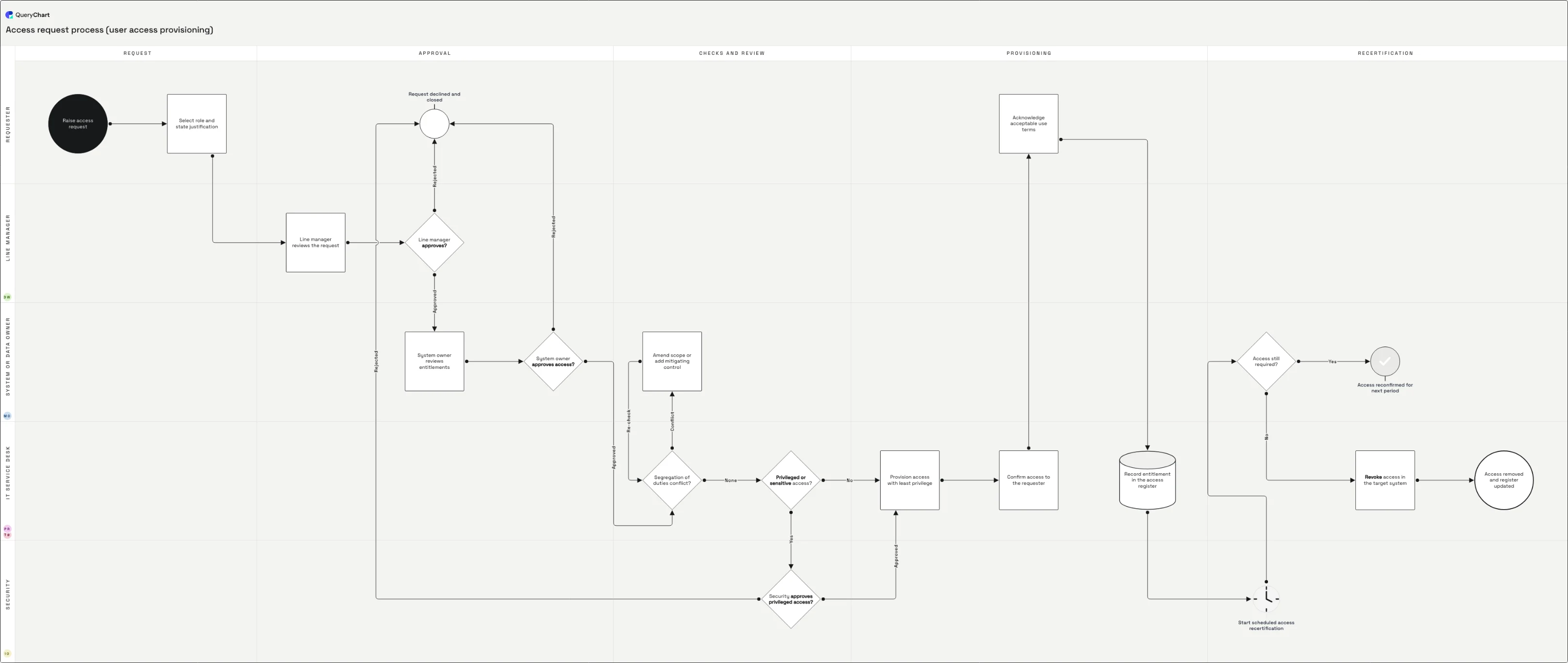
The access-request example below crosses requester, manager, system owner and IT. An incomplete request loops back; access is approved only after a manager and owner check; provisioning is followed by confirmation. These handoffs and exception routes are where an automation design needs explicit rules and audit records.
QueryChart is used here to document and review the map. The diagram does not provision access or run an automated workflow. Once the process is agreed, use its steps, decisions and records to write requirements for the system that will execute it.
Access requests before automation
A cross-role request from submission to provisioned access, with checks and exceptions visible in the same editable chart.
Capture the request
The request starts with the person and access sought. An incomplete submission returns for correction; an automated form would need to validate these fields.
Expose approval ownership
Manager and system-owner checks are separate decisions because they answer different questions. The map shows whose decision can stop the route.
Trace provisioning and confirmation
IT applies the approved access, then the result is confirmed. An automation specification should preserve the approval record and handle a failed provisioning attempt.
How it works
Choose one real case
Pick a recently completed request and identify its trigger and final state. Use the systems, roles and records from that case instead of drawing an idealized process from memory.
List actions and owners
Put each action in a separate QueryChart row and assign the responsible role to a swimlane. Mark transfers between roles; each handoff is a place where a queue, notification or missing context may matter.
Write the business rules
For every decision, record the required input, the criterion, who can override it and the route for each outcome. Keep policy judgement with a named person where it cannot be reduced to a rule.
Add exceptions and evidence
Walk an incomplete request, a rejection and a failed fulfilment through the chart. Note the record each control step must leave, such as the approver, decision and time.
Validate before specifying automation
Review the map with requesters, approvers and the team doing the work. Only then label steps as candidates for automation and use the agreed map to write requirements for the execution system.
Mistakes to avoid
Automating the ideal path
If the map excludes incomplete or rejected requests, the execution system will need ad hoc manual handling immediately. Draw those routes first.
Treating approval as a notification
An approver needs a defined question and a refusal route. A notification that cannot change the outcome should not be drawn as an approval gate.
Open the access-request map
Edit the steps and handoffs to document the process your team wants to automate.
Related guides
Frequently asked questions
Does QueryChart execute the automation?
No. QueryChart maps and documents the process. Use the agreed map as input to the workflow or automation system that will run it.
Should I map the current or future process?
Start with the current process to expose its actual rules, workarounds and exceptions. Then design the future route separately and compare the two before implementation.
What should stay manual?
Keep a named person at decisions that require judgement, an exception review or formal authorization. The map should show that person's input, decision and resulting record even if surrounding data collection or routing is automated.